sipstack/nginx
Dockerized NGINX with Letsencrypt bundled
1.0K
sipstack/nginx repository overview
Nginx + Letsencrypt
Dockerized NGINX with Letsencrypt bundled on debian slim.
When you want full control over your nginx configuration files and run certbot certificates the way you want, chained or unchained and possibly add cool logging features.
Usage
Deploy with docker run
docker run -d --name nginx -p 80:80 -p 443:443 -v /srv/nginx/log:/var/log/nginx -v /srv/nginx/conf.d:/etc/nginx/conf.d -v /srv/nginx/html:/var/www/html -v /srv/nginx/letsencrypt:/etc/letsencrypt sipstack/nginx
Deploy with docker compose
version: "2.1"
services:
  nginx:
    image: sipstack/nginx
    container_name: nginx
    cap_add:
      - NET_ADMIN
    environment:
      - TZ=America/Toronto
    volumes:
      - /srv/nginx/log/:/var/log/nginx
      - /srv/nginx/conf.d/:/etc/nginx/conf.d
      - /srv/nginx/html:/var/www/html
      - /srv/nginx/letsencrypt:/etc/letsencrypt
    ports:
      - 443:443
      - 80:80
    restart: unless-stopped
Letsencrypt Guide
Add new certificate / to chain
docker exec -it nginx certbot certonly --agree-tos --email [email protected] --webroot -w /var/lib/letsencrypt/ -d example.com -d www.example.com
Renew
docker exec -it nginx certbot renew --dry-run
Delete
docker exec -it nginx certbot delete --cert-name example.com
Nginx Guide
Usage
# test config
docker exec -it nginx nginx -t

# reload config
docker exec -it nginx service nginx reload

# restart nginx
docker exec -it nginx service nginx restart
Examples
These configuration files should be stored in /srv/nginx/conf.d/30-example_www.conf
HTTP
server {
  listen 80;
  server_name example.com www.example.com;
  include snippets/letsencrypt.conf;
  include snippets/proxy.conf;
}
HTTPS
server {
    listen 80;
    server_name www.example.com example.com;

    include snippets/letsencrypt.conf;
    include snippets/force-ssl.conf;
}

server {
    listen 443 ssl http2;
    server_name www.example.com;

    ssl_certificate /etc/letsencrypt/live/example.com/fullchain.pem;
    ssl_certificate_key /etc/letsencrypt/live/example.com/privkey.pem;
    ssl_trusted_certificate /etc/letsencrypt/live/example.com/chain.pem;
    include snippets/ssl.conf;
    include snippets/letsencrypt.conf;

    return 301 https://example.com$request_uri;
}

server {
    listen 443 ssl http2;
    server_name example.com;

    ssl_certificate /etc/letsencrypt/live/example.com/fullchain.pem;
    ssl_certificate_key /etc/letsencrypt/live/example.com/privkey.pem;
    ssl_trusted_certificate /etc/letsencrypt/live/example.com/chain.pem;
    include snippets/ssl.conf;
    include snippets/letsencrypt.conf;

    location / {
      # include snippets/bots.conf;
      # include snippets/block-exploits.conf;
      include snippets/proxy.conf;
      include snippets/resolver.conf;

      set $upstream_app ca1;
      set $upstream_port 80;
      set $upstream_proto http;
      proxy_pass $upstream_proto://triton-$upstream_app.telair.net:$upstream_port;

    }

    # . . . other code
}
Extras
When you want to transport your logs to grafana for the ultimate experience:
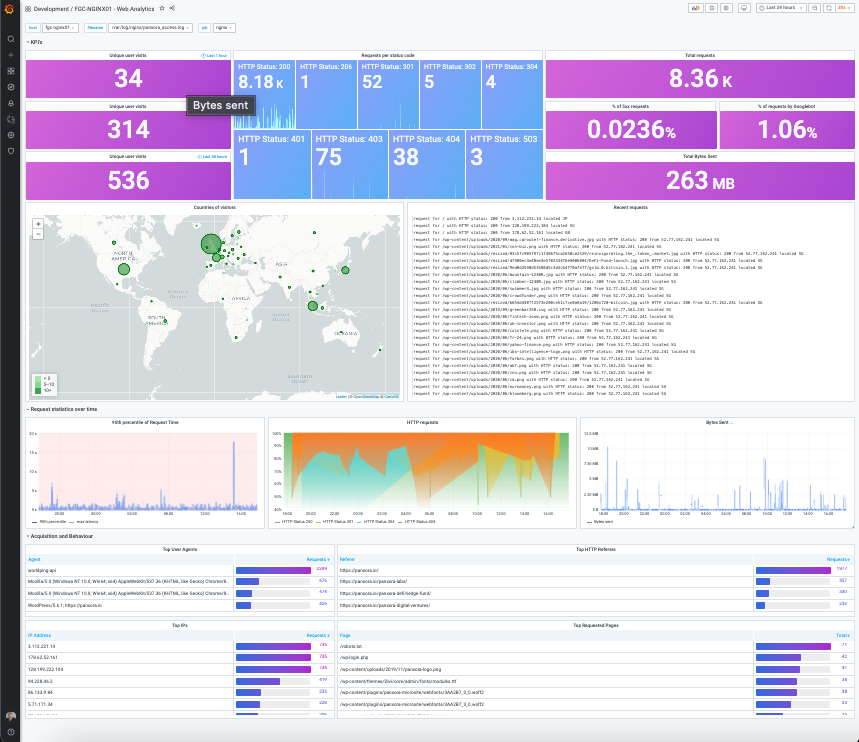
To transport logging to grafana, add a promtail service to your stack
promtail:
    image: grafana/promtail:latest
    container_name: promtail
    volumes:
      - /srv/nginx/log/:/var/log/nginx/:ro
      - /srv/promtail/docker-config.yml:/etc/promtail/docker-config.yml
    restart: unless-stopped
    command: -config.expand-env=true -config.file=/etc/promtail/docker-config.yml
Add this config into your /srv/promtail/docker-config.yml file:
server:
  http_listen_port: 0
  grpc_listen_port: 0

positions:
  filename: /tmp/positions.yaml

clients:
  - url: https://<your-loki-ingestion-ip-or-domian>/loki/api/v1/push

scrape_configs:
  - job_name: system
    static_configs:
      - targets:
          - localhost
        labels:
          job: nginx_access_log
          host: example.com
          agent: promtail
          __path__: /var/log/nginx/*.json
Add GeoIP files (not included)
Search for GeoIP.dat and GeoIPCity.dat and add them to your /srv/nginx/conf.d/ folder. These are the original free versions, not GeoIP v2.
Add below logging file to your /srv/nginx/conf.d/10-promtail.conf
geoip_country /etc/nginx/conf.d/GeoIP.dat;
geoip_city /etc/nginx/conf.d/GeoIPCity.dat;
log_format json_analytics escape=json '{'
    '"msec": "$msec", ' # request unixtime in seconds with a milliseconds resolution
    '"connection": "$connection", ' # connection serial number
    '"connection_requests": "$connection_requests", ' # number of requests made in connection
    '"pid": "$pid", ' # process pid
    '"request_id": "$request_id", ' # the unique request id
    '"request_length": "$request_length", ' # request length (including headers and body)
    '"remote_addr": "$remote_addr", ' # client IP
    '"remote_user": "$remote_user", ' # client HTTP username
    '"remote_port": "$remote_port", ' # client port
    '"time_local": "$time_local", '
    '"time_iso8601": "$time_iso8601", ' # local time in the ISO 8601 standard format
    '"request": "$request", ' # full path no arguments if the request
    '"request_uri": "$request_uri", ' # full path and arguments if the request
    '"args": "$args", ' # args
    '"status": "$status", ' # response status code
    '"body_bytes_sent": "$body_bytes_sent", ' # the number of body bytes exclude headers sent to a client
    '"bytes_sent": "$bytes_sent", ' # the number of bytes sent to a client
    '"http_referer": "$http_referer", ' # HTTP referer
    '"http_user_agent": "$http_user_agent", ' # user agent
    '"http_x_forwarded_for": "$http_x_forwarded_for", ' # http_x_forwarded_for
    '"http_host": "$http_host", ' # the request Host: header
    '"server_name": "$server_name", ' # the name of the vhost serving the request
    '"request_time": "$request_time", ' # request processing time in seconds with msec resolution
    '"upstream": "$upstream_addr", ' # upstream backend server for proxied requests
    '"upstream_connect_time": "$upstream_connect_time", ' # upstream handshake time incl. TLS
    '"upstream_header_time": "$upstream_header_time", ' # time spent receiving upstream headers
    '"upstream_response_time": "$upstream_response_time", ' # time spend receiving upstream body
    '"upstream_response_length": "$upstream_response_length", ' # upstream response length
    '"upstream_cache_status": "$upstream_cache_status", ' # cache HIT/MISS where applicable
    '"ssl_protocol": "$ssl_protocol", ' # TLS protocol
    '"ssl_cipher": "$ssl_cipher", ' # TLS cipher
    '"scheme": "$scheme", ' # http or https
    '"request_method": "$request_method", ' # request method
    '"server_protocol": "$server_protocol", ' # request protocol, like HTTP/1.1 or HTTP/2.0
    '"pipe": "$pipe", ' # "p" if request was pipelined, "." otherwise
    '"gzip_ratio": "$gzip_ratio", '
    '"http_cf_ray": "$http_cf_ray",'
    '"geoip_city": "$geoip_city", '
    '"geoip_longitude": "$geoip_longitude", '
    '"geoip_latitude": "$geoip_latitude", '
    '"geoip_country_code": "$geoip_country_code"'
'}';
Finally, to log only service hosts or folders, add the below to your nginx conf file either in the sever{} or location{} blocks.
access_log /var/log/nginx/example_com.json json_analytics;
Tag summary
Content type
Image
Digest
sha256:2231f28d1…
Size
97.2 MB
Last updated
about 3 years ago
docker pull sipstack/nginx