sivm99/mail
REST API built for managing email routing rules on Cloudflare with multi user support.
1.1K
sivm99/mail repository overview
One Alias Service API
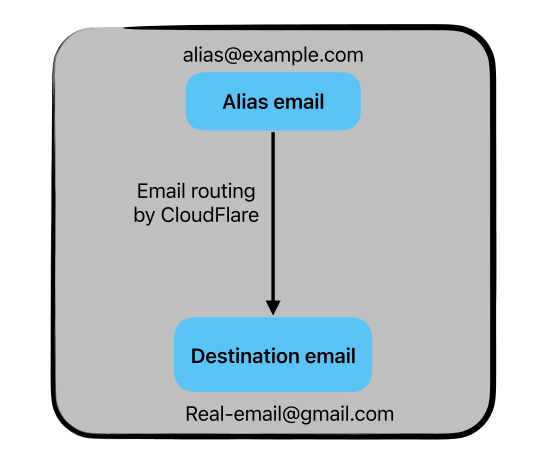
REST API built for managing email routing rules on Cloudflare with multi user support. Each user can have their own destinations, aliases, and rules. Custom domain* setup within user is also possible but hasn't been implemented yet.
CheckOut the GitHub Page
For the API documentation, visit the OAS official Documentation.
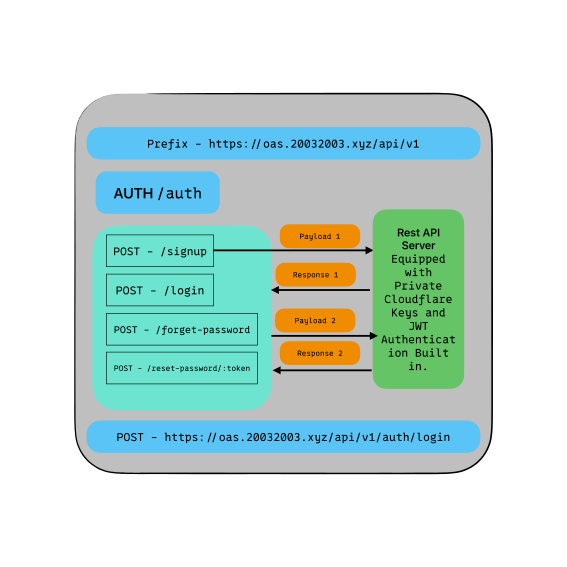
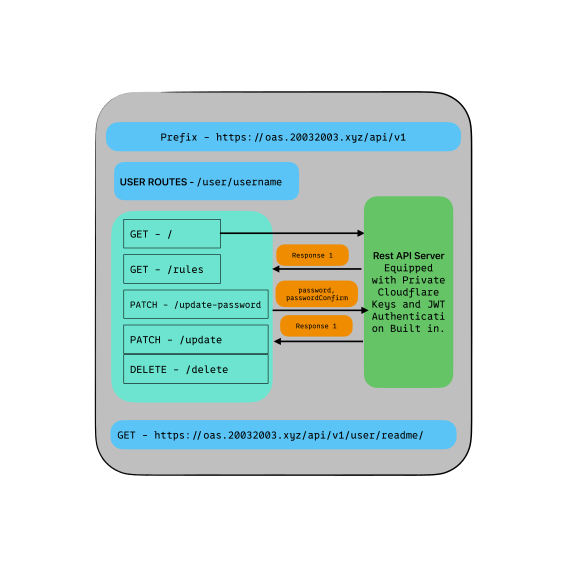
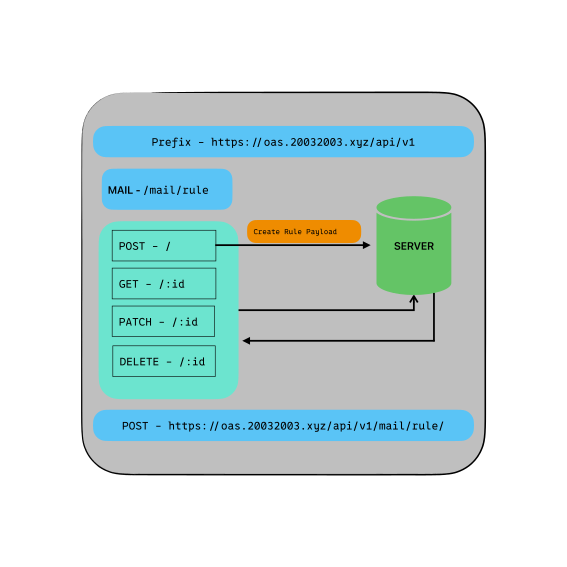
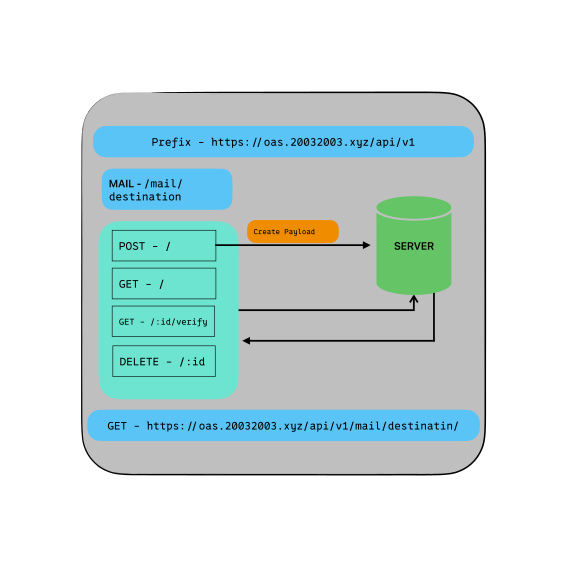
API Endpoints Visualization
 |  |
|---|---|
| Alias Illustration | API Endpoints Auth |
 |  |
|---|---|
| API Endpoints User | API Endpoints Mail |
 |
|---|
| API Endpoints Destination |
Features
- User authentication with JWT.
- User registration.
- User password reset.
- User email verification with Cloudflare.
- Alias/Rules CRUD operations.
- Destination CRUD operations.
- Rate limiting.
Installation and Setup
There are three ways to install and set up this project:
Using Docker (Recommended for production)
Docker provides a lightweight and portable way to run your application. Follow these steps to set up your project using Docker:
- Clone the repository and navigate to the project directory.
git clone --depth 1 https://github.com/thanksduck/mail
cd mail
- Copy the
config.env.defaultfile toconfig.envand fill in the required fields.
cp config.env.default config.env
- Build the Docker image.
sudo docker build -t mail .
- Run the Docker container.
sudo docker run -d -p 3456:3456 --env-file config.env mail
Using Node (Recommended for development)
If you prefer to run your application locally using Node, follow these steps:
- Clone the repository and navigate to the project directory.
git clone --depth 1 https://github.com/thanksduck/mail
cd mail
- Copy the
config.env.defaultfile toconfig.envand fill in the required fields.
cp config.env.default config.env
- Install the dependencies.
npm install
- Start the server.
npm start
Using Docker Compose
If you want to run your application with a database locally using Docker Compose, follow these steps:
- Clone the repository and navigate to the project directory.
git clone --depth 1 https://github.com/thanksduck/mail
cd mail
- Copy the
config.env.defaultfile toconfig.envand fill in the required fields.
cp config.env.default config.env
- Run the Docker Compose command.
sudo docker-compose up
config.env Fields
The config.env file contains several fields that are used to configure your application. Here's a breakdown of each field:
Cloudflare API Key
The Cloudflare API key can be generated from the Cloudflare dashboard. Learn how to generate an API key. And the zone id can be found in the Cloudflare dashboard. Make sure to provide the account and zone permission of email destination and Routing rules, additionally, you can give it DNS Edit support if you want to add custom domains.
CF_EMAIL: Required Cloudflare email.CF_API_KEY: Required Cloudflare API key.CF_ZONE_ID: Required Cloudflare zone ID.
MongoDB Configuration
LOCAL_CONNECTION_STRING: Optional local connection string for MongoDB.MONGO_URI: Required MongoDB URI, can also be a local connection string.
Server Configuration
NODE_ENV: Optional environment variable to set the Node.js environment to production or development.PORT: Optional port number to run the server on. Defaults to 3456.
JWT Configuration
JWT_SECRET: Required JWT secret.JWT_EXPIRES_IN: Required JWT expiration time.
Email Configuration
EMAIL_USER: Required email user registered with the SMTP service.EMAIL_PASSWORD: Required email password with the SMTP service.EMAIL_HOST: Optional SMTP host.EMAIL_PORT: Optional SMTP port.
Rate Limiting
RATE_LIMIT_MAX: Required rate limit max.
Cookie Expiration
COOKIE_EXPIRES: Required cookie expiration time.
Note: Make sure to replace the placeholder values with your own values for each field.
Tag summary
Content type
Image
Digest
sha256:2b4acf0a5…
Size
87 MB
Last updated
almost 2 years ago
docker pull sivm99/mail