sofiane77/pschristmastree
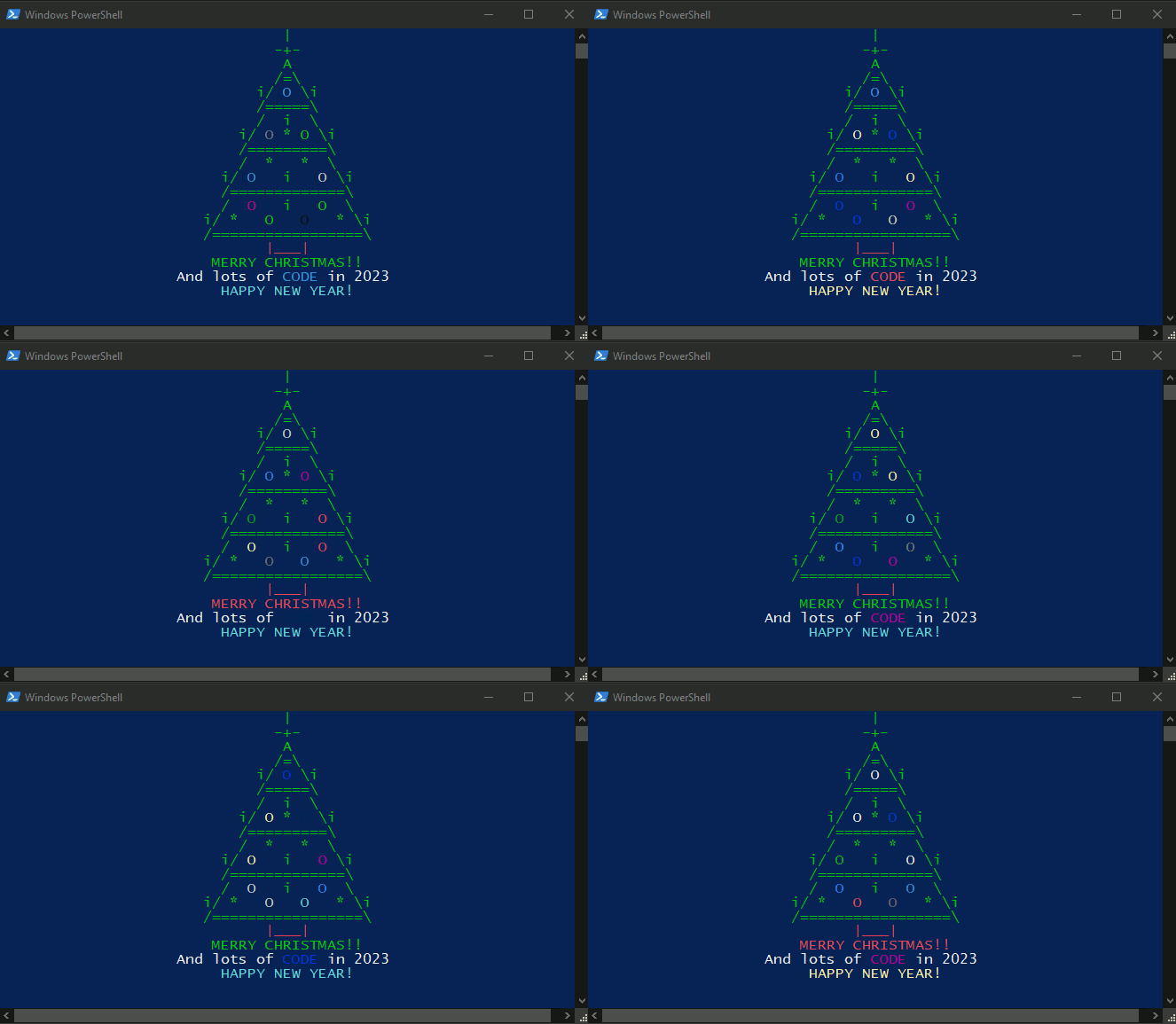
Just an animated Christmas tree for Powershell available at docker🎄
349
sofiane77/pschristmastree repository overview

PSChristmasTree
A festive PowerShell experience, packaged for Docker.
Animated terminal Christmas tree with configurable styles, colors, decorations, localized messages, and optional carol playback.




Why this image?
This image gives you a ready-to-run PSChristmasTree environment without installing the module locally. It is ideal for:
- quick demos
- festive terminal setups
- ephemeral development environments
- CI or scripting experiments
- trying the project in a clean PowerShell container
Highlights
- Zero local module setup: pull the image and start using the module right away
- Built on PowerShell 7.4 + Ubuntu 22.04
- Preinstalled module commands:
Show-PSChristmasTreeGet-PSChristmasTreeConfigSet-PSChristmasTreeConfigReset-PSChristmasTreeConfig
- Customizable output: colors, tree style, messages, decorations, animation speed, carol playback
- Persistent configuration support through Docker volume mounting
Quick start
Run an interactive PowerShell session inside the container:
docker run -it --rm sofiane77/pschristmastree
Then launch your first tree:
Show-PSChristmasTree
Run a command directly
You can also execute a command without entering an interactive shell:
docker run -it --rm sofiane77/pschristmastree pwsh -NoLogo -Command "Show-PSChristmasTree"
Examples
Basic usage
Show-PSChristmasTree
Play the carol once
Show-PSChristmasTree -PlayCarol 1
Use a custom color palette
Show-PSChristmasTree -ColorMode Palette -Palette @('Green', 'Red', 'Yellow')
Use a single-color theme
Show-PSChristmasTree -ColorMode Single -SingleColor Cyan
Change the tree style
Show-PSChristmasTree -TreeStyle Wide
Save your preferences
Set-PSChristmasTreeConfig -ColorMode Palette -Palette @('Green', 'White', 'Red') -HideCursor $true
Show-PSChristmasTree
Persist your configuration
Inside the container, the configuration file is stored under:
/root/.config/PSChristmasTree/config.json
To keep your settings between runs, mount that directory from your host:
Linux / macOS
docker run -it --rm \
  -v "$HOME/.config/PSChristmasTree:/root/.config/PSChristmasTree" \
  sofiane77/pschristmastree
Docker Desktop / PowerShell
docker run -it --rm `
  -v "${HOME}/.config/PSChristmasTree:/root/.config/PSChristmasTree" `
  sofiane77/pschristmastree
What is included in the image?
- Base image:
mcr.microsoft.com/powershell:7.4-ubuntu-22.04 - Preloaded PSChristmasTree module in PowerShell's module path
- Healthcheck that verifies the module can be imported and its configuration can be read
- Default container command:
pwsh
Included commands
Once the container starts, these commands are available immediately:
| Command | Purpose |
|---|---|
Show-PSChristmasTree | Render the animated Christmas tree |
Get-PSChristmasTreeConfig | Read the saved configuration |
Set-PSChristmasTreeConfig | Save or update preferences |
Reset-PSChristmasTreeConfig | Remove the saved configuration |
Links
- Docker Hub: https://hub.docker.com/r/sofiane77/pschristmastree
- Source code: https://github.com/Sofiane-77/PSChristmasTree
- Documentation: https://sofiane-77.github.io/PSChristmasTree/
- License: https://github.com/Sofiane-77/PSChristmasTree/blob/main/LICENSE
Notes
- This image is intended for interactive terminal usage.
- Audio playback support depends on the runtime environment and terminal capabilities.
- For the best experience, run the container with an attached TTY (
-it).
Tag summary
Content type
Image
Digest
sha256:01e6c6805…
Size
122.7 MB
Last updated
about 2 months ago
docker pull sofiane77/pschristmastree