softwareag/adabas-ce
Software AG Adabas Community Edition
8.8K
softwareag/adabas-ce repository overview

Prior to executing the Docker Pull Command, downloading, using or installing the accompanying software product, please ensure to read and accept the terms applying to this offering:
LIMITED USE LICENSE AGREEMENT FOR DOCKER IMAGES FROM SOFTWARE AG (ALTERNATE LINK: https://documentation.softwareag.com/legal/docker/Limited_Use_License_for_Docker.txt)
Adabas Community Edition
This documentation describes the usage of the Adabas Community Edition container image.
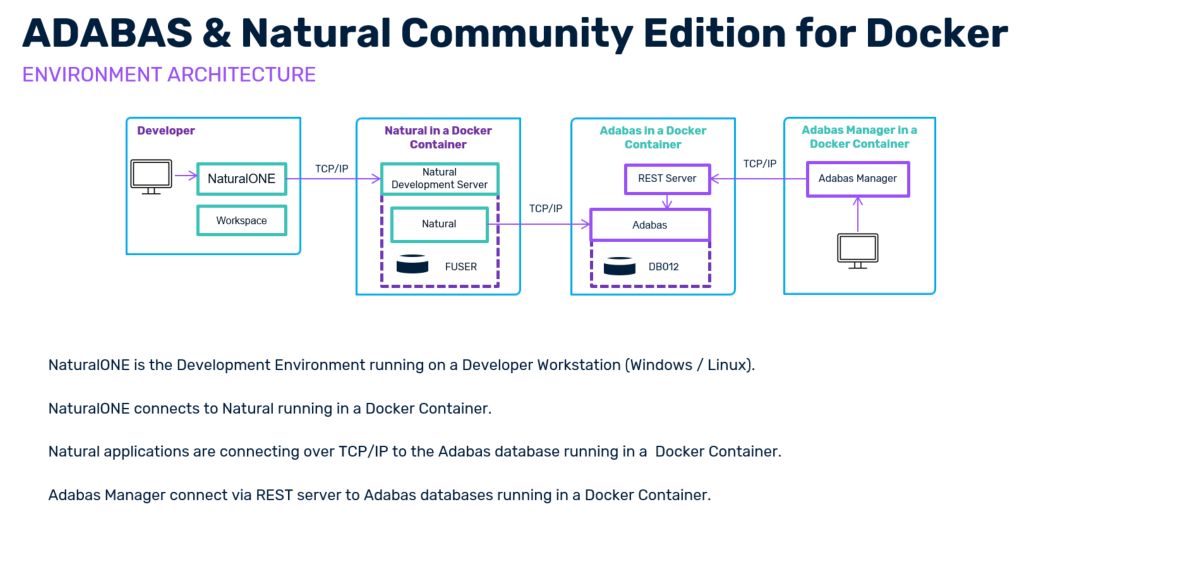
This image is part of the Adabas & Natural Community Edition for Docker
This package includes all tools for developing and running applications in Natural, such as:
- NaturalONE Community Edition - Software AG's Eclipse-based development environment for the Natural programming language.
- Natural Community Edition for Docker- Natural's runtime and development environment (in a Docker container).
- Adabas Community Edition for Docker - Software AG's database system, including a demo database (in a Docker container).
- Adabas Manager Community Edition for Docker - A web application to administer Adabas databases in Linux, Unix and Windows environments.
Please check the download page in the Software AG community: https://tech.forums.softwareag.com/t/adabas-natural-community-edition-for-docker-download/235228
Container Image Versioning
The Adabas Community Edition container images are versioned using the following scheme: <major>.<minor>.<sp>:
<major>: The major release version of Adabas<minor>: The minor release version of Adabas<sp>: Service Patch level of Adabas
Restrictions
The container does not contain any licenses for Adabas. If the license keys are missing, the restrictions of an Adabas Community Edition apply. These are:
- No Adabas
PLOGusage - Limit Adabas container sizes
- Limit the number of concurrent TCP connections to a total of 4
- Other restrictions on various Nucleus parameters
To agree to the Software GmbH copyright EULA, you need to set the environment variable ACCEPT_EULA=Y during Adabas container startup.
The Adabas Community Edition for Docker image contains Adabas with all its Adabas utilities.
For communication between Adabas Server and other Adabas Client containers, Adabas provides a Adabas TCP/IP based communication link ADATCP. The Natural Community Edition Docker image contains the corresponding Adabas Client components and configuration option to use the Adabas TCP/IP link.
Quickstart
To quickly spin up an Adabas container without data persistence, you can, for example, use the following command:
docker run -d -p 60001:60001 -e ACCEPT_EULA=Y -e ADABAS_DBID=12 -e ADABAS_DB_CREATION=demodb --name adabas-db softwareag/adabas-ce:<version>
If the database resources of the container host are insufficient, you may need to add the parameter
--sysctl kernel.shmmax=1073741824to yourdocker runcommand.
This command creates an Adabas database with ID 12 containing demo data inside the container. After creation of the database, the Adabas Nucleus is started. The Adabas Nucleus listens on ADATCP port 60001 on the container host.
If you're starting an Adabas container with the Adabas RESTful Administration Service, then you need to expose the respective Adabas REST ports to your host machine. Port 8190 for HTTP access and port 8191 for HTTPS access are the default values: -p 8190:8190 -p 8191:8191
Let's break down the environment variables used in this quick start example command:
- ACCEPT_EULA: Accepting our EULA is mandatory. Otherwise, starting this container will not work!
- ADABAS_DBID: Set your desired Adabas database ID.
- ADABAS_DB_CREATION: Set your preferred database creation method.
For the ADABAS_DB_CREATION variable, either use the demodb parameter to create an Adabas example database using the crdemodb utility, or define the ADAFRM parameters to create your database more granularly. You can find a table with all possible environment variables and the respective descriptions in the chapter Configurable Adabas container environment variables
Inside the Docker container, you can run a helper script to check if the database is working correctly. To check the database status, please run:
# Set desired DBID by script argument
docker exec -it adabas-db adainfo.sh 12

# Set desired DBID by environment variable
docker exec -it -e ADABAS_DBID=12 adabas-db adainfo.sh
To start an interactive session inside the container, use the following command:
docker exec -it adabas-db bash
Configuration
An Adabas Docker container runs one Adabas Nucleus.
To accept the Software GmbH license agreement, the environment variable ACCEPT_EULA=Y must be set. The Docker container starts an Adabas Nucleus with the database ID defined by the ADABAS_DBID environment variable.
To change the Adabas RESTful Administration Service's default username admin and password manage, the environment variables ADABAS_ADMIN_USER and ADABAS_ADMIN_PWD must be set when the container is first started.
Please note that the ADABAS_ADMIN_PWD environment variable also accepts a SHA-512 representation of your password. This ensures that your password will not be displayed as clear text in the command line or in configuration files.
See table below for further configuration options.
Adabas Client
Adabas can be used from any Software AG Adabas Client. An Adabas Client is included in the Adabas Docker container image. The Adabas Client library version must be 6.7.1 or higher.
To use Adabas Client in the container only, set the environment variable ADABAS_RUN_MODE to client. In this case, no Adabas Nucleus will start, and the container will run indefinitely. Then, you can exec into the container to execute Adabas Client-related commands to communicate with another Adabas Nucleus running in a different container or on a remote host.
The Adabas TCP/IP remote port configuration can be done by adding communication information to a dbmapping.txt file located in the AdabasClient/config directory. Use the ADABAS_DB_MAPPING environment variable to define the content of the dbmapping.txt file during container startup. The statement must be in quotes, and use either a space or a comma as a separator. For example:
docker run -d -e ACCEPT_EULA=Y -e ADABAS_RUN_MODE=client -e ADABAS_DB_MAPPING="12=adatcp://adabas-db:60001" --name adabas-client softwareag/adabas-ce:<version>
However, these adjustments can also be made manually after starting the container. For example, exec into the container and modify the dbmapping.txt file directly:
# Start the container in client mode
docker run -d -e ACCEPT_EULA=Y -e ADABAS_RUN_MODE=client --name adabas-client softwareag/adabas-ce:<version>

# Copy the template file to the actual dbmapping.txt file
docker exec -it adabas-client cp AdabasClient/config/dbmapping.tmpl AdabasClient/config/dbmapping.txt

# Add your Adabas database connection information to the dbmapping.txt file
docker exec -it adabas-client bash -c "echo '12 = adatcp://adabas-db:60001' >> AdabasClient/config/dbmapping.txt"

# Verify the content of the dbmapping.txt file
docker exec -it adabas-client cat AdabasClient/config/dbmapping.txt
This example dbmapping.txt entry in the file dbmapping.txt adds an entry for the Adabas database 12, which connects to the host adabas-db on port 60001. Keep in mind that adjusting the dbmapping.txt file inside the container will be lost if the container is removed. To make the changes persistent, mount the entire AdabasClient/config directory or just the file itself into your container using Docker volumes.
Adabas RESTful server
The Adabas Community Edition Docker container image includes the Adabas RESTful Administration Service. This service enables monitoring and administrative tasks via JSON- and XML-based REST calls. The service can be exposed on port 8190 without SSL and on port 8191 with SSL support.
If it does not exist, the default configuration is copied to the persistent volume at /data/configuration. This configuration uses the username admin and the password manage by default. To change the default credentials, please make sure to set your desired username and password (a SHA-512 hash as password is also valid) in the corresponding ADABAS_ADMIN_USER and ADABAS_ADMIN_PWD environment variables. Refer to the chapter Configurable Adabas container environment variables for more information.
The Adabas RESTful Administration Service can be used with any REST client. However, Software GmbH recommends using the Adabas Manager, a web application that provides an Adabas administration user interface.
It can be pulled:
- from our official ADABAS & NATURAL Container Registry or
- from Dockerhub.
Container data location
Adabas expects the Adabas container directory infrastructure (ADADATADIR) to be located in /data within the Docker container. The corresponding Adabas configuration must be located in /data/etc/ADABAS.INI.
The /data location can be inside or outside the Docker image. To persist an Adabas database container, it is possible to mount your Adabas containers to the mount point /data like this:
docker run -d -p 60001:60001 -e ACCEPT_EULA=Y -e ADABAS_DBID=12 -e ADABAS_DB_CREATION=demodb --name adabas-db -v <your data directory>:/data:rw softwareag/adabas-ce:<version>
If you want to use an Adabas database from a previous installation, you can modify the directory definitions in /data/etc/ADABAS.INI and in the /data/db<db number>/DB<db number>.INI files.
Configurable Adabas Container Environment Variables
| Environment Variable | Default Value | Description |
|---|---|---|
| ACCEPT_EULA | Mandatory parameter to accept the EULA variable. Please accept it by setting the environment variable to Y. | |
| ADABAS_TRACE_ENABLED | Start the trace version of Adabas and define the appropriate trace. Trace values such as i9 or i9999 are possible. Trace files will automatically be written to the /data/trace directory. | |
| ADABAS_DBID | 001 | Defines the database ID used. |
| ADABAS_DB_CREATION | demodb | Defines the parameter used to create the database. Parameters are either demodb to create demo data or the appropriate ADAFRM utility parameters. |
| ADABAS_LOAD_EXAMPLES | If you are using ADAFRM parameters in the ADABAS_DB_CREATION environment variable and you want to load demo data into your database, set this environment variable to Y. | |
| ADABAS_RESTORE_BCK | If the environment variable contains the path to an Adabas backup within the container, the backup will be restored upon startup. Example: ADABAS_RESTORE_BCK=/data/data.bck 4-10. The second parameter is optional and defines a file list to be restored. If the parameter is omitted, the wildcard character * is used by default, which performs a restore at the database level. | |
| ADABAS_NUCPARMS_ADD | Define which Adabas nucleus parameter to add or modify. Use a space as the separator, e.g. ADABAS_NUCPARMS_ADD="PLOG NT=8 NU=1500". | |
| ADABAS_NUCPARMS_DEL | Define which Adabas nucleus parameter to delete. Use a space as the separator, e.g. ADABAS_NUCPARMS_DEL="PLOG ADATCP". | |
| ADABAS_RUN_MODE | server | Defines the run mode of the Adabas container. The possible values are server or client. If set to client, an Adabas database will not start automatically, and the container will run indefinitely. Then, you can for example exec into the container to execute Adabas Client related commands. |
| ADABAS_DB_MAPPING | Adjust the Adabas Client dbmapping file if necessary. The statement must be in quotes, and use either a space or a comma as a separator, e.g. ADABAS_DB_MAPPING="12=adatcp://adabas-db:60001 13=adatcps://adabas-db:60002". Please avoid having a space in the dbmapping line. This option will only be processed when the ADABAS_RUN_MODE is set to client! | |
| ADABAS_ADMIN_USER | admin | Only valid for Adabas container images with a RESTful Administration service! Defines the Adabas REST Administration user server. |
| ADABAS_ADMIN_PWD | manage | Only valid for Adabas container images with a RESTful Administration service! Defines the Adabas REST Administration password in clear text. It's also possible to inject an already hashed SHA-512 password as value. |
Docker Compose Example
The following is an example of a docker-compose.yml file showing how to use the Adabas Community Edition and the Adabas Manager Community Edition container images together:
networks:
  ada-ce-network:

services:
  adabas-db:
    container_name: adabas-db
    image: softwareag/adabas-ce:<version>
    environment:
      - ACCEPT_EULA=Y
      - ADABAS_DBID=12
      - ADABAS_DB_CREATION=demodb
      - ADABAS_ADMIN_USER=admin
      - ADABAS_ADMIN_PWD=38b6664d0f52faf6020a6959f21ccc36c03d322f61cc6e23d644b6fe5444551c59bf2610ff6acf12a517d2ae18d53db088ec3774bc75cfbc677ca8b5f9ae2fd2 # sha-512 representation of the default password "manage"
    networks:
      - ada-ce-network
    ports:
      - 60001:60001
      - 60002:60002
      - 8190:8190
      - 8191:8191
    restart: unless-stopped

  adabas-manager:
    container_name: adabas-manager
    image: softwareag/adabasmanager-ce:<version>
    environment:
      - ACCEPT_EULA=Y
    networks:
      - ada-ce-network
    ports:
      - 4990:4990
    restart: unless-stopped
Base Image
This product references the official UBI9.8 image as its base image. Software GmbH is not responsible for the contents of this base image.
Copyright Information
Copyright (©) 2018-2026 Software GmbH, Darmstadt, Germany and/or its subsidiaries and/or its affiliates and/or their licensors.
The name Software AG and all Software GmbH product names are either trademarks or registered trademarks of Software GmbH and/or its subsidiaries and/or its affiliates and/or their licensors. Other company and product names mentioned herein may be trademarks of their respective owners.
Detailed information on trademarks and patents owned by Software GmbH and/or its subsidiaries is located at https://softwareag.com/licenses
This software may include portions of third-party products. For third-party copyright notices, license terms, additional rights or restrictions, please refer to "License Texts, Copyright Notices and Disclaimers of Third Party Products". For certain specific third-party license restrictions, please refer to section E of the Legal Notices available under "License Terms and Conditions for Use of Software GmbH Products / Copyright and Trademark Notices of Software GmbH Products". These documents are part of the product documentation, located at https://softwareag.com/licenses and/or in the root installation directory of the licensed product(s).
THE LICENSE
With this Agreement, Software GmbH grants you - free of charge - a non-exclusive, non-transferable license to use and copy the Product and accompanying documentation on the number of computers, workstations or on terminals within a network as specified in the respective Product documentation (please refer to the respective section in the Release Notes relating to use restrictions) for your internal production use and for a time period defined below (see section License Validity). You must use the Product solely as described in its accompanying documentation. In no event may the Product be used to develop an integrated solution that requires for the Product to be integrated into your or any third party intellectual property in order to create a combined product that is provided to third parties. You may not pass on or distribute copies of the Product to any third party. You have the right to make one copy of the Product solely for archival and backup purposes. You may not decompile, disassemble, modify, decrypt, extract or otherwise reverse engineer, or make further copies of the Product or parts thereof. This Agreement is proof of your entering into this Agreement and you must retain it. This Agreement does not grant you the right to sublicense, transfer, rent, assign or lease the Product, in whole or in part.
THIRD PARTY RESTRICTIONS
The Software may contain or include software applications for which the Software GmbH itself had to acquire a license to use from a third party ("Third Party Applications"). These Third Party Applications may be subject to additional license terms ("Third Party Terms"), which are identified below or made available under the web address http://softwareag.com/licenses. The third party shall be entitled - only in relation to the respective third-party software - to exercise the rights of Software GmbH under this Agreement as a third party beneficiary directly against the licensee. Your use of the Third Party Applications will demonstrate your agreement to be bound by the Third Party Terms. Your use of Java SE Platform Products is expressly subject to the terms and conditions set forth here: http://www.oracle.com/technetwork/java/javase/terms/license/index.html. You may not use or distribute these third party applications or its APIs on a stand-alone basis without the Product nor attempt to alter or modify it. Software GmbH’s Product may reference dependencies on other Third Party Applications (e.g. database or operating system base layers) which are not part of the Product shipment and packaging and which are not linked to Software GmbH’s product in any way but which may be downloaded on execution of the Product package by Licensee. These Third Party Applications come with their own license terms and Software GmbH does not take liability of any kind for such dependencies. SOFTWARE GMBH MAKES NO WARRANTIES OF ANY KIND, WHETHER EXPRESS OR IMPLIED, WITH REGARD TO ANY THIRD PARTY APPLICATIONS. ALL THIRD PARTY APPLICATIONS ARE PROVIDED "AS-IS," WITHOUT WARRANTIES OF ANY KIND. IN NO EVENT WILL SOFTWARE GMBH BE LIABLE TO YOU OR ANY THIRD PARTY FOR ANY DIRECT, INDIRECT, PUNITIVE, EXEMPLARY, INCIDENTAL, SPECIAL, OR CONSEQUENTIAL DAMAGES ARISING OUT OF THE THIRD PARTY APPLICATIONS, EVEN IF SOFTWARE GMBH HAS BEEN ADVISED OF THE POSSIBILITY OF SUCH DAMAGES OR LOSSES. Your sole remedies with regard to the Third Party Applications will be as set forth in the relevant Third Party Terms, if any.
LICENSE VALIDITY
This Agreement grants you a license for an indefinite period of time, subject to termination, as provided in this Agreement. The license will however limit your use of the Product to certain features, platforms or restrictions in capacity or other limitations incorporated by default, or - if applicable - by definition in the respective Product documentation. You accept these limitations and will in no event bypass these, whether by reverse engineering or other means.
INTELLECTUAL PROPERTY
Except with respect to the Third Party Applications, Software GmbH or its affiliates and licensors are the sole owners of the intellectual property rights or industrial rights in and to the Product and accompanying user documentation or have the respective distribution rights. References made in or on the Product to the copyright or to other intellectual property or industrial property rights must not be altered, deleted or obliterated in any manner. Except for the limited license granted in this Agreement, Software GmbH, its affiliates, and licensors reserve all other right, title, and interest in the Product. The name Software GmbH and all Software GmbH product names are either trademarks registered trademarks of Software GmbH and/or Software AG LLC, and/or its subsidiaries and/or its affiliates and/or their licensors. Other company and product names mentioned herein may be trademarks of their respective owners. No right, title or interest in any trademark or trade names of Software GmbH or its subsidiaries or its licensors is granted hereunder. Copyright (c) 2023 Software GmbH, Darmstadt, Germany and/or Software AG LLC, Reston, VA, USA, and/or its subsidiaries and/or its affiliates and/or their licensors. You may provide suggestions, comments or other feedback (collectively, “Feedback”) to Software GmbH with respect to the Product. Feedback is entirely voluntary and Software GmbH is not required to hold it in confidence. Software GmbH may use Feedback for any purpose without obligation of any kind. To the extent a license is required under your intellectual property rights to make use of the Feedback, you grant Software GmbH an irrevocable, non-exclusive, perpetual, royalty-free license to use the Feedback in connection with Software GmbH’s business, including the enhancement of the Products.
CONFIDENTIALITY
The Product is confidential and proprietary information of Software GmbH and its licensors, and may not be disclosed to third parties. You shall use such information only for the purpose of exercising the Limited Use License Agreement to the Product and shall disclose confidential and proprietary information only to your employees who require such information for the purpose stated above. You agree to take adequate steps to protect the Product from unauthorized disclosure or use.
LIMITED WARRANTY
The Product is provided "as is" without any warranty whatsoever. TO THE MAXIMUM EXTENT PERMITTED BY LAW, SOFTWARE GMBH AND ITS AFFILIATES AND LICENSORS DISCLAIM ALL WARRANTIES WITH RESPECT TO THE PRODUCT, INCLUDING, BUT NOT LIMITED TO, THE IMPLIED WARRANTIES OF NON-INFRINGEMENT, TITLE, MERCHANTABILITY, QUITE ENJOYMENT, QUALITY OF INFORMATION, AND FITNESS FOR A PARTICULAR PURPOSE. SOFTWARE GMBH AND ITS AFFILIATES AND LICENSORS DO NOT WARRANT THAT THE PRODUCT WILL MEET YOUR REQUIREMENTS, OR THAT THE OPERATION OF THE PRODUCT WILL BE UNINTERRUPTED OR ERROR-FREE, OR THAT DEFECTS IN THE PRODUCT WILL BE CORRECTED. NO ORAL OR WRITTEN INFORMATION OR ADVICE GIVEN BY SOFWARE GMBH OR ANY OF ITS PERSONNEL OR AGENTS WILL CREATE ANY WARRANTIES OR IN ANY WAY INCREASE THE SCOPE OF SOFTWARE GMBH’S OBLIGATIONS UNDER THIS AGREEMENT. You assume full responsibility for the selection of the Product to achieve your intended results and for the installation, use and results obtained from the Product. Any kind of support for the Software GmbH Product is explicitly excluded.
UPDATES AND MAINTENANCE
This Limited Use License Agreement does not grant you any right to, license for or interest in any improvements, modifications, enhancements or updates to the Product and documentation or other support services. Such services are typically available under a Commercial License Agreement only. Any such arrangements shall be the subject of a separate written agreement.
LIMITATION OF LIABILITY
TO THE MAXIMUM EXTENT PERMITTED BY LAW, IN NO EVENT WILL SOFTWARE GMBH OR ITS AFFILIATES OR LICENSORS BE LIABLE TO YOU OR ANY THIRD PARTY FOR ANY DIRECT, SPECIAL, INCIDENTAL, CONSEQUENTIAL, PUNITIVE, OR INDIRECT DAMAGES, WHICH SHALL INCLUDE, WITHOUT LIMITATION, DAMAGES FOR PERSONAL INJURY, LOST PROFITS, LOST DATA AND BUSINESS INTERRUPTION, ARISING OUT OF THE USE OR INABILITY TO USE THE PRODUCT OR ANY SUPPORT SERVICES OR OTHER SERVICES, EVEN IF SOFTWARE GMBH HAS BEEN ADVISED OF THE POSSIBILITY OF SUCH DAMAGES. IN ANY CASE, THE ENTIRE AGGREGATE LIABILITY OF SOFTWARE GMBH AND ITS AFFILAITES AND LICENSORS UNDER THIS AGREEMENT FOR ALL DAMAGES, LOSSES, AND CAUSES OF ACTION (WHETHER IN CONTRACT, TORT (INCLUDING NEGLIGENCE), OR OTHERWISE) WILL BE LIMITED TO FEES PAID BY YOU, IF ANY, DURING THE THREE (3) MONTHS IMMEDIATELY PRECEEDING THE FIRST EVENT GIVING RISE TO LIABILITY. THE LIMITATIONS OF LIABILITY AND DISCLAIMERS OF WARRANTIES PROVIDED IN THIS AGREEMENT FORM AN ESSENTIAL BASIS OF THE BARGAIN BETWEEN THE PARTIES AND SHALL CONTINUE TO APPLY EVEN IF ANY REMEDY HEREUNDER FAILS OF ITS ESSENTIAL PURPOSE.
...
Tag summary
Content type
Image
Digest
sha256:934ed8145…
Size
316.6 MB
Last updated
22 days ago
docker pull softwareag/adabas-ce:7.5.0