solacecommunity/solace-prometheus-exporter
A Prometheus Exporter for Solace Brokers
500K+
solacecommunity/solace-prometheus-exporter repository overview

solace-prometheus-exporter, a Prometheus Exporter for Solace Message Brokers
Overview
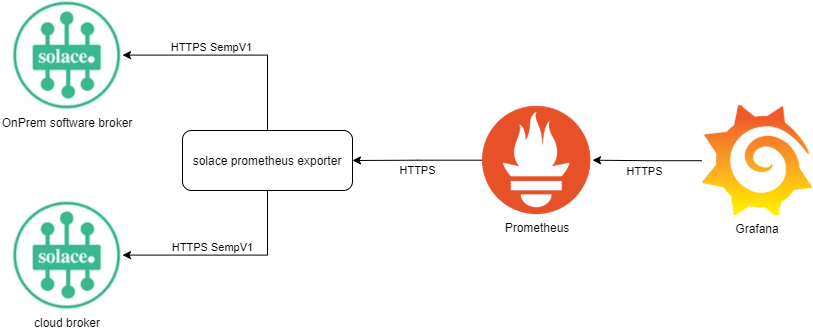
The exporter is written in go, based on the Solace Legacy SEMP protocol. It grabs metrics via SEMP v1 and provide those as prometheus friendly http endpoints.
Video Intro available on youtube: Integrating Prometheus and Grafana with Solace PubSub+ | Solace Community Lightning Talk
Features
It implements the following endpoints:
http://<host>:<port>/                    Document page showing list of endpoints
http://<host>:<port>/metrics             Golang and standard Prometheus metrics
http://<host>:<port>/solace-std          legacy, via config: Solace metrics for System and VPN levels
http://<host>:<port>/solace-det          legacy, via config: Solace metrics for Messaging Clients and Queues
http://<host>:<port>/solace-broker-std   legacy, via config: Solace Broker only Standard Metrics (System)
http://<host>:<port>/solace-vpn-std      legacy, via config: Solace Vpn only Standard Metrics (VPN), available to non-global access right admins
http://<host>:<port>/solace-vpn-stats    legacy, via config: Solace Vpn only Statistics Metrics (VPN), available to non-global access right admins
http://<host>:<port>/solace-vpn-det      legacy, via config: Solace Vpn only Detailed Metrics (VPN), available to non-global access right admins
http://<host>:<port>/solace              The modular endpoint
Modular endpoint explained
Configure the data you want ot receive, via HTTP GET parameters.
The key is always the scrape target prefixed by a m..
The value contains out of 2 parts, delimited by a pipe |.
- The first part is the VPN filter.
- The second part is the ITEM filter.
Not all scrape targets support both filter. Please see scrape target to find out what is supported where.
Both filter can contain multiple asterisk * as wildcard for N chars.
Each scrape target can be used multiple times, to implement or condition filters.
Examples
Get the same result as the legacy solace-det endpoint.
http://your-exporter:9628/solace?m.ClientStats=*|*&m.VpnStats=*|*&m.BridgeStats=*|*&m.QueueRates=*|*&m.QueueDetails=*|*
Get the same result as the legacy solace-det endpoint, but only from VPN myVpn.
http://your-exporter:9628/solace?m.ClientStats=myVpn|*&m.VpnStats=myVpn|*&m.BridgeStats=myVpn|*&m.QueueRates=myVpn|*&m.QueueDetails=myVpn|*
Get all queue information, where the queue name starts with BRAVOor ARBON and only from VPN myVpn.
http://your-exporter:9628/solace?m.QueueStats=myVpn|ARBON*&m.QueueStats=myVpn|BRAVO*&m.QueueDetails=myVpn|ARBON*&m.QueueDetails=myVpn|BRAVO*
Get all queue information, where the queue name starts with BRAVOor ARBON and only from VPN where the name contains a my.
http://your-exporter:9628/solace?m.QueueStats=*my*|ARBON*&m.QueueStats=*my*|BRAVO*&m.QueueDetails=*my*|ARBON*&m.QueueDetails=*my*|BRAVO*
Get all queue information, where the queue name starts with BRAVOor ARBON and only from VPN where the name contains a my and ends with and prod.
http://your-exporter:9628/solace?m.QueueStats=*my*prod|ARBON*&m.QueueStats=*my*prod|BRAVO*&m.QueueDetails=*my*prod|ARBON*&m.QueueDetails=*my*prod|BRAVO*
Get the same result as the legacy solace-det endpoint, but from a specific broker.
http://your-exporter:9628/solace?m.ClientStats=*|*&m.VpnStats=*|*&m.BridgeStats=*|*&m.QueueRates=*|*&m.QueueDetails=*|*&scrapeURI=http://your-broker-url:8080
Scrape targets
| scrape target | vpn filter supports | item filter supported | performance impact | corresponding cli cmd | supported by |
|---|---|---|---|---|---|
| Version | no | no | dont harm broker | show version | software, appliance |
| Health | no | no | dont harm broker | show system health | software |
| Spool | no | no | dont harm broker | show message-spool | software, appliance |
| Redundancy (only for HA broker) | no | no | dont harm broker | show redundancy | software, appliance |
| ConfigSyncRouter (only for HA broker) | no | no | dont harm broker | show config-sync database router | software, appliance |
| Vpn | yes | no | dont harm broker | show message-vpn vpnFilter | software, appliance |
| VpnReplication | yes | no | dont harm broker | show message-vpn vpnFilter replication | software, appliance |
| ConfigSyncVpn (only for HA broker) | yes | no | dont harm broker | show config-sync database message-vpn vpnFilter | software, appliance |
| Bridge | yes | yes | dont harm broker | show bridge itemFilter message-vpn vpnFilter | software, appliance |
| VpnSpool | yes | no | dont harm broker | show message-spool message-vpn vpnFilter | software, appliance |
| ClientStats | yes | no | may harm broker if many clients | show client itemFilter stats count 100 (paged) | software, appliance |
| VpnStats | yes | no | has a very small performance down site | show message-vpn vpnFilter stats | software, appliance |
| BridgeStats | yes | yes | has a very small performance down site | show bridge itemFilter message-vpn vpnFilter stats | software, appliance |
| QueueRates | yes | yes | DEPRECATED: may harm broker if many queues | show queue itemFilter message-vpn vpnFilter rates count 100 (paged) | software, appliance |
| QueueStats | yes | yes | may harm broker if many queues | show queue itemFilter message-vpn vpnFilter rates count 100 (paged) | software, appliance |
| QueueDetails | yes | yes | may harm broker if many queues | show queue itemFilter message-vpn vpnFilter detail count 100 (paged) | software, appliance |
Modular endpoint configs
If you want to keep the endpoint urls short, you can configure endpoints via ini file.
[endpoint.solace-det]
ClientStats=*|*
VpnStats=*|*
BridgeStats=*|*
QueueRates=*|*
QueueDetails=*|*
This will provide a new endpoint.
http://your-exporter:9628/solace-det
This will provide the same output as:
http://your-exporter:9628/solace?m.ClientStats=*|*&?m.VpnStats=*|*&?m.BridgeStats=*|*&?m.QueueRates=*|*&?m.QueueDetails=*|*
Port registration
The registered default port for Solace is 9628
Usage
solace_prometheus_exporter -h
usage: solace_prometheus_exporter [<flags>]

Flags:
  -h, --help                     Show context-sensitive help (also try --help-long and --help-man).
      --log.level=info           Only log messages with the given severity or above. One of: [debug, info, warn, error]
      --log.format=logfmt        Output format of log messages. One of: [logfmt, json]
      --config-file=CONFIG-FILE  Path and name of config file. See sample file solace_prometheus_exporter.ini.</code></pre>
The configuration parameters can be placed into a config file or into a set of environment variables or can be given via URL. If you use docker, you should prefer the environment variable configuration method (see below).
If the exporter is started with a config file argument then the config file entries have precedence over the environment variables. If a parameter is neither found in the URL, nor the config file nor in the environment the exporter exits with an error.
Config File
solace_prometheus_exporter --config-file /path/to/config/file.ini
Sample config file:
[solace]
# Address to listen on for web interface and telemetry.
listenAddr=0.0.0.0:9628

# Base URI on which to scrape Solace broker.
scrapeUri=http://your-exporter:8080

# Note: try with your browser, you should see the broker login page, where you can test the username and password below as well.
# Basic Auth username for http scrape requests to Solace broker.
username=admin

# Basic Auth password for http scrape requests to Solace broker.
password=admin

# Timeout for http scrape requests to Solace broker.
timeout=5s

# Flag that enables SSL certificate verification for the scrape URI.
sslVerify=false
Environment Variables
Sample environment variables:
SOLACE_LISTEN_ADDR=0.0.0.0:9628
SOLACE_SCRAPE_URI=http://your-broker:8080
SOLACE_USERNAME=admin
SOLACE_PASSWORD=admin
SOLACE_TIMEOUT=5s
SOLACE_SSL_VERIFY=false
URL
You can call:
https://your-exporter:9628/solace?m.ClientStats=*|*&m.VpnStats=*|*&scrapeURI=https%3A%2F%2Fyour-broker%3A943&username=monitoring&password=monitoring&timeout=10s
This service grabs metrics via SEMP v1 and provide those as prometheus friendly http endpoints. This allows you to overwrite the parameters, which are in the ini-config file / environment variables:
- scrapeURI
- username
- password
- timeout
This provides you a single exporter for all your on prem broker.
Security: Only use this feature with HTTPS.
Sample prometheus config
- job_name: 'solace-std'
  scrape_interval: 15s
  metrics_path: /solace-std
  static_configs:
    - targets:
      - https://USER:PASSWORD@first-broker:943
      - https://USER:PASSWORD@second-broker:943
      - https://USER:PASSWORD@third-broker:943
  relabel_configs:
    - source_labels: [__address__]
      target_label: __param_target
    - source_labels: [__param_target]
      target_label: instance
    - target_label: __address__
      replacement: solace-exporter:9628
Build
Default Build
cd <some-directory>/solace-prometheus-exporter
go build
Docker
Build Docker Image
A build Dockerfile is included in the repository.
This is used to automatically build and push the latest image to the Dockerhub repository solacecommunity/solace-prometheus-exporter
Run Docker Image
Environment variables are recommended to parameterize the exporter in Docker.
Put the following parameters, adapted to your situation, into a file on the local host, e.g. env.txt:
SOLACE_LISTEN_ADDR=0.0.0.0:9628
SOLACE_SCRAPE_URI=http://your-broker:8080
SOLACE_USERNAME=admin
SOLACE_PASSWORD=admin
SOLACE_TIMEOUT=5s
SOLACE_SSL_VERIFY=false
Then run
docker run -d \
 -p 9628:9628 \
 --env-file env.txt \
 --name solace-exporter \
 solacecommunity/solace-prometheus-exporter
Bonus Material
The sub directory testfiles contains some sample curl commands and their outputs. This is just fyi and not needed for building.
Security
Please ensure to run this application only in a secured network or protected by a proxy.
It may reveal insights of your application you don`t want.
If you use the feature to pass broker credentials via HTTP body/header, you are forced to run this application within kubernetes/openshift or similar to add an HTTPS layer.
Resources
For more information try these resources:
- The Solace Developer Portal website at: https://solace.dev
- Ask the Solace Community
Contributing
Please read CONTRIBUTING.md for details on our code of conduct, and the process for submitting pull requests to us.
Authors
See the list of contributors who participated in this project.
License
See the LICENSE file for details.
Tag summary
Content type
Image
Digest
sha256:05e32b47a…
Size
5.7 MB
Last updated
10 days ago
docker pull solacecommunity/solace-prometheus-exporter