stabrise/pdf-redaction-studio-backend
PDF Redaction Studio Backend
2.0K
stabrise/pdf-redaction-studio-backend repository overview
PDF Redaction Studio - Backend: Self-Hosted Secure Document Redaction
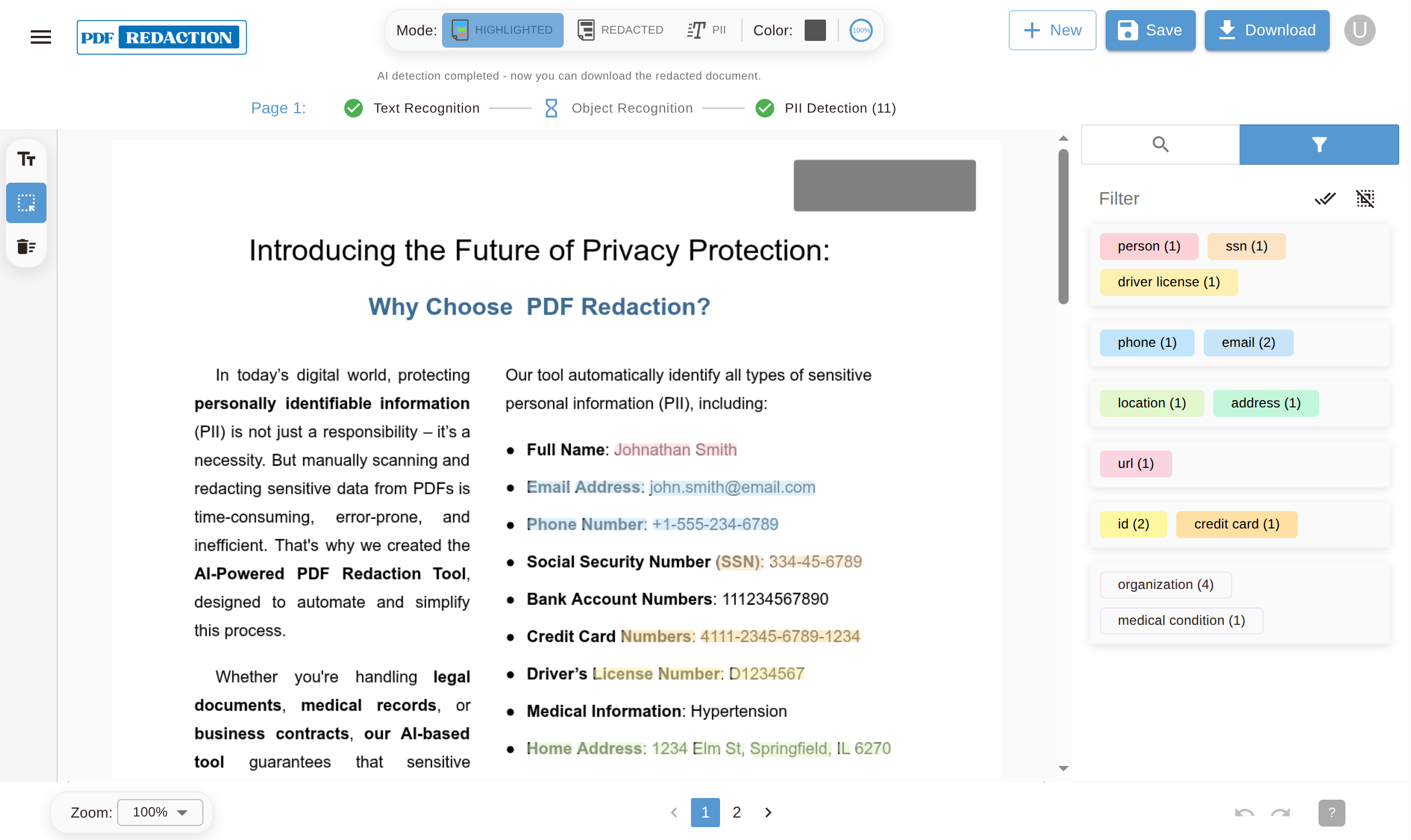
PDF Redaction Studio is a powerful web-based application for redacting sensitive information from PDF documents. This is the backend container for the Studio edition.
Features
- Professional PDF Redaction: Advanced tools for redacting text, images, and metadata from PDFs
- AI-Powered Detection: Automatic detection of PII, sensitive data, and custom patterns
- Batch Processing: Process multiple documents simultaneously
- Custom Redaction Rules: Define your own redaction patterns and rules
- User-Friendly Interface: Intuitive drag-and-drop interface built with React and Next.js
- Real-time Preview: See redactions in real-time before applying changes
- Secure Processing: All processing happens on your own infrastructure
- Flexible Licensing: Free trial available, with pay-as-you-go and subscription options
Demo
You can try it out for free at https://studio.pdf-redaction.com
Pricing & Licensing
- Free Trial: Get started with a 14-days free trial to explore all features
- Pay-as-you-go: Flexible licensing option that scales with your usage
- Subscription Plans: Volume-based subscriptions for teams and enterprises
For detailed pricing information, visit https://pdf-redaction.com/pricing/
Valid license key is required to start the service. You can obtain a free trial or a commercial license at pdf-redaction.com.
🛠 Quick Start
🚀 Instant Install self-hosted PDF Redaction Studio
-
Option A (curl):
/bin/bash -c "$(curl -fsSL https://raw.githubusercontent.com/StabRise/pdf-redaction-studio/main/install.sh)" -
Option B (wget):
/bin/bash -c "$(wget -qO- https://raw.githubusercontent.com/StabRise/pdf-redaction-studio/main/install.sh)"
🐳 Manual Installation with Docker Compose
If you prefer manual setup or want to customize the installation:
-
Clone or download the repository files:
Option A - Clone the repository:
git clone https://github.com/StabRise/pdf-redaction-studio.git cd pdf-redaction-studioOption B - Download individual files:
mkdir pdf-redaction-studio && cd pdf-redaction-studio curl -O https://raw.githubusercontent.com/StabRise/pdf-redaction-studio/main/docker-compose.yaml curl -O https://raw.githubusercontent.com/StabRise/pdf-redaction-studio/main/.env.example -
Configure environment variables:
cp .env.example .env # Edit .env and add your license key from https://pdf-redaction.com/licenses/ -
Start the services:
docker compose up -d -
Access the application: Open http://localhost:3000 in your browser
Useful Docker Compose commands:
docker compose logs -f- Follow logs in real-timedocker compose down- Stop and remove containersdocker compose restart- Restart the servicesdocker compose ps- Show running containers
🐳 Docker Images
This project uses the following Docker images:
- stabrise/pdf-redaction-studio-backend - Backend API server
- stabrise/pdf-redaction-studio-frontend - Frontend web interface
- stabrise/pdf-redaction-api - PDF Redaction API server
🔒 Security & Compliance
This image is designed for high-security environments:
- GDPR/CCPA Ready: Keep data inside your jurisdiction.
- Stateless Processing: Documents are processed in memory or temp volumes and are not stored permanently by the API.
- Resource Efficient: Optimized for VPS deployments with low memory overhead.
Documentation
For full documentation, visit https://pdf-redaction.com/docs/studio/
Support
- Website: https://pdf-redaction.com
- Documentation: https://pdf-redaction.com/docs/studio/
- Contact: https://pdf-redaction.com/contact-us/
- Email: [email protected]
Note: This container is part of the PDF Redaction Studio suite. You'll also need the frontend and PDF Redaction API containers for full functionality.
Tag summary
Content type
Image
Digest
sha256:c56e638d2…
Size
130.1 MB
Last updated
6 months ago
docker pull stabrise/pdf-redaction-studio-backend