steemsjo/ipmi2mqtt
Simple Docker container to publish your IPMI SDR entities to MQTT.
Image
0
365
steemsjo/ipmi2mqtt repository overview
ipmi2mqtt
Simple Docker container to publish your IPMI SDR entities to MQTT.
Information
I have a Supermicro server running at home which supports the IPMI interface. My idea was to get the information it exposes into my Home Assistant. So after some Googling I came to the conclusion there wasn't really any out-of-the-box solution for my case. So why not create it myself and maybe help others too. So enjoy!
Docker Hub / Docker Compose
Source available on GitHub: https://github.com/steemsjo/ipmi2mqtt
Docker Compose:
version: '3.8'
services:
  ipmi2mqtt:
    image: steemsjo/ipmi2mqtt:v0.1
    container_name: ipmi2mqtt
    restart: always
    environment:
        - IPMI_HOST=x.x.x.x
        - IPMI_USERNAME=admin
        - IPMI_PASSWORD=MyP@ssW0rd!
        - IPMI_SCAN_INTERVAL=5 # Optional: default to 5
        - MQTT_HOST=x.x.x.x
        - MQTT_PORT=1883 # Optional: default to 1883
        - MQTT_USERNAME=mqtt
        - MQTT_PASSWORD=mqtt
        - MQTT_TOPIC_PREFIX=ipmi_node_name # Optional: default to ipmi2mqtt/{MQTT_HOST}
Home Assistant:
sensor:
  - platform: mqtt
    name: "CPU1 Temp"
    unique_id: cpu1_temp
    state_topic: "ipmi2mqtt/proxmox/3.1.1"
    unit_of_measurement: "C"
    value_template: "{{ value_json.value }}"
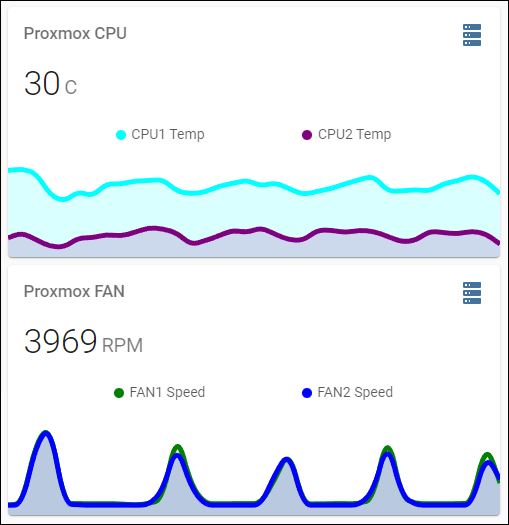
Output example with IPMI_SCAN_INTERVAL=1 :
Notice
This was my very first Python and/or Docker container try-out. If you have any suggestion, let me know!
Tag summary
Content type
Image
Digest
Size
22 MB
Last updated
almost 5 years ago
docker pull steemsjo/ipmi2mqtt:v0.1