stepaniah/port-light
Host port occupancy from listeners, Docker mappings, and Compose declarations.
10K+
stepaniah/port-light repository overview

Port-Light
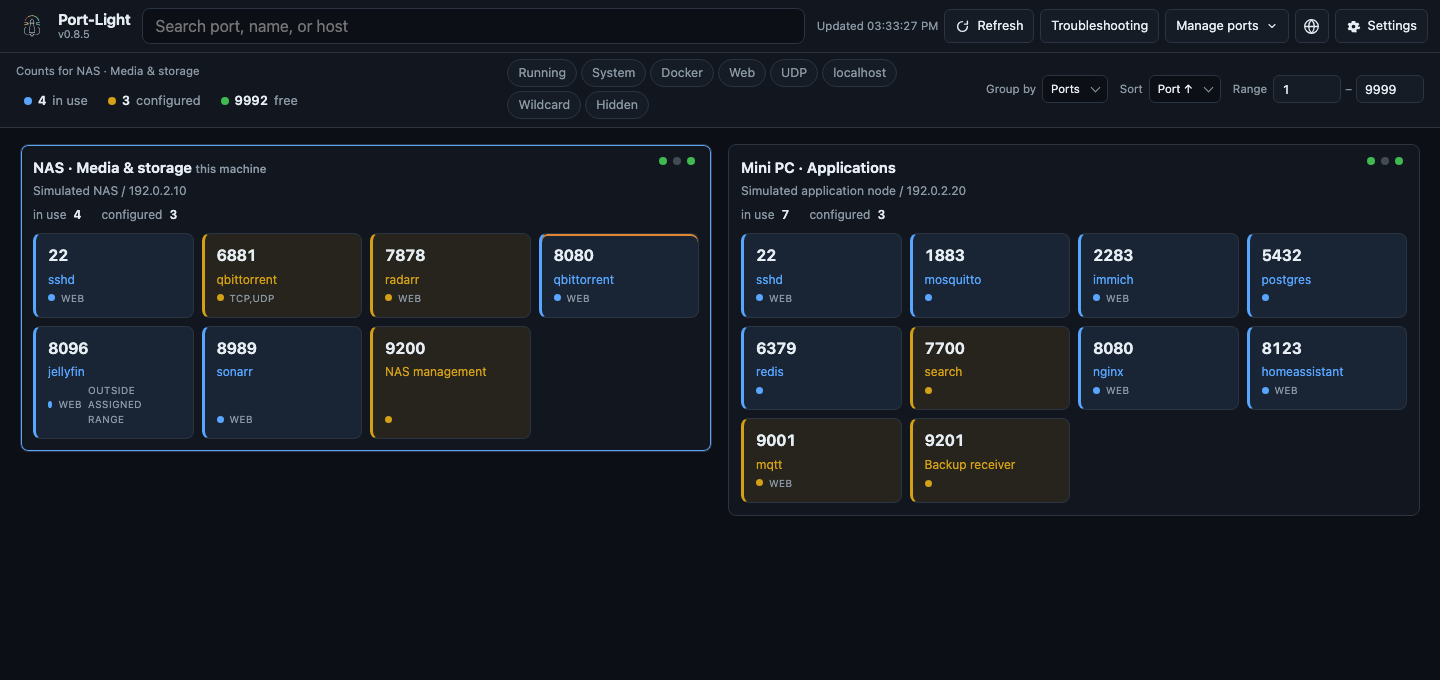
A self-hosted dashboard for host port occupancy. It shows host listeners, Docker port mappings, and Compose declarations.




Quick start · Unraid · Documentation
Quick start
Image: stepaniah/port-light (linux/amd64, linux/arm64). Also published to GHCR on tagged releases (ghcr.io/stepaniah/port-light). Pin a version tag or digest for reproducible deployments.
services:
  port-light:
    image: stepaniah/port-light:v0.8.5
    container_name: port-light
    restart: unless-stopped
    ports:
      - "2100:2100"
    volumes:
      - /path/to/your/compose-stacks:/compose:ro
      - /var/run/docker.sock:/var/run/docker.sock:ro
      - /proc:/host/proc:ro
      - ./data:/data
    environment:
      COMPOSE_SCAN_DIR: /compose
mkdir -p data
docker compose up -d
Open http://localhost:2100.
The Docker socket grants Docker API access, including write operations. Use a socket proxy to restrict access. See the deployment guide for Unraid, Podman, and reverse proxy setup.
All three scanners are enabled by default. For installations without Docker, set PORT_LIGHT_SCANNERS=listen,compose. Failed scans or stale data produce a warning and suspend port allocation. See troubleshooting.
Features
- Search by port, service, project, process, or bind address; filter and sort results.
- Group Compose ports by project or service and collapse contiguous ranges.
- Review Compose conflicts and generate replacement port mappings.
- Create and manage reservations, filter by expiry, and copy release commands.
- Define named port ranges and check project declarations against them.
- View up to 32 peers in waterfall or tab layouts. Each machine runs its own instance; management actions run on the corresponding instance.
- Check and reserve ports through the CLI, API, or MCP server.
- Configure seven UI languages, themes, port history, webhooks, and Doctor diagnostics.
The dashboard lists occupied and configured ports. Searching for a port number also shows available alternatives:
| State | Meaning |
|---|---|
| In use | A process is listening or a running container publishes the port |
| Configured | Declared in Compose or a manual entry, with no listener detected |
| Free | Available within the current scan scope |
Local troubleshooting
The troubleshooting workspace suggests checks, shows recent port changes, and saves reports for later comparison. These checks run locally without a model key.
Optional AI assistance uses your own provider and key, configured in Settings → AI. Choose a preset or add a custom OpenAI-compatible API address. Review the selected evidence and confirm each request; the provider bills your key. See troubleshooting and BYOK for limits, storage and privacy.
Work with an AI assistant
In Settings → Automation, copy the setup prompt into your AI tool. It includes this instance's URL and instructions to install or update the integration and verify the connection. The assistant can then check project ports, reserve them before starting services, and release its claims when the services stop.
For an assistant that can read GitHub, you can also use:
Read https://raw.githubusercontent.com/StepaniaH/port-light/main/docs/ai-setup.md and follow its instructions to install or update Port-Light for my AI tool. My instance URL is
<your-instance-url>.
The instance must be reachable from the AI's execution environment. See the AI setup guide for MCP, CLI + skill, Docker and update details. AI setup and the packaged MCP entry point are available in v0.8.4 and later.
Access control
Set AUTH_USER and AUTH_PASSWORD to enable Basic Auth for the dashboard and API. Use an HTTPS reverse proxy for public deployments.
With Basic Auth or HIDDEN_UNLOCK_PASSWORD enabled, hidden ports require unlocking before API access. Otherwise, hiding a port affects its display only. See SECURITY.md.
Configuration
| Variable | Default | Description |
|---|---|---|
PORT_LIGHT_SCANNERS | listen,docker,compose | Enabled sources, comma-separated; select at least one. |
PORT_LIGHT_SCAN_TIMEOUT_S | 10 | Background refresh deadline in seconds (1–60). A timeout retains the snapshot and marks it stale. Env only. |
COMPOSE_SCAN_DIR | /compose | Directory to scan for compose.y*ml / docker-compose.y*ml (env only) |
COMPOSE_SCAN_DEPTH | 4 | Max subdirectory depth under the scan dir |
COMPOSE_SCAN_EXCLUDE_DIRS | unset | Comma-separated folder names to skip during automatic Compose discovery. Explicit include / extends files are still read. |
COMPOSE_SCAN_MAX_FILES | 400 | Cap on compose files parsed per refresh |
PORT_RANGE_START | 1 | Start of the range used for the free summary count |
PORT_RANGE_END | 9999 | End of the free-count range |
PORT_LIGHT_DATA_DIR | /data | Manual ports, hidden list, and saved settings (JSON) |
PORT_LIGHT_PORT | 2100 | HTTP port inside the container |
CUSTOM_PORTS_FILE | /data/custom_ports.json | Extra / overriding port names (env only) |
THEME_MODE | system | system / dark / light |
THEME_PALETTE | built-in | Palette: gruvbox, catppuccin, solarized, nord, dracula, tokyo-night, one-dark, everforest, rose-pine, kanagawa. Empty uses the built-in colors. |
LOCALE | auto | auto / en / fr / de / es / zh-CN / zh-TW / ja. Auto follows the browser. |
GRID_DENSITY | standard | Card-density preset: loose, standard, or compact. A stored legacy comfortable behaves as standard. |
SHOW_BIND_ADDRESSES | false | Show compact bind-address summaries on occupied cards. |
SHOW_BIND_IPV4 | true | Include IPv4 addresses when card bind summaries are enabled. |
SHOW_BIND_IPV6 | true | Include IPv6 addresses when card bind summaries are enabled. |
REFRESH_MS | 5000 | Dashboard polling interval (1,000–300,000 ms). Settings offers 5s–5m choices and shows the recommended peer capacity. The local background scanner remains capped at a 30s interval. |
PORT_LIGHT_HOST_LAYOUT | waterfall | Responsive waterfall showing all machines, or tabs showing one machine at a time. Both desktop and mobile honor this choice. |
URL_HOST | empty | Hostname used in guessed http(s):// links |
URL_SCHEME | auto | auto / http / https |
AUTH_USER / AUTH_PASSWORD | unset | Optional HTTP Basic Auth for the UI and API. /api/health stays open. Env only. Both values must be nonempty; partial/blank configuration returns 503. Unset both to disable. |
HIDDEN_UNLOCK_PASSWORD | unset | If set (or if Basic Auth is set), hidden-from-grid ports are withheld from the API until you unlock. Env only. |
PORT_LIGHT_SETTINGS_SOURCE | auto | auto: Web UI values override env defaults. env: Compose is the only source and the Settings page is read-only. |
PORT_LIGHT_HOST_NAME | hostname | Label for this machine when other occupancy maps are shown. Also configurable under Settings → Machines & scanning. |
PORT_LIGHT_HOST_DESCRIPTION | empty | Optional plain-text note under this machine's name in the multi-host view, up to 120 characters. |
PORT_LIGHT_PEERS | unset | JSON array of up to 32 {name, url, description?, username?, password?} entries, used when the data file has no peers key or when PORT_LIGHT_SETTINGS_SOURCE=env. Descriptions are optional plain text, up to 120 characters. |
PORT_LIGHT_LOG_LEVEL | warning | Backend log level (debug / info / warning / error). Degraded scans (Docker unreachable, unreadable Compose file, …) log one line and show up in /api/health under degradations. Env-only. |
WEBHOOK_URL | unset | Opt-in webhook target (http(s) only). With WEBHOOK_EVENTS=new_listener,conflict, Port-Light POSTs {event, port} JSON. |
WEBHOOK_SECRET | unset | Sent as X-Port-Light-Secret. |
WEBHOOK_EVENTS | unset | Comma list: new_listener, conflict. |
METRICS_ENABLED | unset | Set to 1 to expose GET /api/metrics (Prometheus text format: used/configured/free counts, hidden, degradations, Compose files). Aggregates only — never ports or names. Env-only. |
AGENT_TOKEN | unset | When set, suggestions and reservation creation/recovery require a matching X-Agent-Token header. Env-only. |
Most options are also available in Settings and save automatically to /data/port_light.json. Configure timeout, paths, and secrets through environment variables. Set PORT_LIGHT_SETTINGS_SOURCE=env for read-only settings.
Use custom_ports.example.json as a template for custom port names. Create the file before bind-mounting it.
Data and privacy
Port-Light has no telemetry. Outbound HTTP requests serve configured peer queries, webhooks, and explicitly confirmed BYOK model requests. Webhooks send {event, port}; model requests send the selected sanitized evidence to your configured provider.
Dashboard and API users can read scan results, machine descriptions, and port rules. Configured hubs also receive this data. Compose .env files are used locally for variable substitution. Doctor reports contain sanitized summaries.
Settings, labels, and history are stored in the data volume. port_light.json may contain peer passwords. CLI release credentials use a private local state directory (/data/cli-state in the container). Browser reservation credentials use tab session storage, and copied release commands contain tokens. Protect sensitive information in the data volume, commands, and screenshots.
Documentation
- Port management: grouping, conflicts, reservations, and range rules
- Deployment and troubleshooting
- CLI, API and MCP; OpenAPI documentation is available at
/docson a running instance - Architecture and contributing
Tech stack
- Backend: Python 3.11+ (CI covers 3.11–3.13), FastAPI, Uvicorn
- Frontend: static HTML/CSS/JS
- Image:
python:3.12-slim+iproute2
License
MIT © 2026 StepaniaH
Tag summary
Content type
Image
Digest
sha256:a96781666…
Size
64.1 MB
Last updated
7 days ago
docker pull stepaniah/port-light