sunxiao0721/beecount-cloud
Self-hosted BeeCount sync server & web console. MCP, encrypted backups. 蜜蜂记账自建云
50K+
sunxiao0721/beecount-cloud repository overview
BeeCount Cloud
Self-hosted sync server and web console for BeeCount, the personal bookkeeping app for iOS and Android.
Keep your books on your own server and access them from your phone or browser. This image bundles the FastAPI backend, React web console, MCP server, and backup tools. The default deployment needs one container and one persistent data directory, with SQLite included.
Website & documentation · Source code · Mobile app · 中文文档
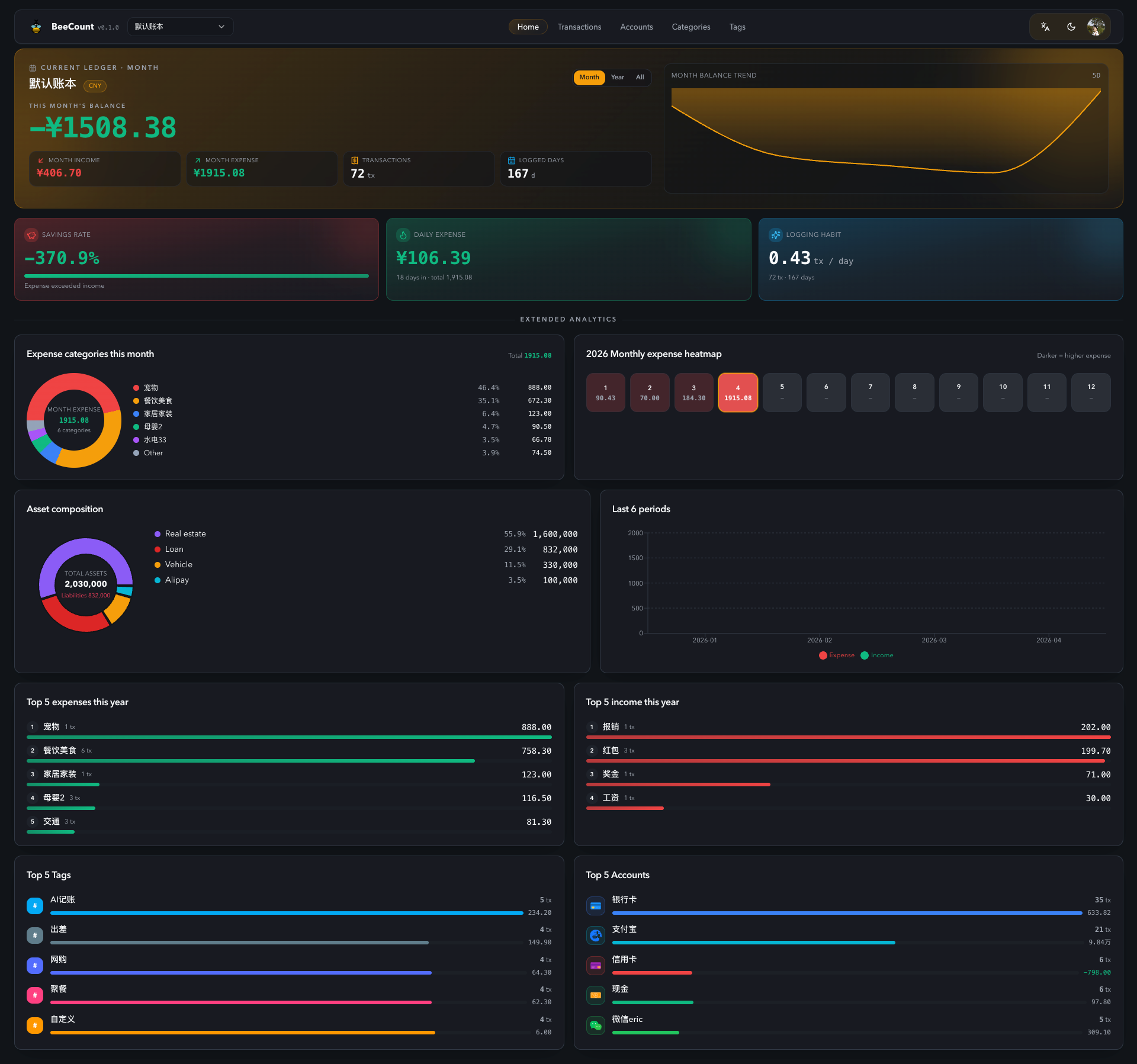
Features
- Sync across devices: two-way WebSocket sync between mobile and web, with offline-first bookkeeping in the mobile app.
- Everyday bookkeeping: multiple ledgers, income, expenses, transfers, accounts, categories, tags, attachments, budgets, and analytics.
- Shared ledgers: collaborate with owner/editor roles and invitation codes.
- Web console: responsive interface, dark/light themes, and English, Simplified Chinese, and Traditional Chinese interfaces.
- Built-in MCP server: connect compatible AI clients to query your books and manage transactions using scoped personal access tokens.
- Encrypted backups: scheduled AES-256 ZIP backups with multiple destinations through rclone, including S3-compatible storage and WebDAV.
- Administration: device sessions, server logs, health checks, and Prometheus metrics.
AI integrations and remote backup destinations are optional and use the providers you configure.
Image and tags
| Item | Value |
|---|---|
| Image | sunxiao0721/beecount-cloud |
| Architectures | linux/amd64, linux/arm64 |
| Container port | 8080 |
| Persistent data | /data |
| Default database | SQLite at /data/beecount.db |
Use latest for the latest published image, or pin a release tag from the Tags page for controlled upgrades. See GitHub Releases for release notes.
Quick start with Docker Compose
Create compose.yml:
services:
  beecount-cloud:
    image: sunxiao0721/beecount-cloud:latest
    restart: unless-stopped
    ports:
      - "8869:8080"
    volumes:
      - ./data:/data
    environment:
      TZ: Asia/Shanghai
Start the service and view its first-launch credentials:
docker compose up -d
docker compose logs beecount-cloud
On a fresh data directory, the server creates an administrator account and prints the email and password in a banner containing 初次启动. Open http://YOUR_SERVER_IP:8869, sign in with those credentials, and change the password.
To choose your initial administrator credentials instead, add both variables under environment before the first launch:
      BOOTSTRAP_ADMIN_EMAIL: [email protected]
      BOOTSTRAP_ADMIN_PASSWORD: "REPLACE_WITH_A_STRONG_PASSWORD"
These variables initialize a new installation; they do not reset an existing account. Public registration is disabled by default. Administrators can create additional users in the web console.
Docker run alternative
docker run -d \
  --name beecount-cloud \
  --restart unless-stopped \
  -p 8869:8080 \
  -v beecount_data:/data \
  -e TZ=Asia/Shanghai \
  sunxiao0721/beecount-cloud:latest

docker logs beecount-cloud
This alternative stores data in the named volume beecount_data. Use either the Compose example or the Docker run example for your installation.
Connect the mobile app
- Install BeeCount on iOS or Android.
- Open Settings → Cloud Service → BeeCount Cloud.
- Enter the same server URL you use in the browser, sign in, and enable sync.
For access from outside your local network, configure an HTTPS reverse proxy such as Caddy or Nginx and enable WebSocket forwarding. Use your HTTPS URL in both the app and browser.
Configuration
| Variable | Purpose |
|---|---|
TZ | Container and backup schedule timezone; default Asia/Shanghai. |
BOOTSTRAP_ADMIN_EMAIL | Initial administrator email on a fresh installation. |
BOOTSTRAP_ADMIN_PASSWORD | Initial administrator password; set together with the email. |
JWT_SECRET | Optional signing secret of at least 32 bytes. If omitted, the server generates and persists it in /data/.jwt_secret. |
REGISTRATION_ENABLED | Public account registration; default false. |
CORS_ORIGINS | Comma-separated allowed browser origins when needed for your deployment. |
EMBEDDING_API_KEY | Optional embedding provider key for AI documentation Q&A. The bundled index uses BAAI/bge-m3. |
The defaults work for the quick start. For advanced options, including PostgreSQL, see the deployment guide and environment variable reference.
Persistent data and backups
Keep /data mounted when recreating or upgrading the container. It contains the default SQLite database, attachments, backup archives, and signing secret.
Configure scheduled encrypted backups in the web console to send backups to your chosen storage destinations. Keep the encryption passphrase separately so you can recover the archives later.
For a complete manual backup of the Compose bind-mount example, stop the service before archiving ./data so the database and its WAL files stay consistent:
docker compose stop beecount-cloud
tar -czf "beecount-cloud-$(date +%F-%H%M%S).tar.gz" ./data
docker compose start beecount-cloud
If you use the Docker run alternative, back up the named volume instead. See the backup and recovery guide.
Upgrade
Back up your data, then run these commands from your Compose directory:
docker compose pull beecount-cloud
docker compose up -d beecount-cloud
If you pinned a release tag, update it in compose.yml first. Database migrations run automatically at startup. See the migration and rollback guide.
Health and integrations
- Liveness:
GET /healthz - Readiness:
GET /ready - Prometheus metrics:
GET /metrics - API documentation:
/docson your server - MCP endpoint:
/api/v1/mcp, using a BeeCount Cloud personal access token
See the MCP setup guide for compatible AI clients and token configuration.
License and support
Personal and family self-hosting, education, research, and internal use by nonprofit organizations are free under the BeeCount Cloud Software License Agreement. Commercial use requires a paid license; the license file contains the full terms.
For bugs, feature requests, or commercial licensing, visit GitHub Issues.
中文说明
BeeCount Cloud 是 蜜蜂记账(BeeCount) 的自部署同步服务和 Web 管理端。 让 iOS、Android 和浏览器共用你的账本,数据存放在自己的服务器上。
镜像集成同步后端、Web 控制台、MCP 服务和备份工具。默认使用 SQLite,一个容器、一个持久化数据目录即可部署。
官网与文档 · 源码 · 移动端 App · 问题反馈
主要功能
- 多端同步:手机和网页通过 WebSocket 双向同步,App 支持离线记账。
- 完整记账:多账本、收支、转账、账户、分类、标签、附件、预算和统计图表。
- 共享账本:支持 Owner / Editor 角色与邀请码协作。
- Web 控制台:响应式界面、深浅色主题、简体中文 / 繁体中文 / 英文。
- MCP 集成:通过有权限范围的访问令牌,让兼容的 AI 客户端查询账本和管理交易。
- 加密备份:定时生成 AES-256 加密 ZIP,通过 rclone 备份到多个远端,支持 S3 兼容存储、WebDAV 等。
- 运维管理:设备会话、服务端日志、健康检查和 Prometheus 指标。
AI 集成和远端备份均为可选功能,使用你自行配置的服务商。
镜像信息
| 项目 | 值 |
|---|---|
| 镜像 | sunxiao0721/beecount-cloud |
| 支持架构 | linux/amd64、linux/arm64 |
| 容器端口 | 8080 |
| 持久化目录 | /data |
| 默认数据库 | /data/beecount.db(SQLite) |
latest 指向最新发布的镜像。需要控制升级节奏时,请从 Tags 页面选择固定版本;更新内容见 GitHub Releases。
Docker Compose 快速部署
新建 compose.yml:
services:
  beecount-cloud:
    image: sunxiao0721/beecount-cloud:latest
    restart: unless-stopped
    ports:
      - "8869:8080"
    volumes:
      - ./data:/data
    environment:
      TZ: Asia/Shanghai
启动并查看首次生成的管理员凭证:
docker compose up -d
docker compose logs beecount-cloud
首次使用空数据目录启动时,服务会自动创建管理员,日志中包含 初次启动 的提示会显示邮箱和密码。浏览器访问 http://你的服务器IP:8869,登录后修改密码。
若要自定义初始管理员,在首次启动前将以下两项一起加入 environment:
      BOOTSTRAP_ADMIN_EMAIL: [email protected]
      BOOTSTRAP_ADMIN_PASSWORD: "请替换为强密码"
这两项只用于新安装初始化,不会重置已有账号。公开注册默认关闭,管理员可在 Web 管理端创建其他用户。
也可使用 docker run(与 Compose 二选一):
docker run -d \
  --name beecount-cloud \
  --restart unless-stopped \
  -p 8869:8080 \
  -v beecount_data:/data \
  -e TZ=Asia/Shanghai \
  sunxiao0721/beecount-cloud:latest

docker logs beecount-cloud
此方式将数据保存在命名卷 beecount_data,而不是当前目录下的 ./data。
App 接入与公网访问
- 安装 蜜蜂记账 App。
- 打开「设置 → 云服务 → BeeCount Cloud」。
- 填写浏览器访问使用的服务器地址,登录并开启同步。
公网部署时,在服务前配置 Caddy / Nginx 等 HTTPS 反向代理,并启用 WebSocket 转发。App 和浏览器均使用你的 HTTPS 地址。
常用配置
| 环境变量 | 说明 |
|---|---|
TZ | 容器与备份调度时区,默认 Asia/Shanghai。 |
BOOTSTRAP_ADMIN_EMAIL | 新安装的初始管理员邮箱。 |
BOOTSTRAP_ADMIN_PASSWORD | 初始管理员密码,需与邮箱一起设置。 |
JWT_SECRET | 可选,至少 32 字节;不填写时自动生成并保存在 /data/.jwt_secret。 |
REGISTRATION_ENABLED | 公开注册开关,默认 false。 |
CORS_ORIGINS | 根据部署需要配置允许的浏览器来源,以逗号分隔。 |
EMBEDDING_API_KEY | 可选,启用 AI 文档问答的向量服务密钥;内置索引使用 BAAI/bge-m3。 |
快速部署无需额外配置。PostgreSQL 等高级选项见部署指南和环境变量示例。
数据持久化、备份与升级
重建或升级容器时保留 /data 挂载。默认 SQLite 数据库、附件、备份归档和签名密钥均在此目录中。
可在 Web 管理端配置定时加密备份和远端存储。加密口令应另行妥善保存,恢复归档时需要它。
使用上述 Compose 目录挂载方案时,手动全量备份应先停止服务,保证数据库及 WAL 文件的一致性:
docker compose stop beecount-cloud
tar -czf "beecount-cloud-$(date +%F-%H%M%S).tar.gz" ./data
docker compose start beecount-cloud
docker run 方案需备份命名卷。更多步骤见备份与恢复指南。
升级前先备份,然后在 Compose 目录执行:
docker compose pull beecount-cloud
docker compose up -d beecount-cloud
若使用固定版本标签,先修改 compose.yml 中的版本。数据库迁移会在启动时自动执行,回滚步骤见迁移与回滚文档。
健康检查与 MCP
- 存活探针:
GET /healthz - 就绪探针:
GET /ready - Prometheus 指标:
GET /metrics - API 文档:服务器地址后的
/docs - MCP 地址:
/api/v1/mcp,使用 BeeCount Cloud 访问令牌认证
AI 客户端接入步骤见 MCP 文档。
许可与支持
个人及家庭自部署、学习研究、非营利组织内部使用免费;商业使用需付费授权。完整条款以 BeeCount Cloud 软件许可协议为准。
问题反馈、功能建议和商业授权咨询请通过 GitHub Issues联系。
Tag summary
Content type
Image
Digest
sha256:23af2d833…
Size
171.4 MB
Last updated
4 days ago
docker pull sunxiao0721/beecount-cloud