superagidev/superagi
SuperAGI is a dev-first opensource framework to build, manage and run useful autonomous AI agents
5.2K
superagidev/superagi repository overview


Open-source framework to build, manage and run useful Autonomous AI Agents









Follow SuperAGI




Connect with the Creator

Share SuperAGI Repository




What are we ?
A dev-first open source autonomous AI agent framework enabling developers to build, manage & run useful autonomous agents. You can run concurrent agents seamlessly, extend agent capabilities with tools. The agents efficiently perform a variety of tasks and continually improve their performance with each subsequent run.
💡 Features
- Provision, Spawn & Deploy Autonomous AI Agents - Create production-ready & scalable autonomous agents.
- Extend Agent Capabilities with Toolkits - Add Toolkits from our marketplace to your agent workflows.
- Graphical User Interface - Access your agents through a graphical user interface.
- Action Console - Interact with agents by giving them input and permissions.
- Multiple Vector DBs - Connect to multiple Vector DBs to enhance your agent’s performance.
- Performance Telemetry - Get insights into your agent’s performance and optimize accordingly.
- Optimized Token Usage - Control token usage to manage costs effectively.
- Agent Memory Storage - Enable your agents to learn and adapt by storing their memory.
- Models - Custom fine tuned models for business specific usecases.
- Workflows - Automate tasks with ease using ReAct LLM's predefined steps.
🛠 Toolkits
Toolkits allow SuperAGI Agents to interact with external systems and third-party plugins.
<img src=https://superagi.com/wp-content/uploads/2023/08/Twitter.png height=50px width=50px alt="Twitter" valign="middle" title="Twitter"> <img src=https://superagi.com/wp-content/uploads/2023/08/Coding.png height=50px width=50px alt="Coding Tool" valign="middle" title="Coding Tool"> <img src=https://superagi.com/wp-content/uploads/2023/08/Insta.png height=50px width=50px alt="Instagram" valign="middle" title="Instagram"> <img src=https://superagi.com/wp-content/uploads/2023/08/Knowledge_tool.png height=50px width=50px alt="Knowledge Search" valign="middle" title="Knowledge Search"> <img src=https://superagi.com/wp-content/uploads/2023/05/Group-113612.png height=50px width=50px alt="Email" valign="middle" title="Email"> <img src=https://superagi.com/wp-content/uploads/2023/05/Group-113610.png height=50px width=50px alt="Jira" valign="middle" title="Jira"> <img src=https://superagi.com/wp-content/uploads/2023/05/Group-113611.png height=50px width=50px alt="File Manager" valign="middle" title="File Manager"> <img src=https://superagi.com/wp-content/uploads/2023/05/Group-113613.png height=50px width=50px alt="Google Search" valign="middle" title="Google Search"> <img src=https://superagi.com/wp-content/uploads/2023/05/Group-113615.png height=50px width=50px alt="Dall-E" valign="middle" title="Dall-E"> <img src=https://superagi.com/wp-content/uploads/2023/05/Group-113614.png height=50px width=50px alt="Github" valign="middle" title="Github"> <img src=https://superagi.com/wp-content/uploads/2023/05/Group-113616.png height=50px width=50px alt="Web Interaction" valign="middle" title="Web Interaction"> <img src=https://superagi.com/wp-content/uploads/2023/05/Group-113622.png height=50px width=50px alt="Duckduckgo" valign="middle" title="Duckduckgo"> <img src=https://superagi.com/wp-content/uploads/2023/08/Calendar_tool.png height=50px width=50px alt="Google Calendar" valign="middle" title="Google Calendar"> <img src=https://superagi.com/wp-content/uploads/2023/08/Search_tool.png height=50px width=50px alt="Google Calendar" valign="middle" title="Google Search"> <img src=https://superagi.com/wp-content/uploads/2023/08/Serp.png height=50px width=50px alt="Serp API" valign="middle" title="Serp API"> <img src=https://superagi.com/wp-content/uploads/2023/08/Searx.png height=50px width=50px alt="Searx" valign="middle" title="Searx "> <img src=https://superagi.com/wp-content/uploads/2023/08/Web_scraper_logo.png height=50px width=50px alt="Web Scraper" valign="middle" title="Web Scraper"> <img src=https://superagi.com/wp-content/uploads/2023/08/Notion_logo.png height=50px width=50px alt="Notion" valign="middle" title="Notion"> <img src=https://superagi.com/wp-content/uploads/2023/08/Apollo_logo.png height=50px width=50px alt="Apollo" valign="middle" title="Apollo">
⚙️ Installation
You can install superAGI using one of the following three approaches.
☁️ SuperAGI cloud
To quickly start experimenting with agents without the hassle of setting up the system, try Superagi Cloud
-
Visit Superagi Cloud and log in using your github account.
-
In your account settings, go to "Model Providers" and add your API key.
You're all set! Start running your agents effortlessly.
🖥️ Local
- Open your terminal and clone the SuperAGI repository.
git clone https://github.com/TransformerOptimus/SuperAGI.git
- Navigate to the cloned repository directory using the command:
cd SuperAGI
-
Create a copy of config_template.yaml, and name it config.yaml.
-
Ensure that Docker is installed on your system. You can download and install it from here.
-
Once you have Docker Desktop running, run the following command in the SuperAGI directory:
a. For regular usage:
docker compose -f docker-compose.yaml up --buildb. If you want to use SuperAGI with Local LLMs and have GPU, run the following command:
docker compose -f docker-compose-gpu.yml up --build -
Open your web browser and navigate to http://localhost:3000 to access SuperAGI.
🌀 Digital Ocean

Deploy SuperAGI to DigitalOcean with one click.
🌐 Architecture
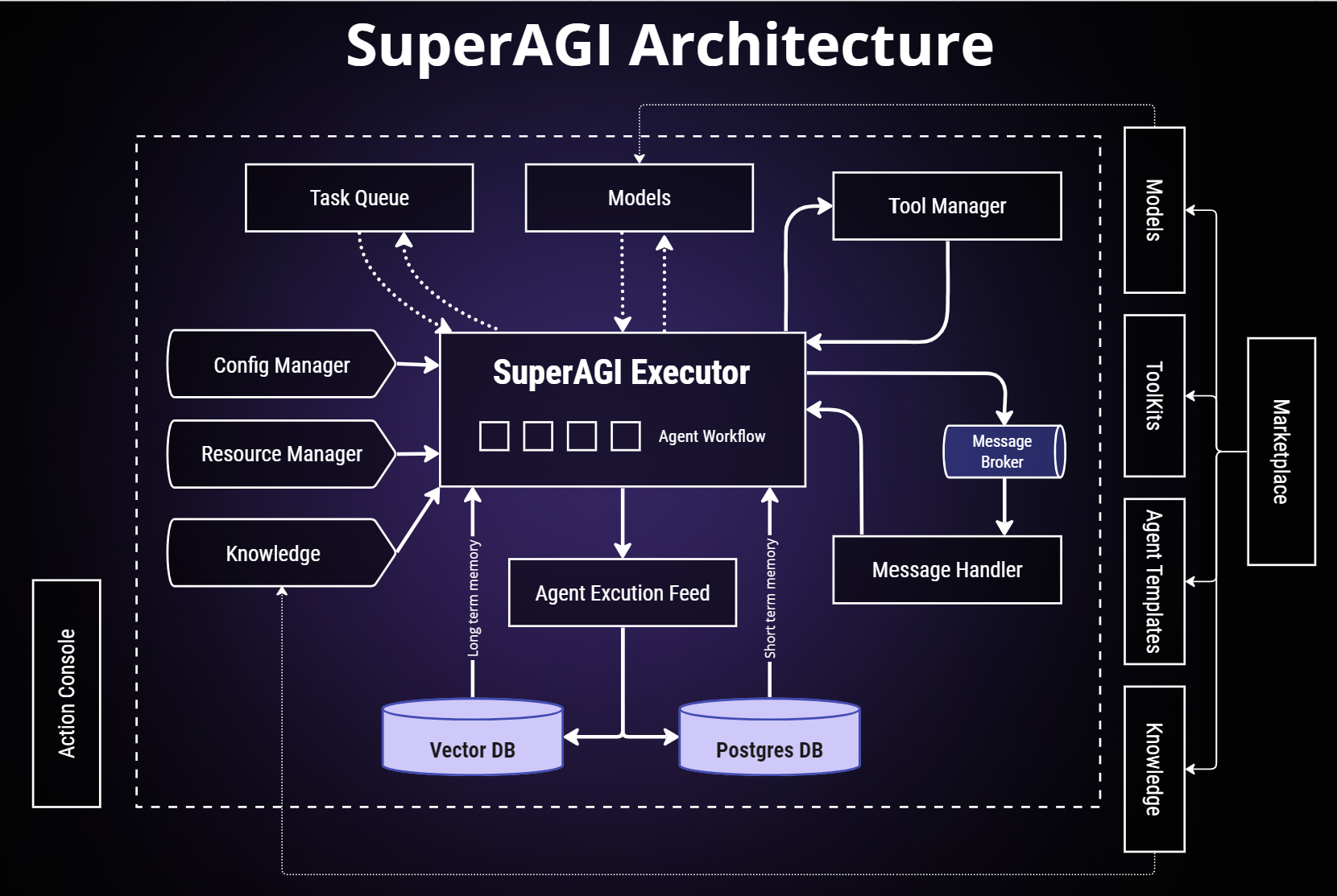
SuperAGI Architecture
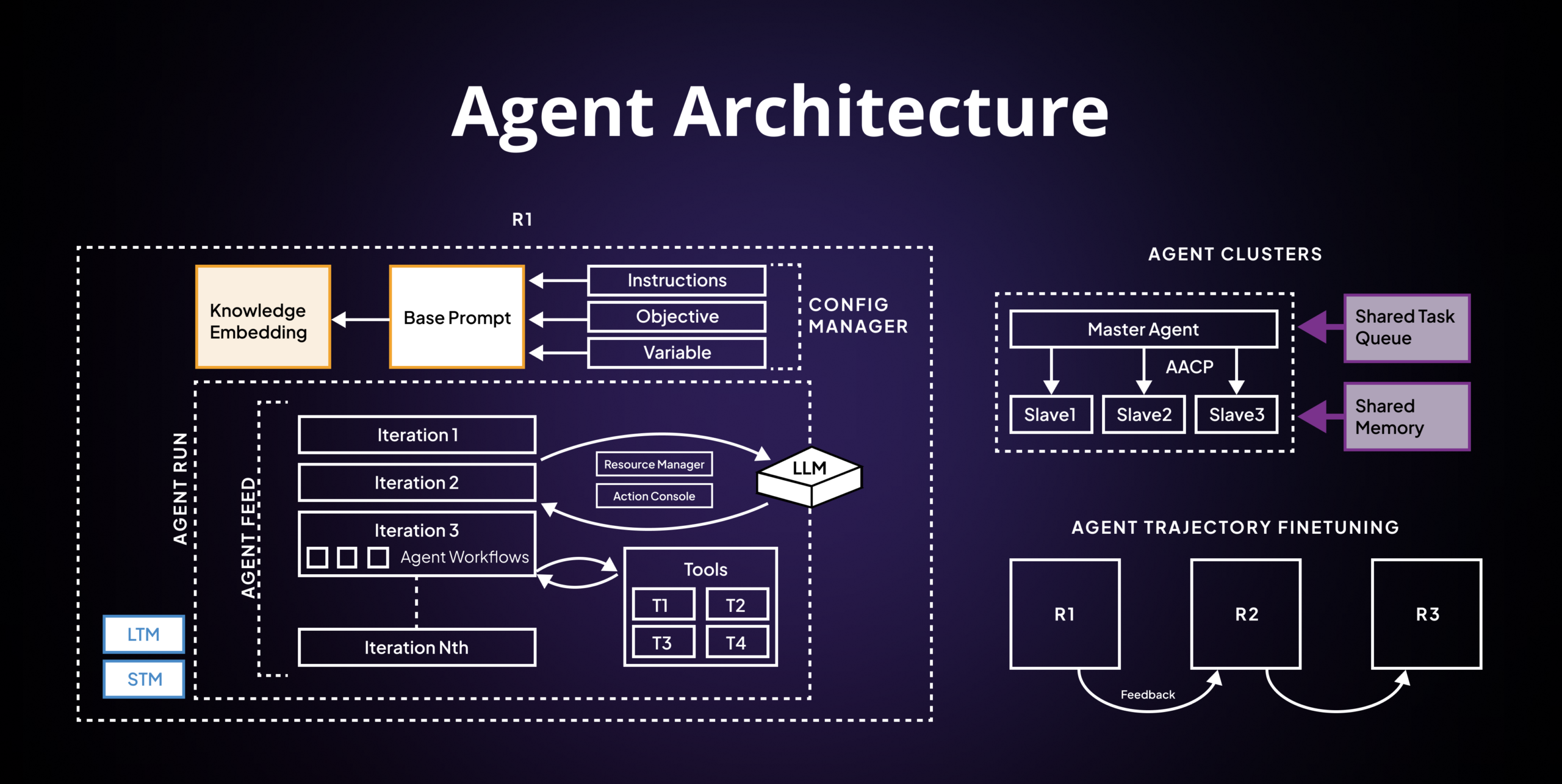
Agent Architecture
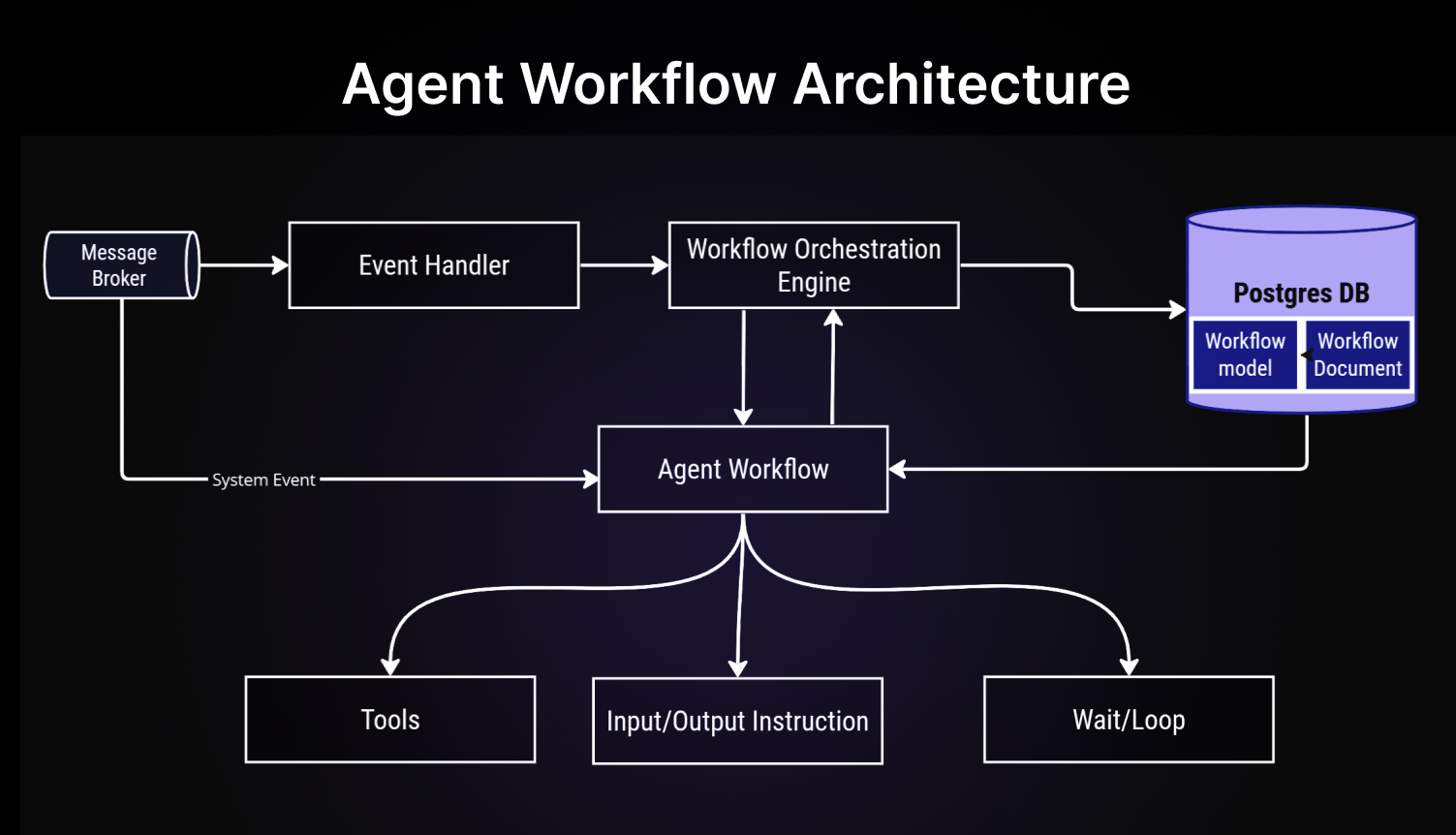
Agent Workflow Architecture
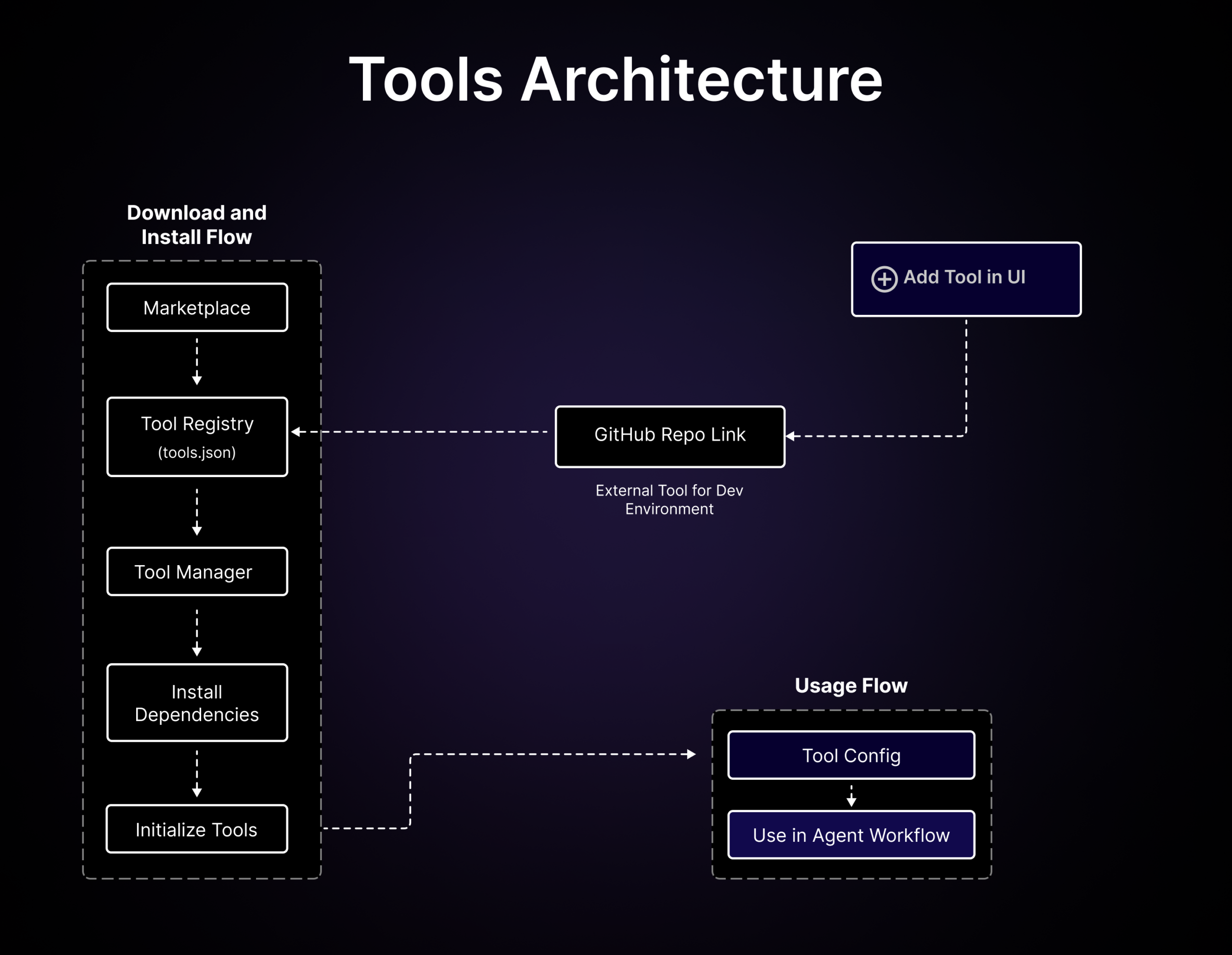
Tools Architecture
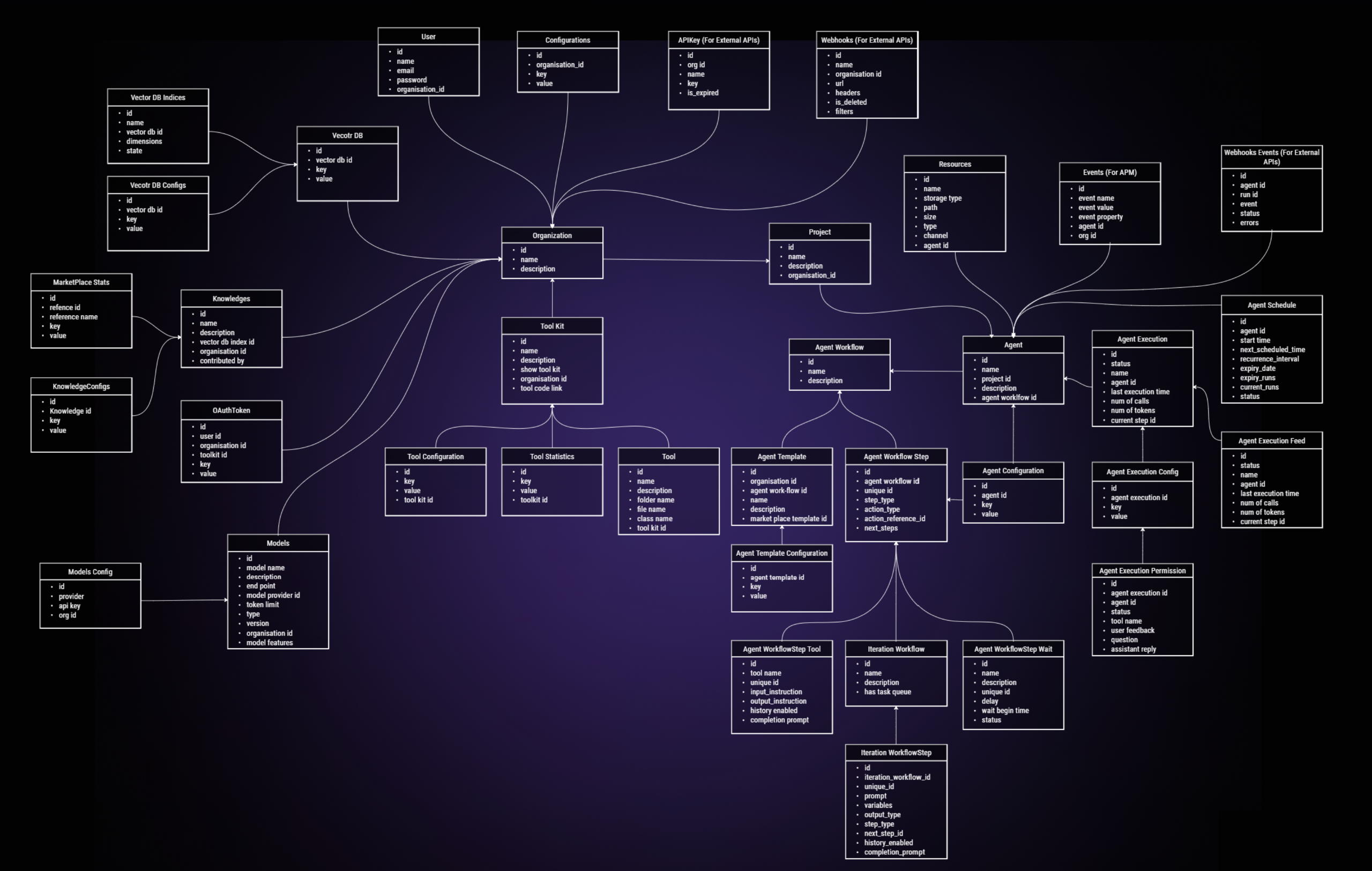
ER Diagram
📚 Resources
📖 Need Help?
Join our Discord community for support and discussions.
If you have questions or encounter issues, please don't hesitate to create a new issue to get support.
💻 Contribution
We ❤️ our contributors. We’re committed to fostering an open, welcoming, and safe environment in the community.
If you'd like to contribute, start by reading our Contribution Guide.
We expect everyone participating in the community to abide by our Code of Conduct.
To get more idea on where we are heading, checkout our roadmap here.
Explore some good first issues to start contributing.
👩💻 Contributors



⚠️ Under Development!
This project is under active development and may still have issues. We appreciate your understanding and patience. If you encounter any problems, please check the open issues first. If your issue is not listed, kindly create a new issue detailing the error or problem you experienced. Thank you for your support!
Tag summary
Content type
Image
Digest
sha256:4307d2fe4…
Size
328.4 MB
Last updated
over 1 year ago
docker pull superagidev/superagi:main