suwey/bridger
Include squeezelite, roon bridge and hqplayer naa like ropieee, great for music streaming.
724
suwey/bridger repository overview
Inspired by ropieee, upgrade to ropieee xl will contain squeezelite/roon bridge/hqplayer naa installed, recommend to use if you have a raspberry pi.
But then your raspberry pi can only use for music streaming, if you still need to use your pi for other things, you can use this docker image. tested in CoreELec on phicomm N1 and Debian pi aarch64 on raspberray pi 4b. Squeezelite version is 1.9.9-1392, Roon bridge version is 1.8(814), HQplayer naa version is 4.1.1-46.
Usage
Turn on your usb dac and plug in, run docker pull suwey/bridger, run sysctl -w kernel.sched_rt_runtime_us=-1 and sysctl -p if you want to pesist change, a simple start shell is like this:
docker run -d --name bridger --device /dev/snd --net host --cap-add=sys_nice --ulimit rtprio=99 --cap-add=IPC_LOCK --ulimit memlock=-1:-1 suwey/bridger
Now you can start to use roon, open http://ip:8080 you can start naa to use hqplayer by my admin server easily:
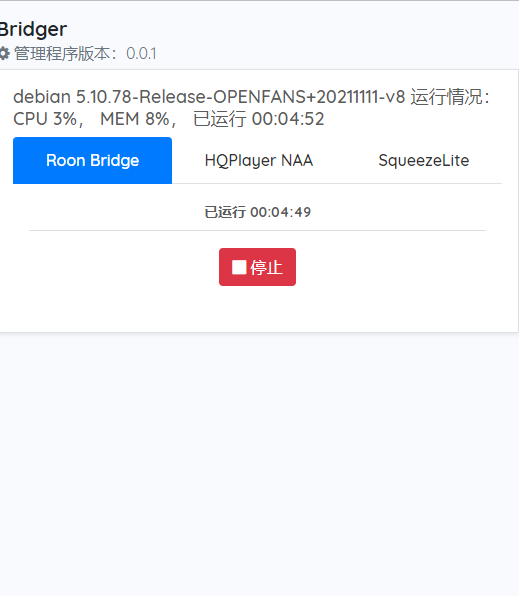
It's a little complicate when come to squeezelite, because it have a lot params, you can get into container like this:
docker exec -it bridger bash
Edit /etc/default/squeezelite and then use admin server to start it, but this will be overwriten when docker run again, but ok if only use docker start, and there are some ENVs:
SL_NAMEname of your squeezelite, set if you need to change it.SL_CARDsound card name of your usb dac, get into container and runsqueezelite -lto get it, mine ishw:CARD=ProMQA,DEV=0.SL_ARGSall other args except -z, mine is-a 100::32:1 -D 100:u32be -p 98 -d all=info -f /tmp/sl.log.SL_SERVERyour Logitech Media Server ip, try set it if server can't see it.
Change -D value to 100:dop or not set -D if your usb dac not support DSD native, get into container and run squeezelite -? to learn more, add ENV to your shell like this:
docker run -d --name bridger --device /dev/snd --net host \
        -e SL_NAME=abc \
       ...
        --cap-add=sys_nice suwey/bridger
Other ENV
ROON_START NAA_START SL_START set to 1 will start the daemon indicaded by name, default only ROON_START=1, remember only turn one daemon on at a time.
ADMIN_PORT set admin server port, default 8080.
Tag summary
Content type
Image
Digest
Size
139.1 MB
Last updated
almost 5 years ago
docker pull suwey/bridger