swaggerql/swagger-combine-ui
Combines multiple Swagger schemas into one site
50K+
swaggerql/swagger-combine-ui repository overview
Swagger Combine UI



The service is used to combine the documentation of various services and display it.
When you should use swagger-combine-ui:
- You have a certain number of microservices and you need to combine their Swagger into one interface
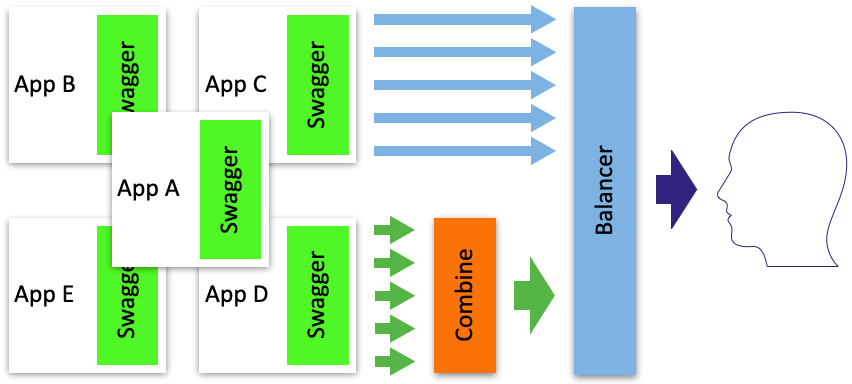
Usage
Checkout this repository locally, then:
npm i
npm start
Now you can visit http://localhost:3000 to view your server.
Docker
Run swagger-combine-ui with a custom config file:
docker run -d -p 3000:3000 -v /path/to/swagger.yaml:/app/swagger.yaml swaggerql/swagger-combine-ui
Configuration
The default path for the configuration file is ./swagger.yaml
Swagger Combine UI requires one configuration schema which resembles a standard Swagger schema except for an additional apis field.
For informations about configuration have a look at the documentation of swagger-combine.
Configuration example
swagger.yaml
swagger: '2.0'
info:
  title: Basic Swagger Combine Example
  version: 1.0.0
apis:
- url: http://petstore.swagger.io/v2/swagger.json
- url: https://api.apis.guru/v2/specs/medium.com/1.0.0/swagger.json
- url: https://api.apis.guru/v2/specs/deutschebahn.com/betriebsstellen/v1/swagger.json
  paths:
    base: /bahn
APIs difference
url field
URL or query path to swagger apidocs.
If the url field contains a path, then the full url is formed from the request headers:
Hostheader is used as the domain.X-Forwarded-Protoheader is used as a schema. Schema ishttpby default.
License
Tag summary
Content type
Image
Digest
Size
81.8 MB
Last updated
over 5 years ago
docker pull swaggerql/swagger-combine-ui