swenske/gotochanger
A fake tape autochanger (virtual library) simulator.
372
swenske/gotochanger repository overview
gotochanger









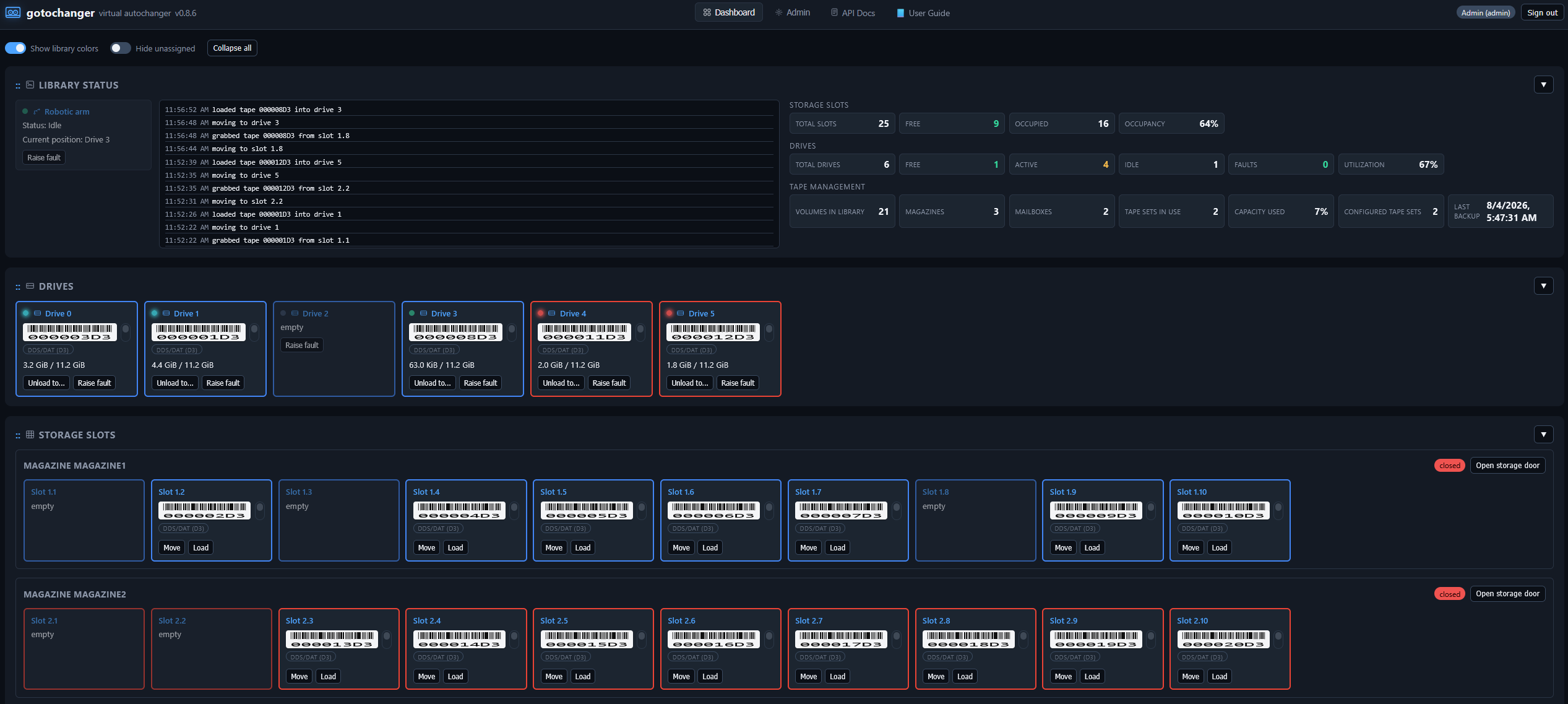
A fake SCSI tape autochanger (virtual library) simulator for testing backup software against something that behaves like a real tape library — storage slots, I/O ("mail slot") elements, multiple drives, volumes, robot moves, and SNMP traps — without any real tape hardware.
It is meant as a drop-in, much more capable replacement for Bareos's
disk-changer.in, adding I/O slots, a REST API, a management web UI, and
SNMP notifications, while remaining compatible with existing
Device Type = File Bareos configurations. An optional second backend can
also expose the same library as real kernel SCSI devices via TCMU/LIO —
see "Features" below; that backend is not available in this Docker
image (see "Install with Docker" for why).
This page covers the Docker image only. For the full project
documentation — Bareos integration, the REST API reference, SNMP/Prometheus
details, and the .deb packages — see the
GitHub repository and the
User Guide.
Features
- Storage slots, I/O ("mail slot") elements, magazines and mailboxes —
door/PIN-gated operator load points, addressed contiguously after storage
slots exactly like a real SCSI medium changer /
mtx-changer. - Multiple drives, each independently faultable, with mounts-since- cleaning tracking and a separate shared-robotic-arm fault model.
- Volumes as plain files with capacity/end-of-tape simulation, write-protect, cleaning tapes with limited use counts, and an offsite vault with manual or scheduled rotation.
- Logical libraries — partition one physical VTL into several independent Bareos-facing autochangers.
- Drop-in Bareos compatibility — point an existing
Device Type = FileAutochanger atgotochanger-changerwith no config rewrite. - REST API with role-based access control (
admin/operator/viewer) and scoped API tokens, plus an embedded web UI (setup wizard, dashboard, full admin section) — nothing extra to install. - SNMPv2c trap notifications with a dynamically generated MIB matching the currently configured enterprise OID.
- Prometheus
/metricsendpoint and a ready-to-import Grafana dashboard. - Interactive API docs (Swagger UI at
/docs) and a self-contained User Guide at/guide, both usable with no internet access. - Kernel mode (optional second backend,
gotochanger-tcmud) exposes the same library as real SCSI devices (/dev/sg*,/dev/nst*) via TCMU/LIO, for tools that insist on talking to an actual SCSI medium changer. Not available in this Docker image — it needs direct host kernel/TCMU access and a real host systemd/polkit that a plain container can't provide. Use thegotochanger-kernel.debpackage on bare metal or a VM instead; see the full Kernel mode documentation on GitHub.
Install with Docker
Only linux/amd64 is published. This image covers the gotochanger
package's contents only (gotochangerd, gotochanger-changer,
gotochangerctl) — see "Kernel mode" above for why
gotochanger-tcmud/gotochanger-kernel isn't shipped as an image.
docker run
# 1. Pull the image
docker pull swenske/gotochanger:latest

# 2. Run it - -v persists state.db (topology/users/tokens/volumes) across restarts
docker run -d --name gotochanger \
  -p 8480:8480 \
  -v gotochanger-data:/var/lib/gotochanger \
  swenske/gotochanger:latest

# 3. Grab the one-time bootstrap admin API token
docker logs gotochanger 2>&1 | grep 'bootstrap API token'
docker compose
services:
  gotochanger:
    image: swenske/gotochanger:latest
    container_name: gotochanger
    restart: unless-stopped
    ports:
      - "8480:8480"
    volumes:
      - gotochanger-data:/var/lib/gotochanger

volumes:
  gotochanger-data:
docker compose up -d
docker compose logs gotochanger | grep 'bootstrap API token'   # one-time, save this token!
A ready-to-use copy of this file is at
docker/gotochanger/docker-compose.yml
in the GitHub repository.
After it's running
Open the web UI at http://<host>:8480/. On first visit you'll set a
password for the built-in Admin account, then be guided through the
setup wizard (VTL name, drives, magazines, mailboxes, tape sets, at least
one logical library, a latency profile). Finishing the wizard hot-applies
the topology immediately — no restart needed.
gotochangerctl is included in the image for one-off admin commands,
either against the same container:
docker exec gotochanger gotochangerctl status
or a remote instance:
docker run --rm --entrypoint gotochangerctl swenske/gotochanger \
  --url http://<host>:8480 --token <api-token> status
Where to go next
- Full README, REST API reference, SNMP/Prometheus details, and Bareos integration examples: github.com/swenske/gotochanger
- User Guide: swenske.github.io/gotochanger
- Release notes: GitHub Releases
Tag summary
Content type
Image
Digest
sha256:acad6e003…
Size
52.1 MB
Last updated
2 months ago
docker pull swenske/gotochanger