syepes/network_exporter repository overview
network_exporter


ICMP & MTR & TCP Port & HTTP Get Prometheus exporter
This exporter gathers either ICMP, MTR, TCP Port or HTTP Get stats and exports them via HTTP for Prometheus consumption.
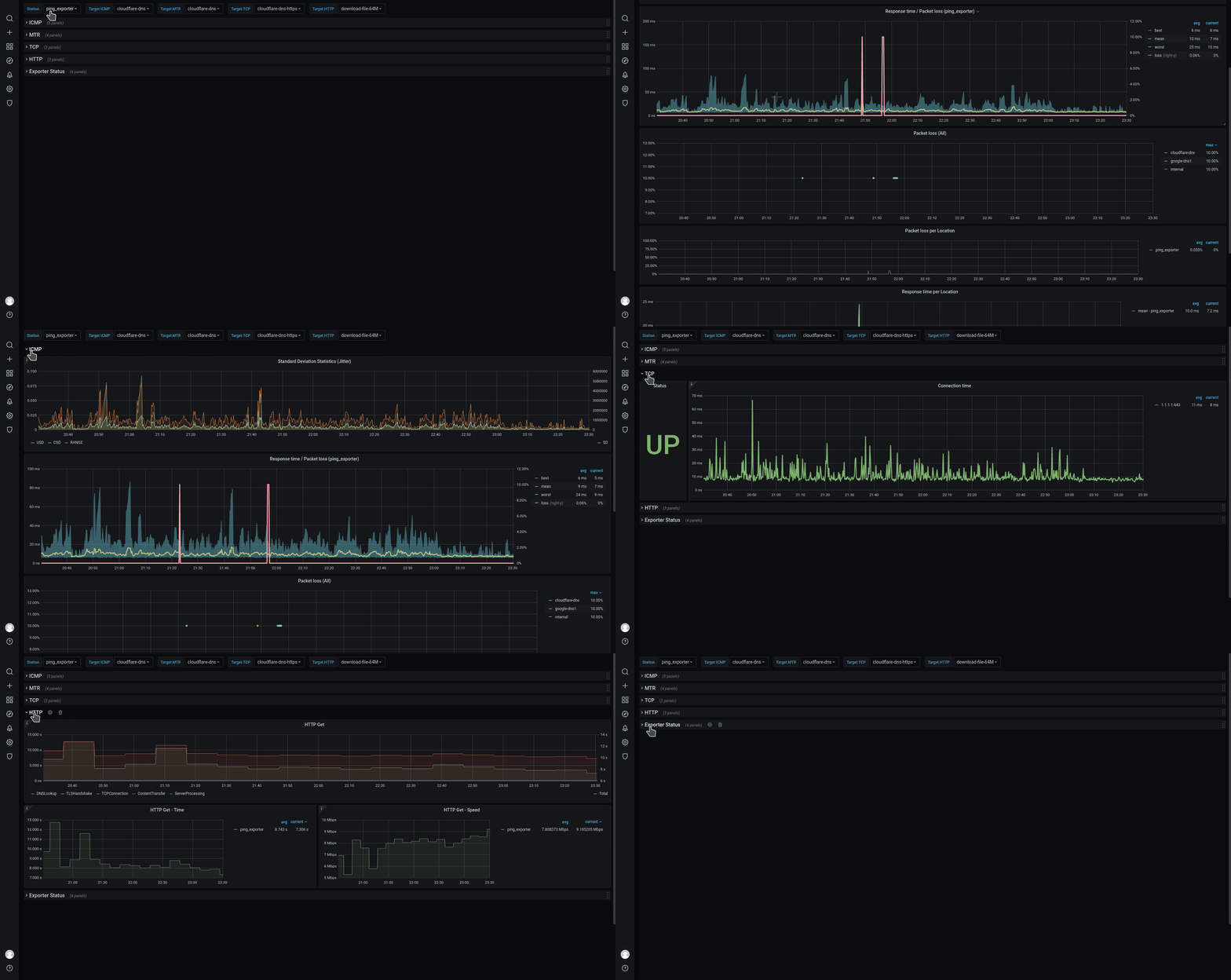
Features
- IPv4 & IPv6 support
- Configuration reloading (By interval or OS signal)
- Dynamically Add or Remove targets without affecting the currently running tests
- Targets can be executed on all hosts or a list of specified ones
probe - Configurable logging levels and format (text or json)
- Configurable DNS Server
Exported metrics
ping_upExporter stateping_targetsNumber of active targetsping_status: Ping Statusping_rtt_seconds{type=best}: Best round trip time in secondsping_rtt_seconds{type=worst}: Worst round trip time in secondsping_rtt_seconds{type=mean}: Mean round trip time in secondsping_rtt_seconds{type=sum}: Sum round trip time in secondsping_rtt_seconds{type=sd}: Squared deviation in secondsping_rtt_seconds{type=usd}: Standard deviation without correction in secondsping_rtt_seconds{type=csd}: Standard deviation with correction (Bessel's) in secondsping_rtt_seconds{type=range}: Range in secondsping_loss_percent: Packet loss in percent
mtr_upExporter statemtr_targetsNumber of active targetsmtr_hopsNumber of route hopsmtr_rtt_seconds{type=last}: Last round trip time in secondsmtr_rtt_seconds{type=best}: Best round trip time in secondsmtr_rtt_seconds{type=worst}: Worst round trip time in secondsmtr_rtt_seconds{type=mean}: Mean round trip time in secondsmtr_rtt_seconds{type=sum}: Sum round trip time in secondsmtr_rtt_seconds{type=sd}: Squared deviation in secondsmtr_rtt_seconds{type=usd}: Standard deviation without correction in secondsmtr_rtt_seconds{type=csd}: Standard deviation with correction (Bessel's) in secondsmtr_rtt_seconds{type=range}: Range in secondsmtr_rtt_seconds{type=loss}: Packet loss in percent
tcp_upExporter statetcp_targetsNumber of active targetstcp_connection_statusConnection Statustcp_connection_secondsConnection time in seconds
http_get_upExporter statehttp_get_targetsNumber of active targetshttp_get_statusHTTP Status Code and Connection Statushttp_get_content_bytesHTTP Get Content Size in byteshttp_get_seconds{type=DNSLookup}: DNSLookup connection drill down time in secondshttp_get_seconds{type=TCPConnection}: TCPConnection connection drill down time in secondshttp_get_seconds{type=TLSHandshake}: TLSHandshake connection drill down time in secondshttp_get_seconds{type=TLSEarliestCertExpiry}: TLSEarliestCertExpiry cert expiration time in epochhttp_get_seconds{type=TLSLastChainExpiry}: TLSLastChainExpiry cert expiration time in epochhttp_get_seconds{type=ServerProcessing}: ServerProcessing connection drill down time in secondshttp_get_seconds{type=ContentTransfer}: ContentTransfer connection drill down time in secondshttp_get_seconds{type=Total}: Total connection time in seconds
Each metric contains the labels:
name(ALL: The target name)target(ALL: the target IP Address)port(TCP: the target TCP Port)ttl(MTR: time to live)path(MTR: traceroute IP)
Building and running the software
Local Build
$ goreleaser release --skip-publish --snapshot --rm-dist
$ ls -l artifacts/network_exporter_*6?
# If you want to run it with a non root user
$ sudo setcap cap_net_raw=+ep artifacts/network_exporter_linux_amd64/network_exporter
Building with Docker
To run the network_exporter as a Docker container by builing your own image or using https://hub.docker.com/r/syepes/network_exporter
docker build -t syepes/network_exporter .
# Default mode
docker run -p 9427:9427 -v $PWD/network_exporter.yml:/network_exporter.yml:ro --name network_exporter syepes/network_exporter
# Debug level
docker run -p 9427:9427 -v $PWD/network_exporter.yml:/network_exporter.yml:ro --name network_exporter syepes/network_exporter /app/network_exporter --log.level=debug
Configuration
To see all available configuration flags:
./network_exporter -h
Most of the configuration is set in the YAML based config file:
conf:
  refresh: 15m
  nameserver: 192.168.0.1:53

icmp:
  interval: 3s
  timeout: 1s
  count: 6

mtr:
  interval: 3s
  timeout: 500ms
  max-hops: 30
  count: 6

tcp:
  interval: 3s
  timeout: 1s

http_get:
  interval: 15m
  timeout: 5s

targets:
  - name: internal
    host: 192.168.0.1
    type: ICMP
    probe:
      - hostname1
      - hostname2
  - name: google-dns1
    host: 8.8.8.8
    type: ICMP
  - name: google-dns2
    host: 8.8.4.4
    type: MTR
  - name: cloudflare-dns
    host: 1.1.1.1
    type: ICMP+MTR
  - name: cloudflare-dns-https
    host: 1.1.1.1:443
    type: TCP
  - name: download-file-64M
    host: http://test-debit.free.fr/65536.rnd
    type: HTTPGet
  - name: download-file-64M-proxy
    host: http://test-debit.free.fr/65536.rnd
    type: HTTPGet
    proxy: http://localhost:3128
Note: Domain names are resolved (regularly) to their corresponding A and AAAA records (IPv4 and IPv6).
By default if not configured, network_exporter uses the system resolver to translate domain names to IP addresses.
You can alos override the DNS resolver address by specifying the conf.nameserver configuration setting.
Deployment
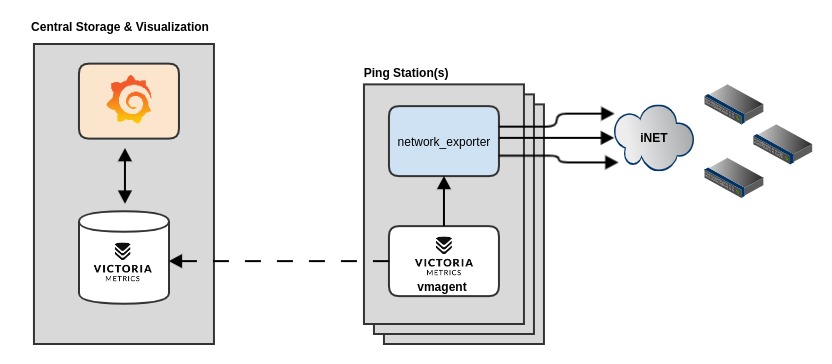
This deployment example will permit you to have as many Ping Stations as you need (LAN or WIFI) devices but at the same time decoupling the data collection from the storage and visualization. This docker compose will deploy and configure all the components plus setup Grafana with the Datasource and Dashboard
Contribute
If you have any idea for an improvement or find a bug do not hesitate in opening an issue, just simply fork and create a pull-request to help improve the exporter.
License
All content is distributed under the Apache 2.0 License Copyright © 2020, Sebastian YEPES
Tag summary
Content type
Image
Digest
sha256:74f0d9002…
Size
27.3 MB
Last updated
about 1 month ago
docker pull syepes/network_exporter