synapsr/louez
🏠 Open-source equipment rental platform. Manage inventory, reservations, customers and more.
7.8K
synapsr/louez repository overview
Louez — the open-source equipment rental platform




Rent out anything — cameras, tools, bikes, party gear, vehicles — from a booking storefront and a back office you actually own.
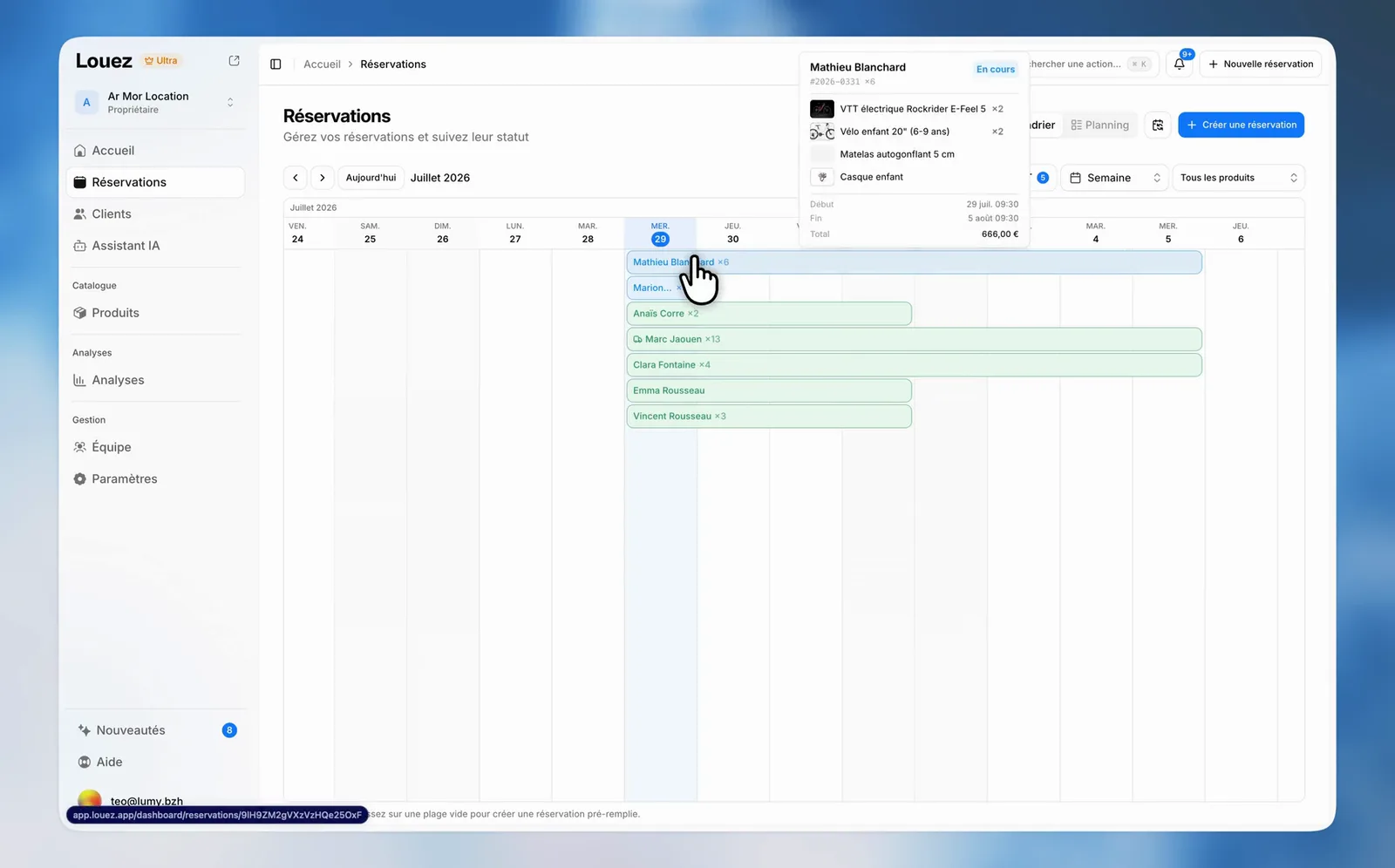
One compose file gives you a live rental business: a branded online store with real-time availability, a full dashboard for reservations, customers, contracts and stats, and every byte of it on your server. No SaaS subscription. No per-booking cut.
Quick start
Grab the stack file and bring it up:
curl -O https://raw.githubusercontent.com/Synapsr/Louez/main/docker-compose.yml
docker compose pull && docker compose up -d
Open http://localhost:3000, create your account, set up your store. That's the whole install.
- Storefront →
/(the root of the site) - Dashboard →
/dashboard
No SQL to run. No secret to generate. No S3 bucket to create. No SMTP account to sign up for.
What the stack brings up
| Service | Image | Role |
|---|---|---|
louez | synapsr/louez | The app: storefront, dashboard and API |
db | mysql:8.4 | Database — the schema installs itself on first boot |
minio + minio-init | minio/minio | Private image bucket, served same-origin through the app under /files |
background-removal | synapsr/louez-background-removal | One-click product cutouts, powered by MIT-licensed rembg — no API key |
State lives in three named volumes: louez_data, mysql_data, minio_data.
The
docker compose pullstep matters when you only downloaded the compose file: the image worker also carries abuild:definition for source checkouts, and pulling first keeps Compose from looking for a build context that isn't there. Prefer building everything from source?git clone https://github.com/Synapsr/Louez.git && cd Louez && docker compose up -d.
Requirements
- Docker Engine 24+ with the Compose plugin
- 2 GB RAM minimum, 4 GB recommended — the image worker holds ~450 MB while loaded
linux/amd64orlinux/arm64(Apple Silicon, Ampere, and friends)
What you actually get
Back office
| Feature | What it does | |
|---|---|---|
| 📦 | Products | Inventory with images, pricing tiers, stock and per-unit fleet tracking |
| 📅 | Reservations | Bookings, statuses, pickups, returns, conflict detection |
| 🗓️ | Calendar | Week and month views across the whole catalog |
| 👥 | Customers | Full customer database with rental history |
| 📈 | Statistics | Revenue, top products, utilisation rates |
| 📄 | Contracts | Auto-generated PDF rental agreements |
| ✉️ | Emails | Confirmations, reminders and notifications |
| 👨👩👧👦 | Team | Staff accounts with role-based permissions |
Storefront — branded catalog with your logo, colors and light/dark theme; live availability; a cart with date selection and dynamic pricing; checkout with terms acceptance; a passwordless customer portal; editable legal pages.
Built in, no extra service — one-click background removal on product photos, and 8 languages out of the box: EN, FR, DE, ES, IT, NL, PL, PT.
Optional AI layer — a storefront advisor that recommends gear from your live catalog and checks real availability, plus a phone receptionist that answers calls, quotes prices and takes booking requests. Self-hosters plug in their own AI and telephony providers; on Louez Cloud it works out of the box.
Put it on your own domain
Create a .env next to the compose file:
NEXT_PUBLIC_APP_URL="https://rentals.example.com"
AUTH_URL="https://rentals.example.com"
Then point a TLS reverse proxy at port 3000. Caddy, in two lines:
rentals.example.com {
  reverse_proxy localhost:3000
}
docker compose up -d again and you're live.
Before you go to production
The compose defaults are convenience passwords. Override them in the same .env before the first boot — generate the values with openssl rand -base64 32 and paste them in, since a .env file stores literal text and never runs shell:
DB_PASSWORD="a-strong-password"
DB_ROOT_PASSWORD="another-strong-password"
MINIO_ROOT_PASSWORD="a-third-strong-password"
CRON_SECRET="a-random-string"   # enables scheduled reminders and digests
LOUEZ_IMAGE_TAG="2"             # pin the major version
Running the image on its own
The image is self-sufficient: give it a MySQL 8 database and a public URL, and it does the rest.
docker run -d --name louez -p 3000:3000 \
  -e DATABASE_URL="mysql://user:password@db-host:3306/louez" \
  -e NEXT_PUBLIC_APP_URL="https://rentals.example.com" \
  -e AUTH_URL="https://rentals.example.com" \
  -v louez_data:/app/data \
  synapsr/louez:2
On first boot the container creates its schema, then generates an AUTH_SECRET and persists it in /app/data so sessions survive container recreation.
Image uploads need S3-compatible storage (S3_*) and product cutouts need the companion worker — so on EasyPanel, Dokploy, Coolify, Portainer or Railway, import the bundled Compose stack rather than the single image.
Image reference
| Tags | latest, 2, 2.1, 2.1.0 — {major} and {major}.{minor} move with releases |
| Architectures | linux/amd64, linux/arm64 |
| Compressed size | ~107 MB |
| Base | node:20-alpine, Next.js standalone output |
| Port | 3000 |
| Volume | /app/data — persisted auth secret |
| Healthcheck | built in, GET /api/health |
| User | non-root (nextjs, uid 1001) |
| Companion | synapsr/louez-background-removal — same tags |
| Mirror | also published to ghcr.io/synapsr/louez |
Pin synapsr/louez:2 in production so you get fixes without an unattended major upgrade.
Configuration
The Compose stack sets all of this for you. For custom deployments:
Required
| Variable | Description |
|---|---|
DATABASE_URL | MySQL connection string |
AUTH_URL | Public URL users sign in from |
NEXT_PUBLIC_APP_URL | Public URL of the app (same value in single-store mode) |
NEXT_PUBLIC_APP_DOMAIN is derived from that URL when unset, and AUTH_SECRET is generated on first boot — set it explicitly only when you run several replicas.
Optional — every one of these degrades gracefully when absent
| Variable | Enables |
|---|---|
S3_* | Image uploads (bundled MinIO in Compose, or any S3-compatible provider) |
SMTP_* | Outgoing email — without it, sends are skipped and owners sign in with a password |
STRIPE_* | Online payments — without it, storefronts take booking requests |
AUTH_GOOGLE_ID / AUTH_GOOGLE_SECRET | "Continue with Google" |
CRON_SECRET | Scheduled reminders and digests |
AI_* | Storefront advisor, phone receptionist, GPT image enhancement |
LOUEZ_MODE | standalone (default) or platform |
The full surface — SMS, analytics, calendar sync, insurance, billing — is documented in .env.example.
Deployment modes
standalone (default) — one store, one origin. Storefront at the root, dashboard under /dashboard, password sign-in, email optional. This is what you want for your own rental business.
platform — multi-tenant SaaS routing: the dashboard on its own subdomain, one storefront per store subdomain. Set LOUEZ_MODE=platform plus the domain variables from .env.example. It's the same code that runs louez.io.
⬆️ Upgrading a multi-store self-host from 1.x? Add
LOUEZ_MODE=platformto your environment before pulling. Images from 2.0 onward default to single-store mode, and subdomain routing would otherwise stop resolving.
Upgrading
docker compose pull
docker compose up -d
Database migrations run automatically at boot — there is no separate migration step to remember. Back up first:
docker compose exec -T db sh -c 'mysqldump -ulouez -p"$MYSQL_PASSWORD" louez' > louez-backup.sql
Your images live in the minio_data volume; back that up alongside the SQL dump.
Cloud or self-hosted
Self-hosting is free, forever, with no feature gate and no booking limit — everything above is the real product.
If you'd rather not run servers, Louez Cloud handles hosting, updates, backups, email delivery, payments and the AI assistant for you. Same software, none of the ops.
Source, security, license
- Source & issues — github.com/Synapsr/Louez
- Changelog — CHANGELOG.md
- Security — report vulnerabilities to [email protected] (policy)
- License — GNU AGPLv3. Free to use, self-host, modify and run commercially; if you modify Louez and offer it to others over a network, share your changes back.
- Trademark — "Louez" and the Louez logo are trademarks of Synapsr. The license covers the code, not the brand.
Built by Synapsr. ⭐ Star the repo if this saves you a subscription.
🇫🇷 En bref
Louez est une plateforme open-source de location de matériel : boutique en ligne avec disponibilités en temps réel, back-office complet (réservations, clients, contrats PDF, statistiques), le tout sur votre serveur.
curl -O https://raw.githubusercontent.com/Synapsr/Louez/main/docker-compose.yml
docker compose pull && docker compose up -d
Ouvrez http://localhost:3000 : base de données MySQL, stockage d'images et détourage produit sont inclus et démarrent avec l'app. Aucun SQL à lancer, aucun secret à générer, aucun compte externe à créer.
Pour votre domaine, ajoutez NEXT_PUBLIC_APP_URL et AUTH_URL dans un .env à côté du fichier compose, puis placez un reverse proxy TLS devant le port 3000. Interface disponible en 8 langues, dont le français.
Documentation complète : README en français · Version hébergée : louez.io
Tag summary
Content type
Image
Digest
sha256:8b0b92712…
Size
266.8 MB
Last updated
14 days ago
docker pull synapsr/louez