sysincz/k8s-sidecar-cm-to-file repository overview


What?
Fork from kiwigrid/k8s-sidecar https://github.com/kiwigrid/k8s-sidecar
This is a docker container intended to run inside a kubernetes cluster to collect config maps with a specified label and store the included files in an local folder. It can also send a html request to a specified URL after a configmap change. The main target is to be run as a sidecar container to supply an application with information from the cluster. The contained python script is working with the Kubernetes API 1.10
Schema
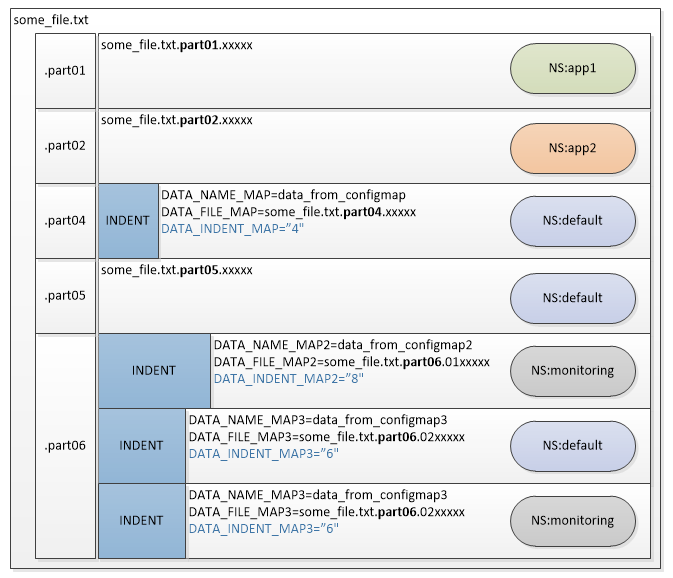
Labels
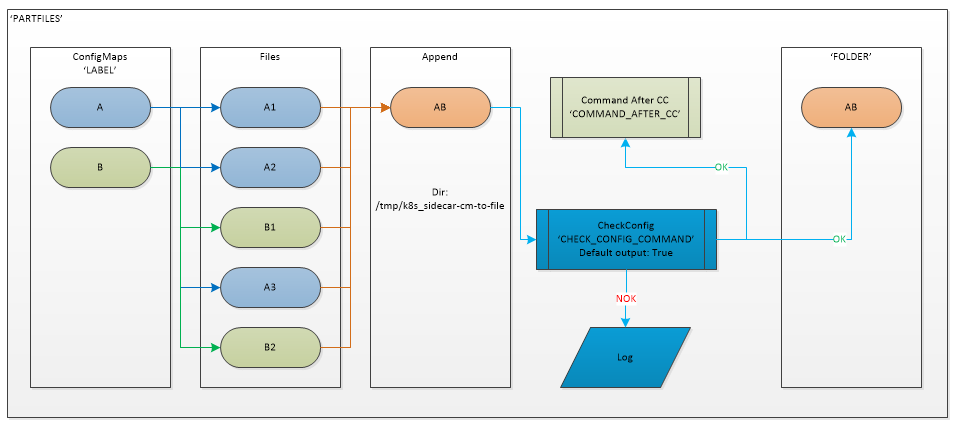
Why?
Currently there is no simple way to hand files in configmaps to a service and keep them updated during runtime.
How?
Run the container created by this repo together you application in an single pod with a shared volume. Specify which label should be monitored and where the files should be stored. By adding additional env variables the container can send a html request to specified URL.
Features
- Extract files from config maps
- Filter based on label
- Update/Delete on change of configmap
- Marge configmaps data to one file
Usage
Example for a simple deployment can be found in example.yaml. Depending on the cluster setup you have to grant yourself admin rights first: kubectl create clusterrolebinding cluster-admin-binding --clusterrole cluster-admin --user $(gcloud config get-value account)
Tags
- Prometheus
- Alertmanager config
- amtool check-config alertmanager.yaml
- ConfigMaps
- Grafana Dashboards big file
- Multi Teams
- Cross Namespace
- Files to secret
- alertmanager.yaml to secrets
Configuration Environment Variables
-
LABEL- description: Label that should be used for filtering
- required: true
- type: string
-
FOLDER- description: Folder where the files should be placed
- required: true
- type: string
-
NAMESPACE- description: If specified, the sidecar will search for config-maps inside this namespace. Otherwise the namespace in which the sidecar is running will be used. It's also possible to specify
ALLto search in all namespaces. - required: false
- type: string
- description: If specified, the sidecar will search for config-maps inside this namespace. Otherwise the namespace in which the sidecar is running will be used. It's also possible to specify
-
REQ_URL- description: URL to which send a request after a configmap got reloaded
- required: false
- type: URI
-
REQ_METHOD- description: Request method GET(default) or POST
- required: false
- type: string
-
REQ_PAYLOAD- description: If you use POST you can also provide json payload
- required: false
- type: json
-
TIMEOUT- description: Auto reconnect to kubernetes after ..sec [ bug fix when sidecar and kubernetes api stoped communicate ]
- required: false
- type: int
- default: "600"
Configuration Environment Variables For Part
-
PARTFILES- description: Take the files with the '.parts\d+' in name of file and save it in one file
- default: False
- required: false
- type: boolean
-
COMMENT- description: Place comment with informtation about datasource to destination file
- default: True
- required: false
- type: boolean
-
COMMAND_AFTER_CC- description: Command after success check config
- required: false
- type: string
- example: "python ./files_to_cm.py --name=alertmanager-main --dir /tmp/k8s_sidecar-cm-to-file/ --file_pattern '.*.yaml'"
Configuration Environment Variables For Part check config amtool (PARTFILES=True)
-
CHECK_CONFIG_COMMAND- description: Command for check config
- required: false
- type: string
- example value: "./amtool check-config /tmp/k8s_sidecar-cm-to-file/alertmanager.yaml"
-
OK_EXIT_CODES- description: Acceptable exit codes from command
CHECK_CONFIG_COMMAND - default: 0,127
- required: false
- type: string
- example value: "0,127"
- description: Acceptable exit codes from command
Configuration Environment Variables For Part Files Mapping (PARTFILES=True)
-
DATA_NAME_{somename}example:DATA_NAME_ROUTE- description: Name of file in ConfigMap
- required: false
- type: string
- example value: "alertmanager-route"
-
DATA_FILE_{somename}example:DATA_FILE_ROUTE- description: Destination file where will be inserted data from ConfigMap "DATA_NAME_{somename}"
- required: false (true if
DATA_NAME_{somename}is set ) - type: string
- example value: "alertmanager.yaml.part1.01routes"
-
DATA_INDENT_{somename}example:DATA_INDENT_ROUTE- description: Count of spaces on left side of strig before save data to "DATA_FILE_{somename}"
- default: 0
- required: false
- type: int
- example value: "2"
file to secrets
# python ./files_to_cm.py -h
usage: ./files_to_cm.py [-h] --name NAME --dir DIR
                        [--file_pattern FILE_PATTERN] [--namespace NAMESPACE]

optional arguments:
  -h, --help            show this help message and exit
  --name NAME           Name of Secret/Configmap
  --dir DIR             Source directory path
  --file_pattern FILE_PATTERN
                        File pattern for match files (default: '.*')
  --namespace NAMESPACE
                        Name of Namespace
example:
Script take all yaml files from directory /tmp/k8s_sidecar-cm-to-file/ and create secret with name alertmanager-main in namespace default
python ./files_to_cm.py --name=alertmanager-main --dir /tmp/k8s_sidecar-cm-to-file/ --file_pattern '.*.yaml' --namespace 'default'
For this step you need have set up ClusterRole
- apiGroups: [""]
  resources: ["secrets"]
  verbs: ["get", "watch", "list","create","update"]
Tag summary
Content type
Image
Digest
Size
26.1 MB
Last updated
over 7 years ago
docker pull sysincz/k8s-sidecar-cm-to-file