takealug/new-easyepg
A docker container for running the NEW easyepg
100K+
takealug/new-easyepg repository overview
docker.new-easyepg
A docker container for running the NEW easyepg
Prerequisites
You will need to have docker installed on your system and the user you want to run it needs to be in the docker group.
Note: The image is a multi-arch build providing variants for amd64, arm32v7 and arm64v8 - the correct variant for your Architecture needs to be tagged eg :amd64 :arm32v7 :arm64v8
Technical info for Docker
To learn how to manually start the container or about available parameters (you might need for your GUI used) see the following example:
docker run \
  -d \
  -e USER_ID="99" \
  -e GROUP_ID="100" \
  -e TIMEZONE="Europe/Berlin" \
  -e REPO="script.service.easyepg-lite" \
  -e BRANCH="main" \
  -e UPDATE="yes" \
  -p 4000:4000 \
  -v {EASYEPG_STORAGE}:/easyepg \
  -v {FOLDER_FOR_XML}:/easyepg/xml \
  --name=new-easyepg \
  --restart unless-stopped \
  --tmpfs /tmp \
  --tmpfs /var/log \
  --net="bridge" \
  takealug/new-easyepg:tag
The available parameters in detail:
| Parameter | Optional | Values/Type | Default | Description |
|---|---|---|---|---|
USER_ID | yes | [integer] | 99 | UID to run easyepg as |
GROUP_ID | yes | [integer] | 100 | GID to run easyepg as |
TIMEZONE | yes | [string] | Europe/Berlin | Timezone to use inside this Container |
REPO | yes | [string] | script.service.easyepg-lite | Repository to clone from (user = sunsettrack4) |
BRANCH | yes | [string] | main | Branch to clone from choosen 'REPO' |
UPDATE | yes | yes/no | yes | Updates easyepg Scriptfiles inside This Container each restart |
Network Settings:
| Parameter | Optional | Values/Type | Default | Description |
|---|---|---|---|---|
-p | yes | [integer] | 4000:4000 | Map Container Listenport to Host Device Listen Port (Bridge Mode) |
--net | yes | bridge/host | bridge | The Network Mode to run The Container in |
Frequently used volumes:
| Volume | Optional | Description |
|---|---|---|
EASYEPG_STORAGE | no | The directory to persist easyepg Programmfiles to |
FOLDER_FOR_XML | no | The directory to persist the generated XML File to |
Note
- When passing volumes please replace the name including the surrounding curly brackets with existing absolute paths with correct permissions.
- For Setup instructions see https://www.kodinerds.net/index.php/Thread/75986-Proof-of-Concept-WIP-easyepg-als-Addon/?postID=698823#post698823
Support my work
If you like my Work, please  - thank you! :-)
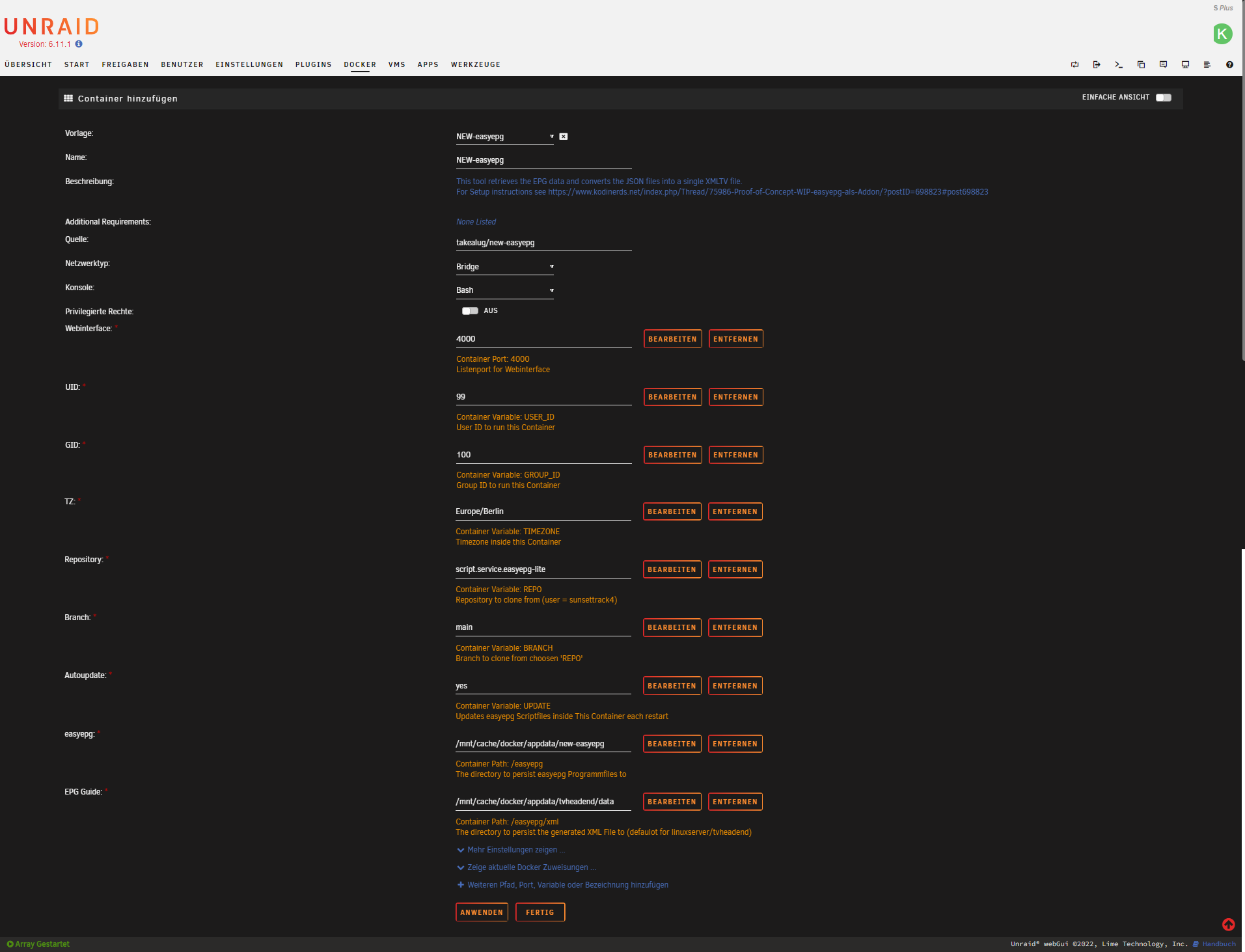
Unraid Template
Note: An Template for Unraid can be found here : https://raw.githubusercontent.com/DeBaschdi/docker.new-easyepg/master/Templates/Unraid/my-NEW-easyepg.xml Please safe it to into /boot/config/plugins/dockerMan/templates-user/my-NEW-easyepg.xml, after that you can use this Template in Unraids Webui. Docker > Add Container > Select Template and choose NEW-easyepg
Tag summary
Content type
Image
Digest
sha256:b5b74127b…
Size
74.8 MB
Last updated
about 3 years ago
docker pull takealug/new-easyepg