techblog/telessist repository overview
Telessist
Telessist allows you to contact GPT3 directly from WhatsApp and not only that. Telessist also allows you to save your own personal data and later search and retrieve it using GPT3 to generate a response. In the examples folder, you can see several examples of how to use this bot so you don't have to remember anything ever again.
Supported Features
-
No-Command: This is the default mode. The bot will respond to any message you send it through the GPT3 regular completion API.
-
Commands: This mode is activated by sending the bot a message starting with the command character. The default command character is /.
- Currently supported commands:
- /h: Show a help message that lists all the commands
- /s : Save the message to the database
- /q : Ask a question about the database and get a response from GPT3.
- /f : Find related messages in the database.
- /w: Get weather forecast from IMS.
- Send audio file for transcription (Multi-languages).
- d/ : Draw using Dall-E.
- /c: Get OpenAI estimated costs
- Today.
- Yesterday.
- Last 7 days.
- Last 30 days.
- Currently supported commands:
Components and Frameworks used in Telessist
- Loguru For logging.
- pyTelegramBotAPI For the Bot.
- weatheril For Weather forecst.
- OpenAI OpenAI client for ChatGPT, Dall-E, and Whisper.
How to use Telessist
Telessist can be installed and run as a system service or a Docker container.
-
Create new telegram bot and get the token Open Telegram messenger, sign in to your account or create a new one.
Enter @Botfather in the search tab and choose this bot (Official Telegram bots have a blue checkmark beside their name.)

Click “Start” to activate BotFather bot.
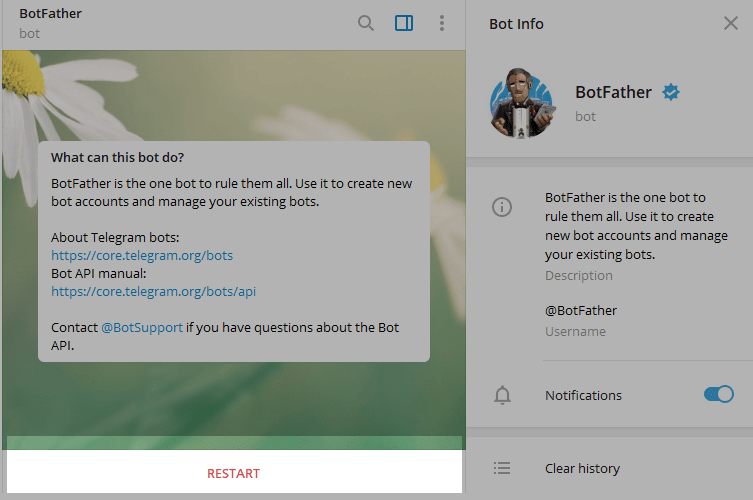
In response, you receive a list of commands to manage bots. Choose or type the /newbot command and send it.

Choose a name for your bot — your subscribers will see it in the conversation. And choose a username for your bot — the bot can be found by its username in searches. The username must be unique and end with the word “bot.”
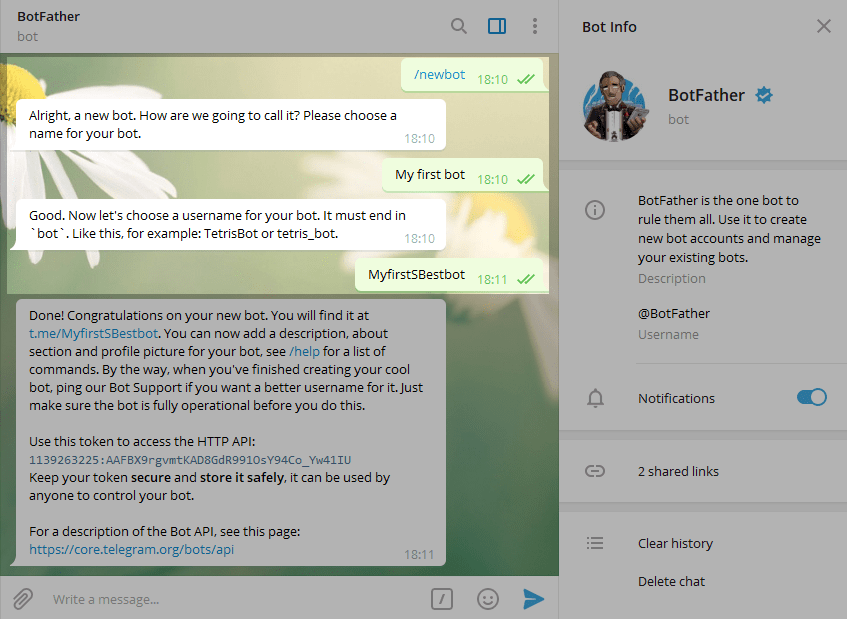
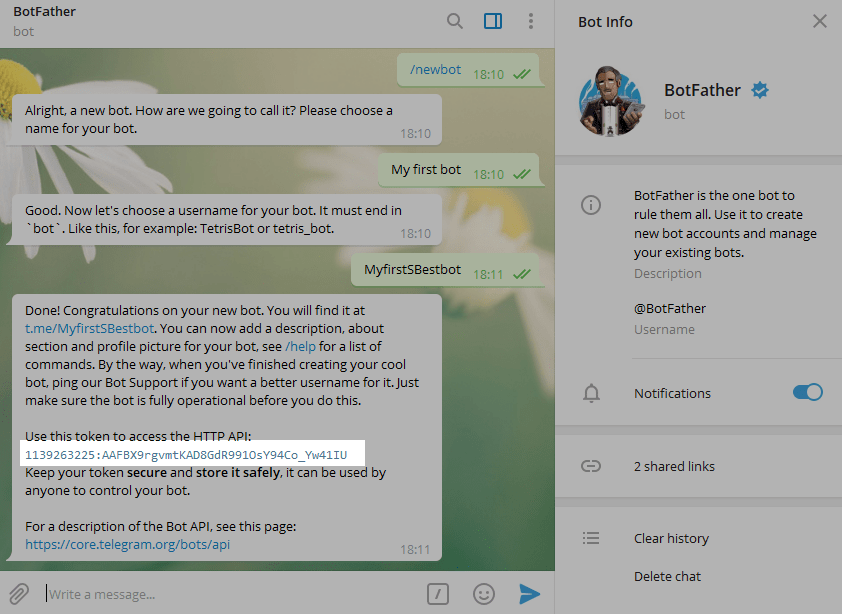
After you choose a suitable name for your bot — the bot is created. You will receive a message with a link to your bot t.me/<bot_username>, recommendations to set up a profile picture, description, and a list of commands to manage your new bot.
-
Set the following environment variables:
- BOT_TOKEN=#Telegram bot Token generated in the previous step.
- OPENAI_KEY= #OpenAPI API key
- ALLOWED_IDS= #List of telegram id's allowed to communicate with the bot, comma-separated values.
-
If you want to run Telessist as a docker container, copy the following code into your docker-compose.yaml:
version: "3.6" services: Telessist: image: techblog/Telessist container_name: Telessist restart: always ports: - 80:7020 environment: - BOT_TOKEN= #Telegram bot Token. - OPENAI_KEY= #OpenAPI API key - ALLOWED_IDS= #List of telegram id's allowed to communicate with the bot, comma-separated values. volumes: - ./Telessist:/app/data**Make sure to set all the environment variables before running the "docker-compose up -d" command.
-
If you want to run Telessist as a systemd service, clone the repository using the following command:
git clone https://github.com/t0mer/Telessistenter the Telessist folder and install the dipendencies:
pip3 install -r requirements.txtNext, create a file names "Telessist.service" under /etc/systemd/system" and paste the following content:
[Unit] Description=GPT Whatsapp After=network-online.target Wants=network-online.target systemd-networkd-wait-online.service StartLimitIntervalSec=5 StartLimitBurst=5 [Service] EnvironmentFile=/etc/environment KillSignal=SIGINT WorkingDirectory=/opt/dev/Telessist/app/ Type=simple User=root ExecStart=/usr/bin/python3 /opt/dev/Telessist/app/app.py Restart=always [Install] WantedBy=multi-user.targetMake sure to adjust the path for "WorkingDirectory" and "ExecStart" accordingly to the path of the Telessist location
Next, run the following command to enable and start the service:
systemctl enable assist. service systemctl start Telessist.serviceTo check the status of the service, run the following command:
systemctl status Telessist.servies
Acknowledgments
Huge credit and a special thanks to @mangate for creating SelfGPT which my code is based on.
Tag summary
Content type
Image
Digest
sha256:8de2a23ae…
Size
932.6 MB
Last updated
almost 3 years ago
docker pull techblog/telessist