thothbot/jmeter-master repository overview
Basic info
We use Apache JMeter for testing: http://jmeter.apache.org
By running multiple instances of JMeter as server in multiple machines we can generate as much load as we need.
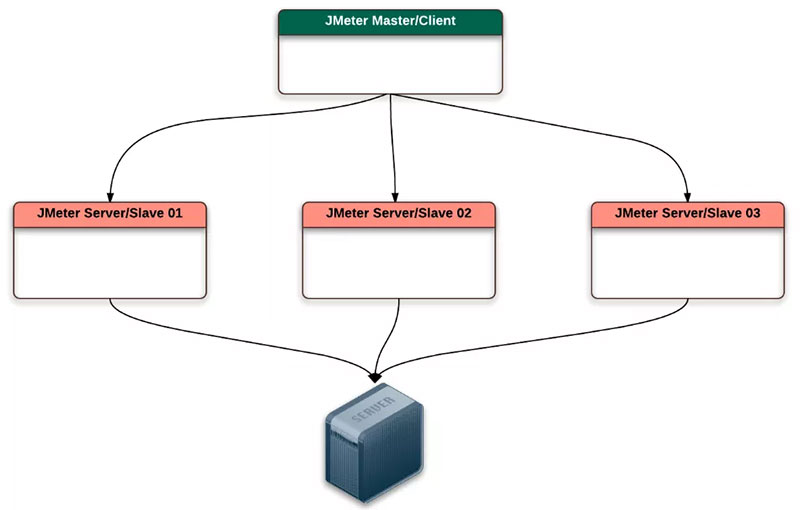
Create testing server
JMeter master and slave communicate as shown in the below picture.
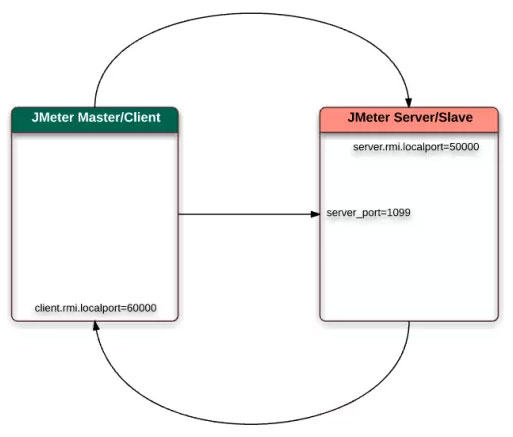
Install Ubuntu Server 16.04 LTS and open ports 1099, 50000, 60000
SSH into server and run
sudo apt-get update
sudo apt-key adv --keyserver hkp://p80.pool.sks-keyservers.net:80 --recv-keys 58118E89F3A912897C070ADBF76221572C52609D
sudo apt-add-repository 'deb https://apt.dockerproject.org/repo ubuntu-xenial main'
sudo apt-get update
apt-cache policy docker-engine
sudo apt-get install -y docker-engine
sudo systemctl status docker
Run tests on a one server
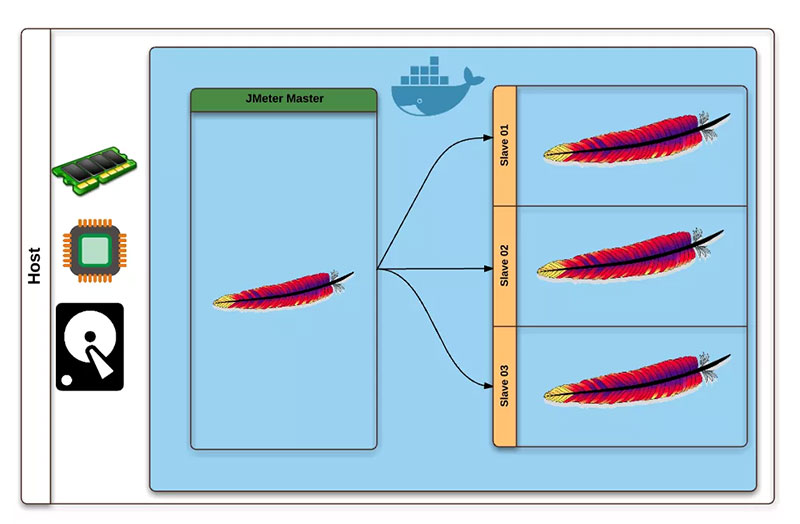
Launch slaves
sudo docker run -dit --name slave01 thothbot/jmeter-slave /bin/bash
sudo docker run -dit --name slave02 thothbot/jmeter-slave /bin/bash
sudo docker run -dit --name slave03 thothbot/jmeter-slave /bin/bash
Launch master
sudo docker run -dit --name master thothbot/jmeter-master /bin/bash
See all the running containers and ports opened
sudo docker ps -a

Get the list of ip addresses for these containers
sudo docker inspect --format '{{ .Name }} => {{ .NetworkSettings.IPAddress }}' $(sudo docker ps -a -q)

Run tests
Copy the test into my JMeter master container:
sudo docker exec -i master sh -c 'cat > /opt/jmeter/bin/docker-test.jmx' < docker-test.jmx
Go inside the container with the below command and we can see if the file has been copied successfully:
sudo docker exec -it master /bin/bash
Lets run the test in master to see if it works fine [not in distributed mode]:
./jmeter -n -t test.jmx
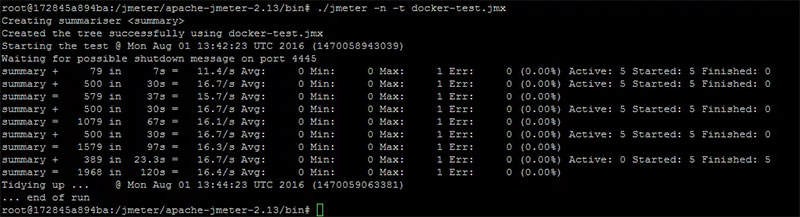
Lets run our test in distributed using docker containers. We just need to append -R[slave01,slave02,slave03]:
./jmeter -n -t test.jmx -R172.17.0.2,172.17.0.3,172.17.0.4
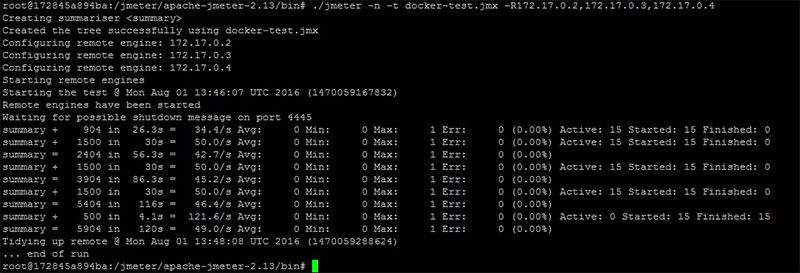
Run distributes tests
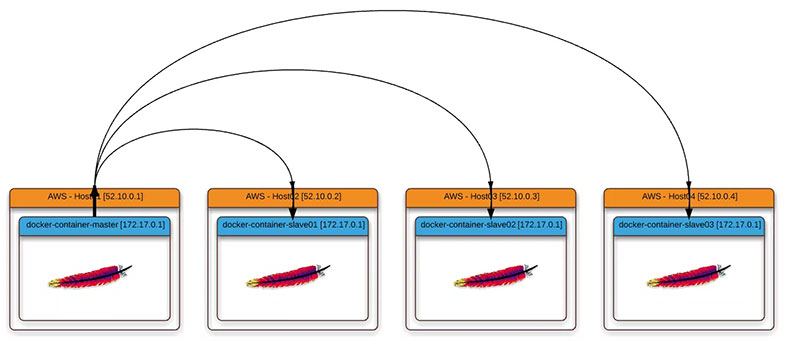
Launch slaves
sudo docker run -dit -e LOCALIP='52.10.0.2' -p 1099:1099 -p 50000:50000 thothbot/jmeter-slave /bin/bash
sudo docker run -dit -e LOCALIP='52.10.0.3' -p 1099:1099 -p 50000:50000 thothbot/jmeter-slave /bin/bash
sudo docker run -dit -e LOCALIP='52.10.0.4' -p 1099:1099 -p 50000:50000 thothbot/jmeter-slave /bin/bash
Launch master
sudo docker run -dit --name master -p 60000:60000 thothbot/jmeter-master /bin/bash
Run tests
./jmeter -n -t docker-test.jmx -Djava.rmi.server.hostname=52.10.0.1 -Dclient.rmi.localport=60000 -R52.10.0.2,52.10.0.3
Tag summary
Content type
Image
Digest
Size
99.1 MB
Last updated
almost 8 years ago
docker pull thothbot/jmeter-master