tillschoepe/prekit-frontend repository overview
PreKit - Alpamayo's Prestudy Platform
Development Environment:
Before getting started, you should have the following installed and running:
- Vue Cli 3 - instructions
- Python 3.10
Development Server
[To be updated]
Kubernetes
- DevSpace can help you set up the Kubernetes deployment.
Frontend
Ports
| Port | |
|---|---|
| 5173 | debugging |
| 8081 | deployed via http-server |
Generate Fetcher for Swagger API definitions
npm install openapi-typescript-fetch
npx openapi-typescript http://192.168.178.23:8090/docs/?format=openapi --output src\services\fetcher\PrekitApiV1.ts
Recommended IDE Setup
VSCode + Volar (and disable Vetur) + TypeScript Vue Plugin (Volar).
Volar provides a feature called "Takeover Mode" to improve performance. In takeover mode, Volar provides support for both Vue and TS files using a single TS language service instance. Otherwise, you will have two TS language service instances running in parallel, which is a bit inefficient and can lead to performance issues in large projects. To activate follow these instructions.
Vue.js Dev Tools (Chrome) Recommended browser plugin. There are also plugins for other browsers.
Type Support for .vue Imports in TS
TypeScript cannot handle type information for .vue imports by default, so we replace the tsc CLI with vue-tsc for type checking. In editors, we need TypeScript Vue Plugin (Volar) to make the TypeScript language service aware of .vue types.
If the standalone TypeScript plugin doesn't feel fast enough to you, Volar has also implemented a Take Over Mode that is more performant. You can enable it by the following steps:
- Disable the built-in TypeScript Extension
- Run
Extensions: Show Built-in Extensionsfrom VSCode's command palette - Find
TypeScript and JavaScript Language Features, right click and selectDisable (Workspace)
- Run
- Reload the VSCode window by running
Developer: Reload Windowfrom the command palette.
Customize configuration
See Vite Configuration Reference.
Project Setup
npm install
Compile and Hot-Reload for Development
npm run dev
Type-Check, Compile and Minify for Production
npm run build
Run Unit Tests with Vitest
npm run test:unit
Run End-to-End Tests with Cypress
npm run build
npm run test:e2e # or `npm run test:e2e:ci` for headless testing
Lint with ESLint
npm run lint
Vue/TypeScript Coding Guidelines
-
Prefer Vue Component API over Options API.
-
Create *.d.ts files for JavaScript code:
npx -p typescript tsc src/**/*.js --declaration --allowJs --emitDeclarationOnly --outDir types
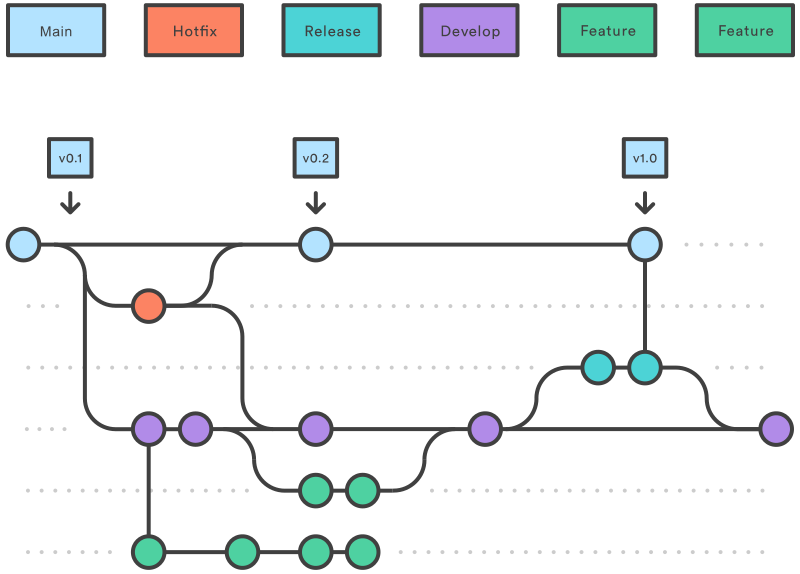
Git Best Practices:
Please see Jira board and use git smart commits to handle issues properly.
The branch structue will strongly follow the git-flow best-practices.
Tag summary
Content type
Image
Digest
sha256:427d77db1…
Size
35.4 MB
Last updated
over 2 years ago
docker pull tillschoepe/prekit-frontend