Sign inSign up

tolerantsoftware/bank

By tolerantsoftware

Updated 7 months ago

Official Images for TOLERANT Bank

Image
Integration & delivery
Machine learning & AI
Content management system
0

2.8K

tolerantsoftware/bank repository overview

⚠️ Attention

Starting with version TOLERANT Bank 11.2 supports additional country information for Austria, along with new data fields for output. When using this version, you must use an updated version of the reference data. You can find the new reference data alongside the legacy data on our SFTP server.
The Docker image provided here includes built-in sample data, which already contains the new content, so you can start your testing right away.

Quick reference

Product Overview

Check bank details already at data entry and avoid payment rejections

Companies dealing with direct debit mandates and bank transfers know how costly and time-consuming return debit notes and payment rejections can be. Often, invalid account numbers are responsible for the financial and bureaucratic effort that then arises. With TL Bank you can check and correct bank data at the time of entry and avoid such rejects and costly manual corrections.

Validate bank details with TL Bank

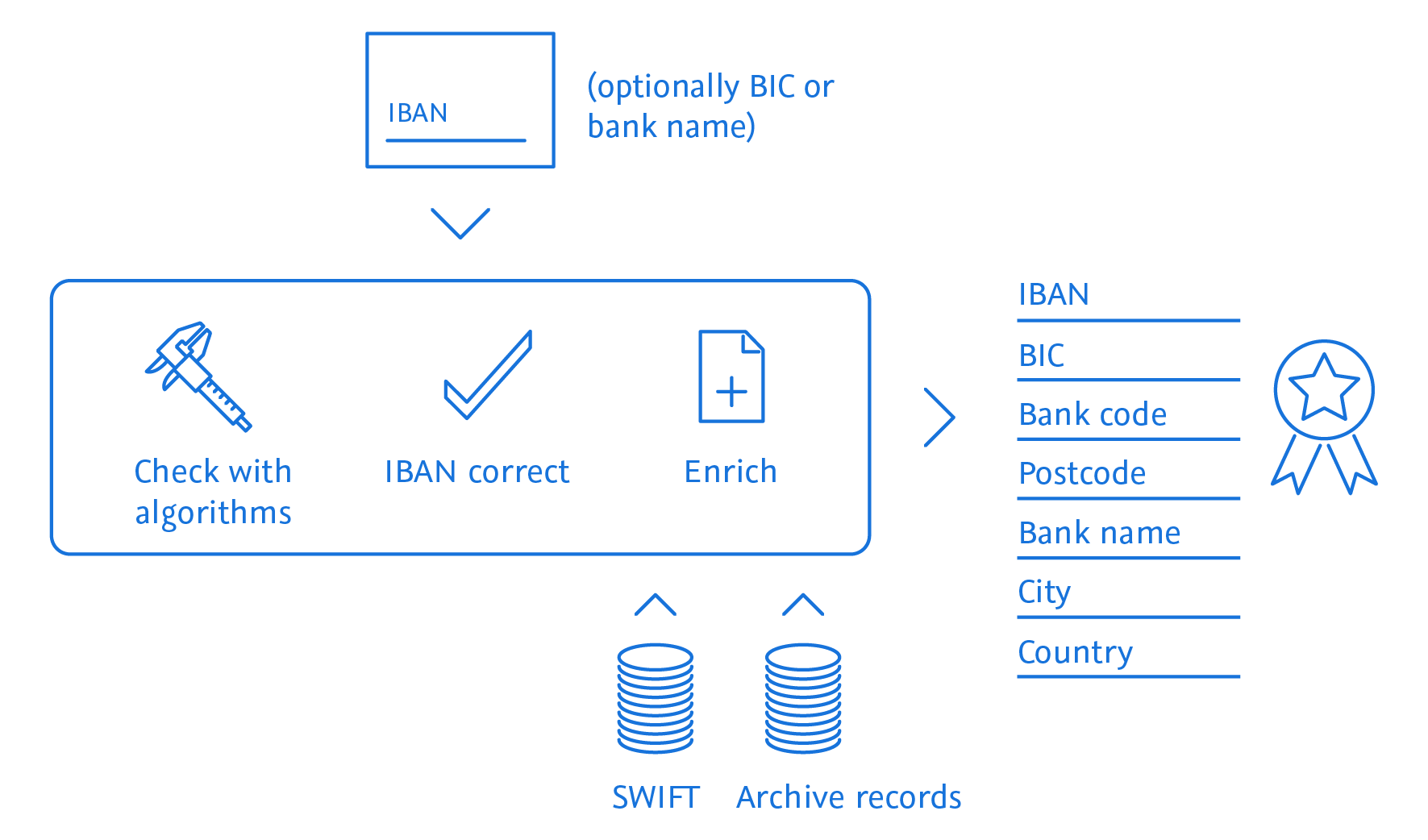
TL Bank is a validation system for bank details. Reference data is integrated into the application, which is used to check the validity of the data and to complete or correct it if necessary.

Check IBAN and bank data already during data entry

TL Bank can already check during data entry whether the IBAN is syntactically correct, all specifications for the structure of an IBAN are met and the IBAN can be clearly assigned to a bank. If everything is correct, the IBAN is valid. Missing information about the bank – such as the complete bank name, bank code, BIC, postal code or city – is enriched by TL Bank with reference data from SWIFT.
Reference tables and check digit algorithms of the Deutsche Bundesbank (German Federal Bank) and the Österreichische Nationalbank (Austrian Federal Bank) as well as city and suburb directories serve as data source for the German version. The reference data is kept up-to-date by us. Program modifications and enhancements are made as part of the update process.
In the current international version TL Bank is available for all 75 official IBAN countries. For bank names, the TOLERANT search with integrated synonym and stop word catalogues is used for the bank name determination, as well as the city/subcity determination known from TL Bank. The matching is based on the proven technology of TL Match.
What is the BIC?

The BIC (Business Identifier Code) is an internationally valid bank code defined by SWIFT (Society for Worldwide Interbank Financial Telecommunication). It is also referred to synonymously as the SWIFT code. The BIC code consists of eight or eleven alphanumeric characters and is subdivided as follows:

  • 4-digit bank code
  • 2-digit country code
  • 2-digit coding of the city
  • 3-digit identification number of the branch (optional)

Together with the internationally standardized account number IBAN, it is used to identify an account in the SEPA area (Single Euro Payments Area) and for euro transfers, which have been valid since 2008, in order to identify a recipient perfectly in both national and international payment transactions. The SEPA area consists of the 28 EU member states, the other EEA countries Iceland, Liechtenstein and Norway, as well as Switzerland, Monaco and San Marino. In the SEPA area, standardized procedures are offered throughout Europe for cashless payment transactions.

TOLERANT Bank image

Usage

Notes

  • The container needs licenses and data to run properly. For proper test licences and testdata please contact [email protected].
  • The required memory depends on the amount of data used.
  • The required configuration files can be found on the official Bank GitHub

Starting and stopping can be managed using a simple docker compose file. Here is an example without security:

services:

  backend:
    image: ${TBANK_DOCKER_REGISTRY}/bank:${TBANK_VERSION}
    restart: unless-stopped
    mem_limit: 6g
    mem_reservation: 2g
    shm_size: 1g
    cpus: 4
    # Uncomment the below line and set user and group id (from host system) to use it in container
    # user: "$UID:$GID"
    volumes:
      # persist bank logs
      - bank-logs:/opt/tolerant/logs
      # Example for custom configuration via volume:
      - bank-config:/opt/tolerant/config
      # Example for custom data via volume
      - bank-data:/opt/tolerant/data
      # Example for custom protocols via volume
      - bank-protocols:/opt/tolerant/protocols
    environment:
      # number of processors to be used by the JVM
      - JVM_OPT_ACTIVE_PROCESSOR_COUNT=4
      - TZ=${TZ}
      # If no prometheus export is wanted, set to false
      - TL_PROMETHEUS_METRICS_ENABLED=true

  gui:
    image: ${TBANK_DOCKER_REGISTRY}/bank-gui:${TBANK_VERSION}
    restart: unless-stopped
    mem_limit: 6g
    mem_reservation: 1g
    shm_size: 512M
    cpus: 2
    # Uncomment the below line and set user and group id (from host system) to use it in container
    # user: "$UID:$GID"
    volumes_from:
      - backend:rw 
    environment:
      - TZ=${TZ}
      # url to service backend
      - BACKEND_SERVICE_URL=http://backend:8080
      # number of processors to be used by the JVM 
      - JVM_OPT_ACTIVE_PROCESSOR_COUNT=2
      # If no prometheus export is wanted, set to false
      - TL_PROMETHEUS_METRICS_ENABLED=false
      # Uncomment the below line when installing soap
      # - IS_SOAP_INSTALLED=true

  prometheus:
    image: prom/prometheus:${PROMETHEUS_VERSION}
    volumes:
      - type: bind
        source: ./config/prometheus/prometheus.yml
        target: /etc/prometheus/prometheus.yml
        read_only: true
      - prometheus-data:/prometheus
    expose:
      - 9090
    depends_on:
      - backend

  grafana:
    image: grafana/grafana:${GRAFANA_VERSION}
    volumes:
      - ./config/grafana/datasources:/etc/grafana/provisioning/datasources
      - ./config/grafana/dashboards:/etc/grafana/provisioning/dashboards
      - grafana-data:/var/lib/grafana
    environment:
      - GF_SECURITY_ADMIN_USER=tolerant
      - GF_SECURITY_ADMIN_PASSWORD=tolerant
    ports:
      - ${GRAFANA_PORT}:3000
    depends_on:
      - prometheus

  proxy:
    image: nginx:${NGINX_VERSION}-alpine
    restart: unless-stopped
    volumes:
      - type: bind
        source: ./config/nginx/default.conf.template
        target: /etc/nginx/templates/default.conf.template
        read_only: true

      # persist nginx logs
      - nginx-logs:/etc/nginx/logs
    environment:
      - PROXY_HOST_PORT=${NGINX_PORT}

    ports:
      - ${NGINX_PORT}:8080
    depends_on: 
      backend:
        condition: service_started
      gui:
        condition: service_healthy

volumes:
   # Volume for persistent data of keycloak
   nginx-logs:
   bank-logs:
   grafana-data:
   prometheus-data:
   bank-protocols:
   # Examples for external created volumes with custom configuration and data
   bank-config:
   #   external: true
   bank-data:
   #   external: true

Here is an example with enabled security:

services:

  backend:
    image: ${TBANK_DOCKER_REGISTRY}/bank:${TBANK_VERSION}
    restart: unless-stopped
    mem_limit: 6g
    mem_reservation: 2g
    shm_size: 1g
    cpus: 4
    # Uncomment the below line and set user and group id (from host system) to use it in container
    # user: "$UID:$GID"
    volumes:
      # persist bank logs
      - bank-logs:/opt/tolerant/logs
      # Example for custom configuration via volume:
      - bank-config:/opt/tolerant/config
      # Example for custom data via volume
      - bank-data:/opt/tolerant/data
      # Example for custom protocols via volume
      - bank-protocols:/opt/tolerant/protocols
    environment:
      - INTERNAL_IDENTITY_PROVIDER_URL=${INTERNAL_IDENTITY_PROVIDER_URL}
      - TOLERANT_CLIENT_ID=${TOLERANT_CLIENT_ID}
      - SECURITY_ENABLED=true
      # number of processors to be used by the JVM
      - JVM_OPT_ACTIVE_PROCESSOR_COUNT=4
      - TZ=${TZ}
      # If no prometheus export is wanted, set to false
      - TL_PROMETHEUS_METRICS_ENABLED=true
    extra_hosts:
      - host.docker.internal:host-gateway
    depends_on:
      - keycloak

  gui:
    image: ${TBANK_DOCKER_REGISTRY}/bank-gui:${TBANK_VERSION}
    restart: unless-stopped
    mem_limit: 6g
    mem_reservation: 1g
    shm_size: 512M
    cpus: 2
    # Uncomment the below line and set user and group id (from host system) to use it in container
    # user: "$UID:$GID"
    volumes_from:
      - backend:rw
    environment:
      - TZ=${TZ}
      # enable security for the GUI service
      - TOLERANT_GUI_URL=https://host.docker.internal:${NGINX_HTTPS_PORT}
      - TOLERANT_CLIENT_ID=${TOLERANT_CLIENT_ID}
      - IDENTITY_PROVIDER_URL=${IDENTITY_PROVIDER_URL}
      - INTERNAL_IDENTITY_PROVIDER_URL=${INTERNAL_IDENTITY_PROVIDER_URL}
      - SECURITY_ENABLED=true
      # url to service backend
      - BACKEND_SERVICE_URL=http://backend:8080
      # number of processors to be used by the JVM
      - JVM_OPT_ACTIVE_PROCESSOR_COUNT=2
      # If no prometheus export is wanted, set to false
      - TL_PROMETHEUS_METRICS_ENABLED=false
      # Uncomment the below line when installing soap
      # - IS_SOAP_INSTALLED=true
    extra_hosts:
      - host.docker.internal:host-gateway
    depends_on:
      - keycloak

  prometheus:
    image: prom/prometheus:${PROMETHEUS_VERSION}
    volumes:
      - type: bind
        source: ./config/prometheus/prometheus.yml
        target: /etc/prometheus/prometheus.yml
        read_only: true
      - prometheus-data:/prometheus
    expose:
      - 9090
    depends_on:
      - backend

  grafana:
    image: grafana/grafana:${GRAFANA_VERSION}
    volumes:
      - ./config/grafana/datasources:/etc/grafana/provisioning/datasources
      - ./config/grafana/dashboards:/etc/grafana/provisioning/dashboards
      - grafana-data:/var/lib/grafana
    environment:
      - GF_SECURITY_ADMIN_USER=tolerant
      - GF_SECURITY_ADMIN_PASSWORD=tolerant
    ports:
      - ${GRAFANA_PORT}:3000
    depends_on:
      - prometheus

  openssl:
    image: tolerant-products/openssl
    build: ./config/openssl
    environment:
      - ORGANISATION_UNIT=TOLERANT Bank
    volumes:
      - ./config/nginx/ssl/certs:/etc/ssl/certs
      - ./config/nginx/ssl/private:/etc/ssl/private

  proxy:
    image: nginx:${NGINX_VERSION}-alpine
    restart: unless-stopped
    volumes_from:
      - openssl
    volumes:
      - type: bind
        source: ./config/nginx/ssl.conf.template
        target: /etc/nginx/templates/ssl.conf.template
        read_only: true
      - type: bind
        source: ./config/nginx/locations/keycloak.loc.template
        target: /etc/nginx/templates/keycloak.loc.template
        read_only: true
      # for case of own ssl certificate
      #- ./config/nginx/ssl/certs:/etc/ssl/certs
      #- ./config/nginx/ssl/private:/etc/ssl/private

      # persist nginx logs
      - nginx-logs:/etc/nginx/logs
    environment:
      - PROXY_HOST_HTTPS_PORT=${NGINX_HTTPS_PORT}
      - CERT_PRIVATE_KEY_FILENAME=${CERT_PRIVATE_KEY_FILENAME}
      - CERT_FILENAME=${CERT_FILENAME}
      - NGINX_SERVER_NAME=${NGINX_SERVER_NAME}
      # the following variables are only needed if the included keycloak is to be used
      - INTERNAL_IDENTITY_PROVIDER_URL=${INTERNAL_IDENTITY_PROVIDER_URL}
      - INTERNAL_IDENTITY_PROVIDER_PORT=${KC_PORT}

    ports:
      - ${NGINX_HTTPS_PORT}:8443
    depends_on:
      backend:
        condition: service_started
      gui:
        condition: service_healthy
      openssl:
        condition: service_completed_successfully
        restart: true
    extra_hosts:
      - host.docker.internal:host-gateway

  postgres:
    image: postgres:${POSTGRES_VERSION}
    restart: unless-stopped
    volumes:
      - postgres-data:/var/lib/postgresql/data
    environment:
      POSTGRES_DB: keycloak
      POSTGRES_USER: keycloak
      POSTGRES_PASSWORD: password

  keycloak:
    image: keycloak/keycloak:${KC_VERSION}
    command: start-dev --import-realm
    restart: unless-stopped
    volumes:
      - type: bind
        source: ./config/keycloak/import
        target: /opt/keycloak/data/import
        read_only: true
    environment:
      - KC_DB=postgres
      - KC_DB_SCHEMA=public
      - KC_DB_USERNAME=keycloak
      - KC_DB_PASSWORD=password
      - KC_DB_URL_HOST=postgres
      - KC_DB_URL_PORT=5432
      - KEYCLOAK_ADMIN=admin
      - KEYCLOAK_ADMIN_PASSWORD=admin
      - KC_HOSTNAME_PORT=${KC_PORT}
      - KC_PROXY=edge
      - KC_HOSTNAME_STRICT=false
      - TOLERANT_CLIENT_ID=${TOLERANT_CLIENT_ID}
      - TOLERANT_REALM=${TOLERANT_REALM}
    ports:
      - ${KC_PORT}:8080
    depends_on:
      - postgres


volumes:
  # Volume for persistent data of keycloak
  nginx-logs:
  bank-logs:
  grafana-data:
  prometheus-data:
  bank-protocols:
  # Examples for external created volumes with custom configuration and data
  bank-config:
  #   external: true
  bank-data:
  #   external: true
  # Volume for persistent data of keycloak
  postgres-data:

The services can be started using the following commands:

Without security:

docker compose up -d

With enabled security:

docker compose -f compose-secure.yml up -d

The docker compose command should be executed from the directory containing the compose.yaml or compose-secure.yml file.

Stopping

The running services can be stopped using the following commands:

Without security:

docker compose down

With enabled security:

docker compose -f compose-secure.yml down

License

TOLERANT Bank is licensed under a commercial license. This means that the software can only be used for commercial purposes, and that the user must have a valid license to use the software. To get a valid license, please contact [email protected]

Tag summary

Content type

Image

Digest

sha256:66d417625

Size

278 MB

Last updated

7 months ago

docker pull tolerantsoftware/bank