tolerantsoftware/name
Official Images for TOLERANT Name
3.6K
tolerantsoftware/name repository overview
Quick reference
- Maintained by: https://www.tolerant-software.de/
- Where to get help: [email protected]
- Release Notes: https://www.tolerant-software.de/en/products/tolerant-name/product-support/
Product Overview
Check names reliably and structure them uniformly
Your female customer receives a high-quality catalogue – and is addressed as a gentleman. Another customer may have been annoyed for a long time that his doctoral title is mentioned incorrectly or not at all in every newsletter that reaches him. Such slip-ups are not only unpleasant – they are also superfluous. Because TL Name validates the names and the correct spelling of your customer data already during data entry.
Name validation already during data entry
When entering customer names, many errors can creep in. Because names consist of several elements. Often, however, these elements are entered in a single field or are stored in the wrong field. In a hurry, careless mistakes can occur. For the correct customer address – e.g. in the letter or e-mail salutation – you must know the individual building blocks such as salutation, title, first name and last name and combine them correctly.
TL Name analyzes, standardizes and structures the name components in your master data and helps you to address your customers with the correct name. In addition, TL Name checks your address database against reference lists of valid names and evaluates the plausibility of the data entered.
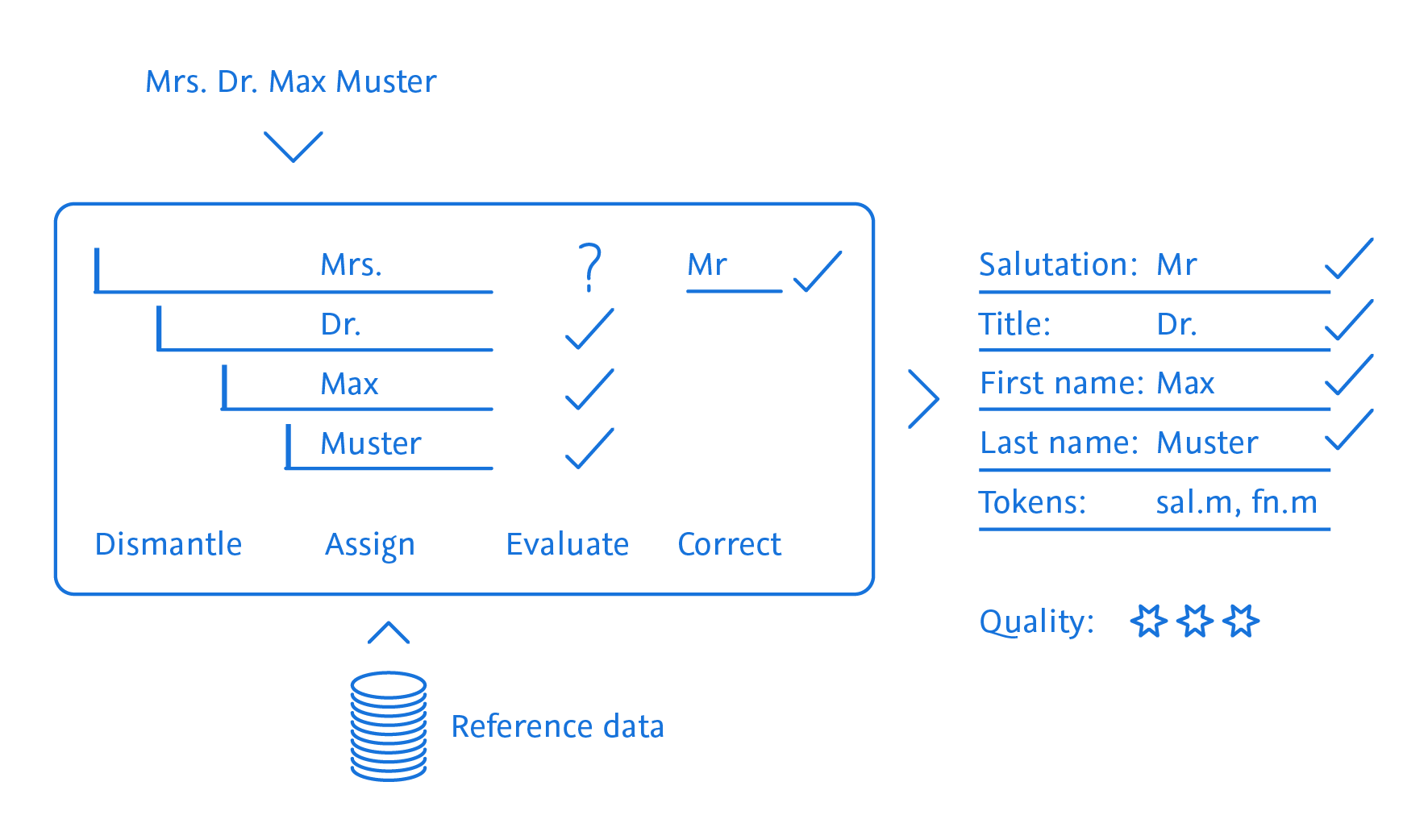
Best data quality for correct salutations and successful data processing
TL Name can both check your inventory data and be used directly during data entry. The result: a consistently high level of your data quality. Your data is uniformly structured and thus perfectly prepared for further processing, for example the generation of correct salutations for marketing campaigns, correct duplicate recognition or customer clustering.
How TL Name validates and structures your data:
| RECORD | TYPE | ADDRESS | TITLE | FIRST NAME | SURNAME | COMPANY | LEGAL FORM | QUALITY |
|---|---|---|---|---|---|---|---|---|
| query | DR. MAX MEIER | |||||||
| result | Person | Herr | Dr. | Max | Meier | ***** | ||
| query | Testmann GmbH | |||||||
| result | Company | Testmann GmbH | GmbH | ***** |
TOLERANT Name image
Usage
Notes
- We recommend to use docker volumes instead of bind mounts in production environments.
- The required configuration files can be found on the official Name GitHub
Starting
The services can be started using the following commands:
Without security:
docker compose up -d
With enabled security:
docker compose -f compose-secure.yml up -d
The docker compose command should be executed from the directory containing the compose.yaml or compose-secure.yml file.
Stopping
The running services can be stopped using the following commands:
Without security:
docker compose down
With enabled security:
docker compose -f compose-secure.yml down
The docker compose command should be executed from the directory containing the compose.yaml or compose-secure.yml file.
License
TOLERANT Name is licensed under a commercial license. This means that the software can only be used for commercial purposes, and that the user must have a valid license to use the software. To get a valid license, please contact [email protected]
Tag summary
Content type
Image
Digest
sha256:cf7bc0c9d…
Size
282.5 MB
Last updated
2 days ago
docker pull tolerantsoftware/name