Official Images for TOLERANT Post
5.7K
If you want to reach your customers, you need correct address material. Nothing is more annoying than an expensive catalogue that ends up in the trash instead of the right recipient. And when you reach your customers, it is important that the salutation and names are correct. Because anything else doesn’t leave a good impression – and it’s precisely this good impression that is crucial in advertising and marketing campaigns. That’s why TL Post checks your address material for possible errors directly during data entry. This leads to a significantly higher address and data quality. But even correct data can change: Up to 1 percent of postal addresses become invalid each year due to incorporations and street renamings. With TL Post you can regularly check your address database and update streets, postal codes and cities.
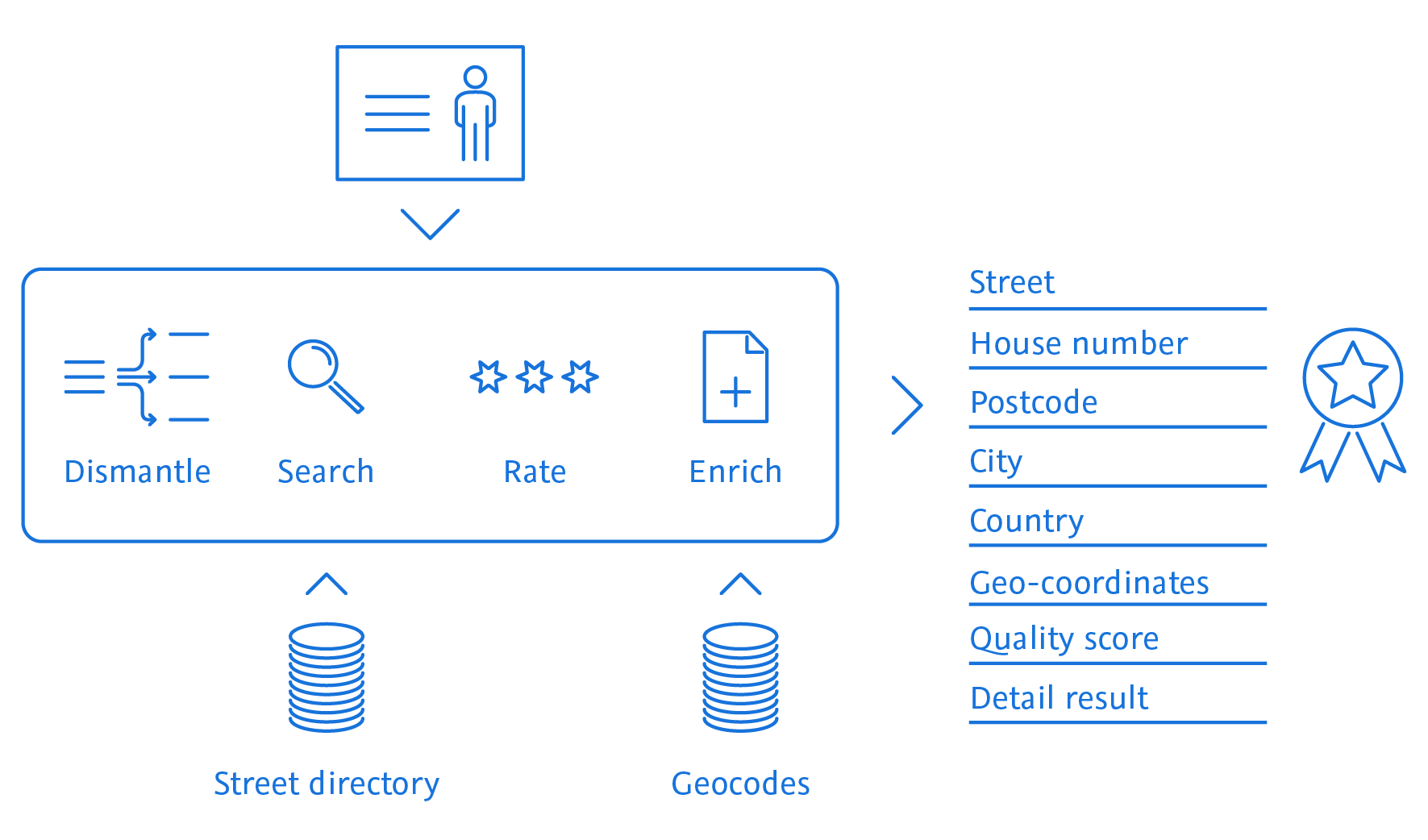
TL Post checks and standardizes your postal address database and thus supports further measures such as duplicate recognition. The software uses postal standardized addresses as a basis, which are divided into individual fields such as postal code, city, street and house number. This standardization simplifies further measures and increases the hit rate when you are specifically looking for a particular customer.
Duplicates in address databases can be expensive. Not only might a customer receive the same mailing more than once. Duplicates can also distort company statistics and analyses.
The software TL Post knows Bohemian villages and speaks Chinese. No matter from which country your addresses originate: TL Post is cosmopolitan and at home everywhere. The software takes into account the respective country-specific standards and rules, even for international postal traffic.
Lifestyle and living conditions play a significant role in most of your customers’ purchasing decisions. So if you know these factors, you can target your customers better and more precisely. The current extension of TL Post enriches your addresses with this so-called lifestyle data. This allows you to identify potential and increase your market share in the long term. To do this, TL Post uses CAMEO data, which classifies consumers in a unique way based on their life stage and wealth, Europe-wide. This classification supports you in location planning, target group and potential analysis. In addition, you can use this data to identify and standardize geographic roles for Big Data analyses (country/region/state/zip code area/sales territory). Another plus for your sales: TL Post also enriches your addresses with territory structure data, for example GKZ (German Community Identification Number according to Official Municipality Key), statistical district and more.
TL Post ensures first-class address quality and safeguards communication with your customers. In this way, you create the basis for long-term successful customer loyalty. With TL Post you can validate and qualify postal addresses for more than 200 countries and territories and enrich them with geo-coordinates.
| RECORD | STREET | NUMBER | POSTAL CODE | TOWN/CITY | LATITUDE | LONGITUDE |
|---|---|---|---|---|---|---|
| query | Rhrakerstr. 7 | 7 | S | |||
| result | Rohrackerstr. | 7 | 70329 | Stuttgart | 48.7587451 | 9.2542207 |
| query | R1 6 | Mannheim | ||||
| result | R1 | 6 | 68161 | Mannheim | 49.4891971 | 8.4686494 |
Notes
- The container needs licenses and reference data to run properly. For proper test licences and test data please contact [email protected].
- The required memory depends on the amount of reference data used.
- We recommend to use docker volumes instead of bind mounts in production environments.
- The required configuration files can be found on the official Post GitHub
Starting and stopping can be managed using a simple docker compose file. Here is an example without security:
services:
backend:
image: ${TPOST_DOCKER_REGISTRY}/post:${TPOST_VERSION}
restart: unless-stopped
mem_limit: 6g
mem_reservation: 2g
shm_size: 1g
# Uncomment the lines below in case of Rocky/RHEL/CentOS with infinite nofile limits
# ulimits:
# nofile:
# soft: 65536
# hard: 131072
cpus: 4
volumes:
# persist post logs
- post-logs:/opt/tolerant/logs
# Example for custom configuration via volume:
- post-config:/opt/tolerant/config
# Example for custom data via volume
- post-data:/opt/tolerant/data
# Example for custom protocols via volume
- post-protocols:/opt/tolerant/protocols
environment:
# number of processors to be used by the JVM
- JVM_OPT_ACTIVE_PROCESSOR_COUNT=4
- TZ=${TZ}
# If no prometheus export is wanted, set to false
- TL_PROMETHEUS_METRICS_ENABLED=true
# comment this line in to change the logging profile. possible values: anonymized, console, request, jdbc or multi-project
# - LOGGING_PROFILE=console
gui:
image: ${TPOST_DOCKER_REGISTRY}/post-gui:${TPOST_VERSION}
restart: unless-stopped
mem_limit: 6g
mem_reservation: 1g
shm_size: 512M
# Uncomment the lines below in case of Rocky/RHEL/CentOS with infinite nofile limits
# ulimits:
# nofile:
# soft: 65536
# hard: 131072
cpus: 2
volumes_from:
- backend:rw
environment:
- TZ=${TZ}
# url to service backend
- BACKEND_SERVICE_URL=http://backend:8080
# number of processors to be used by the JVM
- JVM_OPT_ACTIVE_PROCESSOR_COUNT=2
# If no prometheus export is wanted, set to false
- TL_PROMETHEUS_METRICS_ENABLED=false
# Uncomment the below line when installing soap
# - IS_SOAP_INSTALLED=true
# comment this line in to change the logging profile. possible values: anonymized, console, request, jdbc or multi-project
# - LOGGING_PROFILE=console
prometheus:
image: prom/prometheus:${PROMETHEUS_VERSION}
volumes:
- type: bind
source: ./config/prometheus/prometheus.yml
target: /etc/prometheus/prometheus.yml
read_only: true
- prometheus-data:/prometheus
expose:
- 9090
depends_on:
- backend
grafana:
image: grafana/grafana:${GRAFANA_VERSION}
volumes:
- ./config/grafana/datasources:/etc/grafana/provisioning/datasources
- ./config/grafana/dashboards:/etc/grafana/provisioning/dashboards
- grafana-data:/var/lib/grafana
environment:
- GF_SECURITY_ADMIN_USER=tolerant
- GF_SECURITY_ADMIN_PASSWORD=tolerant
ports:
- ${GRAFANA_PORT}:3000
depends_on:
- prometheus
proxy:
image: nginx:${NGINX_VERSION}-alpine
restart: unless-stopped
volumes:
- type: bind
source: ./config/nginx/default.conf.template
target: /etc/nginx/templates/default.conf.template
read_only: true
# persist nginx logs
- nginx-logs:/etc/nginx/logs
environment:
- PROXY_HOST_PORT=${NGINX_PORT}
ports:
- ${NGINX_PORT}:8080
depends_on:
backend:
condition: service_started
gui:
condition: service_healthy
volumes:
nginx-logs:
post-logs:
post-protocols:
grafana-data:
prometheus-data:
# Examples for external created volumes with custom configuration and data
post-config:
# external: true
post-data:
# external: true
Here is an example with enabled security:
services:
backend:
image: ${TPOST_DOCKER_REGISTRY}/post:${TPOST_VERSION}
restart: unless-stopped
mem_limit: 6g
mem_reservation: 2g
shm_size: 1g
# Uncomment the lines below in case of Rocky/RHEL/CentOS with infinite nofile limits
# ulimits:
# nofile:
# soft: 65536
# hard: 131072
cpus: 4
volumes:
# persist post logs
- post-logs:/opt/tolerant/logs
# Example for custom configuration via volume:
- post-config:/opt/tolerant/config
# Example for custom data via volume
- post-data:/opt/tolerant/data
# Example for custom protocols via volume
- post-protocols:/opt/tolerant/protocols
environment:
- INTERNAL_IDENTITY_PROVIDER_URL=${INTERNAL_IDENTITY_PROVIDER_URL}
- TOLERANT_CLIENT_ID=${TOLERANT_CLIENT_ID}
- SECURITY_ENABLED=true
# number of processors to be used by the JVM
- JVM_OPT_ACTIVE_PROCESSOR_COUNT=4
- TZ=${TZ}
# If no prometheus export is wanted, set to false
- TL_PROMETHEUS_METRICS_ENABLED=true
# comment this line in to change the logging profile. possible values: anonymized, console, request, jdbc or multi-project
# - LOGGING_PROFILE=console
extra_hosts:
- host.docker.internal:host-gateway
depends_on:
- keycloak
gui:
image: ${TPOST_DOCKER_REGISTRY}/post-gui:${TPOST_VERSION}
restart: unless-stopped
mem_limit: 6g
mem_reservation: 1g
shm_size: 512M
# Uncomment the lines below in case of Rocky/RHEL/CentOS with infinite nofile limits
# ulimits:
# nofile:
# soft: 65536
# hard: 131072
cpus: 2
volumes_from:
- backend:rw
environment:
- TZ=${TZ}
# enable security for the GUI service
- TOLERANT_GUI_URL=https://host.docker.internal:${NGINX_HTTPS_PORT}
- TOLERANT_CLIENT_ID=${TOLERANT_CLIENT_ID}
- IDENTITY_PROVIDER_URL=${IDENTITY_PROVIDER_URL}
- INTERNAL_IDENTITY_PROVIDER_URL=${INTERNAL_IDENTITY_PROVIDER_URL}
- SECURITY_ENABLED=true
# url to service backend
- BACKEND_SERVICE_URL=http://backend:8080
# number of processors to be used by the JVM
- JVM_OPT_ACTIVE_PROCESSOR_COUNT=2
# If no prometheus export is wanted, set to false
- TL_PROMETHEUS_METRICS_ENABLED=false
# Uncomment the below line when installing soap
# - IS_SOAP_INSTALLED=true
# comment this line in to change the logging profile. possible values: anonymized, console, request, jdbc or multi-project
# - LOGGING_PROFILE=console
extra_hosts:
- host.docker.internal:host-gateway
depends_on:
- keycloak
prometheus:
image: prom/prometheus:${PROMETHEUS_VERSION}
volumes:
- type: bind
source: ./config/prometheus/prometheus.yml
target: /etc/prometheus/prometheus.yml
read_only: true
- prometheus-data:/prometheus
expose:
- 9090
depends_on:
- backend
grafana:
image: grafana/grafana:${GRAFANA_VERSION}
volumes:
- ./config/grafana/datasources:/etc/grafana/provisioning/datasources
- ./config/grafana/dashboards:/etc/grafana/provisioning/dashboards
- grafana-data:/var/lib/grafana
environment:
- GF_SECURITY_ADMIN_USER=tolerant
- GF_SECURITY_ADMIN_PASSWORD=tolerant
ports:
- ${GRAFANA_PORT}:3000
depends_on:
- prometheus
openssl:
image: tolerant-products/openssl
build: ./config/openssl
environment:
- ORGANISATION_UNIT=TOLERANT Post
volumes:
- ./config/nginx/ssl/certs:/etc/ssl/certs
- ./config/nginx/ssl/private:/etc/ssl/private
proxy:
image: nginx:${NGINX_VERSION}-alpine
restart: unless-stopped
volumes_from:
- openssl
volumes:
- type: bind
source: ./config/nginx/ssl.conf.template
target: /etc/nginx/templates/ssl.conf.template
read_only: true
- type: bind
source: ./config/nginx/locations/keycloak.loc.template
target: /etc/nginx/templates/keycloak.loc.template
read_only: true
# for case of own ssl certificate
#- ./config/nginx/ssl/certs:/etc/ssl/certs
#- ./config/nginx/ssl/private:/etc/ssl/private
# persist nginx logs
- nginx-logs:/etc/nginx/logs
environment:
- PROXY_HOST_HTTPS_PORT=${NGINX_HTTPS_PORT}
- CERT_PRIVATE_KEY_FILENAME=${CERT_PRIVATE_KEY_FILENAME}
- CERT_FILENAME=${CERT_FILENAME}
- NGINX_SERVER_NAME=${NGINX_SERVER_NAME}
# the following variables are only needed if the included keycloak is to be used
- INTERNAL_IDENTITY_PROVIDER_URL=${INTERNAL_IDENTITY_PROVIDER_URL}
- INTERNAL_IDENTITY_PROVIDER_PORT=${KC_PORT}
ports:
- ${NGINX_HTTPS_PORT}:8443
depends_on:
backend:
condition: service_started
gui:
condition: service_healthy
openssl:
condition: service_completed_successfully
restart: true
extra_hosts:
- host.docker.internal:host-gateway
postgres:
image: postgres:${POSTGRES_VERSION}
restart: unless-stopped
volumes:
- postgres-data:/var/lib/postgresql/data
environment:
POSTGRES_DB: keycloak
POSTGRES_USER: keycloak
POSTGRES_PASSWORD: password
keycloak:
image: keycloak/keycloak:${KC_VERSION}
command: start-dev --import-realm
restart: unless-stopped
volumes:
- type: bind
source: ./config/keycloak/import
target: /opt/keycloak/data/import
read_only: true
environment:
- KC_DB=postgres
- KC_DB_SCHEMA=public
- KC_DB_USERNAME=keycloak
- KC_DB_PASSWORD=password
- KC_DB_URL_HOST=postgres
- KC_DB_URL_PORT=5432
- KEYCLOAK_ADMIN=admin
- KEYCLOAK_ADMIN_PASSWORD=admin
- KC_HOSTNAME_PORT=${KC_PORT}
- KC_PROXY=edge
- KC_HOSTNAME_STRICT=false
- TOLERANT_CLIENT_ID=${TOLERANT_CLIENT_ID}
- TOLERANT_REALM=${TOLERANT_REALM}
ports:
- ${KC_PORT}:8080
depends_on:
- postgres
volumes:
nginx-logs:
post-logs:
post-protocols:
grafana-data:
prometheus-data:
# Examples for external created volumes with custom configuration and data
post-config:
# external: true
post-data:
# external: true
# Volume for persistent data of keycloak
postgres-data:
The services can be started using the following commands:
Without security:
docker compose up -d
With enabled security:
docker compose -f compose-secure.yml up -d
The docker compose command should be executed from the directory containing the compose.yaml or compose-secure.yml file.
The running services can be stopped using the following commands:
Without security:
docker compose down
With enabled security:
docker compose -f compose-secure.yml down
The docker compose command should be executed from the directory containing the compose.yaml or compose-secure.yml file.
Note The config file and the reference data must exist inside the container.
A batch process can be stated with the following example
docker compose -f compose-batch.yml up -d
Removing the container after it has exited
docker compose -f compose-batch.yml down
Steps to use your own configuration and data for a batch process
compose-batch.yml to match the following pattern:entrypoint: ["postBatch.sh", "<configFilename>", "<projectId>", "<profileId>"]
TOLERANT Post is licensed under a commercial license. This means that the software can only be used for commercial purposes, and that the user must have a valid license to use the software. To get a valid license, please contact [email protected]
Content type
Image
Digest
sha256:05bab0c72…
Size
314 MB
Last updated
7 months ago
docker pull tolerantsoftware/post