toolboc/azure-iot-edge-device-container
An Azure IoT Edge Device in a Docker container
500K+
toolboc/azure-iot-edge-device-container repository overview
azure-iot-edge-device-container


An Azure IoT Edge Device in a Docker container with x64 / arm32 / aarch64 support
Create an Edge Device Container Instance using an existing device connection string
Obtain the device connection string:
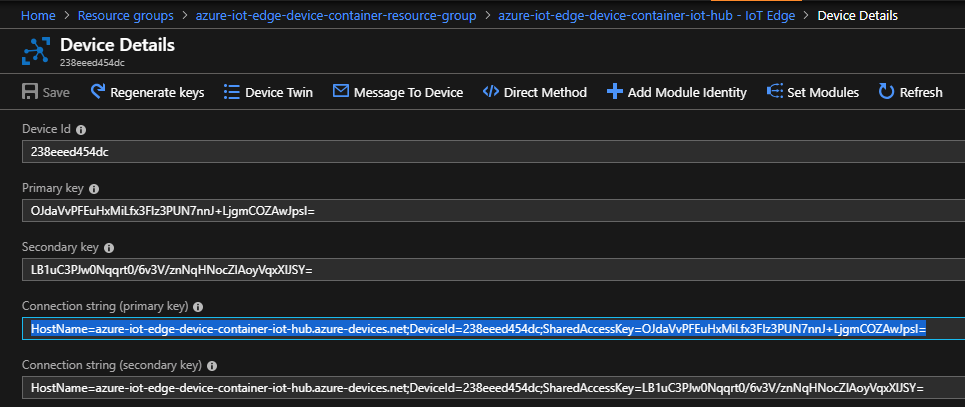
Start a container instance with:
docker run -it -d --privileged -e connectionString='<IoTHubDeviceConnectionString>' toolboc/azure-iot-edge-device-container
Create a self-provisioning Edge Device Container Instance
Create an Azure IoT Hub
Install the Azure-Cli
Run az login to sign in with the azure cli and set the appropriate subscription with:
az account set --subscription
Create a Service Principal for your subscription with the azure cli:
az ad sp create-for-rbac --name <name> --password <password>
You should see output similar to:
{
"appId": "12345678-1234-1234-1234-1234567890ab",
"displayName": "azure-iot-edge-device-container-sp",
"name": "http://azure-iot-edge-device-container-sp",
"password": "MyPassword",
"tenant": "abcdefgh-abcd-abcd-abcd-abcdefghijkl"
}
Take note of the name, password, and tenant as these values will be used later for <spAppURl>, <spPassword>, and <tenant> respectively.
Obtain the following Parameters:
| Parameter | Description | |
|---|---|---|
| spAppUrl | The Service Principal app URL | Required |
| spPassword | The Password for the Service Principal | Required |
| tenantId | The tenant id for the Service Principal | Required |
| subscriptionId | The azure subscription id where the IoT Hub is deployed | Required |
| iothub_name | The name of the Azure IoT Hub | Required |
| environment | A value to use for the envrionment tag in the created device's devicetwin | Optional |
Start a container instance with:
docker run -it -d --privileged -e spAppUrl='<spAppUrl>' -e spPassword='<spPassword>' -e tenantId='<tenantId>' -e subscriptionId='<subscriptionId>' -e iothub_name='<iothub_name>' -e environment='<environment>' toolboc/azure-iot-edge-device-container
The device will automatically register itself as an Edge device within the specified IoT Hub using the hostname of the container instance.
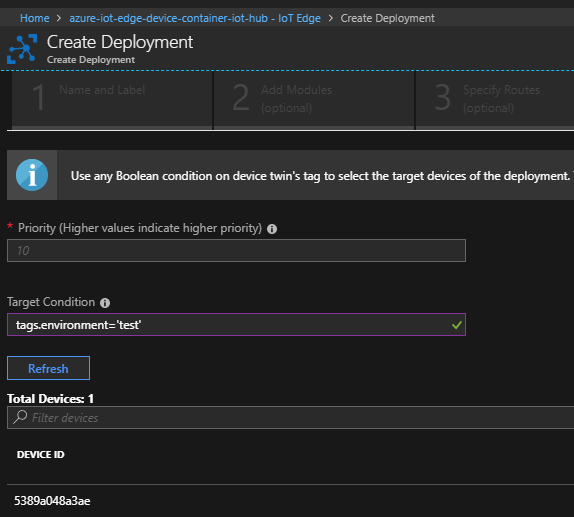
You can use the environment tag to specify a Target Condition to apply apply an IoT Deployment definition.
Deploy multiple Edge Device Container Instances to K8s using Helm:
Create an Azure Kubernetes Service
Install helm and install tiller in your cluster
Navigate to the helm directory in this repo and execute the following:
helm install --name azure-iot-edge-device-container azure-iot-edge-device-container --set spAppUrl=<spAppUrl> --set spPassword=<spPassword> --set tenantId=<tenantId> --set subscriptionId=<subscriptionId> --set iothub_name=<iothub_name> --set environment=<environment> --set replicaCount=1
Use iotedge cli within the Edge Device Container Instance
You can use the iotedge cli within the docker container.
For example, when running a single instance in docker, you can open an interactive shell by running:
docker exec -it <containerid> bash
Then, within that interactive shell, run the following command to list the modules on your edge device, or any other iotedge command you wish:
iotedge list
To exit the interactive shell, simply run the following within the interactive shell:
exit
Use iotedge cli from the Host
First you need to have the Azure IoT Edge Runtime Installed on your host machine.
Find the container id for the Edge Device Container Instance by running the following command to obtain the CONTAINER ID value for the azure-iot-edge-device-container.
docker container list
Next, you need to inspect the Edge Device Container Instance using the following command on the host machine:
docker inspect <containerid>
In the output look for the IPAddress value:
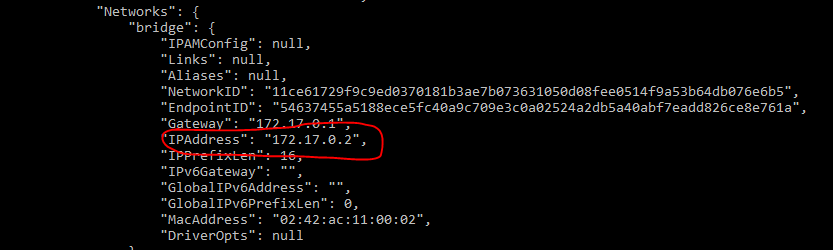
Then, using that IP address you can run the following from the host machine:
docker exec <containerid> iotedge -H http://<IPAddress>:15580 list
For example, if the container id for your Edge Device Container Instance started with 0a and the IPAddress value for your container was 172.17.0.2 you could run:
docker exec 0a iotedge -H http://172.17.0.2:15580 list

Tag summary
Content type
Image
Digest
Size
305.6 MB
Last updated
over 7 years ago
docker pull toolboc/azure-iot-edge-device-container