tplcom/docker-java
An introduction to Docker with Java.
941
tplcom/docker-java repository overview

Docker with Java - Introduction
Java Meetup Thessaloniki, 2016
TheodorosPloumis.com / @theoploumis
Get them: online presentation / source code / docker image
Under Attribution 4.0 International license.
Let me ask you
- Who knows about Docker?
- Who uses Docker for development?
- Who uses Docker in production?
- Who tried but could not do it?
What is Docker (v1.12.3)
Docker is an open platform for Developing, Packaging, Shipping and Running applications.
Docker vs VMs

Docker History
- Solomon Hykes (@solomonstre)
- dotCloud (now Docker Inc)
- March 2013
- Apache 2.0 license
- 37k stars on Github
- 270k public repositories on docker hub
Docker Benefits
- Fast (deployment, migration, restarts)
- Secure
- Lightweight (save disk & CPU)
- Open Source
- Portable software
- Microservices and integrations (APIs)
- Simplify DevOps
- Version control capabilities
Common Docker usages
- Scaling apps
- Development collaboration
- Infrastructure configuration
- Sandbox (develop, test, debug, educate etc)
- Local development
- Continuous Integration & Deployment
- Multi-tier applications
- PaaS, SaaS
See the survey results for 2016
Technology stack
- Linux x86-64 & Windows (Server 2016+)
- Go language
- Client - Server (deamon) architecture
- Union file systems (UnionFS: AUFS, btrfs, vfs etc)
- Namespaces (pid, net, ipc, mnt, uts)
- Control Groups (cgroups)
- Container format (libcontainer)
See more at Understanding docker
The Docker architecture

See more at Understanding docker
Docker components
- (Docker) client
- daemon
- engine
- machine
- compose
- swarm
- registry
Docker client
It is the primary user interface to Docker. It accepts commands from the user and communicates back and forth with a Docker daemon.
Docker daemon
It runs on a host machine. The user does not directly interact with the daemon, but instead through the Docker client with the RESTful api or sockets.
Docker engine
A Client with a Daemon as also as the docker-compose tool. Usually referred simply as "docker".
Docker machine
Creates servers, installs Docker on them and configures the Docker client to talk to them.

Docker compose
A tool for defining and running complex applications with Docker (eg a multi-container application) with a single file.
Docker swarm
Swarm pools together several Docker hosts and exposes them as a single virtual Docker host (clustering). It scales up to multiple hosts.
Docker distribution
A (hosted) service containing repositories of images which responds to the Registry API.
The Docker Components diagram
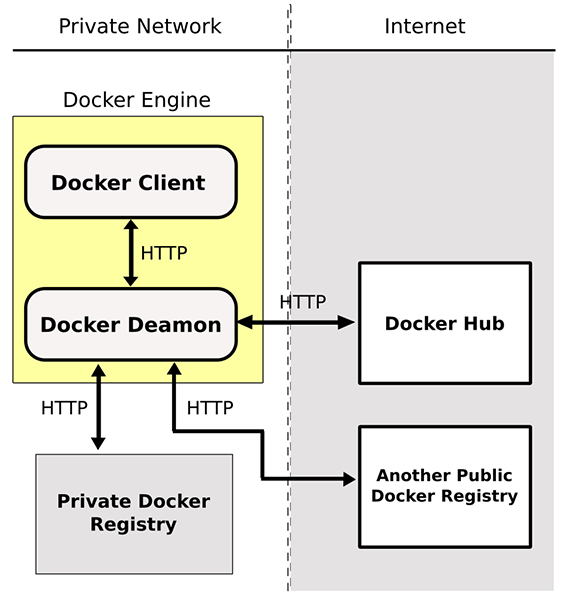
Steps of a Docker workflow
docker run -i -t ubuntu:15.04 /bin/bash
- Pulls the ubuntu:15.04 image from the registry
- Creates a new container
- Allocates a filesystem and mounts a read-write layer
- Allocates a network/bridge interface
- Sets up an IP address
- Executes a process that you specify (
/bin/bash) - Captures and provides application output
Screencast: Steps of a Docker workflow.
The docker image

The docker container

The Dockerfile
A Dockerfile is a text document that contains all the commands a user could call on the command line to create an image.
- Dockerfile with inline comments just for education
- Dockerfile reference on docker docs
- Public Dockerfiles (wildfy, Spring Boot, openjdk 9)
Docker examples
- SSH into a container
- Build an image
- Docker Volume
- Common Docker Commands
- Linked containers
- Using docker-compose
- Scale with docker-compose
- Screen and sound within containers
Example: SSH into a container
docker pull ubuntu
docker run -it --name ubuntu_example ubuntu /bin/bash
Screencast: SSH into a container
Example: Build an Image
Let's build a jenkins image
git clone [email protected]:komljen/dockerfile-examples.git ~/Docker-presentation
cd ~/Docker-presentation/jenkins
docker build -t jenkins-local .

// Test it
docker run -d -p 8099:8080 --name jenkins_example jenkins-local

// Open http://localhost:8099
curl localhost:8099
Screencast: Docker build an image
Example: Docker volume
Let's use Apache server
cd ~/Docker-presentation
mkdir apache-example
cd apache-example

docker pull eboraas/apache
docker run --name apache_volume_example \
           -p 8180:80 -p 443:443 \
           -v $(pwd):/var/www/ \
           -d eboraas/apache

// Locally create an index.html file
mkdir html
cd html
echo "It works using docker volume." >> index.html

// Open http://localhost:8180 to view the html file
curl localhost:8180
Screencast: Docker simple volume example
Example: Common Docker Commands
// General info
man docker // man docker run
docker help // docker help run
docker info
docker version
docker network ls

// Images
docker images // docker [IMAGE_NAME]
docker pull [IMAGE] // docker push [IMAGE]

// Containers
docker run
docker ps // docker ps -a, docker ps -l
docker stop/start/restart [CONTAINER]
docker stats [CONTAINER]
docker top [CONTAINER]
docker inspect -f "{{ .State.StartedAt }}" [CONTAINER]
docker rm [CONTAINER]
Screencast: Common Docker commands
Example: Docker link containers
Let's create a JBoss Ticket Monster app
docker pull rafabene/wildfly-ticketmonster
docker pull postgres:9.4
docker pull donnex/pgweb

// Start a container for postgres
docker run -d --name postgres_db \
           -e POSTGRES_USER=ticketmonster \
           -e POSTGRES_PASSWORD=ticketmonster-docker \
           postgres:9.4

// Create a container for Ticket Monster app
// Usage: --link [name or id]:alias
docker run -d --name ticketmonster \
           -p 8088:8080 \
           --link postgres_db:db \
           rafabene/wildfly-ticketmonster-h2

// Open http://localhost:8088/ticket-monster/ to see the App UI

// There is a proper linking
docker inspect -f "{{ .HostConfig.Links }}" ticketmonster

// Link a pgweb ui
docker run -d -p 8022:8080 \
           --link postgres_db \
           donnex/pgweb

// Open http://localhost:8022 and connect to the Pgweb UI
// Tip to find the Postgres credentials.
// Type: docker inspect --format='{{json .Config}}' postgres_db
Example: Using Docker Compose
Let's do the same but with docker-compose.yml
git clone [email protected]:theodorosploumis/docker-java.git ~/docker-java
cd ~/docker-java/examples/docker-compose

// Run docker-compose using the docker-compose.yml
docker-compose up -d

// Same as previous
// Eg open http://localhost:8088/ticket-monster/ etc
Example: Scale with Docker Compose
Following from previous...
// Create up to 10 Ticket Monster apps
docker-compose scale mywildfly=10

// Get their IP addresses
docker ps

// Open several apps (eg http://localhost:32781 etc)
// All apps share the same database
Example: GUI with Docker
See examples at hub.docker.com/u/jess
// Grant access to everyone on the X Server (locally)
// Otherwise the containers below will never start
xhost +

// Libreoffice
docker run -it \
           -v /tmp/.X11-unix:/tmp/.X11-unix \
           -e DISPLAY=unix$DISPLAY \
           --name cathode \
           jess/cathode

// SublimeText 3
docker run -it \
           -e NEWUSER=$USER \
           -v $HOME/.config/sublime-text-3/:/root/.config/sublime-text-3 \
           -v /tmp/.X11-unix:/tmp/.X11-unix \
           -e "DISPLAY=unix${DISPLAY}" \
           --name sublime_text \
           jess/sublime-text-3

// Audacity (sound in docker container)
docker run --rm \
            -u $(id -u):$(id -g) \
            -v /tmp/.X11-unix:/tmp/.X11-unix:ro \
            -v /dev/snd:/dev/snd \
            -v "$HOME:$HOME" \
            -w "$HOME" \
            -e DISPLAY="unix$DISPLAY" \
            -e HOME \
            $(find /dev/snd/ -type c | sed 's/^/--device /') \
            knickers/audacity

// Disable access to x11
xhost -
Docker tips
There are known best practices (see a list at examples/tips)
- Optimize containers (see imagelayers.io)
- Create your own, tiny base images
- Containers are not Virtual Machines
- Full stack Images VS 1 process per Container
- Use files/scripts to setup container
- Prefer using docker-compose
- Production needs orchestration tools
The Docker war
| Type | Software |
|---|---|
| Cluster & orchestrate | Swarm, Kubernetes, Marathon, MaestroNG, decking, shipyard |
| Registry | Portus, Docker Distribution, Docker Hub, Quay, Google Container Reg., Artifactory, ProjectAtomic, Treescale, Canister |
| PaaS | Rancher, Tsuru, dokku, flynn, Octohost, DEIS |
Docker Alternatives
Instead of Resources
- Awesome Docker (list of Docker resources & projects)
- Docker cheat sheet
- Docker in Practice, The Docker Book, Docker for Java Developers - free (books)
- Docker aliases/shortcuts
- Docker case studies
Questions?
Next: Docker in production, Scaling, Private registries, PaaS.
Tools used: oh my zsh / reveal.js / Simple Docker UI for Chrome / docker compose 1.9.0 / docker 1.12.3
Tag summary
Content type
Image
Digest
Size
9.7 MB
Last updated
almost 10 years ago
docker pull tplcom/docker-java