trakhound/mtconnect.net-agent
.NET MTConnect Agent v6 that supports HTTP, MQTT, and SHDR. Built from the MTConnect.NET project.
4.2K
trakhound/mtconnect.net-agent repository overview

MTConnect.NET Agent

Overview
This project is a full implementation of an MTConnect Agent used to read data from industrial machine tools and devices. This MTConnect Agent application is fully compatible with the latest Version 2.3 of the MTConnect Standard.
Features
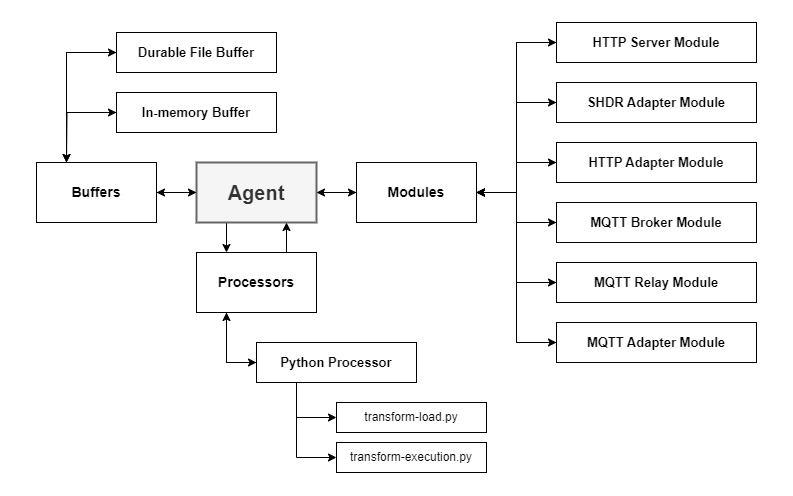
- Plugin architecture to support Http Server, Mqtt Server, SHDR Adapters, etc.
- Processors for transforming input data using simple Python scripts
- Easy setup with Windows Installers
- Options to run as Windows Service or as a console application (typically for testing/debugging)
- Optional 'Durable' buffer used to retain the Agent data between application/machine restarts
- High performance / Low resource usage
- Flexible Device configurations (traditional 'devices.xml' file or 'devices' directory with individual Device files)
- On-Demand MTConnect Versioning allowing for older clients to request the version of MTConnect they are compatible with using HTTP Url parameters
- Configuration File monitoring to automatically restart the Agent upon configuration file changes
- Flexible Logging using NLog which can be used to output log information to separate files for easier analysis
Capabilites
| Description | Description |
|---|---|
| MTConnect Probe | HTTP Server |
| MTConnect Current | MQTT Server (Internal Broker) |
| MTConnect Sample | MQTT Server (External Broker) |
| MTConnect Assets | SHDR Adapters (Input Data) |
| MTConnect Interfaces | HTTP Adapters (Input Data) |
| Configuration File Monitoring | MQTT Adapters (Input Data) |
| Unit Conversion | XML Stylesheets |
| Script Transformation (Python) | XML Static Files |
| Windows Service | XML Schemas |
| Linux Supported | XML Validation |
| Durable File Buffer | JSON (MTConnect.NET v5) |
| Debug Logging | JSON (cppagent) |
| MTConnect Entity Validation | TLS (HTTP & MQTT) |
Configuration
More information about Configurations. The default configuration file is shown below :
# - Device Configuration -
devices: devices

# - Processors -
processors:
- python: # - Add Python Processor
    directory: processors

# - Modules -
modules:

- http-server: # - Add HTTP Server module
    hostname: localhost
    port: 5000
    allowPut: true
    indentOutput: true
    documentFormat: xml
    responseCompression:
    - gzip
    - br
    files:
    - path: schemas
    location: schemas
    - path: styles
    location: styles
    - path: styles/favicon.ico
    location: favicon.ico

- mqtt-relay: # - Add MQTT Relay module
    server: localhost
    port: 1883
    currentInterval: 5000
    sampleInterval: 500

- shdr-adapter: # - Add SHDR Adapter module for Device = M12346 and Port = 7878
    deviceKey: M12346
    hostname: localhost
    port: 7878

- shdr-adapter: # - Add SHDR Adapter module for Device = OKUMA-Lathe and Port = 7879
    deviceKey: OKUMA-Lathe
    hostname: localhost
    port: 7879

- mqtt-adapter: # - Add MQTT Adapter module for Device = M12346 and Topic = cnc-01
    deviceKey: M12346
    server: localhost
    port: 1883
    topic: cnc-01


# The maximum number of Observations the agent can hold in its buffer
observationBufferSize: 150000

# The maximum number of assets the agent can hold in its buffer
assetBufferSize: 1000

# Sets whether the Agent buffers are durable and retain state after restart
durable: false

# Sets the default MTConnect version to output response documents for.
defaultVersion: 2.3
Device Configuration
devices- The Path to look for the file(s) that represent the Device Information Models to load into the Agent. The path can either be a single file or a directory. The path can be absolute or relative to the executable's directory
Module Configuration
modules- Contains configurations for Agent Modules. These configurations are specific to the individual modules and may be customized for custom modules.
Agent Configuration
-
observationBufferSize- The maximum number of Observations the agent can hold in its buffer -
assetBufferSize- The maximum number of assets the agent can hold in its buffer -
durable- Sets whether the Agent buffers are durable and retain state after restart -
useBufferCompression- Sets whether the durable Agent buffers use Compression -
ignoreTimestamps- Overwrite timestamps with the agent time. This will correct clock drift but will not give as accurate relative time since it will not take into consideration network latencies. This can be overridden on a per adapter basis. -
defaultVersion- Sets the default MTConnect version to output response documents for. -
convertUnits- Sets the default for Converting Units when adding Observations -
ignoreObservationCase- Sets the default for Ignoring the case of Observation values. Applicable values will be converted to uppercase -
inputValidationLevel- Sets the default input validation level when new Observations are added to the Agent. 0 = Ignore, 1 = Warning, 2 = Strict -
monitorConfigurationFiles- Sets whether Configuration files are monitored. If enabled and a configuration file is changed, the Agent will restart -
configurationFileRestartInterval- Sets the minimum time (in seconds) between Agent restarts when MonitorConfigurationFiles is enabled -
enableMetrics- Sets whether Agent Metrics are captured (ex. ObserationUpdateRate, AssetUpdateRate)
Logging
Logging is done using NLog which allows for customized logging through the NLog.config file located in the application's install directory. The loggers are setup so that there is a separate logger for:
- (agent-logger) MTConnect Agent
- (agent-validation-logger) MTConnect Data Validation Errors
- (module-logger) Modules
The default NLog Configuration File is shown below:
<?xml version="1.0" encoding="utf-8" ?>
<nlog xmlns="http://www.nlog-project.org/schemas/NLog.xsd" xmlns:xsi="http://www.w3.org/2001/XMLSchema-instance">

	<!-- the targets to write to -->
	<targets>

		<!--Console-->
		<target name="logconsole" xsi:type="Console" />

		<!--Application Log File-->
		<target xsi:type="File" name="application-file" fileName="logs\application-${shortdate}.log"
			layout="${longdate}|${event-properties:item=EventId_Id:whenEmpty=0}|${uppercase:${level}}|${logger}|${message} ${exception:format=tostring}" />

		<!--Agent Log File-->
		<target xsi:type="File" name="agent-file" fileName="logs\agent-${shortdate}.log"
			layout="${longdate}|${event-properties:item=EventId_Id:whenEmpty=0}|${uppercase:${level}}|${logger}|${message} ${exception:format=tostring}" />

		<!--Agent Validation Log File-->
		<target xsi:type="File" name="agent-validation-file" fileName="logs\agent-validation-${shortdate}.log"
			layout="${longdate}|${event-properties:item=EventId_Id:whenEmpty=0}|${uppercase:${level}}|${logger}|${message} ${exception:format=tostring}" />

		<!--Module Log File-->
		<target xsi:type="File" name="module-file" fileName="logs\module-${shortdate}.log"
			layout="${longdate}|${event-properties:item=EventId_Id:whenEmpty=0}|${uppercase:${level}}|${logger}|${message} ${exception:format=tostring}" />

		<!--Processor Log File-->
		<target xsi:type="File" name="processor-file" fileName="logs\processor-${shortdate}.log"
			layout="${longdate}|${event-properties:item=EventId_Id:whenEmpty=0}|${uppercase:${level}}|${logger}|${message} ${exception:format=tostring}" />

	</targets>

	<!-- rules to map from logger name to target -->
	<rules>

		<!--Write to Console-->
		<logger name="*" minlevel="Debug" writeTo="logconsole" />

		<!--Application Logger-->
		<logger name="application-logger" minlevel="Info" writeTo="application-file" final="true" />

		<!--Agent Logger-->
		<logger name="agent-logger" minlevel="Info" writeTo="agent-file" final="true" />

		<!--Agent Validation Logger (Used to log Data Validation Errors)-->
		<logger name="agent-validation-logger" minlevel="Warning" writeTo="agent-validation-file" final="true" />

		<!--Module Logger-->
		<logger name="module-logger" minlevel="Info" writeTo="module-file" final="true" />

		<!--Processor Logger-->
		<logger name="processor-logger" minlevel="Info" writeTo="processor-file" final="true" />

		<!--Skip non-critical Microsoft logs and so log only own logs (BlackHole) -->
		<logger name="Microsoft.*" maxlevel="Info" final="true" />
		<logger name="System.Net.Http.*" maxlevel="Info" final="true" />

	</rules>
</nlog>
Source Code
This project uses the MTConnect.NET-Applications-Agents library (available on Nuget) to create an MTConnect Agent application. More information about this library can be found Here. The MTConnect.NET-Applications-Agents library makes creating an MTConnect Agent application simple as well as makes it easy to keep updated using Nuget. A fully functionaly MTConnect Application can be created in just a few lines of code.
Contribution / Feedback
- Please use the Issues tab to create issues for specific problems that you may encounter
- Please feel free to use the Pull Requests tab for any suggested improvements to the source code
- For any other questions or feedback, please contact TrakHound directly at [email protected].
License
This application and it's source code is licensed under the MIT License and is free to use and distribute.
Tag summary
Content type
Image
Digest
sha256:446866501…
Size
39.8 MB
Last updated
about 1 year ago
docker pull trakhound/mtconnect.net-agent