treytesoro/wingetnode
A private Winget REST API with a MongoDB backend.
1.2K
treytesoro/wingetnode repository overview
Wingetnode Docker
You will need a real or self-signed pair of private and public certificates. Winget will not allow additions of non-SSL sources.
Please visit the following repository for more information:
WingetNodeTS- https://github.com/treytesoro/wingetnodets
Environment variables:
WGN_SERVERID - The server ID used by winget CLI
WGN_SUPPORTED_VERSIONS = a comma separated list of server version numbers (1.0.1, 1.1.0)
WGN_HTTP_PORT - The http port
WGN_HTTPS_PORT - The https port
WGN_PRIVATEKEYPATH - Custom path for server's private key
WGN_PUBLICKEYPATH - Custom path for server's public key
WGN_PACKAGESPATH - Where we store setup packages
WGN_MONGO_CONNECTIONSTRING - The URL of the mongo DB
WGN_SERVEPACKAGES - Set to "1" to enable serving packages at /downloads endpoint
Example docker-compose.yaml
name: wgn
services:
  wingetnode:
    image: treytesoro/wingetnode:latest
    ports:
      - "7070:7070"
      - "7071:7071"
    volumes:
      - "./wgn/certs:/certs"
      - "./wgn/packages:/packages"
    environment:
      WGN_MONGO_CONNECTIONSTRING: "mongodb://root:example@mongo:27017/"
      WGN_SERVERID: "DevTest"
      WGN_PRIVATEKEYPATH: "/certs/server.key"
      WGN_PUBLICKEYPATH: "/certs/server.crt"
      WGN_HTTP_PORT: "7070"
      WGN_HTTPS_PORT: "7071"
      WGN_SERVEPACKAGES: "1"
  mongo:
    image: mongo:latest
    restart: always
    volumes:
      - "./wgn/dockerdata/db:/data/db:rw"
      - "./wgn/dockerdata/configdb:/data/configdb:rw"
    environment:
      MONGO_INITDB_ROOT_USERNAME: root
      MONGO_INITDB_ROOT_PASSWORD: example

  mongo-express:
    image: mongo-express
    restart: always
    ports:
      - 8081:8081
    environment:
      ME_CONFIG_MONGODB_ADMINUSERNAME: root
      ME_CONFIG_MONGODB_ADMINPASSWORD: example
      ME_CONFIG_MONGODB_URL: mongodb://root:example@mongo:27017/
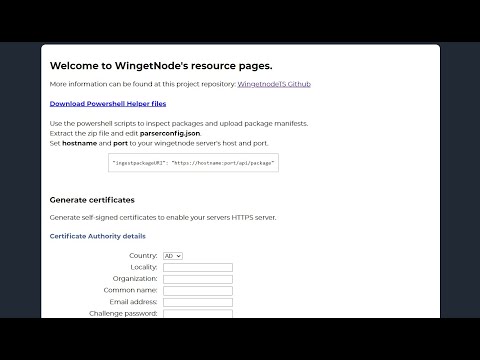
Once running, you will be able to generate a self-signed cert directly from the webUI.
Tag summary
Content type
Image
Digest
sha256:e9a3cb4a2…
Size
158.4 MB
Last updated
over 2 years ago
docker pull treytesoro/wingetnode