trickshotmlg/mealstack repository overview
🍲 Meal Stack






📖 Description
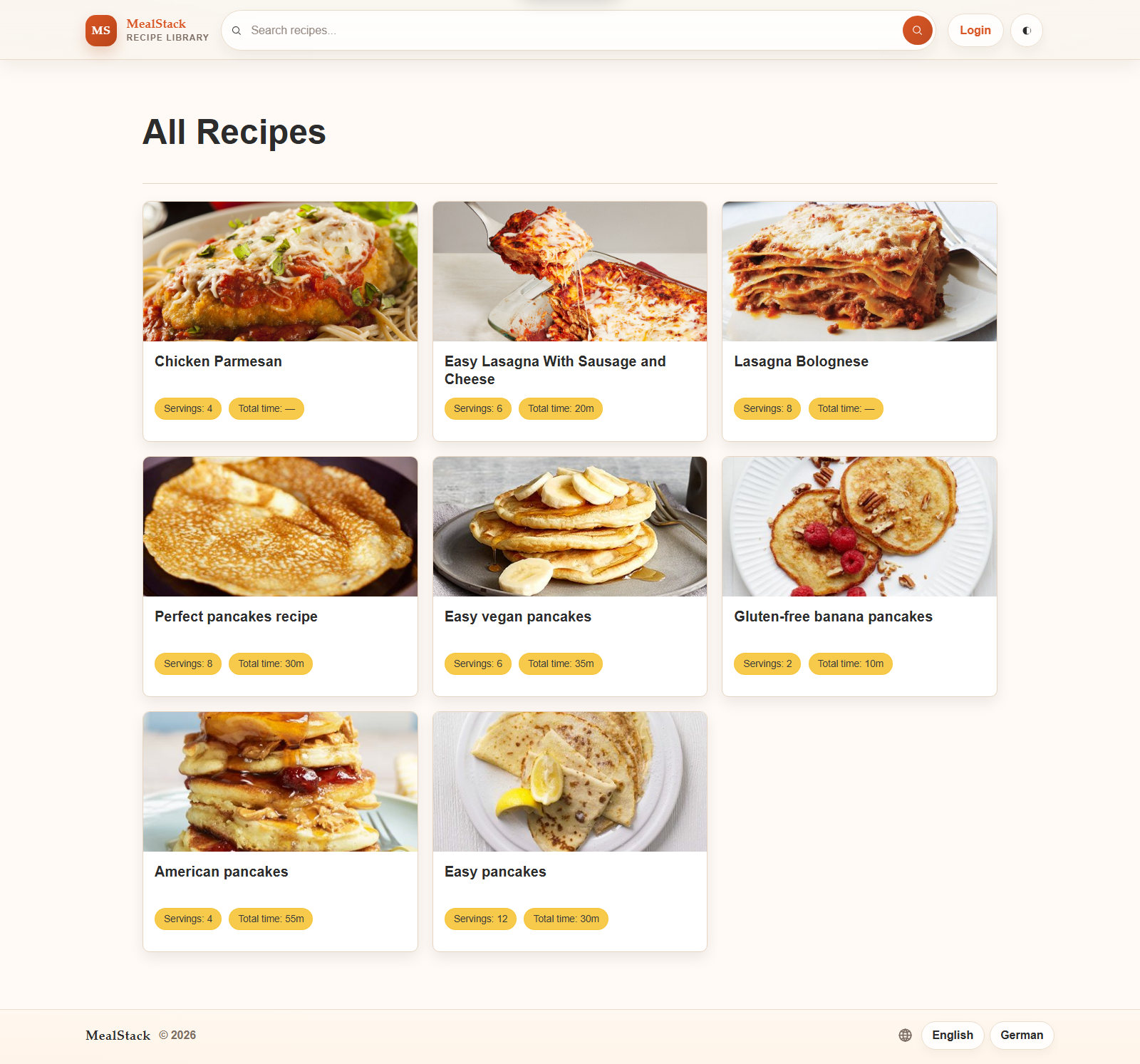
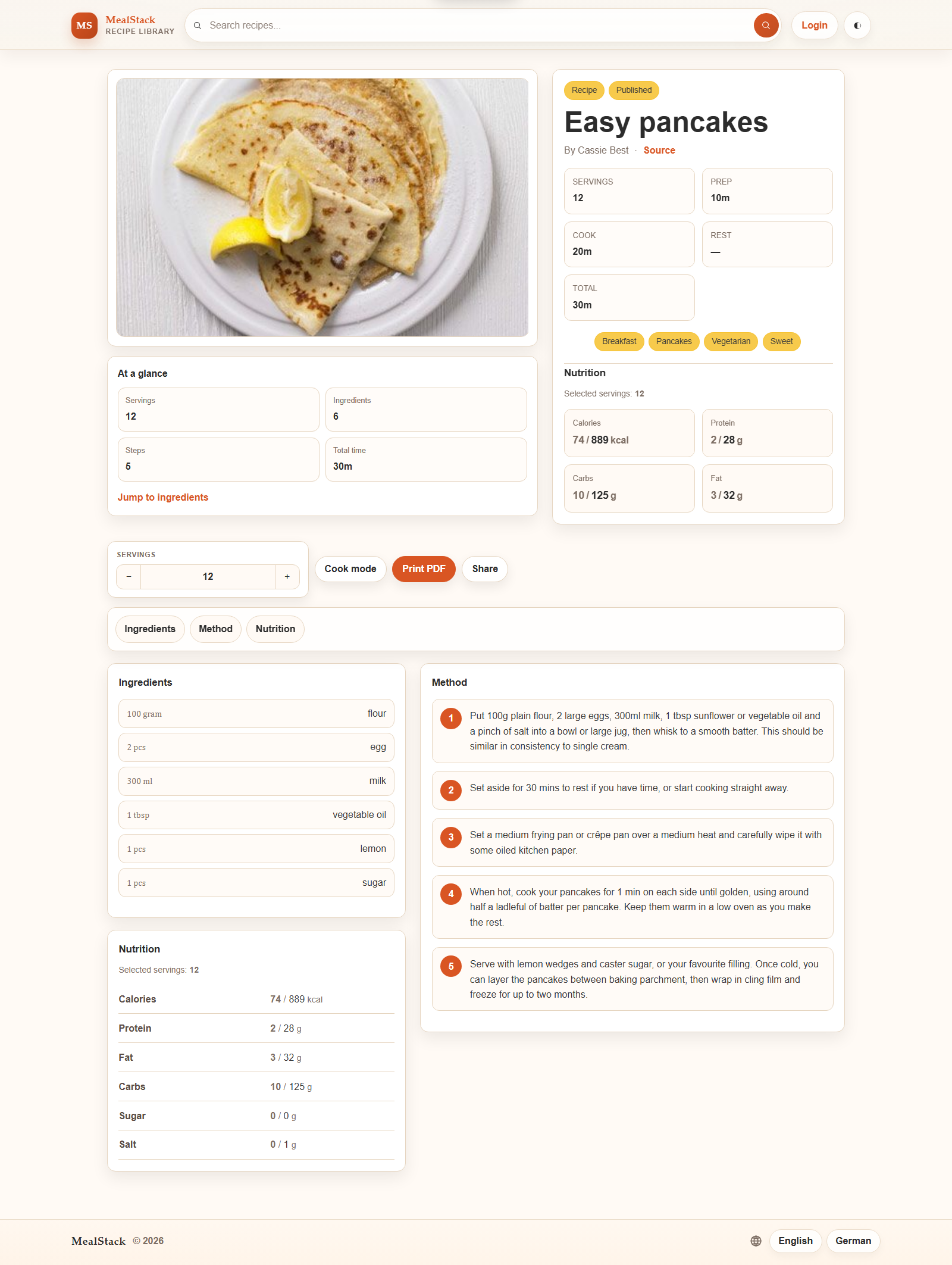
Meal Stack is a Django recipe web application for managing, organizing, and sharing cooking recipes. It supports recipe search, tagging, categories, localized UI text, OIDC login, recipe scrapers, admin bulk actions, and a refined recipe detail experience with cook mode, print export, serving adjustments, and share links.
📌 Features
- Create, edit, and manage recipes
- Combine recipes into reusable linked components such as dough, sauces, toppings, and side dishes
- Configure the servings used by each linked component while keeping one recipe detail page
- Combine ingredients, preparation steps, cooking times, and nutrition from linked recipes
- Prevent circular recipe links and protect component recipes from accidental deletion
- Mark recipes as component only so they are available through parent recipes without appearing in the public recipe list
- Search recipes, ingredients, tags, and categories
- Use fuzzy search in admin forms and autocomplete fields, which is useful for large ingredient catalogs
- Browse recipes in a compact list layout and a polished detail view
- Adjust servings and recalculate ingredients and nutrition live on the recipe page
- Enter decimal servings with either a locale decimal separator or mixed fractions such as
7 3/4 - Use cook mode for a compact, focused reading experience
- Export styled recipe PDFs for printing or saving
- Share recipe URLs, including the current serving selection
- Manage ingredients, units, tags, categories, and importers in the admin
- Bulk update recipe status between draft and published in the admin
- Sign in through the public account login with local authentication or configured OIDC providers
- Link OIDC identities to user profiles, bookmark recipes, and organize recipes into personal lists
- Import ingredients from OpenFoodFacts
- Import recipes from Chefkoch, BBC Good Food, and Epicurious
- Run ingredient imports from the CLI with
ingredient_importer - Run recipe imports from the CLI with
recipe_importer - Use light and dark themes
📷 Preview
🚀 Quick Start
1. Clone and configure
git clone https://github.com/TrickShotMLG02/MealStack.git
cd MealStack
cp .env.example .env
Adjust .env for your local setup. If you use Docker Compose, review docker-compose.env as well.
2. Install dependencies
Meal Stack uses uv:
uv python install
uv sync
3. Run migrations
uv run python manage.py migrate
4. Seed demo data
Run all seeds at once:
uv run python manage.py seed_all
Or run individual seeds:
uv run python manage.py seed_admin_user
uv run python manage.py seed_tags
uv run python manage.py seed_units
uv run python manage.py seed_ingredients
uv run python manage.py seed_recipe
5. Run the development server
uv run python manage.py runserver
Open:
- App: http://127.0.0.1:8000/
- Admin: http://127.0.0.1:8000/admin/
Default seed login:
- User:
admin - Password:
admin
Authentication and OIDC
The public login page is available at /account/login/. The admin login remains available at
/admin/login/ and is intended for admin access.
Enable OIDC in .env with:
OIDC_ENABLED=true
OIDC_ALLOW_LOCAL_LOGIN=true
OIDC providers are managed in the admin under OIDC → OIDC providers. Create one provider record for each service you want to offer, such as Google, Microsoft, Keycloak, Authentik, GitHub, or Steam. Each provider can have its own:
- display name, slug, and icon/image URL
- client ID and secret
- authorization, token, user-info, and JWKS endpoints
- scopes and signing algorithm
- enabled/disabled status
- automatic user creation policy
- authoritative status and groups claim mapping for staff/group synchronization
The shared callback URL to register with every identity provider is:
https://your-domain.example/oidc/callback/
The active absolute callback URL and required scopes are also shown as readonly values on the provider edit page in the admin. The exact URL should use the public host and scheme of the deployment.
The login link in the site header preserves the page the visitor was viewing. Direct access to the admin area uses the same public login page; staff users return to the admin panel, while regular users return to the recipe start page if they do not have admin access.
When OIDC is enabled but no database providers have been configured, the public login page keeps
the OIDC section visible and explains that setup is still required. The OIDC_CLIENT_ID,
OIDC_CLIENT_SECRET, endpoint, issuer, and scope environment variables remain supported for the
legacy single-provider/admin OAuth flow; database-backed providers are the recommended way to
configure multiple providers for the public login page.
Troubleshooting
OIDC login fails with Claims verification failed
Meal Stack requires a stable sub claim. When the provider returns an email claim, it also
requires email_verified to be true. This protects account matching by email and avoids treating
an unverified address as an existing Meal Stack account.
Some providers do not emit email_verified by default. Authentik is one example. Create a
property mapping for the application and return the standard claim as a boolean:
return {
    "email": request.user.email,
    "email_verified": True,
}
Attach the mapping to the Authentik provider/application and make sure it is included in the
requested token or UserInfo response. Enable the relevant openid email profile scopes. If the
custom mapping is attached to a provider-specific scope such as user, add that scope to the
provider's Meal Stack Scopes field as well:
openid email profile user
There is no universal OIDC scope named user; the required scope name depends on the identity
provider. The same issue can occur with other OIDC providers if they omit the claim, return it
under a non-standard name, or return an unexpected value. A string such as "true" is accepted,
but a missing or false claim is rejected when an email is supplied.
When diagnosing the problem, inspect the claim names and sanitized values in the ID token/UserInfo response, without sharing the token or client secret. Also verify that the provider record is enabled and that its issuer, client ID, endpoints, JWKS endpoint, and signing algorithm match the identity provider configuration.
OIDC login returns to the wrong page
The header login link includes the current page as a safe next destination. Direct admin access
uses /admin/ as its default destination. Staff users can return there; regular users are sent to
/recipes/ instead. If a deployment still returns to the home page after a failed login, confirm
that it includes the current LOGIN_REDIRECT_URL_FAILURE setting and that the deployed image
contains the current OIDC callback configuration.
Component recipes do not appear in the recipe list
Set the linked recipe's visibility to Component only. It remains available when linked from a parent recipe but is intentionally hidden from public recipe lists and direct public recipe pages. The parent recipe must still be published for public users to view the composed ingredients and steps.
Tests and coverage
Most of the time this is enough:
uv run python manage.py test --keepdb
The test runner uses a local SQLite test database by default, even if your .env points at MySQL.
That keeps local test runs fast and avoids needing extra database permissions for test_*
databases. It also shows a progress bar and a short summary at the end.
For coverage reports, install the dev dependencies first:
uv sync --dev
Then run:
uv run python manage.py test_coverage --keepdb
This runs the suite once and reports app-only coverage for apps/. Tests, migrations, and test
helpers are not counted.
For a more detailed report, add --per-test:
uv run python manage.py test_coverage --keepdb --per-test
This is slower, but useful when checking what a single test actually covers. Each test is measured against the app files it touched, not against the whole project.
Common flags:
| Option | Description |
|---|---|
--keepdb | Reuse the test database between runs. Usually worth using locally. |
--per-test | Add the slower per-test touched-file coverage table. |
--no-progress | Hide progress bars. With manage.py test, this falls back to Django's dot output. With test_coverage --per-test, this falls back to one line per measured test. |
--no-color | Disable colored output. |
--configured-database | For test_coverage, use the database from the active Django settings instead of isolated SQLite. |
--pattern "test*.py" | Use a different test discovery pattern. |
You can limit coverage runs with normal Django test labels:
uv run python manage.py test_coverage apps.recipes.tests.test_recipe_list_search --keepdb
uv run python manage.py test_coverage apps.recipes.tests.test_unit_model.UnitModelTests --keepdb --per-test
Failed and skipped tests are shown in the summary. In --per-test mode, one failed test does not
stop the remaining tests from being measured.
If you really want manage.py test to use the database from .env, set:
USE_CONFIGURED_TEST_DATABASE=true
🐳 Docker Compose
The repository includes docker-compose.yml for local stack usage.
docker compose up --build
Compose uses:
.envfor application settingsdocker-compose.envfor Compose-specific and stack-specific overrides
📦 Portainer
Portainer stacks cannot use build: for remote deployments. Build and push the image first, then replace the build: block with one of the published images:
trickshotmlg/mealstack:latesttrickshotmlg/mealstack:dev
For Portainer, comment out the active env_file block and provide stack variables through stack.env.
🐳 Docker Images
You can also run Meal Stack directly from Docker Hub:
docker run --env-file .env -p 8000:8000 trickshotmlg/mealstack:latest
Development image:
docker run --env-file .env -p 8000:8000 trickshotmlg/mealstack:dev
🤝 Contributing
Contributions are welcome.
- Check the Contribution Issue to get started.
- Fork the repo, make your changes, and submit a pull request.
🤖 AI Usage
This repository was founded and built by hand without AI tools.
AI was used selectively for:
- refactoring support
- idea generation
- complex implementation work such as fuzzy search
- web design and UI refinement
- debugging help
- README generation and rewording
AI-assisted changes were always reviewed, adapted where needed, and integrated deliberately. Nothing was copied blindly into the codebase.
📄 License
This project is licensed under the GNU General Public License v3 (GPL-3.0). You are free to use, modify, and distribute this software under the terms of the GPL-3.0, which requires that any distributed modifications or derivative works also be open source.
Please give credit to the original authors when using or modifying this project.
Tag summary
Content type
Image
Digest
sha256:344cfa757…
Size
336.4 MB
Last updated
2 months ago
docker pull trickshotmlg/mealstack