tristanteu/funkloch
Signal history, trends and alerts for every Zigbee2MQTT and Thread (OTBR) device
1.9K
tristanteu/funkloch repository overview

Funkloch: signal history for Zigbee2MQTT, Thread and Matter devices
A self-hosted dashboard that records the signal quality of every Zigbee2MQTT, Thread (OpenThread Border Router) and Matter (matterjs-server, Thread and Wi-Fi) device over time.
It shows which devices get worse over days, which drop out and how they are connected, instead of one snapshot.
One Docker container next to Zigbee2MQTT, your OTBR or your Matter server, read-only, no cloud, open source.















docker run -d --name funkloch --network host -v funkloch-data:/data \
  -e ZIGBEE2MQTT_MQTT_URL=mqtt://localhost:1883 tristanteu/funkloch
Install • Features • Screenshots • Alternatives • FAQ • Documentation
💡 Why Funkloch?
Zigbee2MQTT shows the LQI of each device and a network map on request, the OpenThread Border Router its neighbor table. Both are snapshots: they don't tell you that the sensor in the cellar has been getting worse since Friday, or that the socket on the terrace drops every evening.
- History instead of a snapshot: every message is kept, condensed to hourly medians for a year.
- Early warning: falling trends, devices that go silent, evenings that are always weak and parent changes stand out before a device is gone, with a message by ntfy, webhook or MQTT.
- Every network in one list: Zigbee, Thread and Wi-Fi on one 0–100 % scale, each chart in its own raw unit (LQI, RSSI).
- Thread behind any border router: through matterjs-server, Matter devices report their own neighbor tables, so the mesh shows up behind an Apple TV, a HomePod, a Nest hub or an Aqara hub too, and Matter devices on Wi-Fi get their RSSI.
- Read-only: Funkloch never switches, pairs or reconfigures anything.
Runs on any Linux server, NAS or Raspberry Pi that runs Docker or Podman (amd64 and arm64).
🚀 Install
With Podman Quadlet (~/.config/containers/systemd/funkloch.container):
[Container]
Image=docker.io/tristanteu/funkloch:latest
Network=host
Volume=funkloch-data:/data
Environment=ZIGBEE2MQTT_MQTT_URL=mqtt://localhost:1883
Environment=OTBR_URL=http://localhost:8081
Environment=MATTER_SERVER_URL=ws://localhost:5580/ws
Environment=TZ=Europe/Berlin
AutoUpdate=registry

[Install]
WantedBy=default.target
Or with Docker Compose:
services:
  funkloch:
    image: tristanteu/funkloch:latest
    network_mode: host
    volumes:
      - funkloch-data:/data
    environment:
      ZIGBEE2MQTT_MQTT_URL: mqtt://localhost:1883
      OTBR_URL: http://localhost:8081
      MATTER_SERVER_URL: ws://localhost:5580/ws
      TZ: Europe/Berlin
    restart: unless-stopped
volumes:
  funkloch-data:
Then open http://<host>:8090 and set the admin password. Each network is on when its variable is
set:
| Variable | Meaning | Default |
|---|---|---|
ZIGBEE2MQTT_MQTT_URL | MQTT broker of Zigbee2MQTT, e.g. mqtt://localhost:1883; empty: Zigbee off | |
ZIGBEE2MQTT_MQTT_USER, ZIGBEE2MQTT_MQTT_PASSWORD | broker login | |
ZIGBEE2MQTT_BASE_TOPIC | Zigbee2MQTT base topic | zigbee2mqtt |
OTBR_URL | REST API of the OpenThread Border Router, e.g. http://localhost:8081; empty: Thread off | |
MATTER_SERVER_URL | WebSocket of matterjs-server, e.g. ws://localhost:5580/ws; empty: Matter off | |
PORT | port of the web UI | 8090 |
TZ | time zone for day boundaries | UTC |
FUNKLOCH_DEMO | 1 starts with a demo network instead |
Reverse proxy, backups, password reset and every variable: installation guide.
✨ Features
📶 Device list
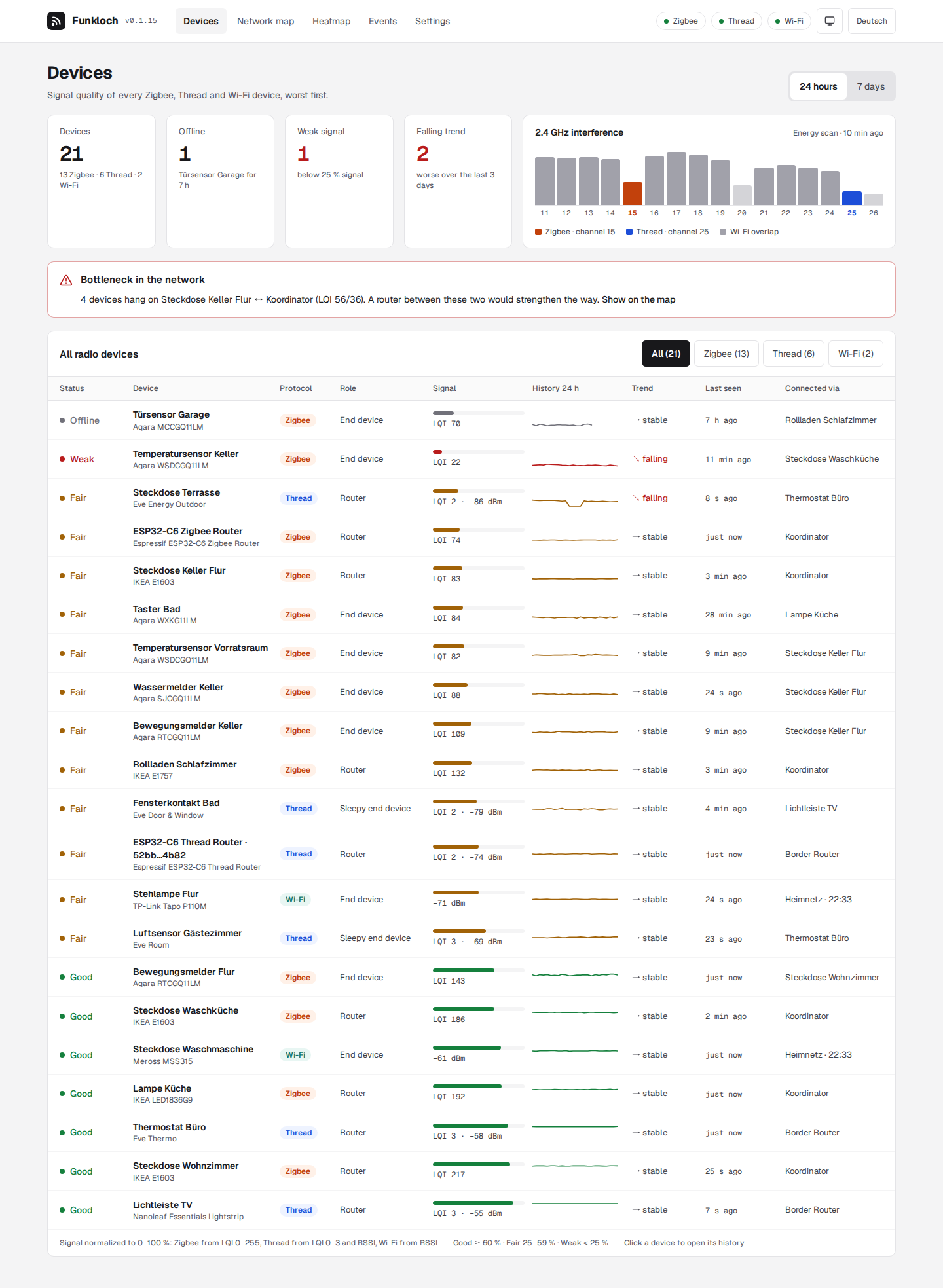
- Traffic light per device from the median of the last hour: good, fair, weak, offline.
- Sparkline of the last 24 hours or 7 days, trend over 72 hours, last seen and the parent it is connected through; worst devices first, filter by protocol.
- 2.4 GHz energy scan: interference per channel 11–26, the Zigbee and Thread channels marked.
- Matter: names, makers, battery and reachability of every Matter device from matterjs-server; next to the OTBR it names the Thread devices the border router only knows by address.
📈 Device history
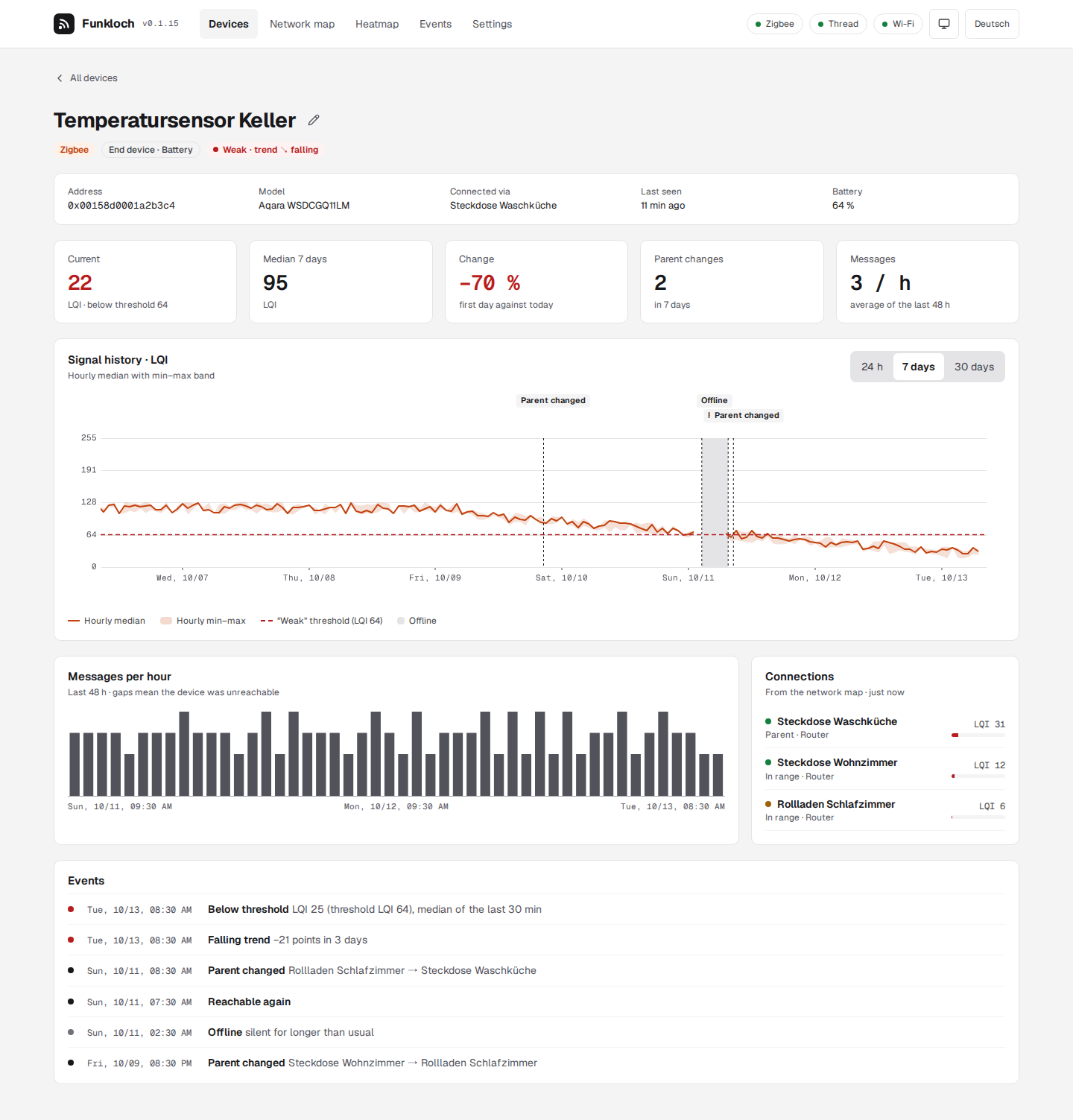
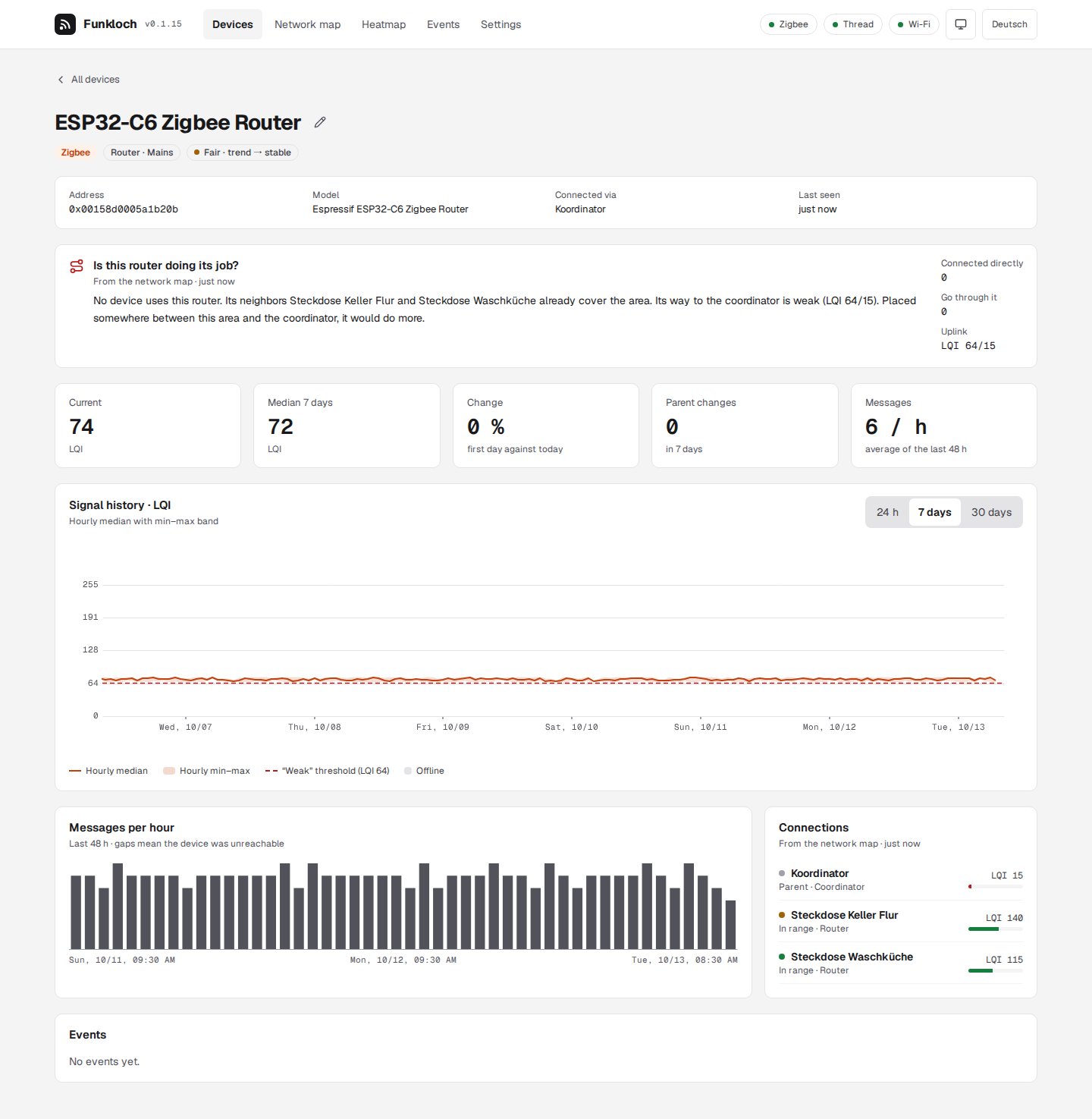
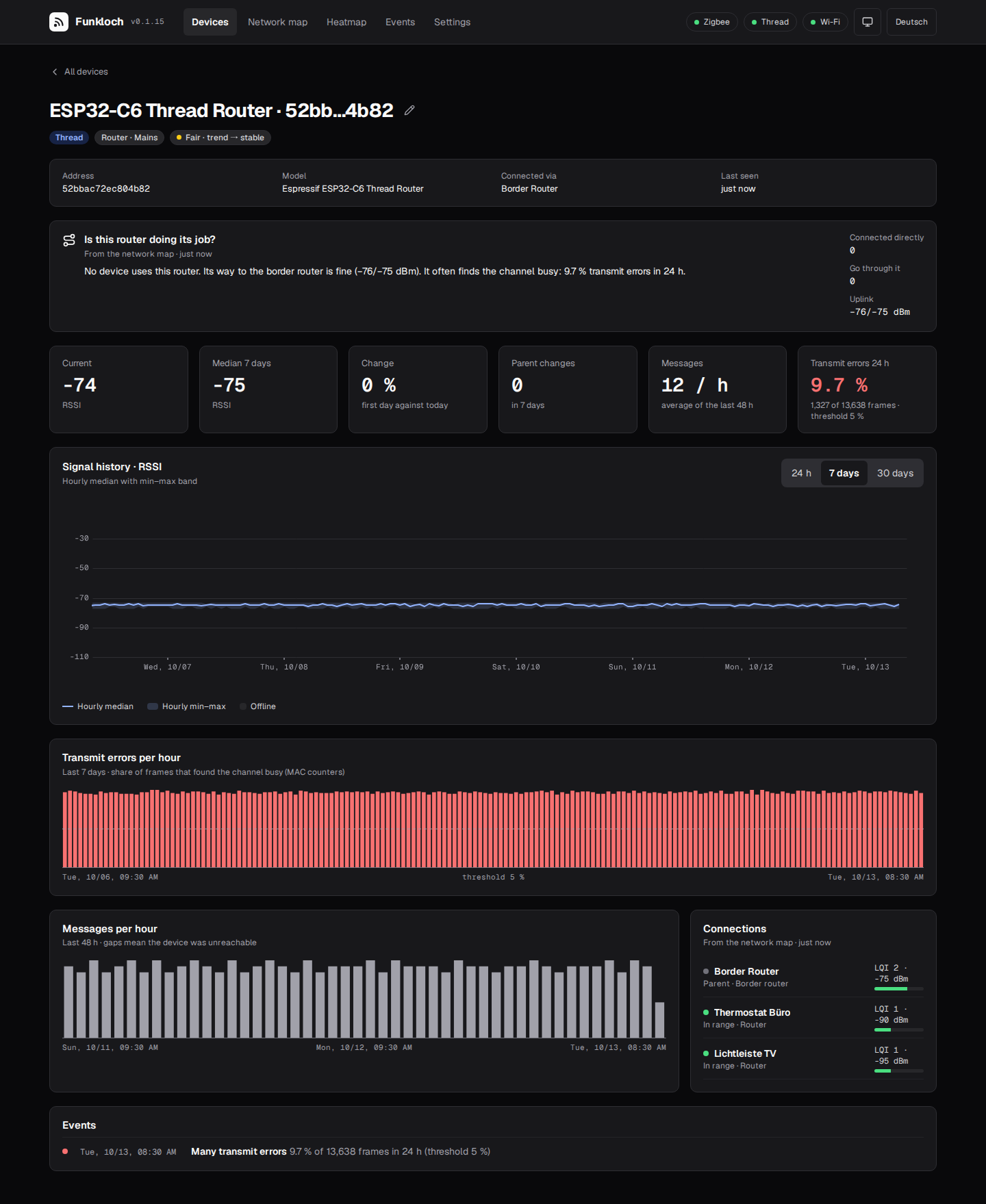
- Raw value chart (LQI or RSSI): every message for 24 hours, hourly median with min–max band for 7 and 30 days, offline stretches and the weak threshold drawn in.
- Messages per hour, parent changes, connections and the device's events.
- Names: Thread routers named after the model their diagnostics report, and a name of your own set right on the device's page.
- Transmit errors of Thread routers from their MAC counters: how often the channel was busy, per hour over 7 days, with a warning from 5 % a day.
🕸️ Network map and heatmap
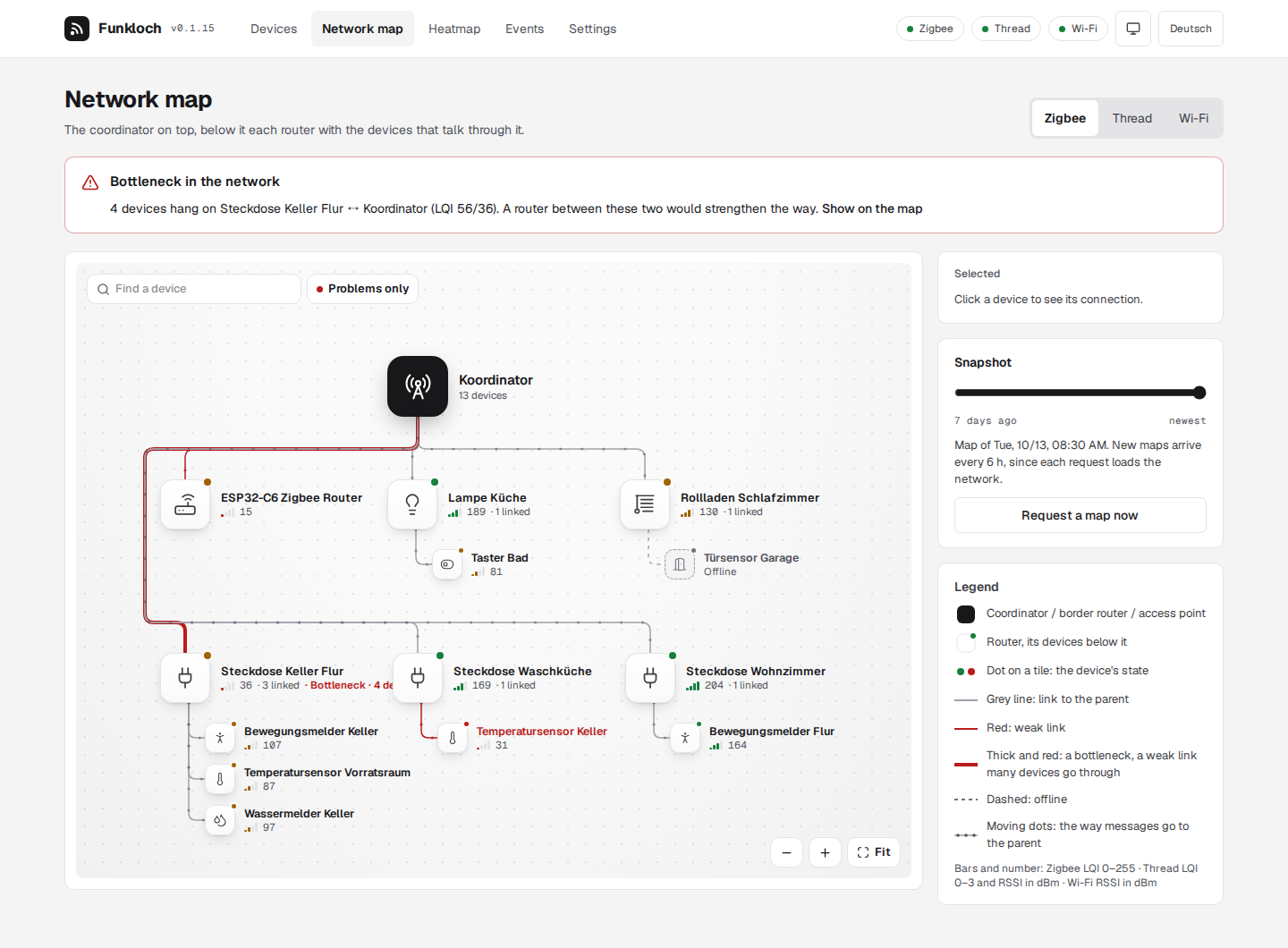
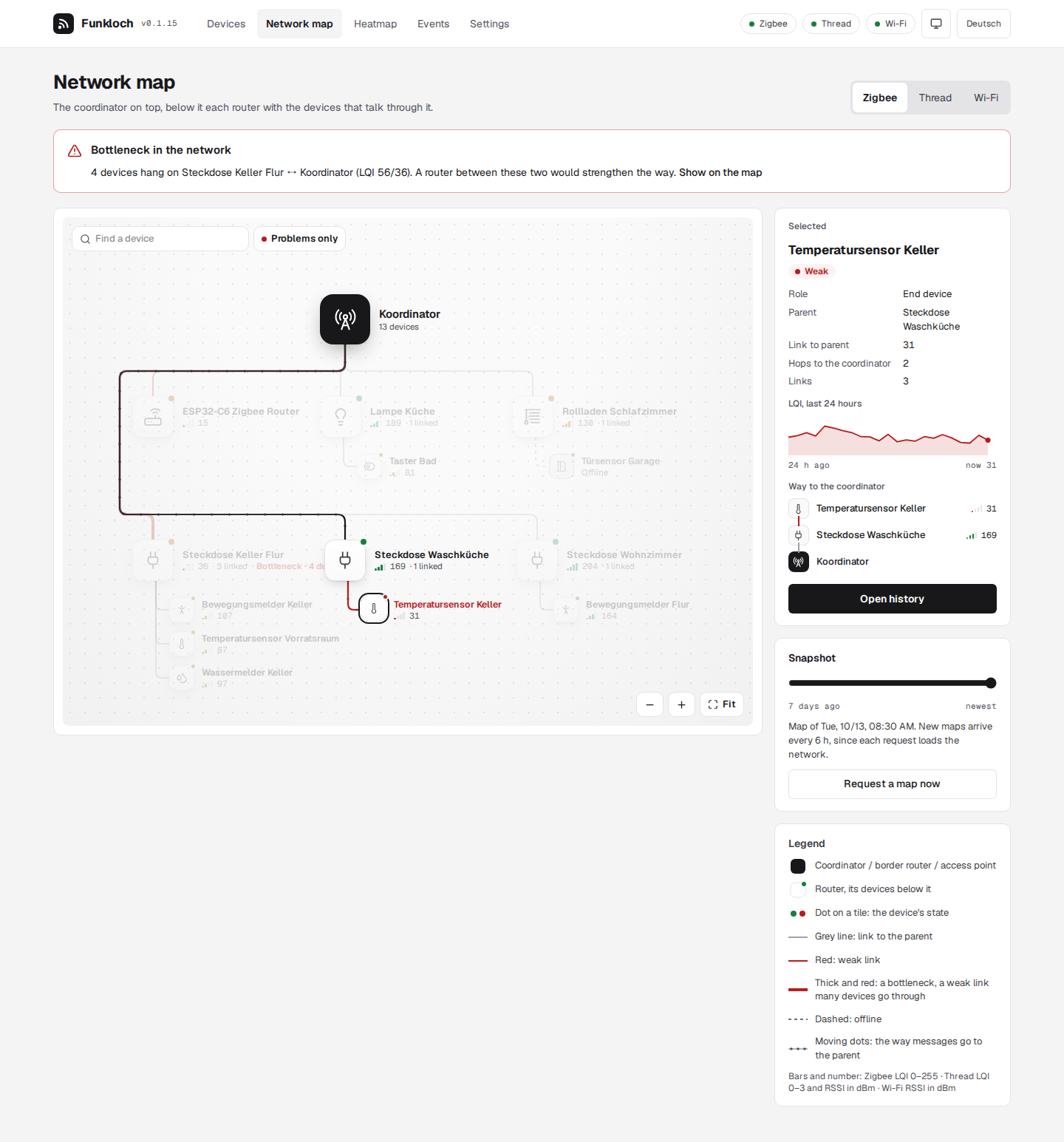
- Network map of the Zigbee mesh, the Thread network and the Wi-Fi access points as a tree: the coordinator on top, each router with the devices that talk through it, signal bars on every link, problems in red. The routers wrap into rows to fit the screen, so the map shows at full size on a phone too. Drag and zoom, search, "problems only", a device's way to the coordinator lit up on hover, older snapshots to compare.
- Repeaters: see which devices connect through a new Zigbee or Thread router, since when, and whether their signal got better; repeaters without sensors get a history from the network map.
- Router check: each router's page says whether it does its job: how many devices go through it, how strong its way to the coordinator is, whether other routers already cover its area, and where it would do more.
- Bottlenecks: a weak link that many devices hang on is named on the overview and drawn thick on the map, with where a router in between would help.
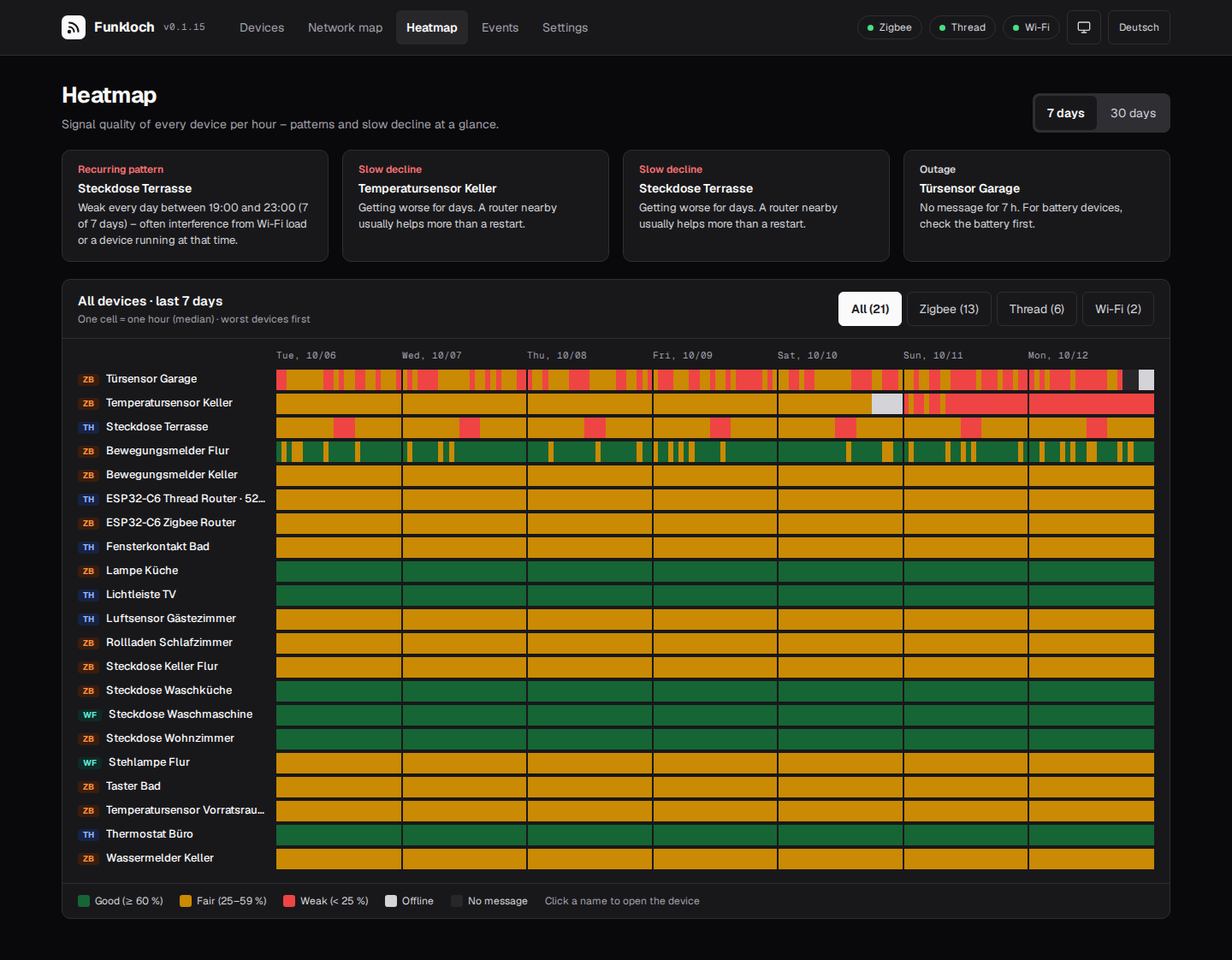
- Heatmap of every device by hour over 7 or 30 days, with recurring weak hours (the socket that drops every evening) and slow declines pointed out.
🔔 Events and notifications
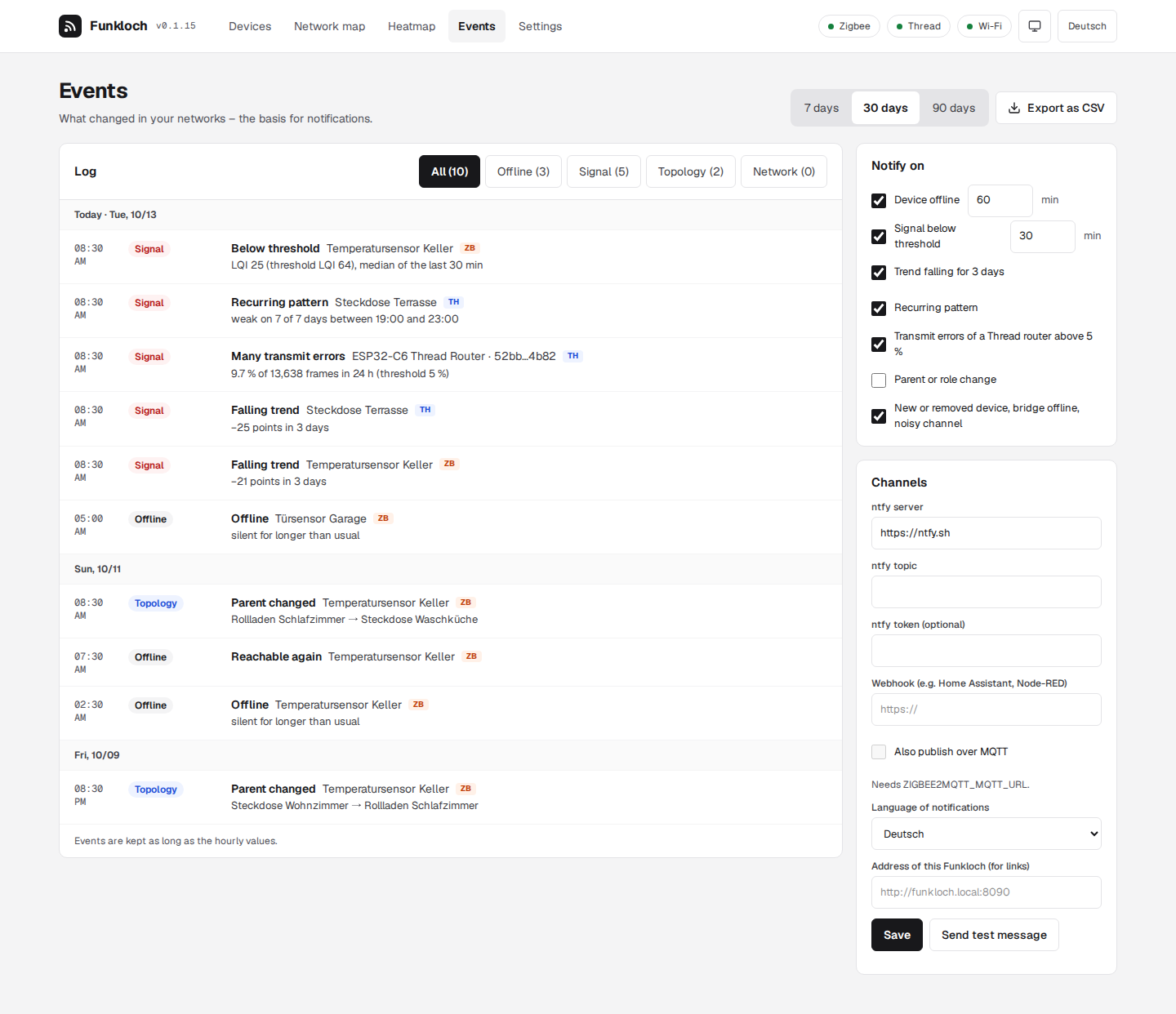
- Events: offline and back, below threshold, falling trend, recurring pattern, many transmit errors, parent or role change, new or removed device, bridge offline, noisy channel; CSV export.
- Notifications by ntfy, webhook (JSON) or MQTT, with a wait time for offline and weak signal, one message per device and hour, in German or English.
🔒 Self-hosted
- Login with one admin password (argon2), sessions in the database.
- One SQLite file: raw readings for 14 days, hourly values for a year, both adjustable.
- German and English interface, light and dark: as the system is set or chosen in the header, which also shows the version that runs.
📸 Screenshots
 |  |
 |  |
 |  |
 |
🔀 Funkloch and the alternatives
Funkloch is made for watching signal quality over time, not for controlling devices.
| What it is | Where Funkloch differs | |
|---|---|---|
| Zigbee2MQTT frontend | controls devices, shows current LQI and a network map | keeps the history and trends of every device |
| Home Assistant | home automation with entity history | linkquality history only per entity, no mesh history, nothing for Thread links |
| OTBR web UI | the border router's own pages | Thread topology and RSSI over time, next to Zigbee |
| Prometheus + Grafana with an exporter | general monitoring | no setup of exporters and dashboards, Thread included |
❓ FAQ
Does Funkloch change anything in my Zigbee or Thread network?
No. It only listens to Zigbee2MQTT over MQTT, reads the OTBR REST API and matterjs-server's WebSocket. The only requests it sends are the Zigbee2MQTT network map (at most hourly, every 6 hours by default), OTBR diagnostics and Matter attribute reads (neighbor tables and Wi-Fi signal, every 15 minutes by default); it never writes an attribute or commissions a device.
Does it work without Thread or without Zigbee?
Yes. Each network is on when its variable is set; with one network the protocol filter disappears.
Which Thread border routers work?
Through the REST API: those running the OpenThread Border Router (ot-br-posix), including the Home Assistant add-on. Newer images give RSSI per device; older ones only the topology. Details: Thread.
Through Matter: any border router (Apple, Google, Aqara, …), since the Matter devices report their own neighbor tables to matterjs-server, the server behind Home Assistant's Matter integration. Details: Matter.
How do I get notified when a Zigbee device goes offline?
Set up ntfy, a webhook or MQTT under Events → Notifications. Funkloch waits 60 minutes by default, so a short dropout sends nothing. See notifications.
Can I try it without my own network?
Yes: docker run --rm -p 8090:8090 -e FUNKLOCH_DEMO=1 tristanteu/funkloch starts with a demo
network of 21 devices and 30 days of history.
📚 Documentation
The full documentation, with search, is at firsttris.github.io/funkloch.
| Installation | Quadlet, Compose, variables, reverse proxy, backup, password reset |
| Zigbee2MQTT | what Funkloch reads and the one request it sends |
| Thread (OTBR) | REST API, older images, names |
| Matter | matterjs-server: Thread behind any border router, Wi-Fi devices, together with the OTBR |
| Signal, trend and reachability | score formulas, traffic light, trend, offline rule, patterns |
| Repeaters | which devices use a repeater, Zigbee2MQTT settings for silent routers |
| Events and notifications | rules, ntfy, webhook and MQTT payload |
| Development | building, checks, architecture, releases |
🛠️ Development
Requires Bun 1.4 or newer.
git clone https://github.com/firsttris/funkloch && cd funkloch
bun install
bun run demo          # http://localhost:8090 with the demo network
Bun, TanStack Start (React), TanStack Router, Query and Table, Zod, SQLite with Drizzle, mqtt.js, Tailwind 4, uPlot, Paraglide (German and English). Architecture, tests and releases: Development; fixtures from your own network: Recording fixtures.
🤝 Contributing
Issues and pull requests are welcome. A good bug report names the Zigbee2MQTT version, OTBR image or matterjs-server version
and, for parsing problems, includes a short recording from bun run record. Please run
bun run typecheck && bunx biome ci . && bun run test before opening a pull request.
⭐ Like Funkloch? A star on GitHub helps others find it.
🐛 Report a bug · 💡 Request a feature
License: AGPL-3.0 · © Tristan Teufel and contributors
Changed versions you pass on or run for others must offer their source code under the AGPL; a commercial license without these obligations is available via teufel-it.de.
Funkloch is not affiliated with Zigbee2MQTT, the Connectivity Standards Alliance, the Thread Group, OpenThread, matter.js or the Open Home Foundation.
Tag summary
Content type
Image
Digest
sha256:fcee8b9c0…
Size
71.6 MB
Last updated
5 days ago
docker pull tristanteu/funkloch