tristanteu/stellwerk
Central web UI to manage Syncthing on all your devices
588
tristanteu/stellwerk repository overview
Stellwerk: central web UI to manage Syncthing on all your devices
Self-hosted control center for Syncthing: pair devices, share folders and set paths for every PC from one web UI.
A small agent on each device brings its own Syncthing and follows what the server says; a hub Syncthing on the server keeps a full copy of every folder.
Open source, no cloud, no clicking "accept" on every machine.




docker compose up -d && docker compose exec -T stellwerk stellwerk set-password <<< 'a long password'
Install • Why • Features • Screenshots • Alternatives • FAQ • Documentation
💡 Why Stellwerk?
Syncthing has no central management: every device is set up in its own web UI, and every new share has to be accepted on the other side. Resilio Sync offers a management console, but only commercially and closed source.
- Configure once, on the server: pair a device, pick folders, modes and paths; both sides are set up automatically.
- No standstill when a PC is off: the server is a member of every folder and holds a full copy, so changes reach a device as soon as it is back.
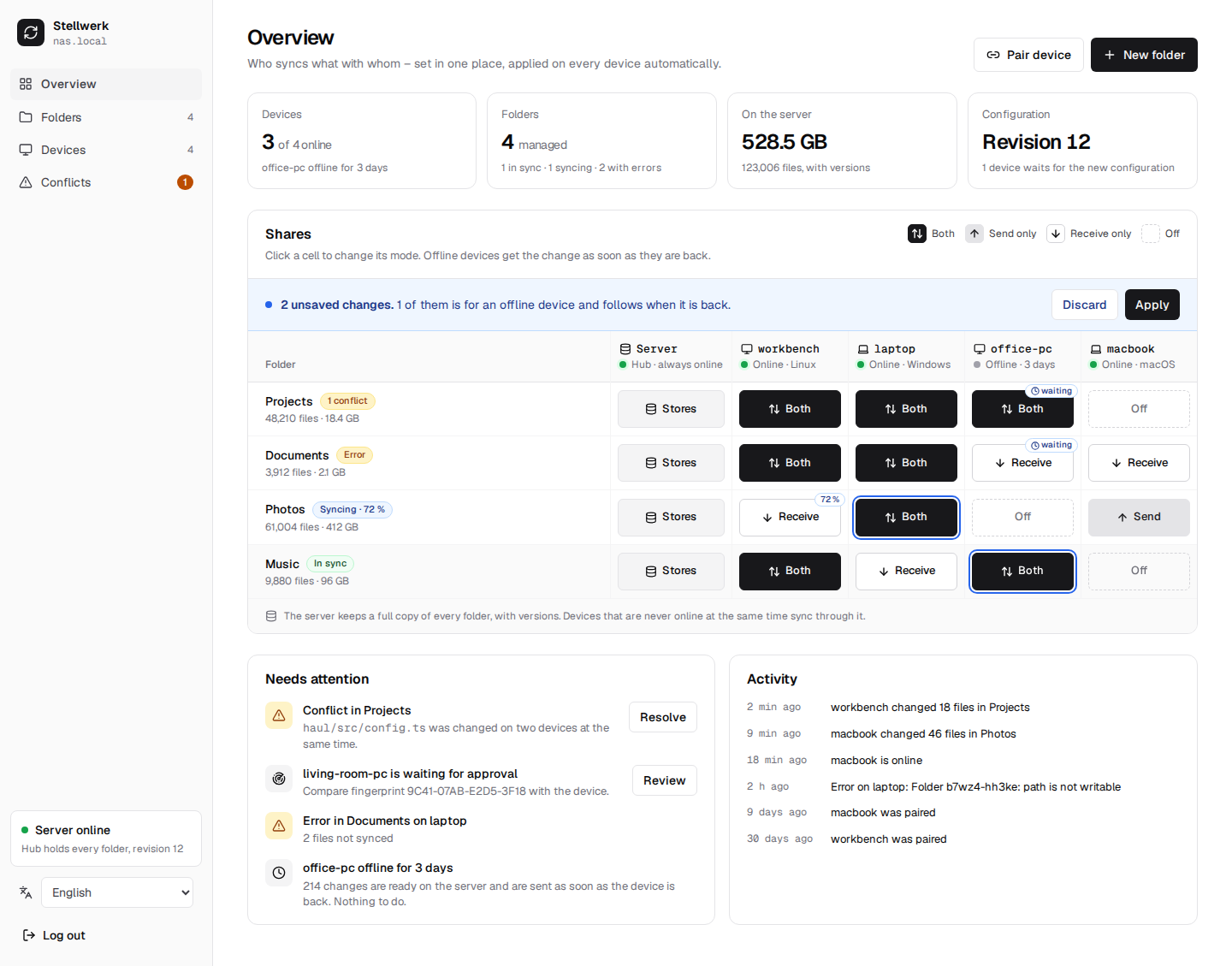
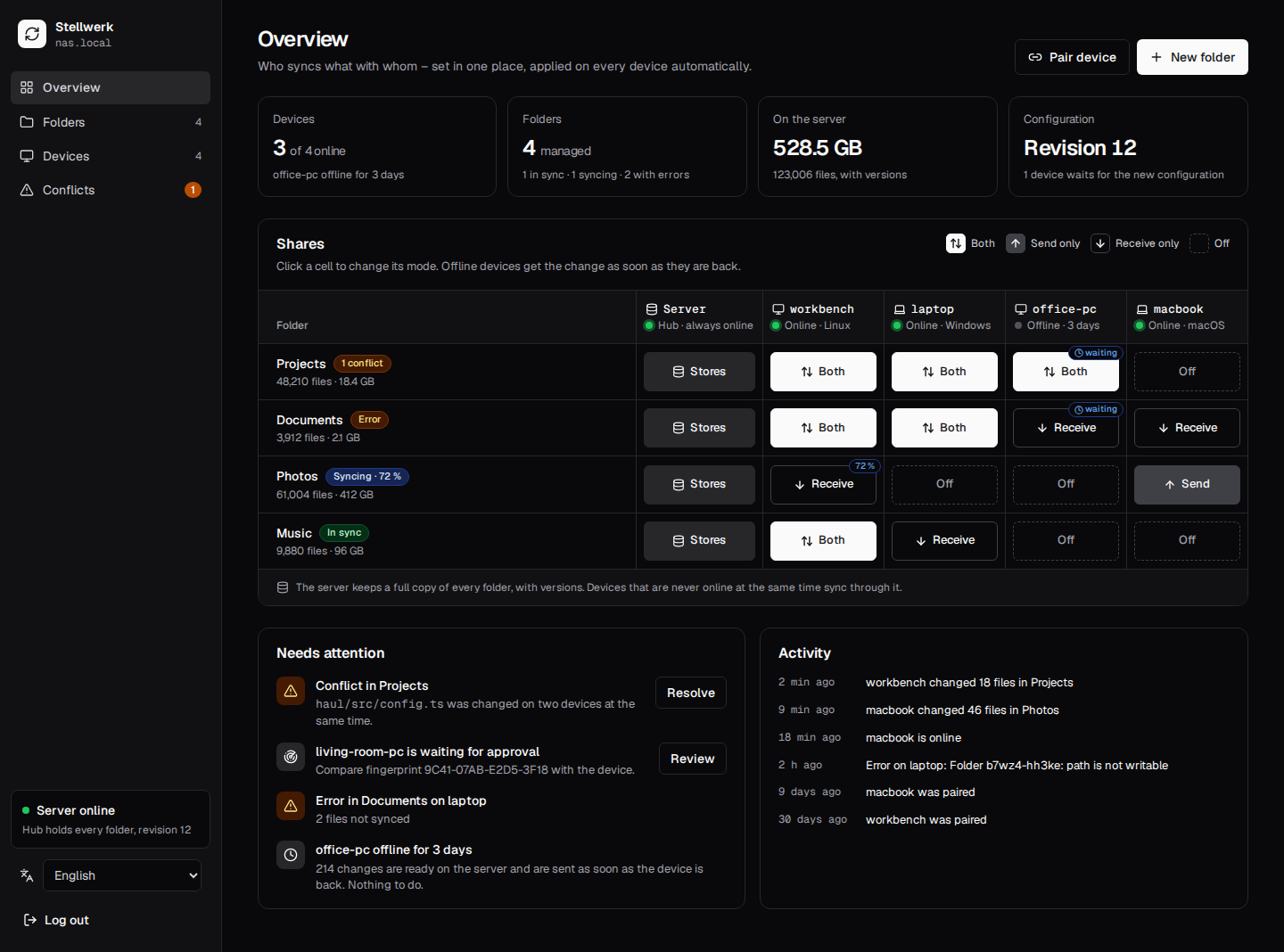
- A clear overview: folders × devices as one matrix, sync status at a glance.
- Syncthing does the syncing: proven, encrypted transfer; Stellwerk only steers it.
Server: Linux with Docker or Podman (amd64 and arm64: a NAS, a mini PC, a Raspberry Pi 4/5, a VPS). Devices: Linux, Windows and macOS.
🚀 Install
On the server, a compose.yaml (the hub address is where your devices reach the server):
services:
  stellwerk:
    image: tristanteu/stellwerk:latest
    restart: unless-stopped
    ports: ["8080:8080", "22001:22001"]   # web UI and agents; sync port of the hub
    environment:
      STELLWERK_HUB_ADDRESS: tcp://nas.local:22001
    volumes: ["stellwerk:/data"]
volumes:
  stellwerk:
docker compose up -d
docker compose exec -T stellwerk stellwerk set-password <<< 'a long password'
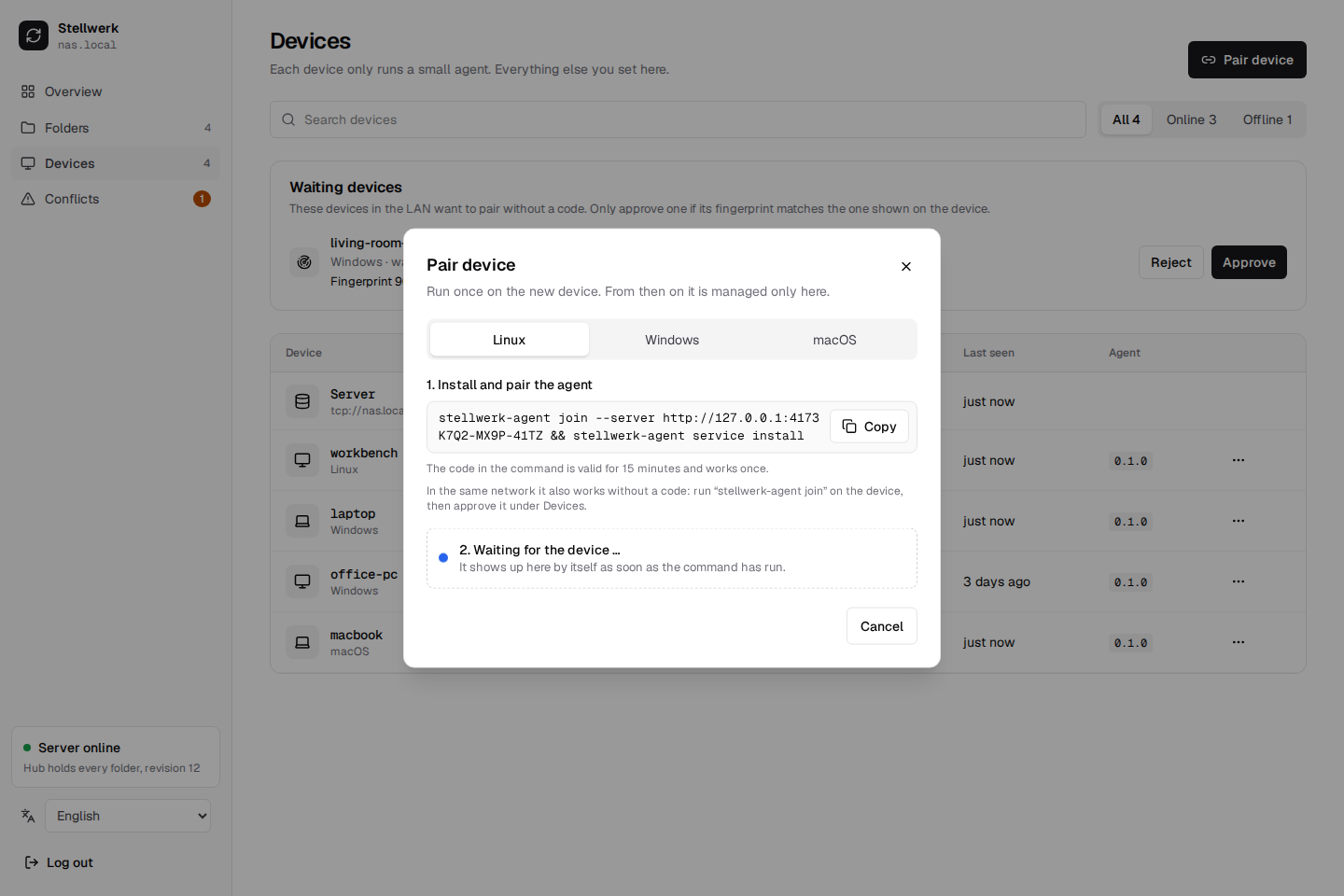
Open http://nas.local:8080, click Pair device and run the one command it shows in a terminal
on each device, as the normal user. It downloads the agent, pairs it and starts it:
curl -fsSL https://github.com/firsttris/stellwerk/releases/download/vX.Y.Z/install.sh | sh -s -- http://nas.local:8080 K7Q2-MX9P-41TZ
On Windows the dialog shows the same as a PowerShell command; there is also an installer that asks for the address and the code. Podman Quadlet, a reverse proxy with HTTPS, backups and updates are in the installation guide; a step-by-step first run is in Getting started.
Before v1.0: every release publishes the image
tristanteu/stellwerkand carries the agents. Everything works and is tested on Linux, Windows and macOS; the self-update of the agents is the last piece before v1.0 (roadmap).
✨ Features
🗺️ One matrix for everything
- Folders × devices: one click per cell switches between both directions, send only, receive only and off.
- Drafts: changes collect until you apply them, then go out as one numbered revision.
- Offline devices catch up: a device that is off gets the new configuration and the files as soon as it is back; the cell says "waiting" until then.
🔗 Pairing without clicking on every PC
- One command per device: "Pair device" shows a command with a code valid for 15 minutes; it downloads the agent, pairs it and starts it, and the device appears in the UI by itself.
- Your own CA works too: behind a private CA (e.g. Caddy's
tls internal) the command carries the CA's fingerprint, and the agent trusts it without any setup on the device. - In the LAN without a code:
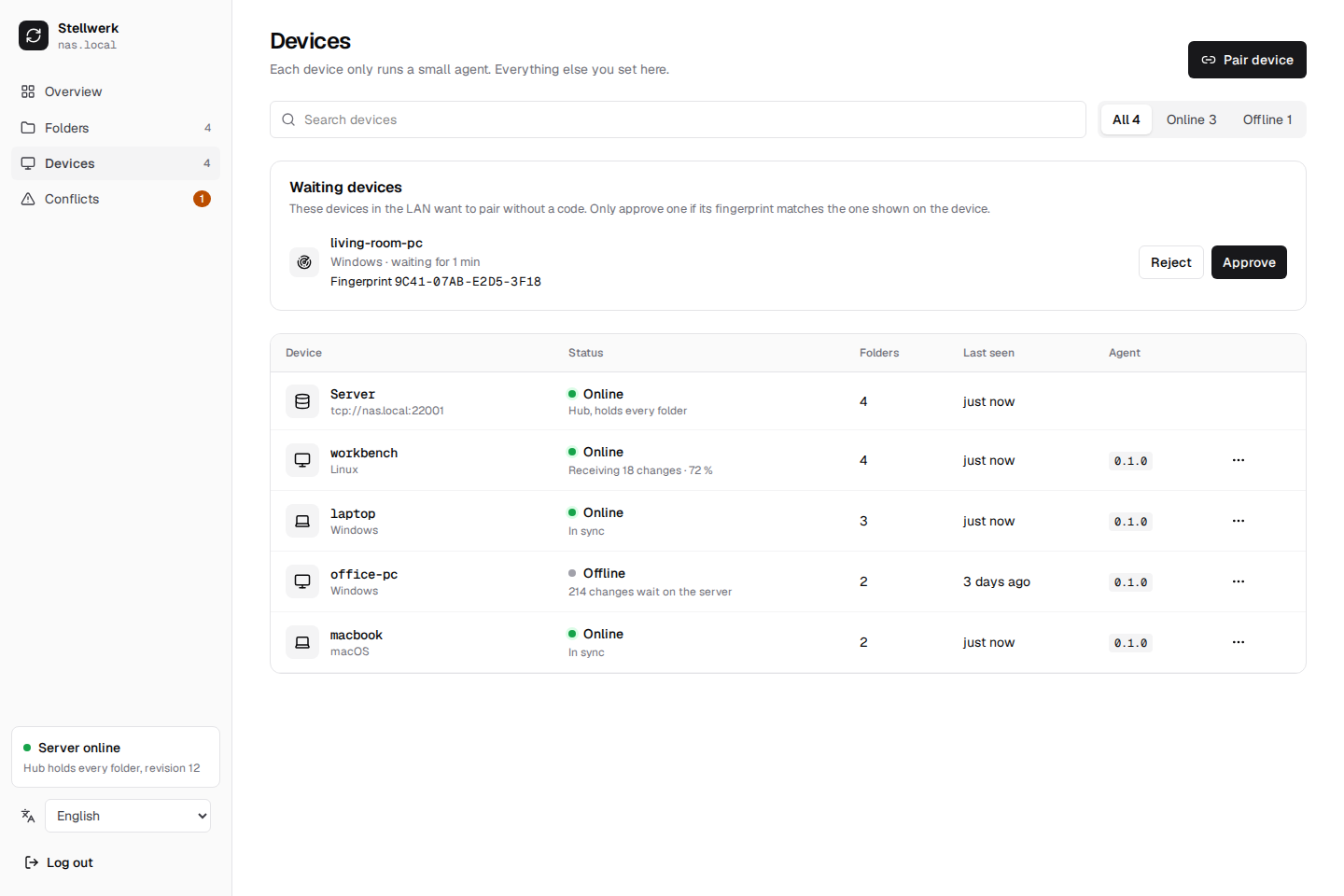
stellwerk-agent joinfinds the Zentrale over mDNS; the device waits under "Waiting devices" until you approve it, after comparing its fingerprint. - Runs in the background:
stellwerk-agent service install(or the Windows installer) starts the agent at login as the current user, without admin rights, on Linux, macOS and Windows. - Signed sign-in: after pairing, the agent signs in with its own Ed25519 key; a device can be blocked or removed in the UI.
🗄️ The server holds everything
- Hub in every folder: the server keeps a full copy of each folder, with versions for a year.
- Live status: progress per folder and device, what an offline device will get, and an activity feed ("laptop changed 18 files in Projects").
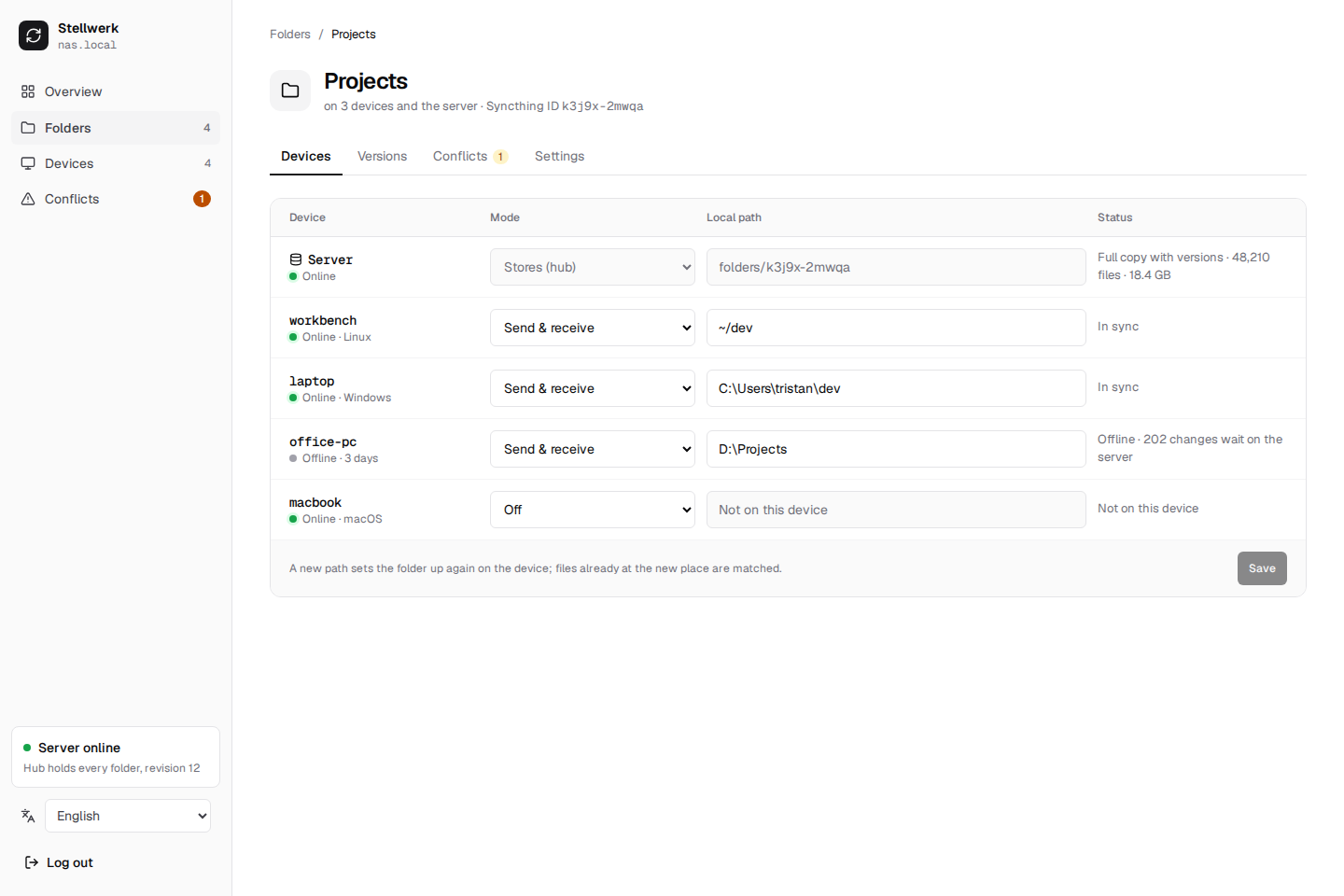
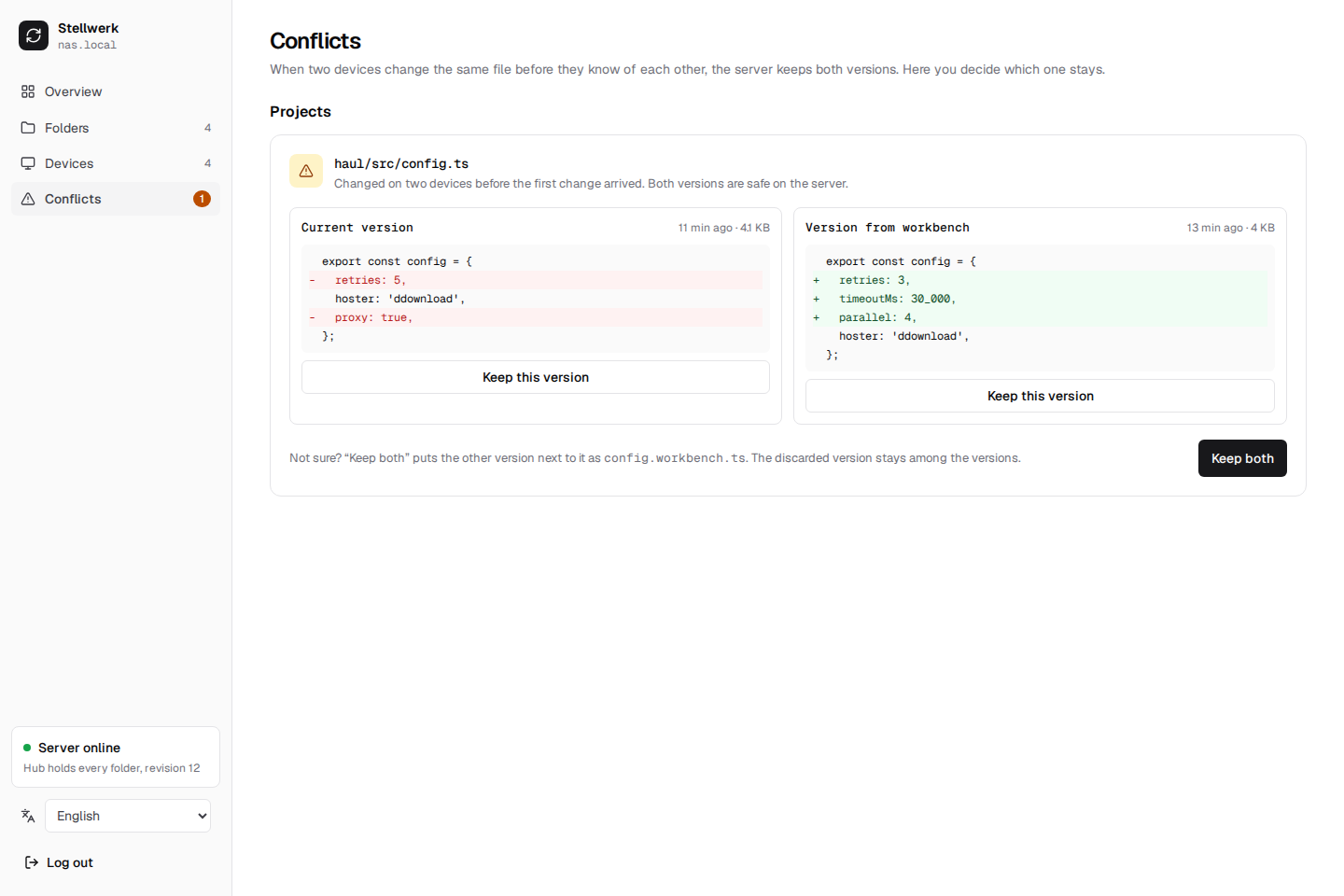
- Conflicts solved in one place: both versions side by side with a diff; keep one or both, the other stays in the versions. Any older version of a file can be restored.
- German and English, following the browser or switched in the sidebar.
- Your Syncthing stays yours: the agent brings its own Syncthing on its own ports and never touches a Syncthing you already run.
📸 Screenshots
 |  |
 |  |
 |
🔀 Stellwerk and the alternatives
Stellwerk is made for one admin who wants all their own devices synced through their own server.
| What it is | Where Stellwerk differs | |
|---|---|---|
| Syncthing alone | peer-to-peer sync, configured on each device | one place to configure all devices, a server that is always in every folder |
| Resilio Sync with Management Console | sync with central management | open source and free; no commercial license needed |
| Seafile | self-hosted file sync and share server with its own clients | uses Syncthing; plain folders on every device, no own storage format |
| Nextcloud | self-hosted cloud suite with file sync | does only sync, light on the server, direct LAN transfer through Syncthing |
| SyncWings | web file manager on top of Syncthing instances | manages the Syncthing on every device, not only on the server |
❓ FAQ
Is there a central management UI for Syncthing?
Yes, that is what Stellwerk is for: one web UI on your server that configures Syncthing on all your devices. There is no release yet, but it can be built from source; see Install.
Does it change my existing Syncthing?
No. The agent brings its own Syncthing with its own configuration and ports and leaves a Syncthing you already run alone.
Can I add devices that run plain Syncthing, like a phone?
Not yet. Every device needs the agent, which runs on Linux, Windows and macOS. Android and iOS are not supported.
Does it run on a Synology, Unraid or Raspberry Pi?
Anywhere Docker or Podman runs on Linux with amd64 or arm64: a Raspberry Pi 4 or 5 with a 64-bit OS, Unraid, a Synology with Container Manager. The server needs disk space for a full copy of every folder.
Do the devices need admin rights or open ports?
No. The agent runs as the normal user and starts at login; devices only connect out to the server. Only the server needs two ports open: the web port (behind HTTPS) and the hub's sync port.
Is my data encrypted?
In transit, yes: Syncthing encrypts every transfer with TLS and accepts only known devices; the web UI and the agents' connection go through your HTTPS proxy. On the server, the hub keeps a normal copy of every folder, so protect the server like the devices. Details in Security.
What happens if the server is down?
The devices keep their files and their last configuration. Changes wait on each device and sync as soon as the server is back.
📚 Documentation
The full documentation, with search, is at firsttris.github.io/stellwerk.
| Getting started | from nothing to a first synced folder |
| User guide | every page of the web UI: matrix, devices, pairing, folders, conflicts, versions |
| Installation | Docker Compose, Podman Quadlet, binary; reverse proxy and TLS; the agent on each OS; updates and backups |
| Reference | every option, port, file and limit |
| Security | trust model, encryption, login, pairing |
| Troubleshooting | logs and the common problems |
| Architecture | Zentrale, hub, agent and engine; protocol; reconciler; roadmap |
| Development | building, tests, CI, releases |
🛠️ Development
Requires Rust (stable), Node 22 and pnpm.
git clone https://github.com/firsttris/stellwerk && cd stellwerk
pnpm install && pnpm dev:demo   # the UI on demo data, no server needed
cargo test                      # downloads the pinned Syncthing once and runs real instances
pnpm e2e                        # Playwright against the UI in demo mode
Rust workspace: protocol (messages, desired state), engine (Syncthing control and
reconciler), agent, zentrale (axum, SQLite); React UI in web/, embedded into the Zentrale.
Running a real Zentrale and agent locally, the tests and releases:
Development.
🤝 Contributing
Issues and pull requests are welcome. A good bug report names the OS, the Stellwerk and Syncthing
versions and what the Zentrale showed. Please run cargo fmt --all --check,
cargo clippy --all-targets -- -D warnings, cargo test and pnpm check before opening a pull
request.
⭐ Like Stellwerk? A star on GitHub helps others find it.
🐛 Report a bug · 💡 Request a feature
License: AGPL-3.0 · © Tristan Teufel and contributors
Changed versions you pass on or run for others must offer their source code under the AGPL; a commercial license without these obligations is available via teufel-it.de.
Stellwerk is not affiliated with the Syncthing Foundation or Resilio.
Tag summary
Content type
Image
Digest
sha256:0ea989e6a…
Size
27 MB
Last updated
about 1 hour ago
docker pull tristanteu/stellwerk