tty0/unifi-controller
The Ubiquiti Unifi Network Controller for ARM64 architecture (Tested in Raspberry Pi 4B).
3.2K
tty0/unifi-controller repository overview
Unifi Controller for ARM64

 LinkedIn
 GitHub
The UniFi Network Controller is a free software suite that allows you to set up, configure, manage, and analyze your UniFi network in a centralized manner. Normally Unifi Controller runs in Cloud Providers or in the data center using the Unifi Cloud Key.
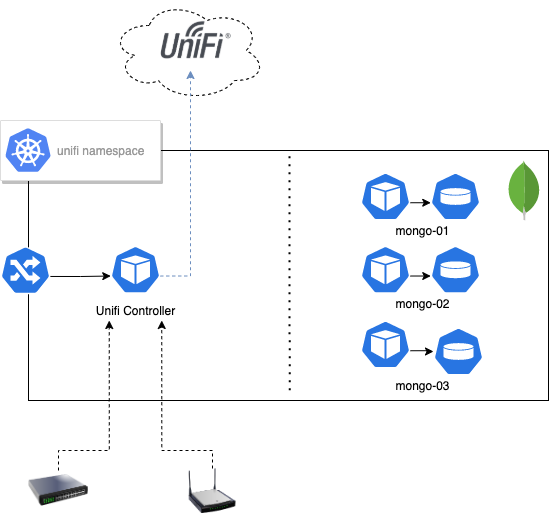
This image, allows you to run Unifi Network Controller in Kubernetes using the ARM64 architecture. It has been tested Raspberry-Pi 4B running Rancher's K3s. The main idea before building this image was to execute this with a decoupled MongoDB database, to improve availability, resiliency, and performance.
The image includes the mongodb binaries because the Unifi Network Controller software needs it to execute, but the server must be running externally.
Typically Unifi Controller configures two different MongoDB databases, ace for the configuration itself and ace_stats to store networking metrics.
You need to create your MongoDB cluster before using this image. A few examples of the Kubernetes configuration have been included in this repository.
Supported tags and respective Dockerfile links
Environment
The following Environment variables require to be initialized before running.
| Variable | Value | Default |
|---|---|---|
DEBUG | Enables init scripts debug mode | false |
JVM_MAX_HEAP_SIZE | JVM Maximum Heap Size | --- |
JVM_INIT_HEAP_SIZE | JVM Minimum Heap Size | --- |
BIND_PRIV | Bind service privately | false |
DB_MONGO_LOCAL | Run local MongoDB instance | --- |
DB_MONGO_URI | MongoDB URI | --- |
STATDB_MONGO_URI | StatDB Mongo URI | --- |
UNIFI_DB_NAME | Name of the UNIFI database | --- |
RUN_CHOWN | Update permissions at init | true |
Running
You need to have an ARM64 cluster with a MongoDB accessible by the Unifi Controller pods. Check the Kubernetes directory to see examples.
Architecture
Exposes
The following ports are exposed by Unifi Controller.
| Protocol | Port number | Description |
|---|---|---|
| UDP | 3478 | Port used for STUN. |
| TCP | 8080 | Port used for device and controller communication. |
| TCP | 8443 | Port used for controller GUI/API as seen in a web browser |
| TCP | 8880 | Port used for HTTP portal redirection. |
| TCP | 8843 | Port used for HTTPS portal redirection. |
| TCP | 6789 | Port used for UniFi mobile speed test. |
| TCP | 8881 | Port used for Unifi Hotspot for redirection. |
| TCP | 8882 | Port used for Unifi Hotspot for redirection. |
| UDP | 10001 | Port used for device discovery |
NOTE: These ports need to be open at the gateway/firewall as well as on the controller host. This would be achieved by creating port forwards on the gateway/firewall where the controller host is located.
Egress Ports Required for UniFi Remote Access
The following ports are required to reach the Unifi Cloud for Remote Access.
| Protocol | Port number | Description |
|---|---|---|
| UDP | 3478 | Port used for STUN. |
| TCP/UDP | 443 | Port used for Remote Access service. |
| TCP | 8883 | Port used for Remote Access service. |
Credits
Bootstrap scripts are based on goofball222/unifi Docker images.
Contributing
Pull requests are welcome. For major changes, please open an issue first to discuss what you would like to change.
License
Tag summary
Content type
Image
Digest
Size
287.4 MB
Last updated
about 5 years ago
docker pull tty0/unifi-controller