tymz315/nesdev
NES / Famicom Development Environment. Includes assembler and C compiler.
10K+
tymz315/nesdev repository overview
NES / Famicom Development Environment
-
Maintained by:
Bundled software
-
CC65 v2.19
-
asm6 v1.6
-
asm6f v1.6_freem02
-
NESASM(MagicKit) v2.51 -
NESASM(Unofficial MagicKit) v2.51
How to use this image
Build with Makefile
For mac(Intel) or Linux
$ docker run --rm -v "$PWD:/workspace" -w /workspace tymz315/nesdev make
For Windows
> docker run --rm -v "%CD%:/workspace" -w /workspace tymz315/nesdev make
Build with NESASM
For mac(Intel) or Linux
$ docker run --rm -v "$PWD:/workspace" -w /workspace tymz315/nesdev nesasm sample.nes
For Windows
> docker run --rm -v "%CD%:/workspace" -w /workspace tymz315/nesdev nesasm sample.nes
To coding with Visual Studio Code
First step
-
(For Windows only) Install WSL2 on your system.
-
Install "Docker Desktop" on your system.
-
(For Windows only) Install "WSL(ms-vscode-remote.remote-wsl)" extension to Visual Studio Code.
-
Install "Dev Containers(ms-vscode-remote.remote-containers)" extension to Visual Studio Code.
Create Project
-
Create a project directory and open it in Visual Studio Code.
-
Create a file with the following contents as .devcontainer/devcontainer.json
{ "name": "NESDEV", "image": "tymz315/nesdev" } -
Run "Dev Containers: Reopen in Container" in the command palette.
-
Visual Studio Code opens in the NESDEV container. In Visual Studio Code, Created source code will be synced with your project directory.
How to compile
Create "sample.nes" and run the following command in the Visual Studio Code terminal.(For NESASM example)
# nesasm sample.nes
Example
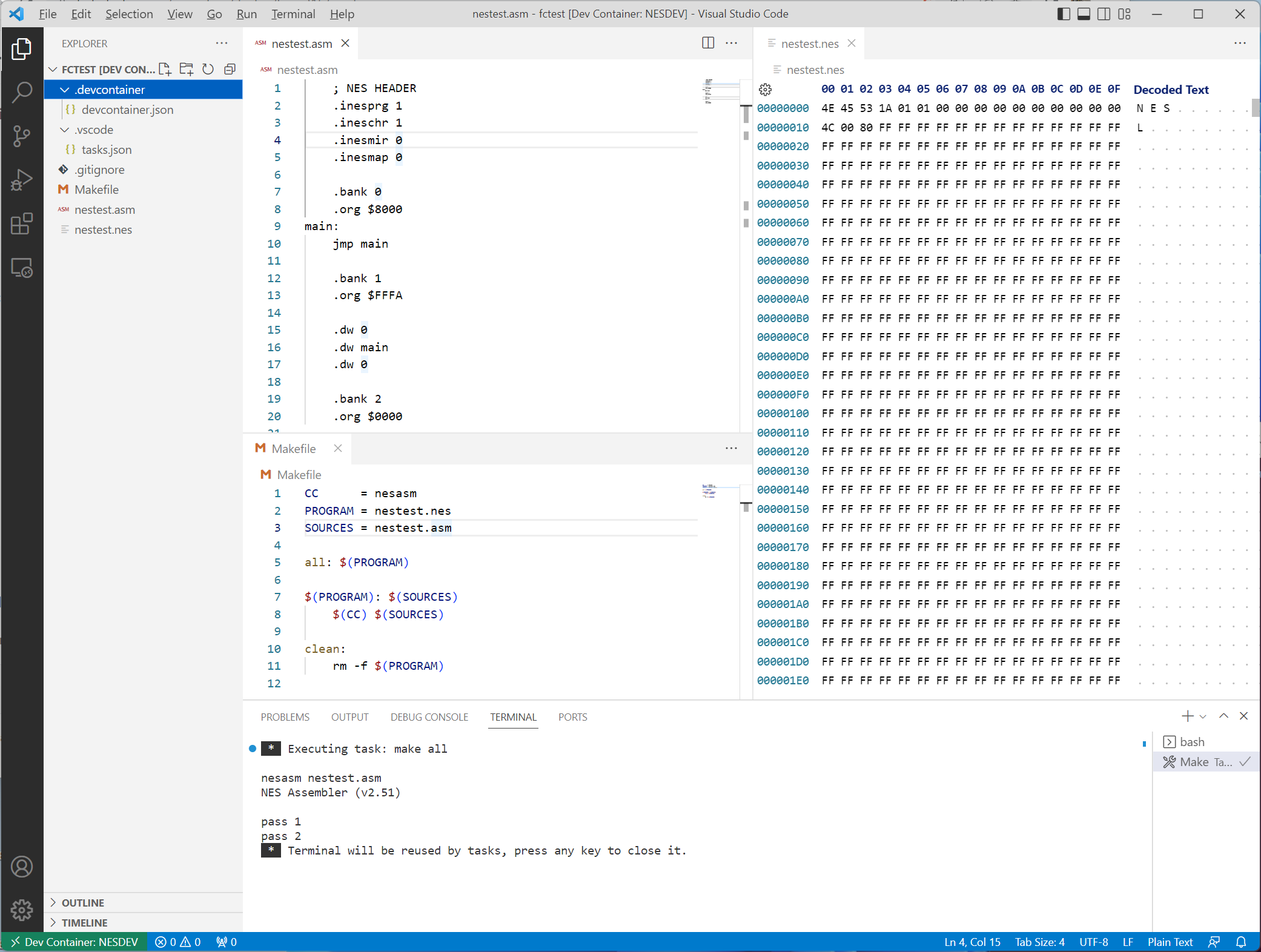
-
.devcontainer/devcontainer.json
Uses Microsoft Hex Editor extension. And associate it *.nes file.
{ "name": "NESDEV", "image": "tymz315/nesdev", "extensions": [ "ms-vscode.hexeditor" ], "settings": { "workbench.editorAssociations": { "*.nes": "hexEditor.hexedit" } } } -
.vscode/tasks.json
Press Ctrl+Shift+B to run make.
{
    "version": "2.0.0",
    "tasks": [
        {
            "label": "Make",
            "type": "shell",
            "command": "make all",
            "problemMatcher": [],
            "group": {
                "kind": "build",
                "isDefault": true
            }
        }
    ]
}
Have fun!
Changelog
[1.0.2] - 2025-03-31
Add support for ARM64 architecture.
[1.0.1] - 2022-12-06
Changed NESASM to unofficial version.
[1.0.0] - 2022-12-04
First release.
Tag summary
Content type
Image
Digest
sha256:fd59b8a1a…
Size
43.1 MB
Last updated
over 1 year ago
docker pull tymz315/nesdev