ugleiton/mongo-gui repository overview

Mongo GUI
A web-based MongoDB graphical user interface.
Demo
Read-only demo: https://mongo-gui.herokuapp.com/
Features
- Connect to local/remote mongodb instances
- View/add/delete databases
- View/add/delete collections
- View/add/update/delete/copy documents
- Multi tab support
- Query documents
- Advanced pagination
- Supports all BSON types in documents
- Rich user interface
How to install and run
There are two ways to install mongo-gui.
From npm:
- Install the module globally using the command
npm install -g mongo-gui - Then use the command
mongo-guito run the application
From github:
- First of all, clone the mongo-gui repository using the command
git clone https://github.com/arunbandari/mongo-guior download the zip file from here. - Change the directory to mongo-gui
cd mongo-gui - Install all the dependencies
npm install - Start the application using either
npm startornode server.jscommand
Note: Node.js must be installed on your machine to run this application
From Docker Hub:
Docker compose
version: '3'

services:
  mongo-gui:
    container_name: "mongo-gui"
    image: ugleiton/mongo-gui
    restart: always
    ports:
      - "4321:4321"
    environment:
      - MONGO_URL=mongodb://localhost:27017
Usage
The commands mongo-gui and npm start or node server.js start the application with the following configuaration:
-
URL (-u):
mongodb://localhost:27017 -
PORT (-p):
4321and the application will be accesible at
http://localhost:4321
To connect to any other mongodb instance, pass mongo connection string as an argument, eg:
-
Installed via npm:
mongo-gui -u mongodb+srv://<username>:<password>@host/<dbnames>?retryWrites=true&w=majority' -
Installed via github:
(npm start --/node server.js) -u mongodb+srv://<username>:<password>@host/<dbnames>?retryWrites=true&w=majority'
Available options:
- -u: url, mongo-gui tries to connect to this mongodb instance
- -p: port, mongo-gui listens on this port
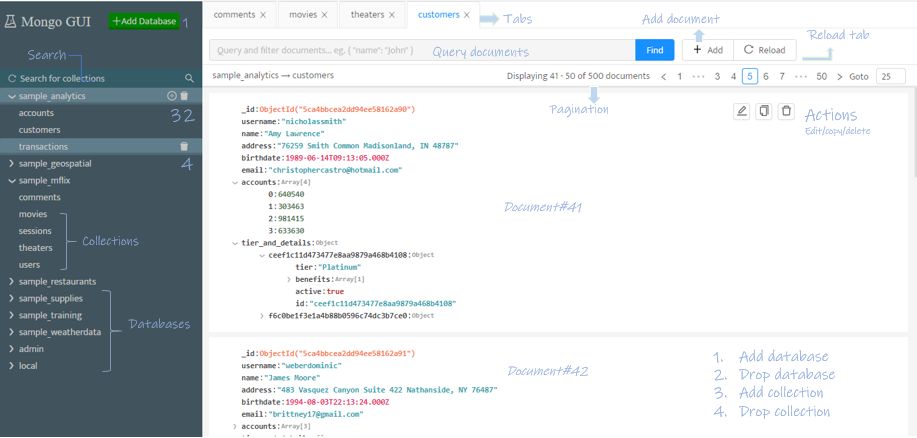
Screenshots
Controls:
License
Tag summary
Content type
Image
Digest
Size
358 MB
Last updated
about 6 years ago
docker pull ugleiton/mongo-gui