vassio/l2tp-ipsec-radius-docker repository overview
Docker image with L2TP (IpSec, Radius, RadSec) server
Description
Access private network from the internet, support port forwarding from private network to outside via cloud.
Example
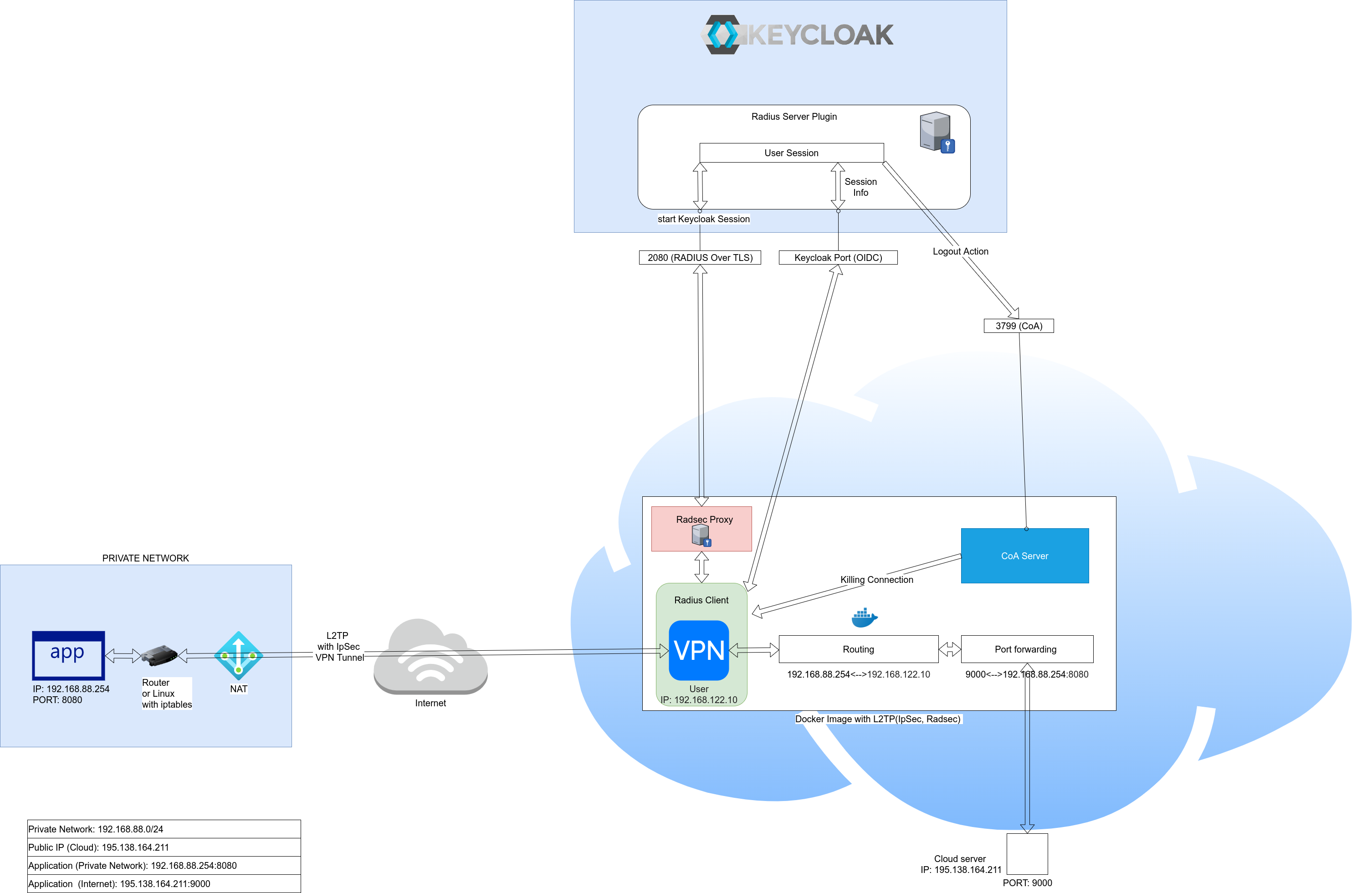
Installation
sudo apt-get update && sudo apt-get install -y curl
curl -sSL https://raw.githubusercontent.com/vzakharchenko/l2tp-ipsec-radius-docker/main/ubuntu.install| bash
Features
- Docker image
- Keycloak authentication and authorization
- Radius client
- RadSec protocol (Radius over TLS)
- IpSec
- Management routing and portforwarding using json file
- Connect to LAN from the internet
- Port forwarding
- Connect multiple networks
- Automatic installation(Ubuntu)
- Manual Installation steps (Ubuntu)
- Deny user access to VPN
config.json structure
{
   "radsec":{
      "privateKey": RADSEC_PRIVATE_KEY,
      "certificateFile": RADSEC_CERTIFICATE_FILE,
      "CACertificateFile": RADSEC_CA_CERTIFICATE_FILE,
      "certificateKeyPassword": RADSEC_PRIVATE_KEY_PASSWORD
   },
   "keycloak":{
      "json":KEYCLOAK_JSON
   },
   "radius":{
      "protocol":RADIUS_PROTOCOL
   },
   "authorizationMap":{
      "roles":{
         KEYCLOAK_ROLE:{
            "routes":ROUTING_TABLE,
            "forwarding":{
               "sourceIp":APPLICATION_IP,
               "sourcePort":APPLICATION_PORT,
               "externalPort":REMOTE_PORT
            }
         }
      }
   },
   "ipsec":{
      "secret":IPSEC_SHARED_SECRET
   }
}
Where
- RADSEC_PRIVATE_KEY ssl privateKey
- RADSEC_CERTIFICATE_FILE ssl private certificate
- CACertificateFile ssl CA certificate
- certificateKeyPassword privateKey password
- KEYCLOAK_JSON Keycloak.json
- RADIUS_PROTOCOL Radius protocol. Supported pap,chap and mschap-v2. If used RadSec(Radius over TLS) then better to use PAP, otherwise mschap-v2
- APPLICATION_IP service IP behind NAT (port forwarding)
- APPLICATION_PORT service PORT behind NAT (port forwarding)
- REMOTE_PORT port accessible from the internet (port forwarding)
- ROUTING_TABLE ip with subnet for example 192.168.8.0/24
- KEYCLOAK_ROLE Role assigned to user
- IPSEC_SHARED_SECRET Ipsec shared secret
Installation Keycloak-Radius-plugin
Configure Keycloak
- Create Realm with Radius client


- Create OIDC client to Radius Realm

- Enable Service Accounts for OIDC client

- Add role "Radius Session Role" to Service Accounts

- Download Keycloak.json

- add keycloak.json to config.json
{
  "radsec": {
    "privateKey": RADSEC_PRIVATE_KEY,
    "certificateFile": RADSEC_CERTIFICATE_FILE,
    "CACertificateFile": RADSEC_CA_CERTIFICATE_FILE,
    "certificateKeyPassword": RADSEC_PRIVATE_KEY_PASSWORD
  },
  "keycloak": {
    "json": {
        "realm": "VPN",
        "auth-server-url": "http://192.168.1.234:8090/auth/",
        "ssl-required": "external",
        "resource": "vpn-client",
        "credentials": {
            "secret": "12747feb-794b-4561-a54f-1f49e9366b21"
         },
        "confidential-port": 0
    }
  },
  "radius": {
    "protocol":"pap"
  },
  "ipsec":{
     "secret":"123456"
  }
}
- create private key, certificate and CA certificate : RADSEC_PRIVATE_KEY , RADSEC_CERTIFICATE_FILE,
Examples
Connect to LAN from the internet
 user1 - router with subnet 192.168.88.0/24 behind NAT

 user2 - user who has access to subnet 192.168.88.0/24 from the Internet
{
   "radsec":{
      "privateKey":"RADSEC_PRIVATE_KEY",
      "certificateFile":"RADSEC_CERTIFICATE_FILE",
      "CACertificateFile":"RADSEC_CA_CERTIFICATE_FILE",
      "certificateKeyPassword":"RADSEC_PRIVATE_KEY_PASSWORD"
   },
   "keycloak":{
      "json":{
         "realm":"VPN",
         "auth-server-url":"http://192.168.1.234:8090/auth/",
         "ssl-required":"external",
         "resource":"vpn-client",
         "credentials":{
            "secret":"12747feb-794b-4561-a54f-1f49e9366b21"
         },
         "confidential-port":0
      }
   },
   "radius":{
      "protocol":"pap"
   },
   "authorizationMap":{
      "roles":{
         "Role1":{
            "routing":[
               {
                  "route":"192.168.88.0/24"
               }
            ]
         }
      }
   },
   "ipsec":{
      "secret":"123456"
   }
}
Port forwarding
user - router with subnet 192.168.88.0/24 behind NAT.
Subnet contains service http://192.168.8.254:80 which is available at from http://195.138.164.211:9000
{
   "radsec":{
      "privateKey":"RADSEC_PRIVATE_KEY",
      "certificateFile":"RADSEC_CERTIFICATE_FILE",
      "CACertificateFile":"RADSEC_CA_CERTIFICATE_FILE",
      "certificateKeyPassword":"RADSEC_PRIVATE_KEY_PASSWORD"
   },
   "keycloak":{
      "json":{
         "realm":"VPN",
         "auth-server-url":"http://192.168.1.234:8090/auth/",
         "ssl-required":"external",
         "resource":"vpn-client",
         "credentials":{
            "secret":"12747feb-794b-4561-a54f-1f49e9366b21"
         },
         "confidential-port":0
      }
   },
   "radius":{
      "protocol":"pap"
   },
   "authorizationMap":{
      "roles":{
         "Role1":{
            "forwarding":[
               {
                  "sourceIp":"192.168.88.1",
                  "sourcePort":"80",
                  "destinationPort":9000
               }
            ]
         }
      }
   },
   "ipsec":{
      "secret":"123456"
   }
}
connect multiple networks
 user1 - router with subnet 192.168.88.0/24 behind NAT. Subnet contains service http://192.168.88.254:80 which is available at from http://195.138.164.211:9000
user2 - router with subnet 192.168.89.0/24 behind NAT.
user1 - router with subnet 192.168.88.0/24 behind NAT. Subnet contains service http://192.168.88.254:80 which is available at from http://195.138.164.211:9000
user2 - router with subnet 192.168.89.0/24 behind NAT. 
 user3 - user who has access to subnets 192.168.88.0/24 and 192.168.89.0/24 from the Internet
{
   "radsec":{
      "privateKey":"RADSEC_PRIVATE_KEY",
      "certificateFile":"RADSEC_CERTIFICATE_FILE",
      "CACertificateFile":"RADSEC_CA_CERTIFICATE_FILE",
      "certificateKeyPassword":"RADSEC_PRIVATE_KEY_PASSWORD"
   },
   "keycloak":{
      "json":{
         "realm":"VPN",
         "auth-server-url":"http://192.168.1.234:8090/auth/",
         "ssl-required":"external",
         "resource":"vpn-client",
         "credentials":{
            "secret":"12747feb-794b-4561-a54f-1f49e9366b21"
         },
         "confidential-port":0
      }
   },
   "radius":{
      "protocol":"pap"
   },
   "authorizationMap":{
      "roles":{
         "Role1":{
            "forwarding":[
               {
                  "sourceIp":"192.168.88.254",
                  "sourcePort":"80",
                  "destinationPort":9000
               }
            ],
            "routing":[
               {
                  "route":"192.168.88.0/24"
               }
            ]
         },
         "Role2":{
            "routing":[
               {
                  "route":"192.168.89.0/24"
               }
            ]
         }
      }
   },
   "ipsec":{
      "secret":"123456"
   }
}
Troubleshooting
- Viewing logs in docker container:
docker logs l2tp-ipsec-radius-docker -f
- print routing tables
docker exec l2tp-ipsec-radius-docker bash -c "ip route"
- print iptable rules
docker exec l2tp-ipsec-radius-docker bash -c "iptables -S"
Cloud Installation
Automatic cloud installation
sudo apt-get update && sudo apt-get install -y curl
curl -sSL https://raw.githubusercontent.com/vzakharchenko/l2tp-ipsec-radius-docker/main/ubuntu.install -o ubuntu.install
chmod +x ubuntu.install
./ubuntu.install
Deny user access to VPN
- create client/realm role and add attribute:
REJECT_Connect-Info=L2TP

- assign a role to a user and after that the user will always be rejected
Manual Cloud Installation(Ubuntu)
- install all dependencies
sudo apt-get update && sudo apt-get install -y iptables git iptables-persistent nodejs linux-modules-extra-$(uname -r)
- install docker
sudo apt-get remove docker docker.io containerd runc
sudo curl -sSL https://get.docker.com | bash
sudo groupadd docker
sudo usermod -aG docker $USER
newgrp docker
- Configure host machine
sysctl -w net.ipv4.ip_forward=1
sysctl -w net.netfilter.nf_conntrack_helper=1
sudo echo "net.ipv4.ip_forward=1">/etc/sysctl.conf
sudo echo "net.netfilter.nf_conntrack_helper=1">/etc/sysctl.conf
-
start docker image
export CONFIG_PATH=/opt/config.json
curl -sSL https://raw.githubusercontent.com/vzakharchenko/docker-l2tp-port-forwarding/main/l2tp-js/generateDockerCommands.js -o generateDockerCommands.js
`node generateDockerCommands.js`
Tag summary
Content type
Image
Digest
Size
164.4 MB
Last updated
over 5 years ago
docker pull vassio/l2tp-ipsec-radius-docker