veremes/vmap
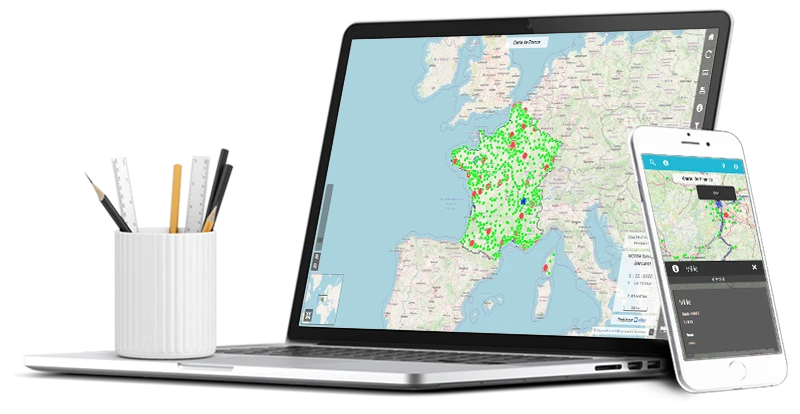
vMap is a powerful webmapping application based on the newest open-source libraries
1.6K
veremes/vmap repository overview
Introduction
vMap is a french powerful open-source webmapping application based on the best open-source libraries (OpenLayers 3, PostgreSQL/PostGIS, Mapserver...).
It can use external map services, local data files produced in many formats (WMS, WMTS, OSM, XYZ, Vector tiles) or publish WMS services using MapServer.
vMap is able to manage editable layers while using WMS producing server software like MapServer, GeoServer, QGIS Server or ArcGis Server.
The current version is called vMap 2, which is a complete rewriting of the first iteration.
Disclaimer
/!\ Warning: this container is dedicated for evaluation and testing purposes, it should not be used in a production environnement, as it was not designed to do so, it could contain security issues, for a production use please use the install process documented here.
Troubleshooting
If during the installation, you encounter errors that you can't fix by yourself, or need help to troubleshoot it, please look about the issues on the Gitlab repo
Useful links
- More about vMap: https://www.veremes.com/produits/vmap (french)
- Documentation: http://documentation.veremes.net/vmap2/ (french)
- Gitlab repo: https://gitlab.veremes.net/open-source/vmap
Created and maintained by Veremes
Supported tags
latest2022.05.02
Getting started
Install Docker
Docker is required in order to launch a vMap container, you can find more informations on how to install and setup Docker at the following link.
Useful informations
- Default database user :
postgreswith default passwordpostgres - Default vMap admin user :
adminwith default passwordadmin(password can change if you launch the container with a different password) - Default URL is
http://localhost:8080/vmap (change 8080 depending on your port number) - There is no HTTPS by default, as you'll need to setup an SSL certificate
Pull the vMap image and launch your first container
You can pull the image by opening a terminal and copy / paste the line below :
docker pull veremes/vmap:latest
The following command will download the image for the latest version of vMap available.
For an older version, you can refer to the tags section where you can find all the vMap versions available.
You can then start a container with the following command :
/!\ warning : you MUST make sure the 3 numbers defined there (8080 in this exemple) are matching and are not used by another application, or a container with the same port is not already running, if you do run in it on an already used port, it may conflict and make the application unusable.
docker run -dit --name vmap -p 8080:8080 -e BIND_PORT=8080 -d veremes/vmap:latest
The -e command allow to set environnement variables, they're used for vMap setup, you can modify the following to configure your vMap instance :
BIND_PORT: this one must be set if you're starting more than one container, or if your default port binding is not on 8080, it allow to change all the port binding used in the application, in order to avoid ports conflicts. Default value is 8080VMAP_ADMIN: allow to change the vMap administrator user password. Default value is 'admin'
What to do next
Once your container is started, you can go to the following URL in your browser http://localhost:8080/vmap (change 8080 depending on your port number) and you should see a login page.
You can log in using the following credentials :
- login: admin
- pass: admin (can change if you change it on container launch)
Now you can freely use the application.
If you don't know what to do next, you can follow the section 5. Premiers pas from the install guide ( only available in French for the moment being).
Available features
Publish queryable layers with create super customisable forms
The map view allows you to click on a item and display the entity infos.
Snapping features when editing geometries
Geographic data quality is essential, to avoid superpositions you can activate the snapping while creating or editing features.
Mobile mode
vMap is also available for mobile devices using a simple browser
Much more
Checkout the documentation, the repo or the website to know more about vMap
Tag summary
Content type
Image
Digest
sha256:784bd0ebf…
Size
2.3 GB
Last updated
almost 4 years ago
docker pull veremes/vmap