vimagick/obfsproxy repository overview
OpenVPN over Obfsproxy
Obfsproxy is a pluggable transport proxy written in python.
It provides several obfuscation method. I consider scramblesuit the best.
I will update this image if there's better one.
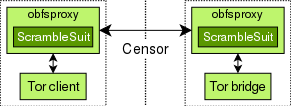
scramblesuit can transport any application that supports SOCKS.
This includes Tor, VPN, SSH, and many other protocols.
We can transport OpenVPN over Obfsproxy, so that firewall cannot detect it.
In the following example, you should run vimagick/openvpn container first.
Don't forget to edit /etc/openvpn/openvpn.conf to use proto tcp.
docker-compose.yml
data:
  image: busybox
  volumes:
    - /etc/openvpn

server:
  image: vimagick/openvpn
  ports:
    - "1194:1194/tcp"
  volumes_from:
    - data
  cap_add:
    - NET_ADMIN
  restart: always

obfsproxy:
  image: vimagick/obfsproxy
  ports:
    - "4911:4911"
  links:
    - server:openvpn
  environment:
    - PASSWORD=J23TNHPJPAOQJLTCPLFD4CQYVFY6MEVP
    - DEST_ADDR=openvpn
    - DEST_PORT=1194
    - LISTEN_ADDR=0.0.0.0
    - LISTEN_PORT=4911
  restart: always
To link a existing openvpn container, please use external_links instead of links.
obfsproxy:
  image: vimagick/obfsproxy
  ports:
    - "4911:4911"
  external_links:
    - openvpn_server_1:openvpn
  environment:
    - PASSWORD=J23TNHPJPAOQJLTCPLFD4CQYVFY6MEVP
    - DEST_ADDR=openvpn
    - DEST_PORT=1194
    - LISTEN_ADDR=0.0.0.0
    - LISTEN_PORT=4911
  restart: always
The default run mode is server. You can also run container in client mode.
The following example shows us how to make a OpenVPN relay:
obfsproxy:
  image: vimagick/obfsproxy
  ports:
    - "1194:1194/tcp"
  environment:
    - PASSWORD=J23TNHPJPAOQJLTCPLFD4CQYVFY6MEVP
    - DEST_ADDR=vpn.easypi.info
    - DEST_PORT=4911
    - RUN_MODE=client
    - LISTEN_ADDR=0.0.0.0
    - LISTEN_PORT=1194
  restart: always
The password should be encoded by Base32 with fixed length.
You can generate one via this command:
python -c 'import base64, os; print base64.b32encode(os.urandom(20))'
Note: There's no ports exposed in Dockerfile. You need to expose port explicitly.
Tag summary
Content type
Image
Digest
sha256:c4002f628…
Size
35.2 MB
Last updated
over 6 years ago
docker pull vimagick/obfsproxy