vkcom/devicehub
Control and manage Android and iOS devices directly from your browser. Real-time screen viewing, res
10K+
vkcom/devicehub repository overview
Welcome to VK DeviceHub!

About Project
VK DeviceHub is a fork of the DeviceFarmer/stf project developed by members of VK Company.
If you have ideas, suggestions, or would like to participate in development, we welcome you to join our development chat (link).
You can watch a presentation about our product at the Heisenbug 2024 conference by following this link:
Presentation at Heisenbug 2024 conference
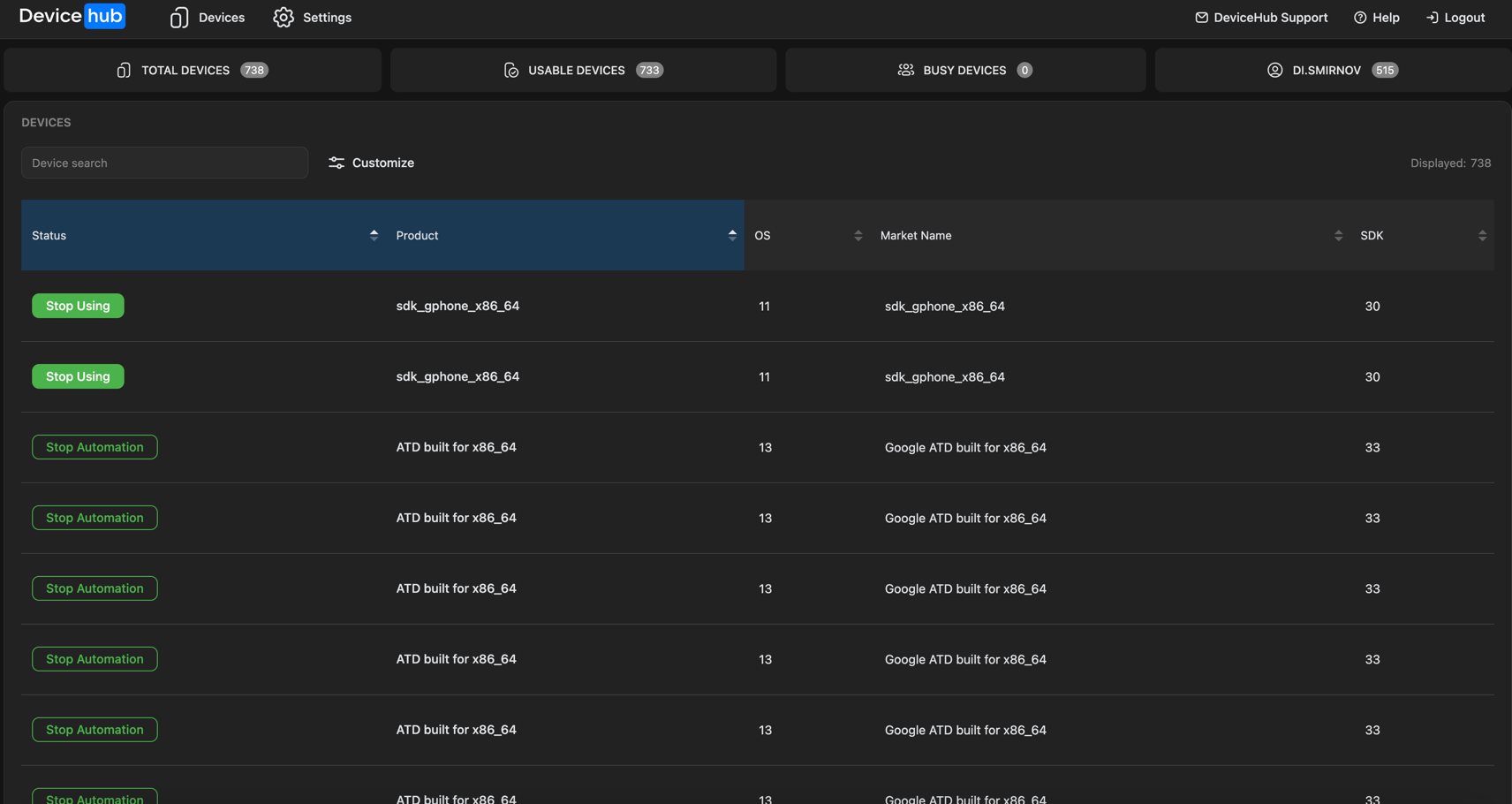
How to run
Run docker compose -f docker-compose-prod.yaml --env-file scripts/variables.env up and a local production-like installation of DeviceHub will be launched on your computer on port 8082. See docker-compose-prod.yaml for more information.
And for MacOS you can use docker compose -f docker-compose-macos.yaml --env-file scripts/variables.env up. You also need adb server on host. Start it with adb start-server
Note: some features require direct access to the provider instance from the browser, so if you are running the provider on a different machine - make sure you pass accessible url to the --public-ip or configure location properly
If you also want to add an iOS device see this document
Features
Database
- Using MongoDB: Utilizes MongoDB instead of RethinkDB for enhanced performance and flexibility.
Operating System Support
- Android:
- Supports a wide range of versions from 2.3.3 (SDK level 10) to 14 (SDK level 34).
- Compatibility with Wear 5.1 and Fire OS, CyanogenMod, and other Android-based distributions.
- No Root Required: All functionalities work without the need for root access.
- iOS:
- All devices that are supported by Appium's WebDriverAgent are available in the UI
- Simple taps and gestures and button presses are supported
- Ability to install apps on iOS devices
- Ability to control device without XCTest by ESP32
- Extended remote debug coming in 2025
Remote Control and Screen View
- Remote Control: Seamlessly control any device from your browser.
- Real-time Screen View: Achieve refresh speeds of 30-40 FPS, depending on device specifications and Android version.
- Rotation Support: Supports automatic and manual rotation adjustments for optimal viewing.
- Keyboard Input: Type text directly from your keyboard with support for meta keys.
- Copy and Paste: Includes support for copy and paste operations, though may require manual paste on older devices.
- Multitouch Support: Enables multitouch interactions on touch screens and gesture support on regular screens.
- Drag & Drop Installation: Easily install and launch
.apkfiles with drag-and-drop functionality. - Reverse Port Forwarding: Access your local server directly from the device, even across different networks.
- Web Browsing: Open websites in any browser with real-time detection of installed browsers.
Device Management
- Device Inventory Monitoring: Keep track of connected devices, battery levels, and hardware specs.
- Device Search: Quickly find devices by various attributes using powerful search queries.
- User Identification: Identify users connected to devices and monitor device usage.
- Device Location: Display identifying information on screen for easy physical location.
- Battery Tracking: Monitor battery level and health for each device.
Booking & Partitioning Systems
- Partitioning System: Allocate devices to different projects or organizations for an unlimited period.
- Booking System: Reserve devices for users during specified time periods.
- Group Management: Organize devices, users, and schedules into groups for efficient management.
- Detailed Documentation: Refer to detailed documentation for instructions on using the booking and partitioning features.
Group Inventory Management
- Group Status Monitoring: Monitor the status of groups, including activity, readiness, and pending status.
- Group Search: Search and filter groups based on various attributes for easy management.
- Group Communication: Contact group owners via email directly from the interface.
Device and User Management
- Device Management: Search for devices, remove devices based on filters, and manage device annotations and controls.
- User Management: Create, search, and remove users, manage user rights, and set group quotas.
- User Communication: Contact users via email and create service users via command line interface (CLI).
REST API
- Simple REST API: Access the system's functionalities programmatically using a simple REST API. Refer to the API documentation for details.
A Quick Note About Security
Originally, STF was an internal project without robust security measures and encryption. However, we have addressed different issues and Common Vulnerabilities and Exposures (CVEs). Additionally, we have updated dependencies that had CVEs.
We welcome contributions to further enhance the security of the project.
Building
Once you have installed all the requirements, you can proceed to fetch the remaining dependencies.
Start by fetching all NPM and Bower modules:
npm install
Additionally, you may want to link the module so that you can access the stf command directly from the command line:
npm link
With these steps completed, you should have a functional installation ready for local development.
Running
STF consists of several independent processes that typically need to be launched separately. In our setup, each of these processes is its own unit. Refer to DEPLOYMENT.md and Setup Examples for more details.
However, for development purposes, there's a handy command to quickly launch all the required processes along with a mock login implementation. Please note that you must have MongoDB running beforehand.
docker run --rm -d -p 27017:27017 -h 127.0.0.1 --name mongo mongo:6.0.10 --replSet=test && sleep 4 && docker exec mongo mongosh --eval "rs.initiate();"
This command will start MongoDB locally.
In addition to native user accounts, STF provides an administrator level with increased rights on certain features (e.g., booking & partitioning systems, management of users & devices, etc.). The built-in administrator user has the following default credentials:
- Name:
administrator - Email:
[email protected]
Another built-in object is the root standard group to which users and devices belong the first time they register with the STF database. Its default name is Common.
These built-in objects are created in the STF database if they do not already exist.
You can override the default values of these built-in objects by setting the following environment variables before initializing the STF database through the stf local or stf migrate commands:
- Root standard group name:
STF_ROOT_GROUP_NAME - Administrator user name:
STF_ADMIN_NAME - Administrator user email:
STF_ADMIN_EMAIL
Once configured, you're ready to start up STF itself:
stf local
After the webpack build process has finished (which may take a moment), your private STF instance should be accessible at http://localhost:7100. If you had devices connected before running the command, those devices should now be available for use. Otherwise, check your console for any errors. You can plug in or unplug devices at any time.
If you need to access STF from other machines, you can use the --public-ip option for quick testing:
stf local --public-ip <your_internal_network_ip_here>
Updating
To update your development version, simply pull the repository and run npm install again.
FAQ
I already use STF with RethinkDB. How can I migrate to MongoDB?
You need to set up MongoDB and then run:
stf migrate-to-mongo
Can I deploy STF to actual servers?
Yes, please refer to DEPLOYMENT.md and Setup Examples for deployment instructions.
Will I have to change battery packs all the time?
Battery packs in devices that are in constant use typically last from 4 to 8 months. After this period, they begin to swell. Expanded batteries should be replaced as soon as possible. Note that this issue isn't specific to STF; it's a common occurrence over time. If you have come up with an interesting solution for running devices without batteries, please let us know.
Ensure that your devices are set up to allow the display to turn off entirely after a short timeout, around 30 seconds or so. STF will wake it up when necessary. Otherwise, you risk reducing the lifetime of your device.
Note that you may encounter a problem if your USB hubs cannot both provide enough power for charging and support a data connection at the same time (data connections require power too). This can cause a device to stop charging when being used, resulting in many charging cycles. If this happens, you will need to get a better USB hub.
Once I have the system running, can I pretty much leave it as is, or is manual intervention required?
In our experience, the system runs smoothly most of the time, with occasional issues mostly related to USB connections. Typically, you'll need to intervene about once a week.
The most common issue is when a device loses all its active USB connections momentarily. While errors may appear in the logs, the worker process will usually recover or get respawned automatically, requiring no action from your side.
However, there are some common errors that do require manual intervention:
-
One device worker keeps getting respawned all the time
- Rebooting the device usually resolves this issue. If the device stays online long enough, you might be able to reboot it from the UI. Otherwise, SSH into the server and manually run
adb reboot. - This could indicate USB problems, and the device may need to be relocated. Simplifying your setup can reduce such issues. Refer to troubleshooting.
- We're working on implementing periodic automatic restarts and better graceful recovery to mitigate this issue.
- Rebooting the device usually resolves this issue. If the device stays online long enough, you might be able to reboot it from the UI. Otherwise, SSH into the server and manually run
-
A whole group of devices keeps dying at once
- These devices are likely connected to the same USB hub, which could be faulty, or there may be compatibility issues. This often occurs with USB 3.0 hubs or USB extension cards. See recommended hardware.
-
A device that should be online is not showing up in the list or is showing up as disconnected
- Refer to troubleshooting for assistance.
How do I uninstall STF from my device?
When you unplug your device, all STF utilities except STFService stop running automatically. There's no harm in force stopping or uninstalling it.
To uninstall the STFService, run the following command:
adb uninstall jp.co.cyberagent.stf
You may also want to remove our support binaries, although they won't run unless the device is connected to STF. You can do this as follows:
adb shell rm /data/local/tmp/minicap \
  /data/local/tmp/minicap.so \
  /data/local/tmp/minitouch \
  /data/local/tmp/minirev
Your device is now clean.
Scrcpy
If you want use scrcpy instead minicap run app with next command(Scrcpy functionality is in unstable state yet):
stf local --need-scrcpy true
Testing
Refer to TESTING.md for testing instructions.
Contributing
To contribute, please read the guidelines outlined in CONTRIBUTING.md.
Other Docs
If you still have questions try to  or contact us in discussions
License
For licensing information, please see LICENSE.
Copyright © 2024 V Kontakte LLC. All Rights Reserved.
Tag summary
Content type
Image
Digest
sha256:1aab68e82…
Size
325.1 MB
Last updated
8 months ago
docker pull vkcom/devicehub