wannaverse/docker-manager
Free open-source web management software for Docker
3.1K
wannaverse/docker-manager repository overview
Wannaverse Docker Manager
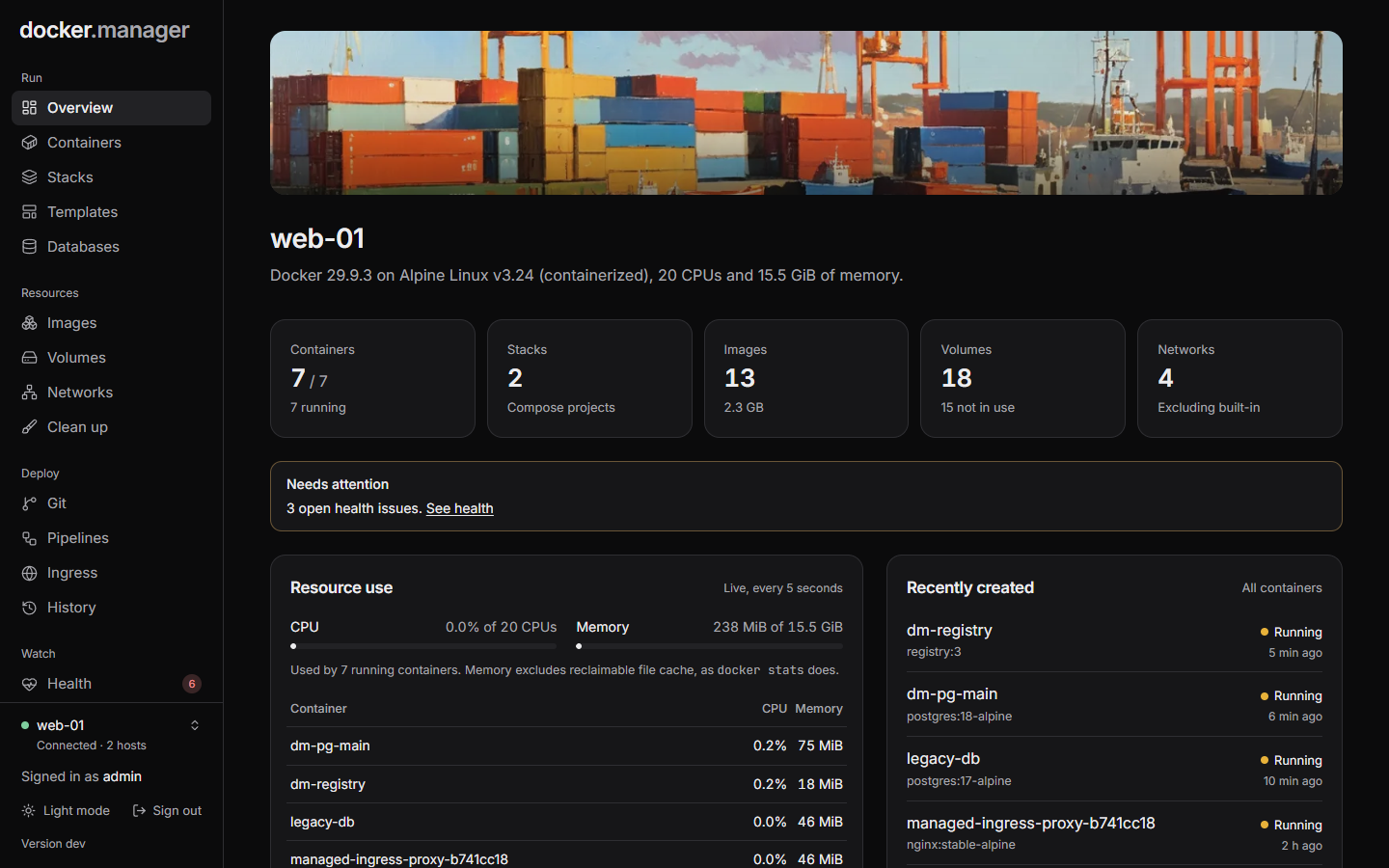
A free, open-source, self-hosted web interface for running Docker servers: containers, Compose stacks, HTTPS ingress, PostgreSQL databases, a Grafana observability stack, a private image registry and security scanning, in one container.
Built for developers, homelab owners and small teams who want a complete tool without subscriptions, licence fees or feature gates.
Contents
- Features
- Screenshots
- Quick start
- Signing in
- Configuration
- Configuration as code
- Rollouts: blue/green and canary
- Databases
- DNS
- Observability
- Private registry
- Security scanning
- Remote hosts
- Upgrading from 1.x
- Development
- License
Features
Run
- Containers: start, stop, restart, logs, a shell, stats, and editing that keeps volumes and puts the original back if the new container doesn't start.
- Compose stacks: create, edit and redeploy, with every deploy kept as a version you can return to. Stacks started outside Docker Manager are detected and can be imported without restarting anything.
- Templates for common apps, a volume browser, and clean-up of unused images, volumes and networks.
Deploy and publish
- Git repositories and pipelines that build and deploy on push.
- Rollouts: blue/green and canary releases with tests before visitors see a new version, live error-rate checks, and automatic rollback.
- Ingress: publish containers on your own domains through a built-in nginx proxy, with Let's Encrypt certificates that renew themselves, optional sign-in pages and per-route users.
- DNS: host your domains' DNS on the server, like Route 53. Ingress routes and rollouts get their records by themselves, with weighted and failover routing, health checks, DNSSEC, and wildcard Let's Encrypt certificates.
- History of every change, with one-click undo.
Data
- PostgreSQL servers with secure defaults, a SQL console, users and per-database access, scheduled backups, restores, copies to S3-compatible storage, and import from the PostgreSQL containers you already run.
- A private Docker registry, served over HTTPS through ingress or on the server only.
Watch and secure
- Health monitoring with email alerts, and a live view of CPU and memory per container.
- An observability stack: Grafana with Prometheus, Mimir, Loki and Tempo, already connected, collecting every container's logs, container and host metrics, and OpenTelemetry from your apps.
- Vulnerability scans of images with Trivy or Docker Scout, and host checks with Docker Bench for Security (the CIS Docker Benchmark), with one-click fixes you confirm first.
- Image rules that allow or block images, users with roles and per-host permissions, and an audit log.
Hosts
- Manage the local Docker host and remote hosts over TLS or SSH from one place.
- Configuration as code: describe everything in one YAML file, preview the changes, apply them, and keep it in git.
Screenshots
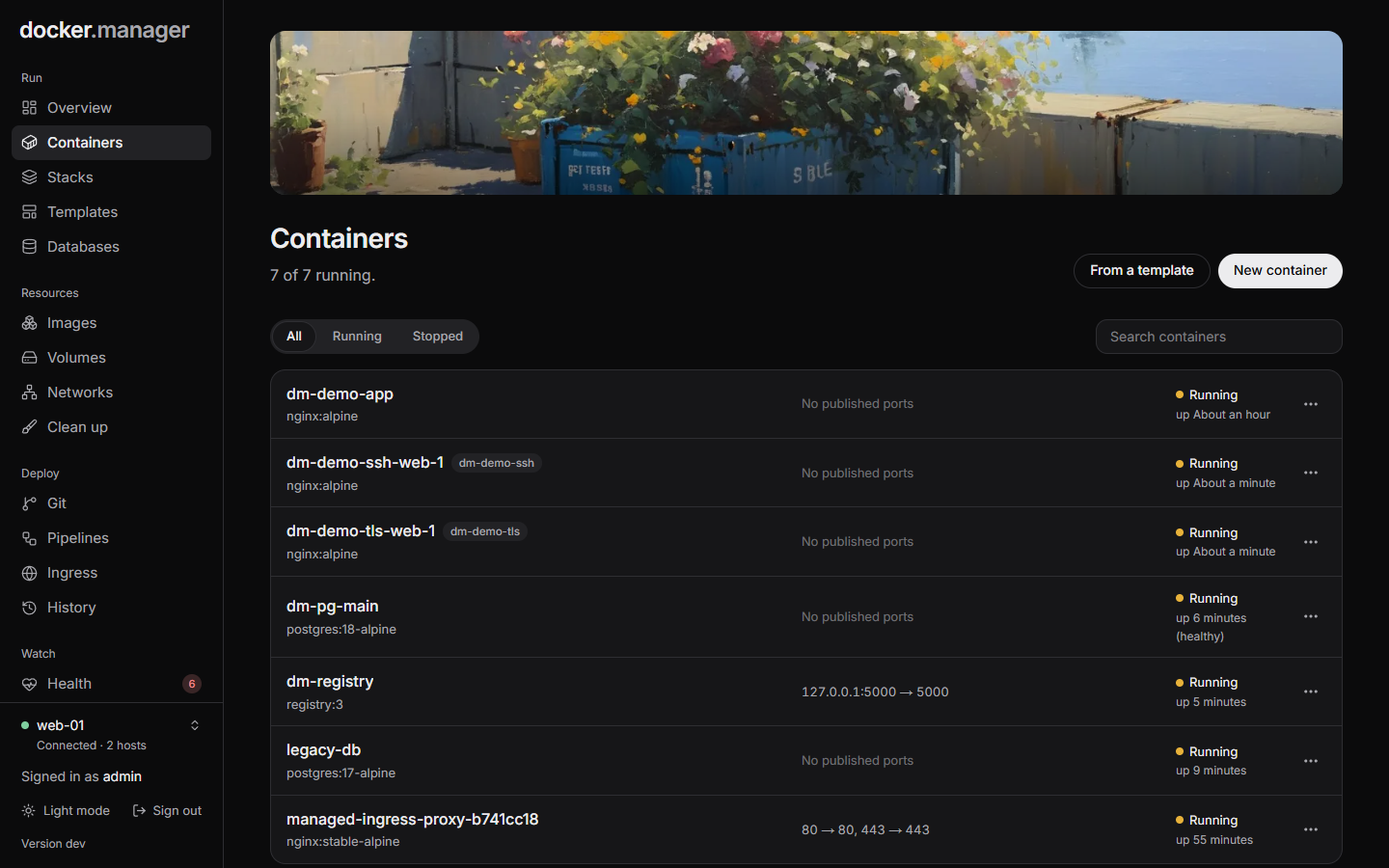 | 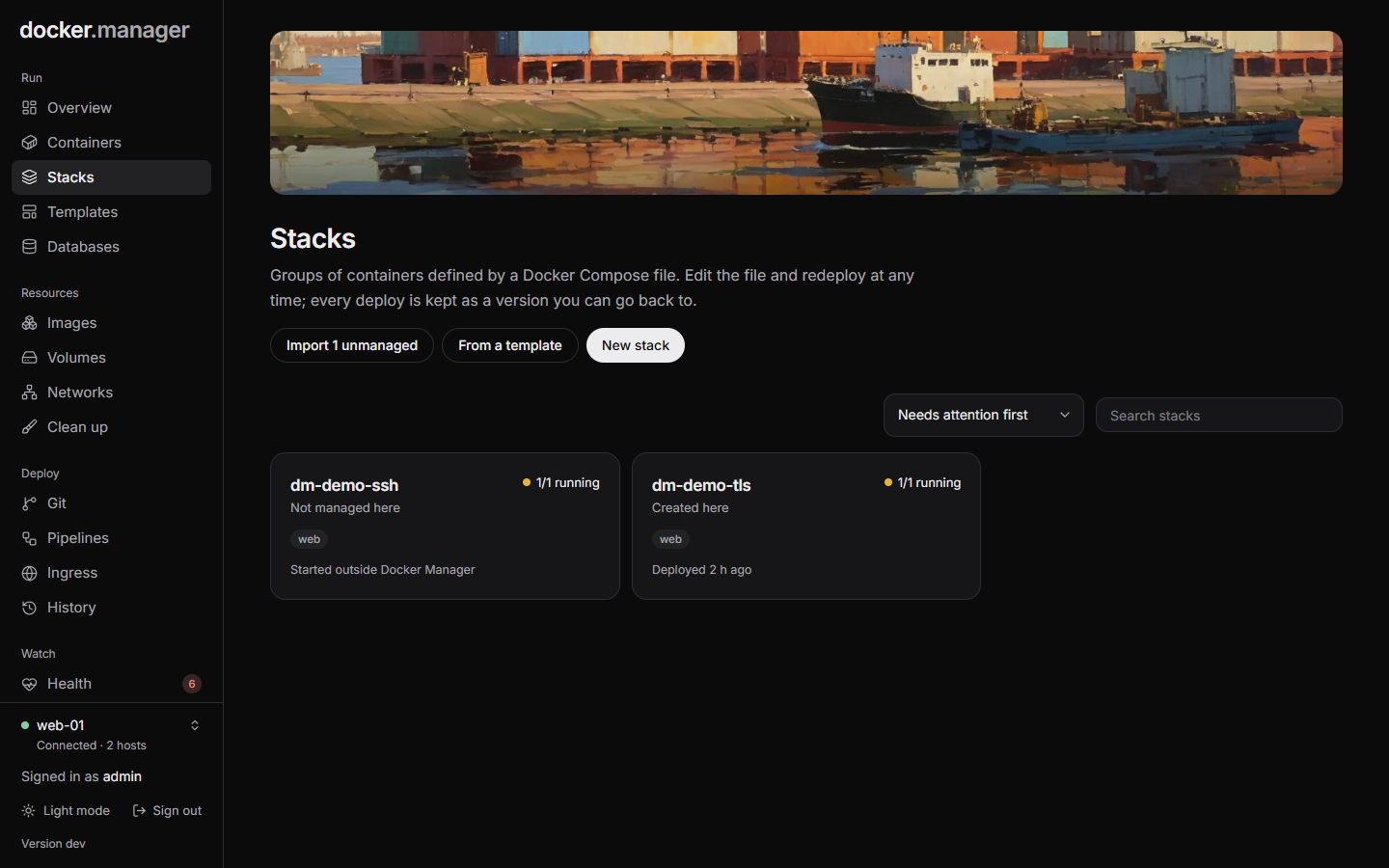 |
| Containers on a host | Compose stacks, including ones started elsewhere |
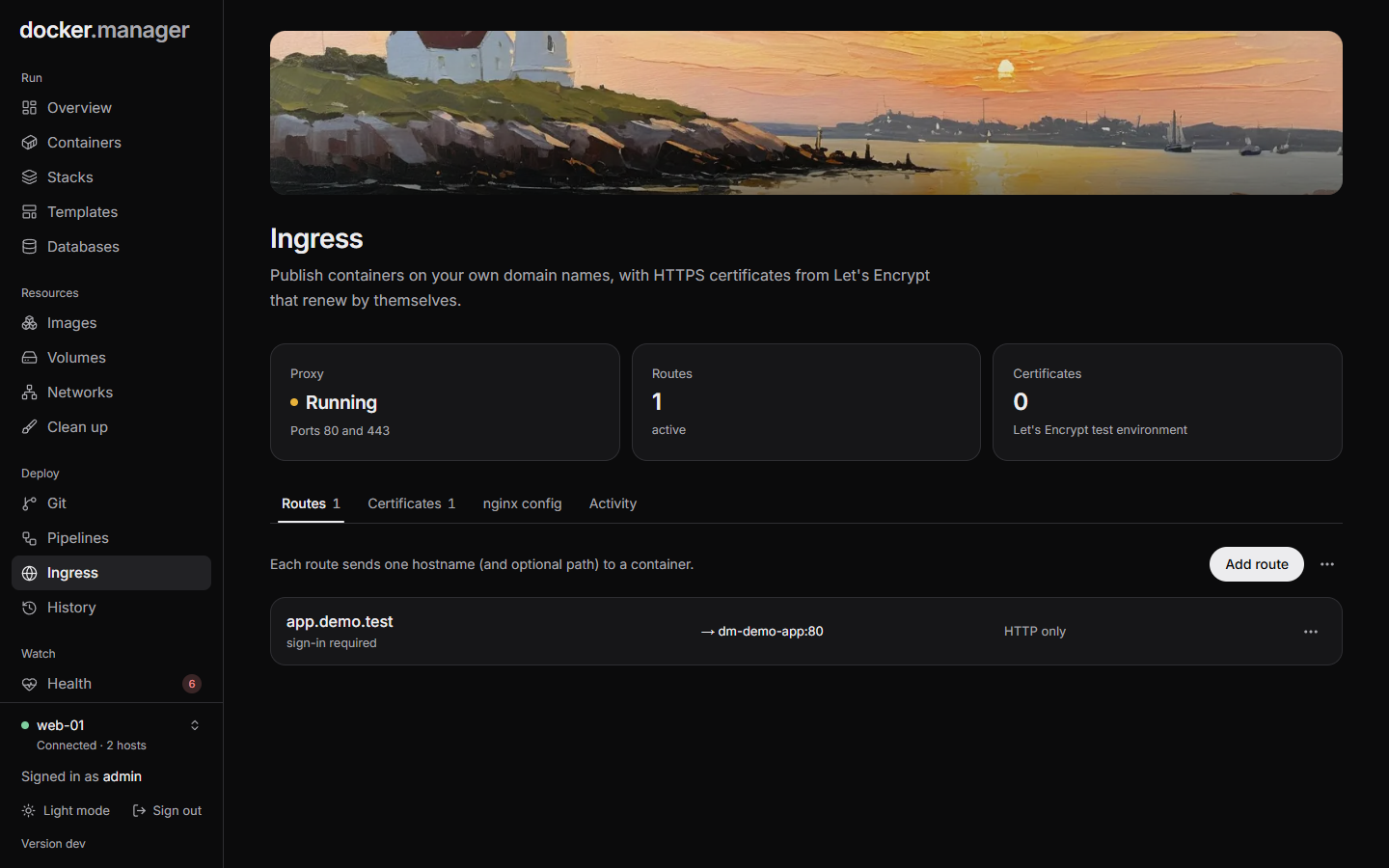 | 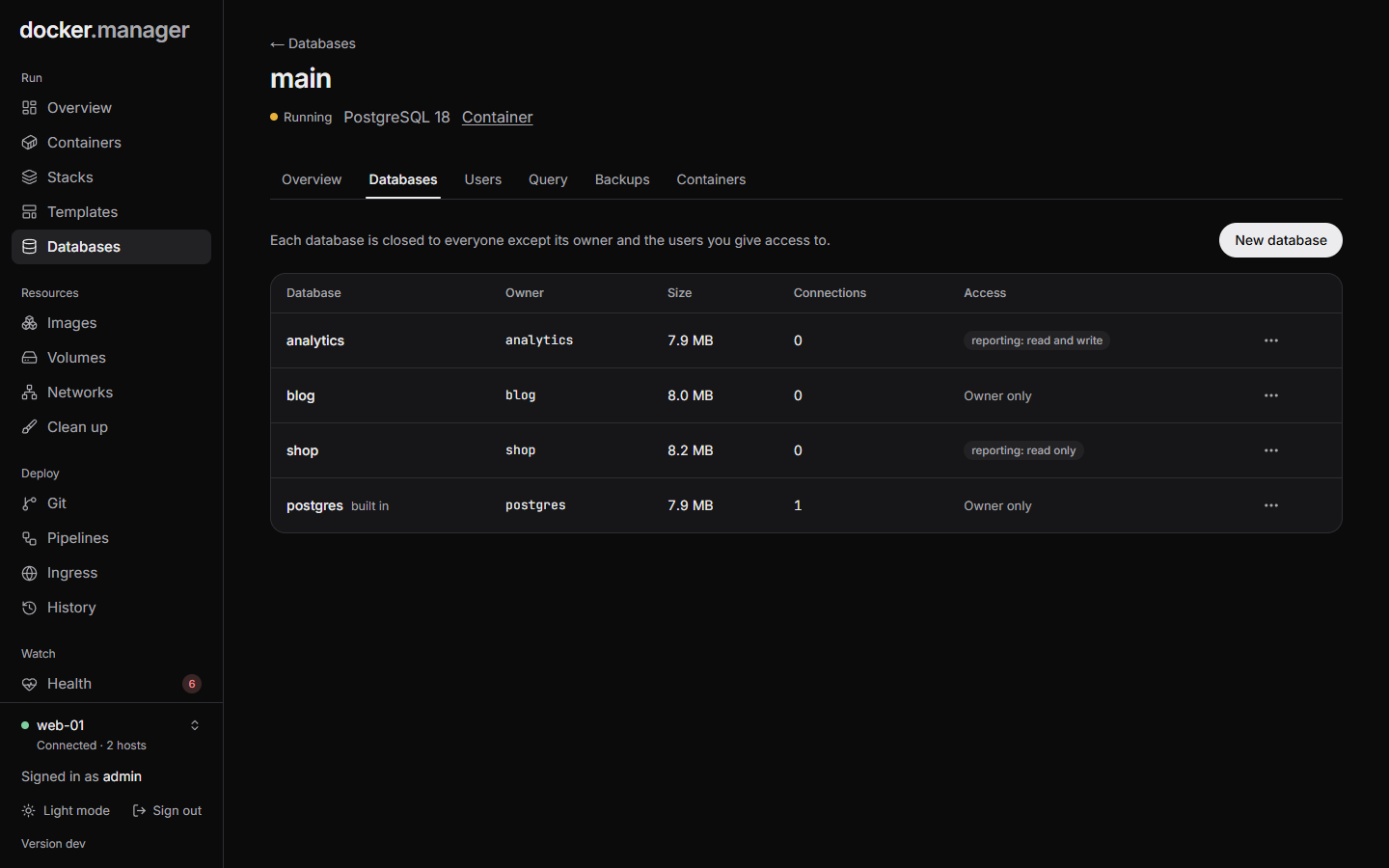 |
| Ingress routes with HTTPS and sign-in | Databases, owners and who can access them |
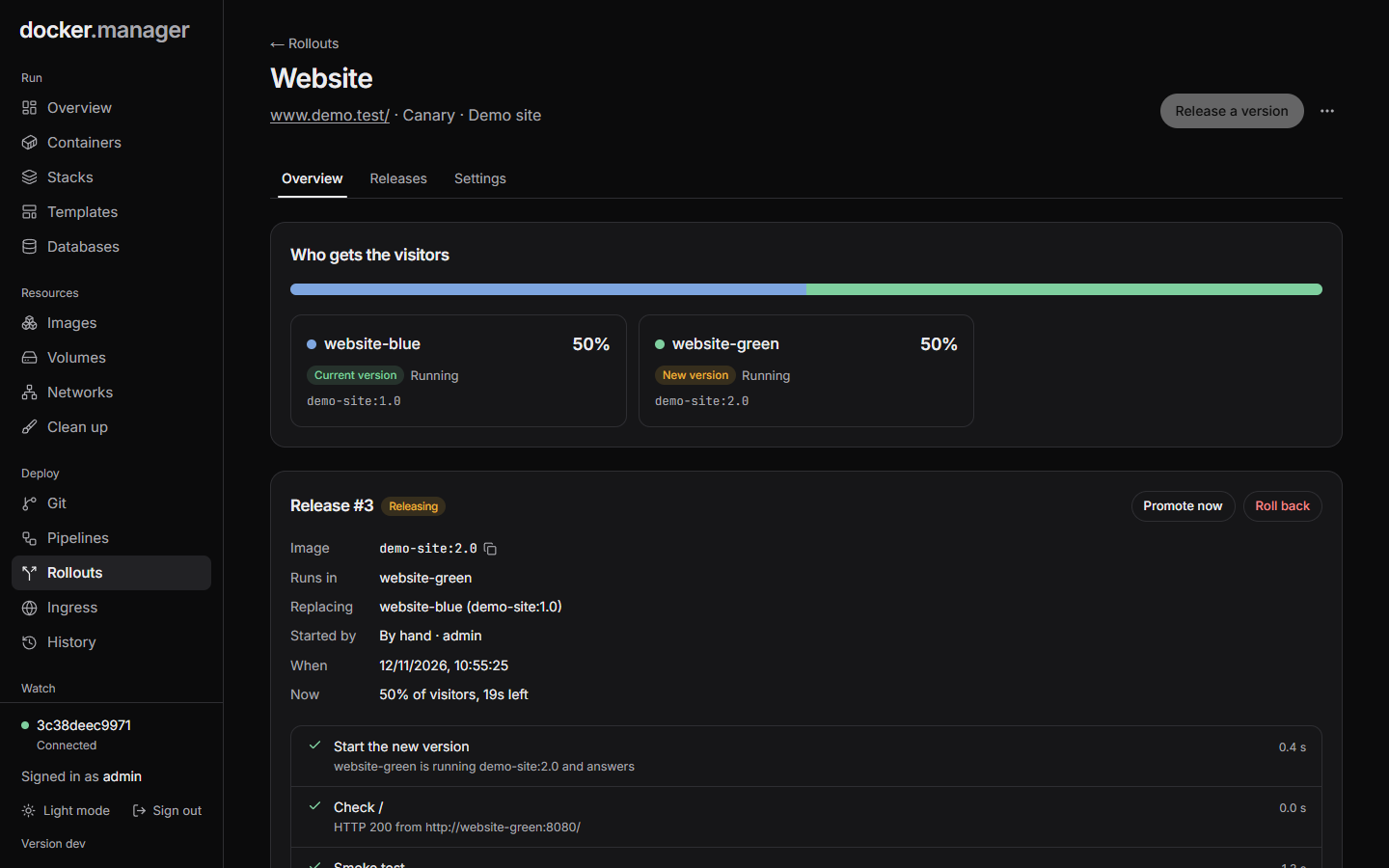 | 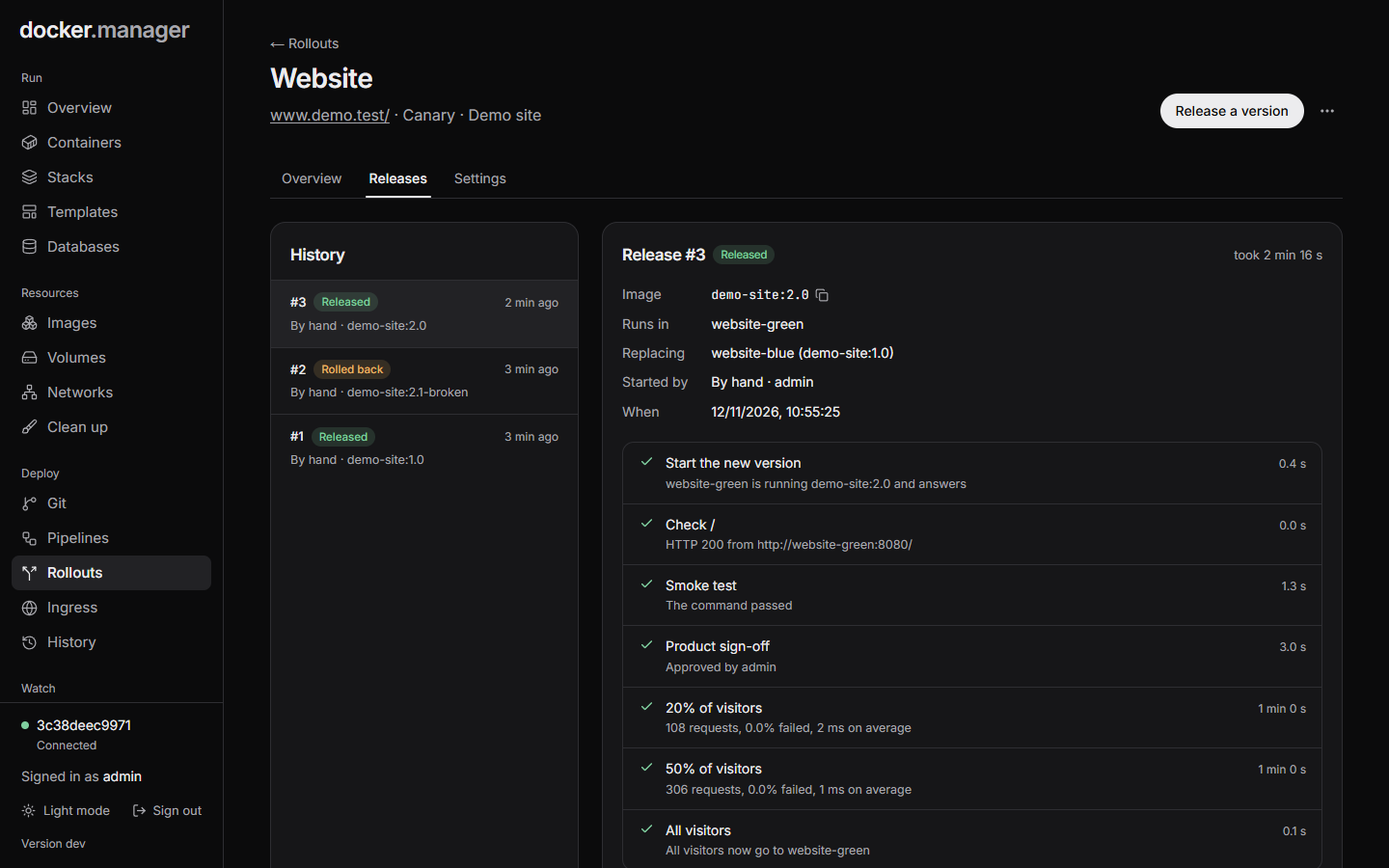 |
| A canary release with half the visitors on the new version | Each release with its tests, traffic steps and results |
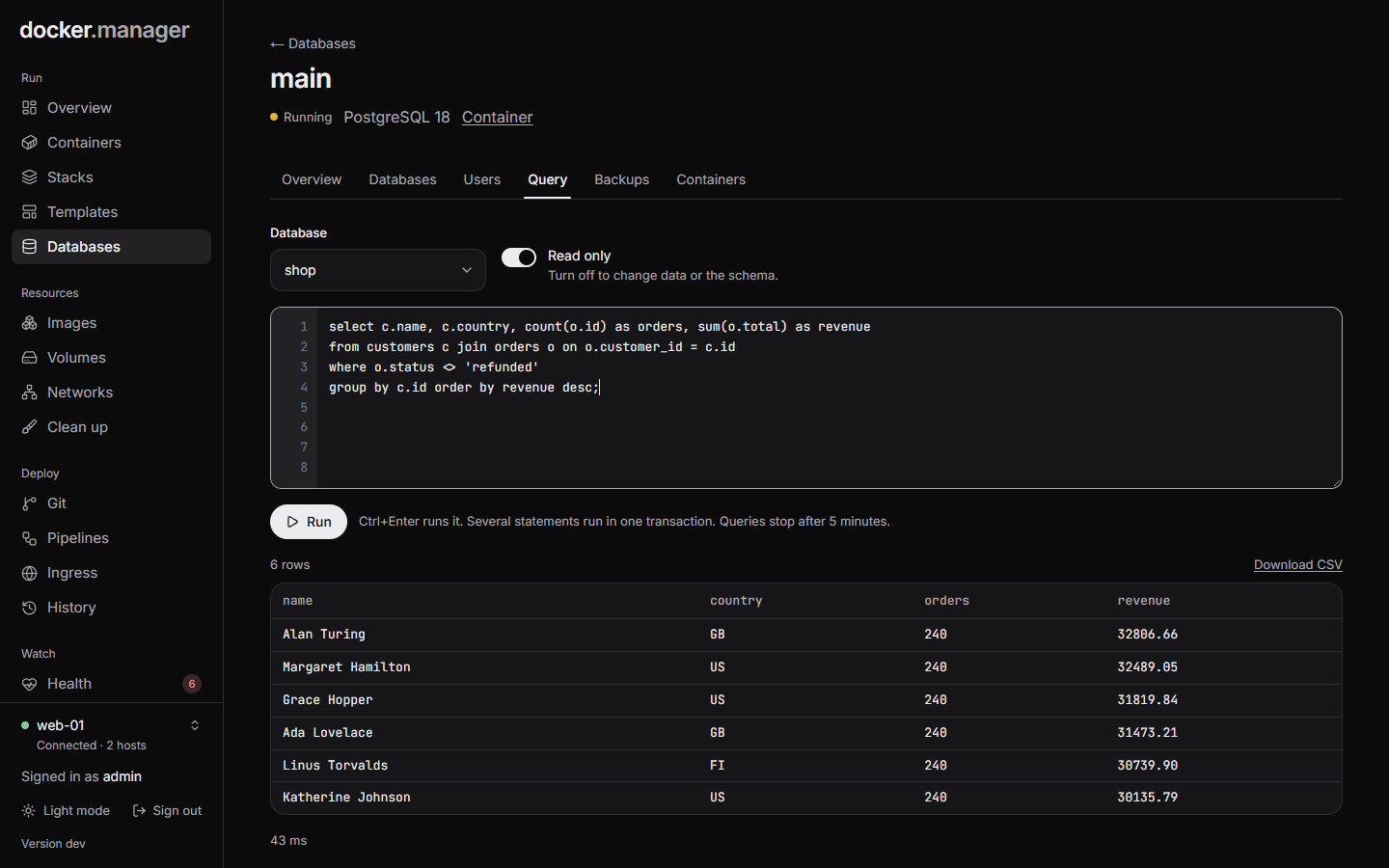 | 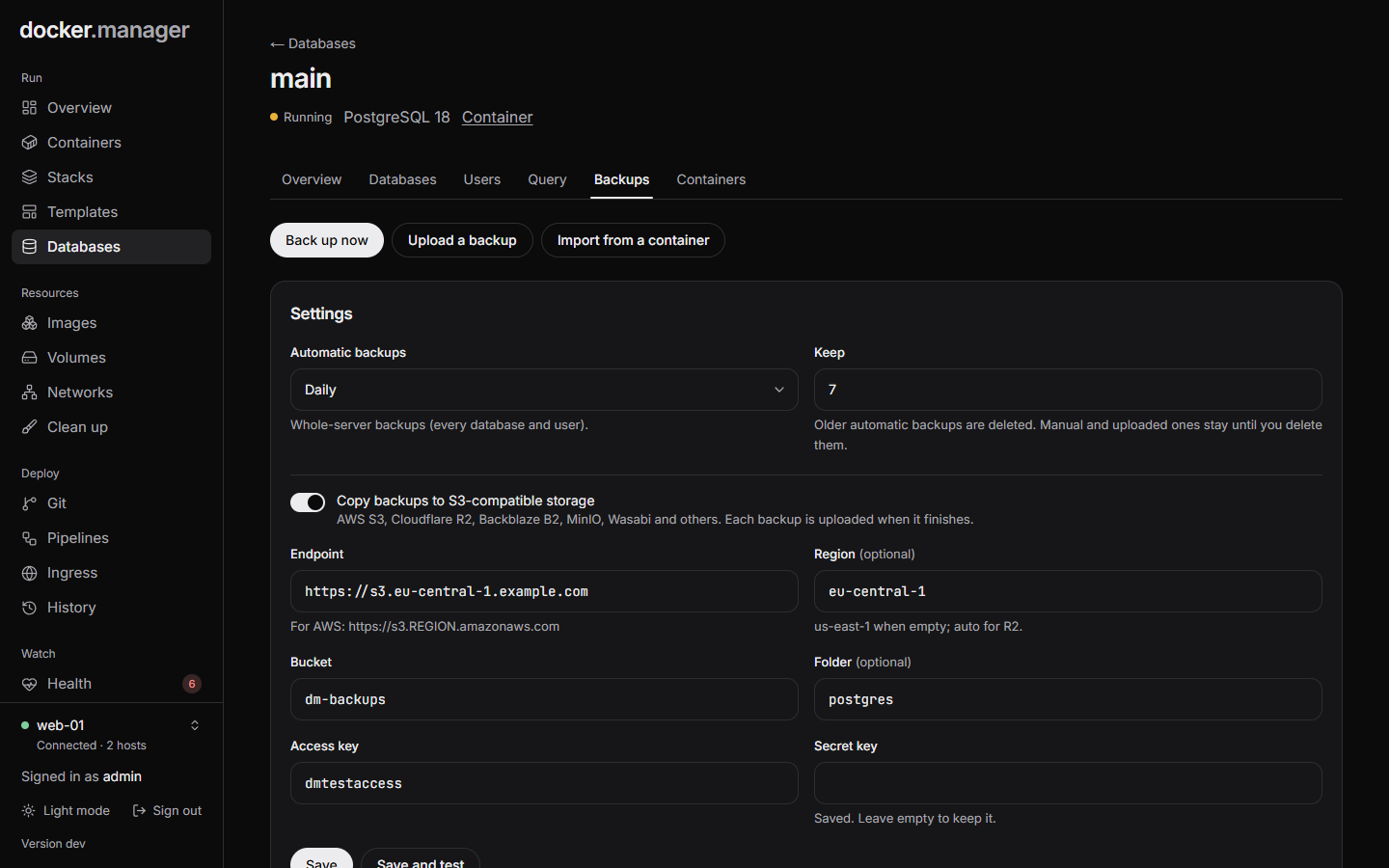 |
| The SQL console, read-only by default | Scheduled backups with copies to S3 |
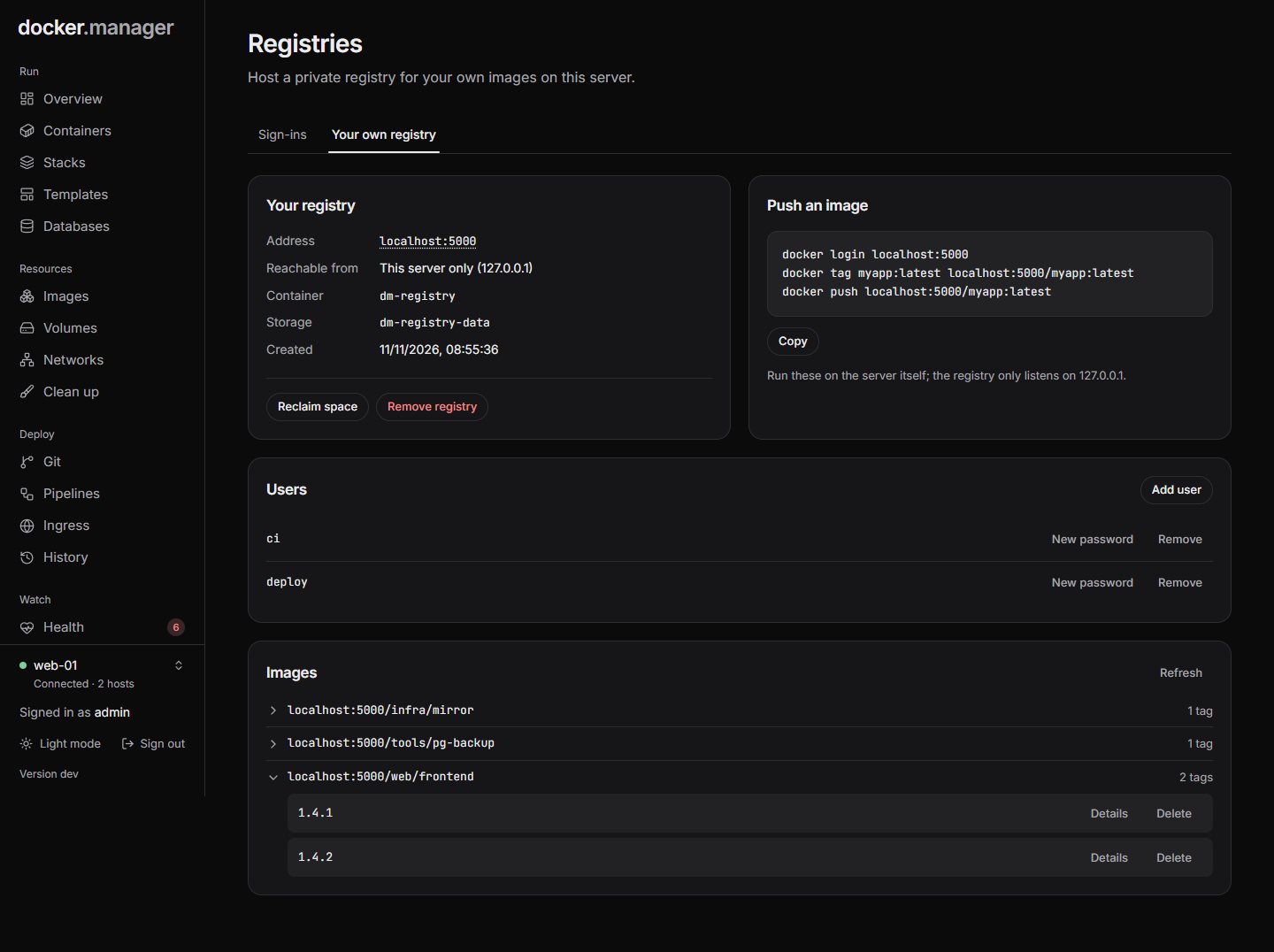 | 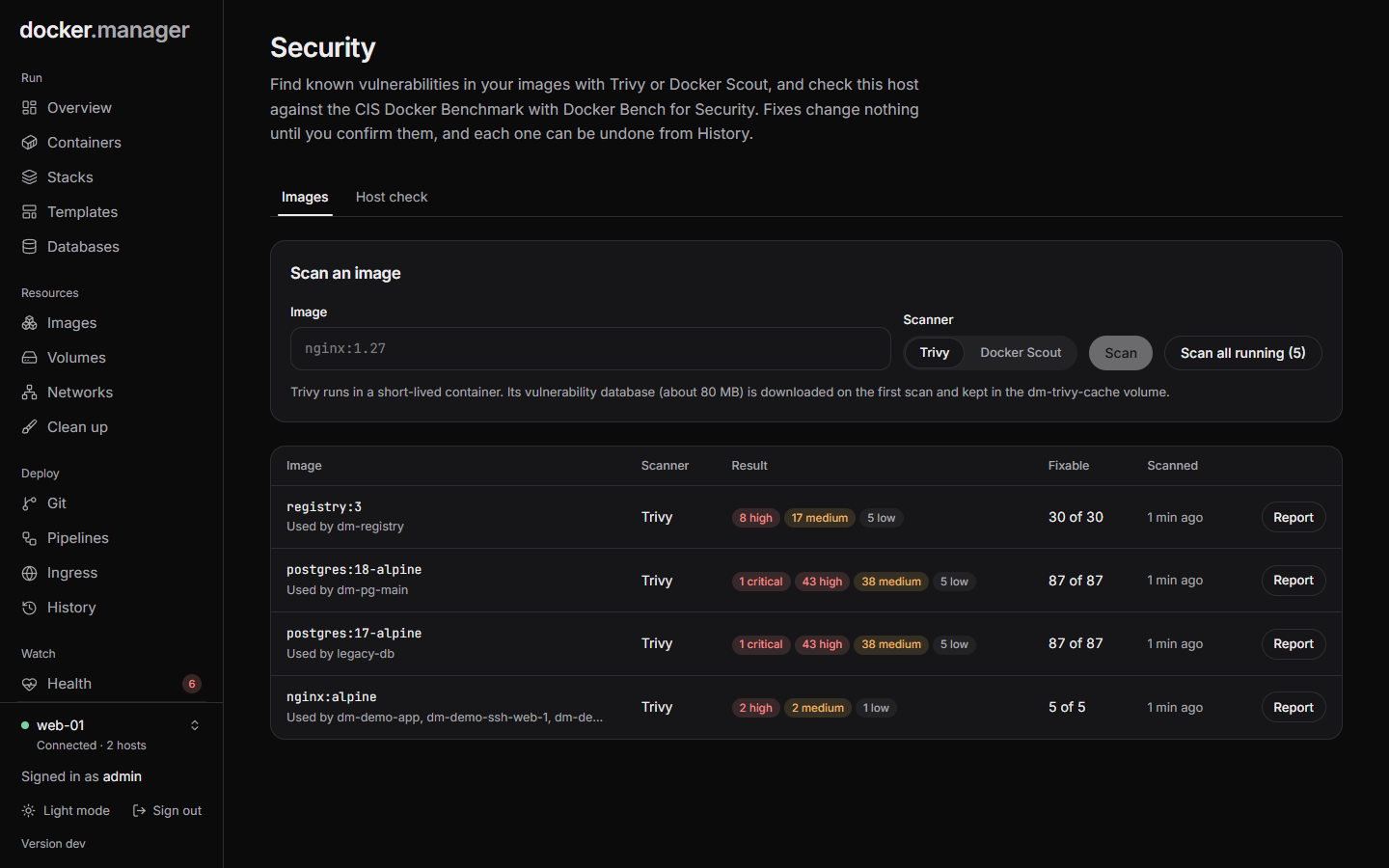 |
| Your own registry, its users and images | Vulnerability scans of the images in use |
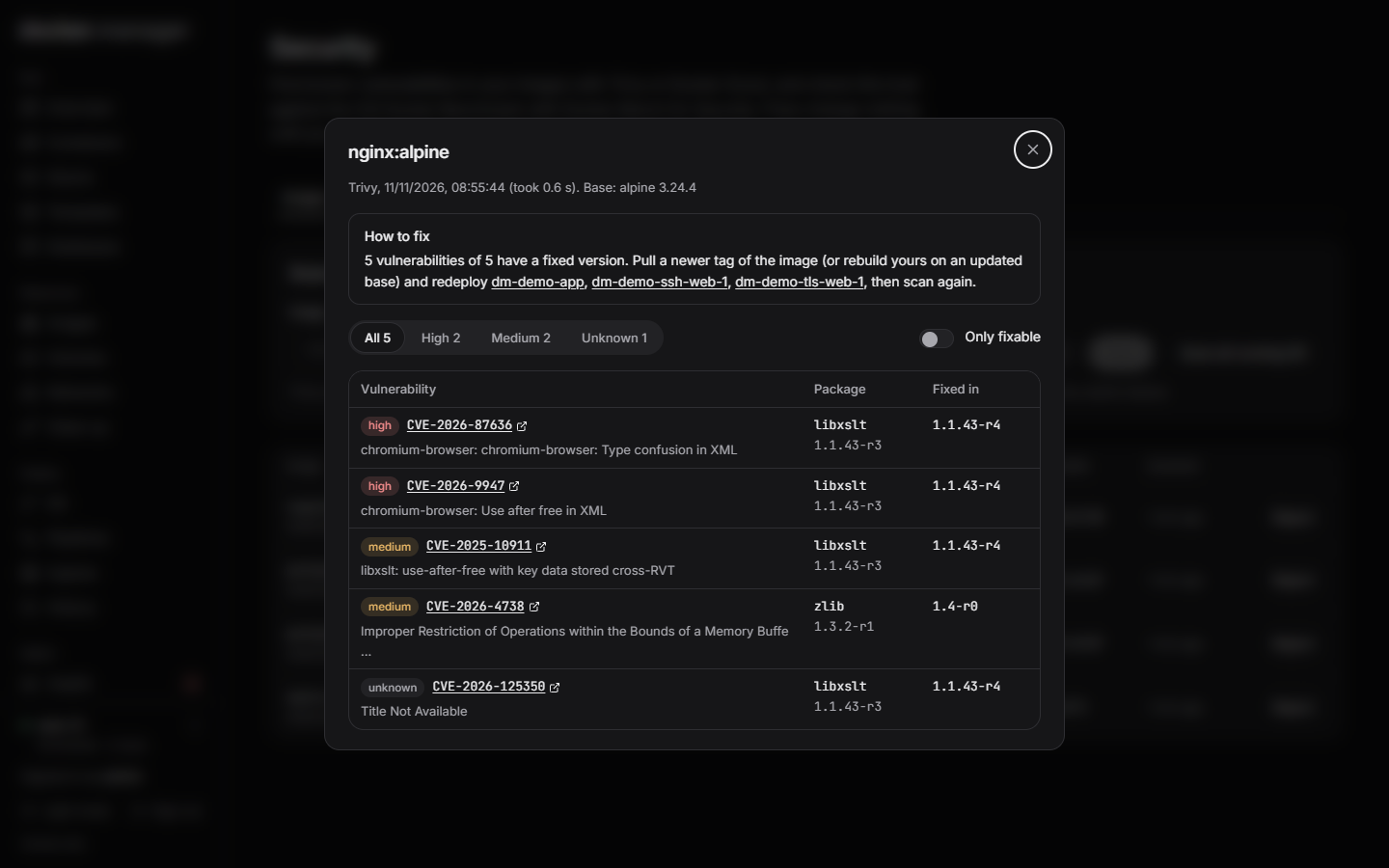 | 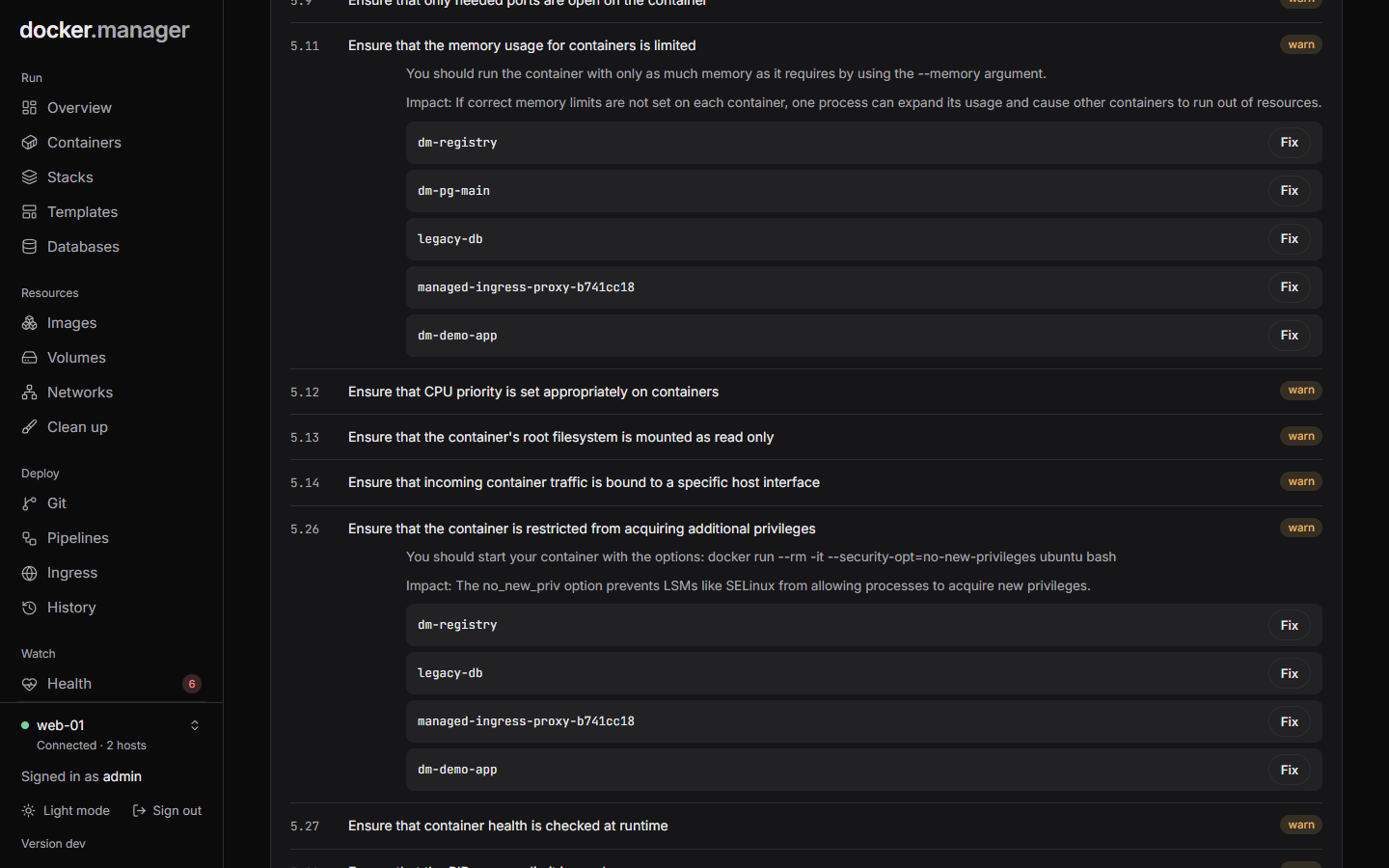 |
| A report with fixed versions and next steps | Host check findings with one-click fixes |
Quick start
Create a docker-compose.yml:
services:
  docker-manager:
    image: wannaverse/docker-manager:latest
    container_name: docker-manager
    pull_policy: always
    restart: unless-stopped
    ports:
      - "8080:8080"
    volumes:
      # Lets Docker Manager control this host's Docker
      - /var/run/docker.sock:/var/run/docker.sock
      # Database, database backups, and the secrets generated on first start
      - docker_manager_data:/app/database
      # Compose stacks and git checkouts. Keep the same path on both sides (see below)
      - /opt/docker-manager/stacks:/opt/docker-manager/stacks
      - /opt/docker-manager/git-repos:/opt/docker-manager/git-repos
    environment:
      # The address you open Docker Manager at; used for webhook URLs and email links
      - BASE_URL=http://your-domain.com
      # Optional: times in emails and logs (default UTC)
      # - TZ=Europe/London

volumes:
  docker_manager_data:
Then run docker compose up -d and open port 8080. The image has its own health check, and the Docker host whose
socket is mounted is added automatically on first start.
For a quick try without a compose file:
docker run -d -p 8080:8080 -v /var/run/docker.sock:/var/run/docker.sock wannaverse/docker-manager
Signing in
The first user is admin. Its password is printed to the container logs on first start, and you choose your own
on first sign-in:
docker logs docker-manager
Add your email address when you choose your password (or later under Your account), so alerts reach you.
Locked out as the only administrator? Set DM_RESET_PASSWORD=admin (the user name) in the container's environment,
recreate the container, and sign in with the temporary password it prints in the logs. Then remove the variable.
Configuration
Settings
| Variable | Default | Meaning |
|---|---|---|
BASE_URL | http://localhost:8080 | Public address, used for webhook URLs and email links |
STACKS_DIR | /opt/docker-manager/stacks | Where stack files are kept |
GIT_CLONE_DIR | /opt/docker-manager/git-repos | Where git repositories are checked out |
TZ | UTC | Time zone for emails and logs |
JWT_ACCESS_SECRET, JWT_REFRESH_SECRET, ENCRYPTION_KEY | generated | See Secrets |
JWT_ACCESS_EXP, JWT_REFRESH_EXP | 15 minutes, 7 days | Session lengths in milliseconds |
API_DOCS_ENABLED | false | Serves the OpenAPI description and Swagger UI |
CORS_ALLOWED_ORIGINS | none | Only needed to run the UI from another origin during development |
LOG_LEVEL | INFO | Server log level |
DM_CONFIG_FILE | none | A configuration file to apply at startup and on every change |
DM_CONFIG_RECONCILE_SECONDS | 300 | How often managed things removed by other means are put back; 0 turns it off |
DM_RESET_PASSWORD | none | A user name: at startup that user gets a new temporary password, printed in the logs. For when the only administrator is locked out; remove it afterwards |
Secrets
Strong random secrets for sign-in tokens and for encrypting stored credentials are generated on first start and
kept in the data volume (/app/database/.secrets.properties). To manage them yourself, set JWT_ACCESS_SECRET,
JWT_REFRESH_SECRET and ENCRYPTION_KEY to random values of at least 32 characters, for example from
openssl rand -base64 48.
Never reuse the example secrets that older versions of this README showed: they are public. Docker Manager replaces public or weak JWT secrets with generated ones automatically.
Stacks and git folders
Each stack's compose.yaml and .env are stored in STACKS_DIR, and git repositories are checked out to
GIT_CLONE_DIR. Docker resolves relative bind mounts in a compose file (like ./data:/data) on the host, so
mount both folders at the same path on the host and in the container, as in the example above.
Stacks you import keep running from their original folder, so their relative paths still point at the same data.
Behind a reverse proxy
- Put Docker Manager behind HTTPS before exposing it to the internet, and consider publishing its port only to the
proxy (
127.0.0.1:8080:8080). - The proxy must send
X-Forwarded-ForandX-Forwarded-Proto. They are trusted from private addresses (Docker networks, LAN); for a proxy on a public address setSERVER_TOMCAT_REMOTEIP_INTERNALPROXIESto a regex matching it. Otherwise every visitor appears to come from the proxy, which shares one sign-in rate limit. - Volume uploads can be up to 100 MB per file, and uploaded database backups can be larger. Raise the proxy's body
size limit to match (nginx defaults to 1 MB, for example
client_max_body_size 2g;).
Docker Manager manages itself carefully
Docker Manager won't stop, remove, replace or disconnect its own container, and won't deploy or stop its own
compose project: compose runs inside it, so it would go offline halfway with nothing to bring it back. Update it on
the server with docker compose pull && docker compose up -d.
Configuration as code
The whole setup can live in one YAML file: hosts, users and groups, registries, image rules, templates, networks,
volumes, containers, stacks, ingress routes and certificates, databases, observability, rollouts, git repositories
and pipelines. Point DM_CONFIG_FILE at it and Docker Manager applies it at startup and whenever it changes, or
paste it on the Configuration page (administrators) to preview the changes and apply them.
version: 1
hosts:
  local:
    url: unix:///var/run/docker.sock
users:
  alice:
    email: [email protected]
    password: ${file:/run/secrets/alice_password}
ingress:
  local:
    routes:
      app:
        hostname: app.example.com
        container: web
        port: 8080
        tls: lets-encrypt
What the file creates, it also removes when you take the entry out; things made by hand are left alone, and an entry
that matches something existing takes it over. Data (databases, volumes) is kept unless an entry asks otherwise.
Managed items are marked Config file in the UI and can only be changed through the file. Secrets come from
files (${file:/run/secrets/name}) or environment variables (see the guide), and Download current setup turns an existing installation into a
file. See docs/configuration.md for the full guide and reference.
Rollouts: blue/green and canary
Rollouts release new versions of an app without downtime. A rollout owns an ingress address and two containers,
NAME-blue and NAME-green. One serves visitors; each new version starts in the other one, next to it.
A release goes like this:
- The new version starts and must answer on its health path (200-399) within the start time.
- Test steps run against it while visitors still use the current version: HTTP checks (status and page text),
a command in any image (with
TARGET_URLpointing at the new version), one of your pipelines (its steps getTARGET_URLand join the same network), and approval by a person. An optional preview address always shows the version being released, so people can look before approving. If a test fails, the new version is stopped and nothing changes for visitors. - Visitors move over:
- Blue/green: all at once, then the new version is watched for a while with the old one still running.
- Canary: a growing share at each step (for example 10%, 25%, 50%), then everyone. Each visitor keeps one
version (chosen by address and browser); testers can set the cookie
dm_variant=canaryorstable.
- While the new version has visitors, the proxy logs which container answered each request. Its share of 5xx answers, its average response time and its health path are checked every 10 seconds. When a limit is crossed, visitors go back to the previous version straight away (if automatic rollback is on).
After a release the previous version is stopped (or kept running, if you prefer instant roll backs), and Roll back starts it again and moves visitors back. Promote, stop and roll back are also available while a release runs. If Docker Manager restarts during a release, visitors are sent back to the previous version.
Where new versions come from: by hand (an image name), from a Dockerfile Git repository (choose Release with
a rollout under "How to run it"; each push builds the image and releases it), or from a pipeline step Release
with a rollout, which can use variables such as my-app:${GIT_COMMIT_SHORT} and waits for the result.
Rollouts need ingress on the host. You can create a new address, or take over an existing route: its container becomes the current version and is stopped (not removed) once a released version serves everyone. Deleting a rollout keeps its address working as an ordinary route.
Databases
Databases runs PostgreSQL servers (versions 16, 17 and 18, Alpine images) so that many apps can share one server instead of each running its own.
Secure defaults. Each server gets a random 32-character administrator password and uses SCRAM-SHA-256 for every
login. It publishes no port unless you ask for one (on 127.0.0.1 or on every interface); apps reach it on its own
Docker network by its container name, dm-pg-NAME:5432. Every database is closed to everyone but its owner and the
users you allow, including the built-in postgres database. Passwords are sent to PostgreSQL as SCRAM verifiers, so
they never appear in its logs.
Working with it. Create a database together with its own user (the password is shown once), give other users read-only or read and write access, and run queries in a console that is read-only until you switch it off. Connect containers to the server's network from the Containers tab, which also shows the lines to add to a compose file so the connection survives redeploys. A user that still owns a database or tables can't be deleted, so no data is ever deleted along with a user.
Backups. Whole-server backups (every database and user, pg_dumpall) run daily by default and the newest seven
are kept; the schedule and retention can be changed. Single databases can be backed up on demand (pg_dump
custom format). Backups are stored in the data volume under /app/database/db-backups, can be downloaded, and can
be copied to S3-compatible storage (AWS S3, Cloudflare R2, Backblaze B2, MinIO, Wasabi and others) as each one
finishes. When a backup fails, or its copy to S3 does, administrators get an email with the error
(once an email server is set up); each administrator can turn this off under Settings, Your notifications,
Database Backup Failed.
Restoring. A whole-server backup replaces the databases it contains and leaves the others alone; a
single-database backup is restored into the database you name, owned by the user you choose. A safety backup of the
whole server is taken before every restore. You can also upload a backup made elsewhere: plain SQL (gzipped or not)
or pg_dump custom format.
Bringing existing databases in. Import from a container copies a database out of another PostgreSQL
container on the same host (signing in with that container's own POSTGRES_USER and POSTGRES_PASSWORD) and
restores it under a new owner. The source container is only read, so you can switch the app over and remove the old
container when you're ready.
DNS
DNS (administrators only) turns Docker Manager into the authoritative nameserver for your domains. Add a domain, point its nameservers at your server at the registrar, and manage its records in Docker Manager:
- Records A, AAAA, CNAME, MX, TXT, SRV, CAA, NS, PTR and DS, checked against DNS rules when you save. Zone files from Route 53, Cloudflare and other hosts can be imported.
- Automatic records: every ingress route under a hosted domain (yours, and those of rollouts, the registry and Grafana) points at its host's public address, set or detected on the Hosts page. A record you add yourself wins.
- Weighted and failover routing with HTTP, HTTPS and TCP health checks, as in Route 53, and an email when a check changes.
- DNSSEC with one click: signed answers, and the DS record to give your registrar.
- Let's Encrypt through DNS: certificates no longer need port 80, and wildcard routes (
*.example.com) get wildcard certificates. - Secondary nameservers can copy zones (AXFR, with NOTIFY on changes).
The server listens on port 1053 inside the container; publish it as port 53 for UDP and TCP:
docker run ... -p 53:1053/udp -p 53:1053/tcp wannaverse/docker-manager:latest
It answers only for its own domains (it is not an open resolver) and limits how fast one address may ask. The DNS guide covers registrar setup, glue records, DNSSEC and secondaries step by step.
Observability
Observability (administrators only) runs a pre-wired stack on the selected host, one per host:
| Component | Image | Role |
|---|---|---|
| Grafana | grafana/grafana:13.3.1 | Dashboards and Explore, with every data source set up |
| Prometheus | prom/prometheus:v3.16.0 | Scrapes metrics every 15 seconds |
| Mimir | grafana/mimir:3.2.4 | Long-term metrics: Prometheus writes everything into it (optional) |
| Loki | grafana/loki:3.7.9 | Logs (optional) |
| Tempo | grafana/tempo:3.1.1 | Traces, service graphs and span metrics (optional) |
| Grafana Alloy | grafana/alloy:v1.21.3 | Collects container logs, and receives OpenTelemetry from apps |
| cAdvisor | ghcr.io/google/cadvisor:0.60.6 | Per-container CPU, memory, network and disk |
| node-exporter | prom/node-exporter:v1.12.1 | The host's CPU, memory, load and disks |
Each piece runs in single-server mode with its data in a dm-obs-* volume, which suits one host rather than a fleet.
Retention is set per signal (metrics 30 days, logs 14, traces 7 by default). Grafana comes with three dashboards in
a Docker Manager folder (Containers, Host and Container logs), trace ids in logs link to Tempo, and traces link
back to their logs.
Reaching Grafana. On a hostname through ingress, with a Let's Encrypt certificate, or on a port on 127.0.0.1.
With a hostname, Docker Manager administrators sign in to Grafana with their own account: Docker Manager signs a
short-lived RS256 token, the ingress proxy keeps it in a cookie and passes it to Grafana, and Grafana checks it with
the public key Docker Manager gave it, so nothing else can sign anyone in. Other users can't open Grafana, since it
shows every container's logs and metrics. Grafana's own administrator account (its password is shown on the page)
works on the port, or on the hostname at /login?local.
Sending data from apps. Connect a container to the stack on the page, or add the dm-obs-otlp network to a
compose file, and point the OpenTelemetry SDK at http://dm-obs-alloy:4318 (or dm-obs-alloy:4317 for gRPC).
Alloy sends traces to Tempo, logs to Loki and metrics to Mimir. Apps on that network can reach Alloy and nothing
else of the stack.
Changing it. Components and collectors can be switched on and off and retention changed at any time; only the containers whose settings change are recreated. Turning a component off, or removing the stack, keeps its data unless you ask for it to be deleted. Images take about 4 GB of disk once unpacked.
Private registry
Registries > Your own registry runs the official registry:3 image (CNCF Distribution) on the selected host:
- Anywhere, over HTTPS: served through ingress on a hostname you choose, with a Let's Encrypt certificate and no upload size limit. Ingress must be turned on, the hostname's DNS must point at the server, and ports 80 and 443 must be reachable.
- This server only: published on
127.0.0.1, which Docker accepts without HTTPS. Enough when images are built and run on the same machine.
Pushing and pulling always need a sign-in; passwords are stored as bcrypt hashes and changes apply without restarting the registry. Docker Manager adds the registry under Sign-ins with its own account, so deployments can pull from it straight away. You can browse repositories and tags, delete tags, and reclaim the disk space they used.
Security scanning
Security brings three tools together. Each runs in a short-lived container on the host it checks.
- Trivy (
aquasec/trivy) scans an image, or every image your running containers use, for known vulnerabilities, and shows which ones have a fixed version. Its vulnerability database is kept in thedm-trivy-cachevolume between scans. - Docker Scout gives a second opinion on images. It needs a Docker Hub sign-in under Registries (a personal access token works).
- Docker Bench for Security checks the host, the Docker daemon's settings and every running container against the CIS Docker Benchmark. It mounts the host's configuration read-only and changes nothing.
Where a finding can be fixed safely, a Fix button explains exactly what will change and does nothing until you
confirm. Container fixes (blocking privilege escalation, limiting processes, limiting memory) recreate the container
with the same image, volumes and networks, put the original back if the new one doesn't start, and can be undone
from History. Containers that belong to a stack get the line to add to their compose file instead. Daemon-level
findings come with a suggested daemon.json, which you apply on the server yourself, because a mistake there would
stop Docker from starting.
Remote hosts
Add other Docker servers under Hosts:
- TLS (
tcp://host:2376): paste the CA certificate, client certificate and client key. This is Docker's own way of protecting a remote daemon. - SSH (
ssh://user@host): paste a private key. Docker Manager opens a tunnel to the remote Docker socket, so the server needsAllowTcpForwarding yesin its SSH configuration. - Plain TCP (
tcp://host:2375) gives full control of the host to anyone who can reach that port, without a password. Use it only on a private network or VPN.
Upgrading from 1.x
- Back up first: copy the
docker_manager_datavolume. On its first start 2.0 also keeps a copy of the database next to it (data.db.before-2.0-migration) before adapting its tables. ENCRYPTION_KEY: registry passwords, git tokens and the SMTP password are encrypted with it.- If your 1.x compose file had the example value from the old README, or no key at all, you can drop it: 2.0 still reads credentials saved with those, and uses a strong generated key for anything saved from now on.
- If you set your own value, keep that exact line in the new compose file, or those credentials can't be read and have to be entered again.
- Folders: add the two
/opt/docker-manager/...mounts from the example above. Without them stacks are kept inside the container and relative paths in compose files point at empty folders. - Everyone signs in again once: sign-in tokens are now derived differently.
- Compose deployments made with 1.x were never saved anywhere; they show up under Stacks as "not managed here". Use **Find the com
Tag summary
Content type
Image
Digest
sha256:273bb4fa3…
Size
294.9 MB
Last updated
27 minutes ago
docker pull wannaverse/docker-manager