webpsh/webps repository overview
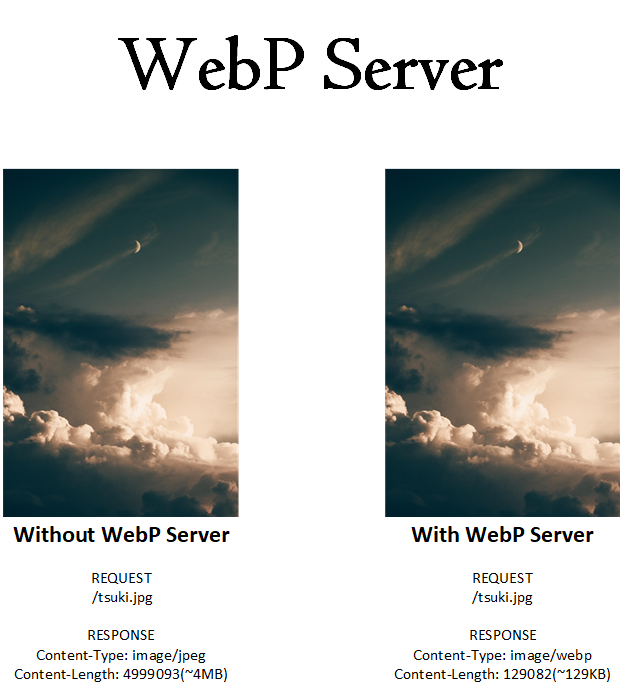


This is a Server based on Golang, which allows you to serve WebP images on the fly.
It will convert jpg,jpeg,png files by default, this can be customized by editing the config.json..
- currently supported image format: JPEG, PNG, BMP, GIF(static image for now)
e.g When you visit
https://your.website/pics/tsuki.jpg,it will serve asimage/webpformat without changing the URL.
For Safari and Opera users, the original image will be used.We've now support Safari/Chrome/Firefox on iOS 14/iPadOS 14
Simple Usage Steps
1. Download or build the binary
Download the webp-server from release page.
2. Dump config file
./webp-server -dump-config > config.json
The default config.json may look like this.
{
  "HOST": "127.0.0.1",
  "PORT": "3333",
  "QUALITY": "80",
  "IMG_PATH": "/path/to/pics",
  "EXHAUST_PATH": "/path/to/exhaust",
  "ALLOWED_TYPES": ["jpg","png","jpeg","bmp"],
  "ENABLE_AVIF": false
}
Config Example
In the following example, the image path and website URL.
| Image Path | Website Path |
|---|---|
/var/www/img.webp.sh/path/tsuki.jpg | https://img.webp.sh/path/tsuki.jpg |
The config.json should be like:
| IMG_PATH |
|---|
/var/www/img.webp.sh |
EXHAUST_PATH is cache folder for output webp images, with EXHAUST_PATH set to /var/cache/webp
in the example above, your webp image will be saved at /var/cache/webp/pics/tsuki.jpg.1582558990.webp.
3. Run
./webp-server --config=/path/to/config.json
4. Nginx proxy_pass
Let Nginx to proxy_pass http://localhost:3333/;, and your webp-server is on-the-fly.
Advanced Usage
For supervisor, Docker sections, please read our documentation at https://docs.webp.sh/
Support us
If you find this project useful, please consider supporting us becoming a sponsor or using Stripe
| USD(Card, Apple Pay and Google Pay) | SEK(Card, Apple Pay and Google Pay) | CNY(Card, Apple Pay, Google Pay and Alipay) |
|---|---|---|
| USD | SEK | CNY |
 |  |  |
License
WebP Server is under the GPLv3. See the LICENSE file for details.
Tag summary
Content type
Image
Digest
sha256:3b9e2e537…
Size
78.8 MB
Last updated
about 1 month ago
docker pull webpsh/webps