weithenn/redis-slave
Weithenn - Redis Sentinel HA Containerzation Image (Redis Slave)
1.8K
weithenn/redis-slave repository overview
Buildup Redis Sentinel provides HA (High Availability) for Redis
In simple terms, hope to package and encapsulate the Redis Sentinel high availability mechanism through Containerzation and then set up the Redis Sentinel HA mechanism very quickly in the Docker Swarm management environment.
Lab Environment
- Host OS:
CentOS 7.4 - Docker version:
17.11.0-ce - Redis Container Base Image:
redis:4.0.6-alpine - Redis Monitor Tool:
Redis-Stat - GUI Management Tool:
Portainer
How to usage
- Buildup
Docker Swarmenvironment. - Download this buildup files
git clone https://github.com/Weithenn/redis-sentinel - Execute
build.shto build the Redis Sentinel high availability mechanism.
Verify docker swarm environment
This article lab environment as below:
| Docker Host | IP Address | Docker Swarm Role |
|---|---|---|
| swarm01.weithenn.org | 10.10.75.71 | Manager and Worker |
| swarm02.weithenn.org | 10.10.75.72 | Manager and Worker |
| swarm03.weithenn.org | 10.10.75.73 | Manager and Worker |
use docker node ls command verify docker swarm environment.

Download this buildup files
use git clone https://github.com/Weithenn/redis-sentinel command download this buildup files.

Buildup / Verify Redis Sentinel provides HA (High Availability) for Redis
Execute build.sh to build the Redis Sentinel high availability mechanism. You will see the establishment of a Redis Master, two Redis Slave, three Redis Sentinel, a Redis-Stat, a Portainer...etc eight containers, and confirm the Redis Sentinel high availability mechanism is complete.

Open the browser link to one of the Docker Swarm Port 80, you will see Redis-Stat monitor screen.

Open the browser link to one of the Docker Swarm Port 9000, you will see Portainer GUI tool screen.

Destroy lab environment
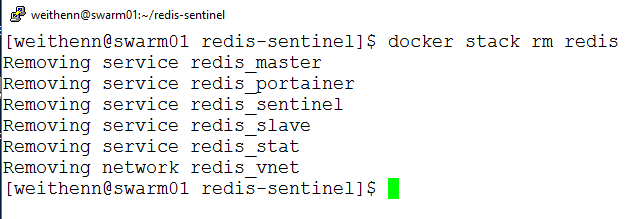
After you have completed the test, you can use the docker stack rm redis command to destroy the lab environment.
More Details
For more information on this, please refer to 實戰 - Redis Sentinel 高可用性機制容器化 ~ 不自量力 の Weithenn。
Tag summary
Content type
Image
Digest
Size
10 MB
Last updated
almost 9 years ago
docker pull weithenn/redis-slave