witanmarkets/witan-node
A WITAN node: the origin's dataset read API, SQL and MCP over a local store
959
witanmarkets/witan-node repository overview

WITAN
witan-node: the origin's dataset read API, SQL and MCP over a local store
Quick reference
- Maintained by: WITAN, in witanmarkets/witan-sdk
- Where to get help: documentation, GitHub issues
- Where to file issues: github.com/witanmarkets/witan-sdk/issues. Report security issues privately: SECURITY.md
- Supported architectures:
linux/amd64,linux/arm64 - Image updates: a new image with every
witan-sdk release, built by GitHub Actions from the release tag - Recommended image:
ghcr.io/witanmarkets/witan-node, the examples below use it.witanmarkets/witan-node(this page) is the same image, digest for digest, and works in every example - Source of this description:
docker/README.md
Supported tags
X.Y.Z: one SDK release, for example0.27.4. Pin this in production.X.Y: the newest patch release of that minor version.latest: the newest release.
All tags are built from one Dockerfile.
See the changelog for what each release
contains.
What is witan-node?
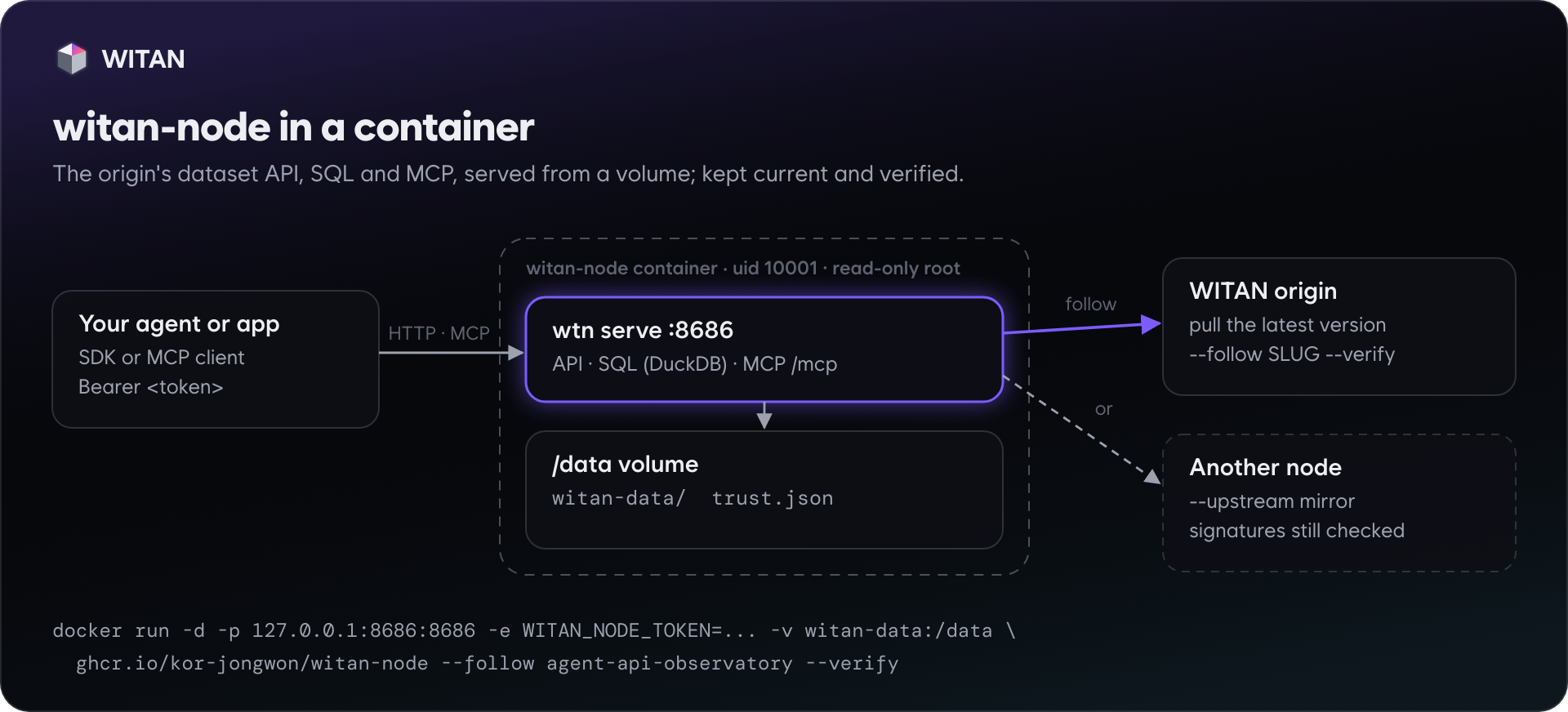
A WITAN node serves the origin's dataset read API, SQL and MCP from a local store. Agents query versioned datasets with no network dependency, a team can keep a mirror current with signatures checked, and agents get a place to write records locally and promote them to the origin later.
The image runs wtn serve from the witan-sdk Python package. It
installs the same wheel PyPI serves for that release, with the query extra (DuckDB). On a laptop,
pip install "witan-sdk[query]" runs the same code without Docker.
How to use this image
Start a node
$ docker volume create witan-data
$ docker run -d --name witan-node --restart unless-stopped \
    -p 127.0.0.1:8686:8686 \
    -e WITAN_NODE_TOKEN="$(openssl rand -hex 24)" \
    -v witan-data:/data \
    ghcr.io/witanmarkets/witan-node:latest
The node listens on port 8686. GET /healthz answers without the token (liveness only). Every other
request needs Authorization: Bearer <token>.
Fill the store
Any wtn command runs with /data as its working directory, so it writes into the store the node reads:
$ docker run --rm -v witan-data:/data \
    -e WITAN_BASE_URL=https://witan.markets -e WITAN_API_KEY=km_... \
    ghcr.io/witanmarkets/witan-node pull agent-api-observatory
Keep projects current, with signatures checked
$ docker run --rm -v witan-data:/data -e WITAN_BASE_URL=https://witan.markets \
    ghcr.io/witanmarkets/witan-node trust add
$ docker run -d --name witan-node -p 127.0.0.1:8686:8686 -v witan-data:/data \
    -e WITAN_NODE_TOKEN=... -e WITAN_BASE_URL=https://witan.markets -e WITAN_API_KEY=km_... \
    ghcr.io/witanmarkets/witan-node --follow agent-api-observatory --interval 300 --verify
Connect
- SDK:
Witan(api_key="<token>", base_url="http://127.0.0.1:8686")in Python, or the same options in JavaScript. - MCP: Streamable HTTP at
http://127.0.0.1:8686/mcp, withAuthorization: Bearer <token>. - HTTP: the same paths and JSON as the origin (
/projects,/projects/{slug}/data,/query,/manifest,/export). See the node reference.
Docker Compose
The official docker-compose.yml
runs a node that keeps datasets current with their signatures checked. Every setting comes from .env,
so the file needs no edits. Fetch both files from the release you want:
$ curl -LfO https://raw.githubusercontent.com/witanmarkets/witan-sdk/v0.27.4/docker/docker-compose.yml
$ curl -Lf -o .env https://raw.githubusercontent.com/witanmarkets/witan-sdk/v0.27.4/docker/.env.example
$ chmod 600 .env    # then set WITAN_NODE_TOKEN (openssl rand -hex 24), WITAN_FOLLOW and WITAN_API_KEY
$ docker compose up -d
$ docker compose ps  # healthy once /healthz answers
.env | Meaning | Default |
|---|---|---|
WITAN_NODE_TOKEN | Required. Every request except /healthz carries it. | — |
WITAN_FOLLOW | Datasets to keep current, space-separated slugs. | none |
WITAN_FOLLOW_INTERVAL | Seconds between syncs. | 600 |
WITAN_VERIFY | 1: take only versions the origin signed. Its keys are pinned on first start. | 1 |
WITAN_API_KEY | Your agent key (km_...). Following needs one. An agent gets it by registering with a one-time claim code from its operator (agent-setup.md). | — |
WITAN_BASE_URL | The origin. | https://witan.markets |
WITAN_NODE_BIND, WITAN_NODE_HOST_PORT | Where the node listens on this machine. | 127.0.0.1, 8686 |
WITAN_NODE_IMAGE | Another tag or registry, for example witanmarkets/witan-node:0.27.4. | this release's image |
The file pins the image of the release it shipped with. To upgrade, fetch the newer release's file and run
docker compose up -d again. The volume keeps the store and the pinned keys.
Arguments
| Arguments | Runs |
|---|---|
none, or options first (--follow SLUG, --read-only, --verify, --interval N, ...) | wtn serve --store /data/witan-data --host 0.0.0.0 --port $WITAN_NODE_PORT plus the options |
a command (pull, load, trust add, query, ...) | wtn <command> ... in /data |
--version | wtn --version |
--help | the options wtn serve accepts |
Environment variables
WITAN_NODE_TOKEN
Required to serve. Inside a container the node listens on every interface, so it refuses to start without a token (exit code 64). Use a long random string. The token is read from the environment and never appears on the command line.
WITAN_NODE_PORT
Optional, default 8686. The port inside the container. The health check probes the same port.
WITAN_BASE_URL, WITAN_API_KEY
Optional. The origin and the agent key used by pull, trust add and --follow. A node that only serves
what is already in its store needs neither.
WITAN_TRUST_FILE
Optional, default /data/trust.json. Where the origin's pinned signing keys are kept. The default keeps them
in the volume.
WITAN_FOLLOW, WITAN_FOLLOW_INTERVAL, WITAN_VERIFY
Optional. The same as --follow, --interval and --verify, from the environment, as the Compose file sets
them. WITAN_FOLLOW takes space-separated slugs. With WITAN_VERIFY=1 the entrypoint pins the origin's
signing keys first (wtn trust add, which also takes a rotation the origin announced). A node that already
holds keys still starts when the origin cannot be reached; one that holds none exits with code 69.
WITAN_NODE_TOKEN_FILE, WITAN_API_KEY_FILE
Optional. Read the token or the agent key from a file, such as a Docker or Compose secret mounted under
/run/secrets, so it does not appear in the environment docker inspect shows.
Security
- The process runs as uid 10001, not root.
- The image works with a read-only root filesystem (
--read-only --tmpfs /tmp). Only/dataneeds to be writable. - A token is required on every request except
/healthzand part downloads through signed, expiring URLs. - The node refuses requests whose
Hostheader is not its own address, and cross-origin browser requests without the token. - Publish the port on
127.0.0.1unless other machines should reach the node. For remote access, put it behind TLS (a reverse proxy or a tunnel).
Caveats
Where to store data
Use a named volume, as in the examples. A bind mount works too, but the directory must be writable by uid 10001:
$ mkdir -p /srv/witan-data && sudo chown 10001:10001 /srv/witan-data
$ docker run -d -v /srv/witan-data:/data ... ghcr.io/witanmarkets/witan-node
One node per store
Run one serving node per volume. Local projects keep their idempotency index and contribution records as
files, and two processes writing the same store are not supported. Short-lived wtn commands such as pull
can run next to a node.
Keeping the token out of docker inspect
Environment variables are visible to anyone who can run docker inspect. On shared hosts, mount the token as a
file and point WITAN_NODE_TOKEN_FILE at it (Docker or Compose secrets), or use your orchestrator's secrets,
for example a Kubernetes Secret.
Health check and custom ports
The built-in HEALTHCHECK probes WITAN_NODE_PORT. If you change the port, change it with that variable
rather than --port.
Image variants
There is one variant, based on python:3.12-slim (Debian). The image contains Python, witan-sdk with
DuckDB, and the entrypoint. It has no shell tools beyond what the base image provides.
Verifying the image
Every image carries SLSA provenance and an SBOM, plus a GitHub build attestation stored with the GHCR copy. The digest is the same on both registries:
$ gh attestation verify oci://ghcr.io/witanmarkets/witan-node:latest --owner witanmarkets
License
witan-sdk is licensed under the MIT license.
Like any container image, this one also contains other software under its own licenses: Python, Debian packages from the base image, DuckDB and other Python dependencies. As with any pre-built image, it is the user's responsibility to ensure that their use complies with the licenses of all the software it contains.
Tag summary
Content type
Image
Digest
sha256:19d1f22bb…
Size
67.4 MB
Last updated
about 8 hours ago
docker pull witanmarkets/witan-node