wondertree/posecamera repository overview
PoseCamera



PoseCamera is python based SDK for multi human pose estimation through RGB webcam.
Install
install posecamera package through pip
pip install posecamera
If you are having issues with the installation on Windows OS then check this page
Usage
See Google colab notebook https://colab.research.google.com/drive/18uoYeKmliOFV8dTdOrXocClCA7nTwRcX?usp=sharing
draw pose keypoints on image
import posecamera
import cv2

posecamera.load("lightweight_pose_estimation.pth")

image = cv2.imread("example.jpg")
poses = posecamera.estimate(image)
for pose in poses:
    pose.draw(image)

cv2.imshow("PoseCamera", image)
cv2.waitKey(0)
Download Pretrained weights file from https://storage.googleapis.com/wt_storage/lightweight_pose_estimation.pth
For training your own model then refer to this document
output of the above example
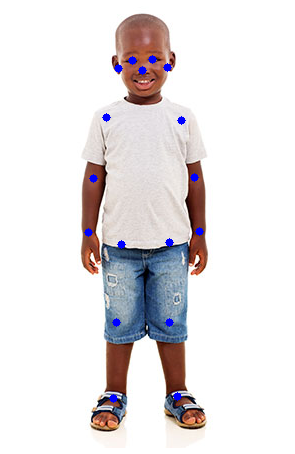
or get keypoints array
for pose in poses:
    keypoints = pose.keypoints
Handtracker
import posecamera
import cv2
det = posecamera.hand_tracker.HandTracker("palm_detection_without_custom_op.tflite", "hand_landmark.tflite", "anchors.csv")

image = cv2.imread("tmp/hands.jpg")
keypoints, bbox = det(image)

for hand_keypoints in keypoints:
    for (x, y) in hand_keypoints:
        cv2.circle(image, (int(x), int(y)), 3, (255, 0, 0), -1)

cv2.imshow("PoseCamera - Hand Tracking", image)
cv2.waitKey(0)
Download Pretrained weights files
Palam Detections https://storage.googleapis.com/wt_storage/palm_detection_without_custom_op.tflite
Hand Landmarks https://storage.googleapis.com/wt_storage/hand_landmark.tflite
SSD Generated Anchors https://storage.googleapis.com/wt_storage/anchors.csv
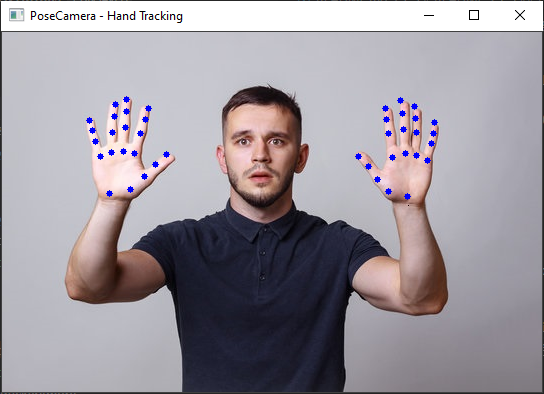
Using Docker
The official docker image is hosted on Docker Hub. The very first step is to install the docker docker on your system.
Also note that your Nvidia driver Needs to be compatible with CUDA10.2.
Doing inference on live webcam feed.
xhost +; docker run --name posecamera --rm --net=host --gpus all -e DISPLAY=$DISPLAY --device=/dev/video0:/dev/video0 wondertree/posecamera --video=0
GPU & Webcam support (if running docker) is not available on Windows Operating System.
To run inference on images use the following command.
docker run --name posecamera --rm --net=host -e DISPLAY=$DISPLAY wondertree/posecamera --images ./tmp/female_pose.jpg --cpu
For more details read our Docs
The base of this repository is based on the following research paper.
@inproceedings{osokin2018lightweight_openpose,
    author={Osokin, Daniil},
    title={Real-time 2D Multi-Person Pose Estimation on CPU: Lightweight OpenPose},
    booktitle = {arXiv preprint arXiv:1811.12004},
    year = {2018}
}
Share your thoughts
Join our Discussion Channel! We love to hear your ideas, suggestions or pull request
Tag summary
Content type
Image
Digest
Size
2.3 GB
Last updated
over 5 years ago
docker pull wondertree/posecamera