yasserbdj96/imbot repository overview
imbot
imbot for making a bot to control any website.


Languages:
* python3Requirements
[✓] hexor[✓] asciitext
[✓] selenium
Supported Distributions:
| Distribution | Version Check | Python Test Version | Supported | Status | Everything works |
|---|---|---|---|---|---|
| Ubuntu | 20.04.3 | 3.6, 3.7, 3.8, 3.9 | Yes | Working | Yes |
| Windwos | 11.6.4 | 3.6, 3.7, 3.8, 3.9 | Yes | Working | No |
| MacOS | 10.0.20348 | 3.6, 3.7, 3.8, 3.9 | Yes | Working | No |
Docker pull,build & run:
# pull:
docker pull yasserbdj96/imbot:latest

# build:
docker build -t docker.io/yasserbdj96/imbot:latest .

# run:
docker run -e headless=<True/False>* -e json_data='<PATH/TO/JSON/FILE>*' -e opiration_title='<TITLE_OF_OPIRATION>*' -e argvs='<ARGV_DATA_ID>="<DATA_TO_INPUT>"' -i -t imbot:latest
# EX:
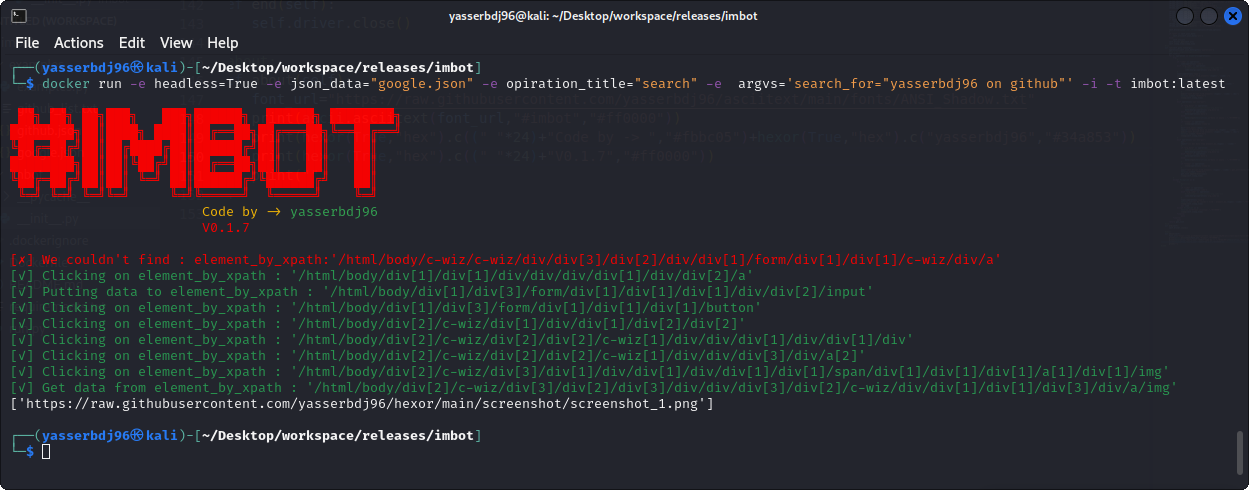
# docker run -e headless=True -e json_data="google.json" -e opiration_title="search" -e  argvs='search_for="yasserbdj96 on github"' -i -t imbot:latest
# *    = All inputs must be entered.
Github Packages pull,build & run:
# pull:
docker pull ghcr.io/yasserbdj96/imbot:latest

# build:
docker build -t ghcr.io/yasserbdj96/imbot:latest .

# run:
docker run -e headless=<True/False>* -e json_data='<PATH/TO/JSON/FILE>*' -e opiration_title='<TITLE_OF_OPIRATION>*' -e argvs='<ARGV_DATA_ID>="<DATA_TO_INPUT>"' -i -t ghcr.io/yasserbdj96/imbot:latest
# EX:
# docker run -e headless=True -e json_data="google.json" -e opiration_title="search" -e  argvs='search_for="yasserbdj96 on github"' -i -t ghcr.io/yasserbdj96/imbot:latest
# *    = All inputs must be entered.
Python Package Installation:
pip install imbot
Run without installation:
git clone https://github.com/yasserbdj96/imbot.git
cd imbot
pip install -r requirements.txt
python3 run.py "headless=<True/False>*" "json_data='<PATH/TO/JSON/FILE>*'" "opiration_title='<TITLE_OF_OPIRATION>*'" "argvs={'<ARGV_DATA_ID>':'<DATA_TO_INPUT>'}"
# EX:
# python run.py "headless=False" "json_data='./examples/google.json'" "opiration_title='search'" "argvs={'search_for':'yasserbdj96 on github'}"
# *    = All inputs must be entered.
Usage:
from imbot import *

p1=imbot("<json_file>")

p1.run(<OPIRATION_TITLE>*,<VARIABLE_NAME>)
# *    = All inputs must be entered.

p1.end()

"""
Default json code:
{
    "url":"<WEBSITE_URL>",
    "<OPIRATION_TITLE>":{
        "operations":[
           {"type":"<xpath/link_text/id/name/tag_name>","code":"<ELEMENT_CODE>","arg_code":"<VARIABLE_NAME>","opt":"<click/put/get>","arg_data":"<VARIABLE_NAME>","data":"<YOUR_DATA>","sleep":<Seconds>}
        ]
    }
}

Help:
# Types of finding elements : "type"=[id,name,xpath,link_text,partial_link_text,tag_name,class_name,css_selector]
# If you don't use the 'code' key, you must use the 'arg_code' key to enter data from your script.
# If you don't use the 'data' key, you must use the 'arg_data' key to enter data from your script.
# When using the 'put' option you must use 'data' or 'arg_data', Unlike the "click" option.
# When using the 'get' option you must use 'data' or 'arg_data', Unlike the "click" option, data=get_attribute("<src/herf/name/id>").
# 'arg_data' and 'arg_code' are 'variable name'.
# 'arg_data' and 'arg_code' are the variable name of the element to be inserted from the list. //Example: p1.run(<OPIRATION_TITLE>,password="123456789")
# 'data' and 'code' for entering data like password or username from json file (this is a common option if the variables you want to use are static).
# 'sleep' To wait for a certain period before starting an operation.
"""
Examples:
from imbot import *

# Examples
# Example 1:
# Open the website link:
p1=imbot("github.json",headless=False)

# Login:
p1.run("login",passw='<YOUR_PASSWORD>')
# login==>OPIRATION_TITLE
# passw=<YOUR_PASSWORD> ==> "arg_data":"passw"
# Bearing in mind that the name of the variable is 'passw'.

# To the profile page:
# p1.run("profile")
# profile==OPIRATION_TITLE

# To home page:
# p1.run("go2home")

# read the list of repositories:
Lines=open('github_list.txt','r').readlines()

# Strips the newline character
#for i in range(len(Lines)):
for i, Line in enumerate(Lines):
    repositorie=Line.strip()
    # To the repositorie:
    p1.run("go2repositorie",repo=repositorie)# repositorie=="arg_code":"repo" //Bearing in mind that the name of the variable is 'repo'
    # make operations:
    p1.run("hide_repositorie",repo=repositorie)# repositorie=="arg_data":"repo" //Bearing in mind that the name of the variable is 'repo'
    # To the home page:
    p1.run("go2home")

# end
p1.end()

# Example 2:
# Open the website link:
p2=imbot("google.json")#,headless=False

# Here, search for a movie poster in Google Images and get the link:
print(p2.run("search",search_for="yasserbdj96 on github"))
print(p2.run("search",search_for="luffy one piece"))

# end
p2.end()
Screenshot:
Changelog History:
## 0.1.7 [30-07-2022]
 - make run option.
 - Modify to build on docker.
 - Change input settings.
 - Fix bugs.

## 0.1.6 [29-05-2022]
 - Fix bugs.

## 0.1.5 [28-05-2022]
 - Add sleep.
 - Fix bugs.

## 0.1.3 [28-05-2022]
 - Add Return 'get_attribute' as a list.
 - Fix bugs.

## 0.1.2 [10-03-2022]
 - Fix bugs.

## 0.1.1 [10-03-2022]
 - Fix bugs.

## 0.1.0
- New build.

## 0.0.1
- First public release.
Don't forget to star ⭐ this repository
all posts #yasserbdj96 ,all views my own.
Tag summary
Content type
Image
Digest
sha256:fe1f6e5f5…
Size
619.1 MB
Last updated
over 3 years ago
docker pull yasserbdj96/imbot