yusoltsev/flint
Self-hosted issue tracker and Markdown wiki for teams that run Gitea
636
yusoltsev/flint repository overview

Flint
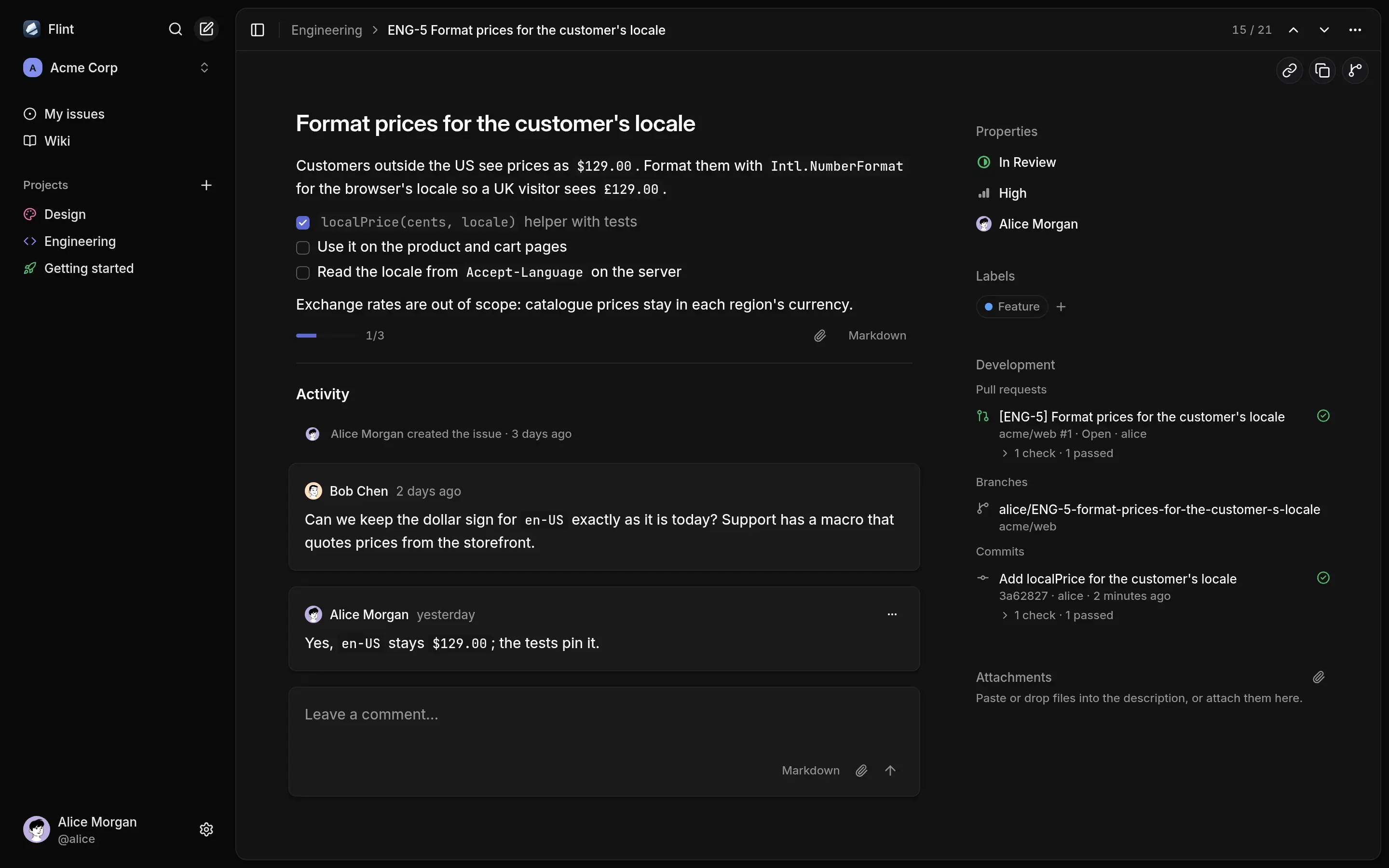
Flint is a self-hosted issue tracker and Markdown wiki for teams that run Gitea. People sign in with their Gitea accounts, and branches, commits, pull requests and CI checks that mention ENG-12 show up on the issue by themselves. A CLI does everything the UI does, so coding agents can work in it too.
- Lists and boards, priorities, labels, assignees, keyboard shortcuts and a command palette.
- Markdown wiki with revision history, Mermaid diagrams and conflict recovery.
- Comments, attachments and live updates across tabs.
- Full-text search; optional semantic search through an embeddings API.
- REST API and a CLI that prints JSON when piped.
Contents
Quick start
You need Bun and Docker Compose. Compose runs PostgreSQL, an S3 server, Gitea with a CI runner, and creates the Gitea users, the OAuth app and the webhook.
git clone https://github.com/yegor-usoltsev/flint.git && cd flint
bun install
cp .env.example .env
docker compose up -d --wait
bun run dev    # or the production image: bun run build && docker compose --profile app up -d --wait --build
bun run demo   # optional, while Flint is running
Open http://localhost:4700, choose Continue with Gitea and sign in as alice with the password password (bob and carol too). Gitea is on http://localhost:4701.
bun run demo creates the workspace Acme Corp with projects, issues, wiki pages and a Getting started project that tours the features, plus a Gitea repository whose pull request shows up on ENG-5 with its CI check. Without it, Flint asks you to create a workspace; tick Include demo data there for a short Getting started project and wiki guide.
To open Flint from another device, set PUBLIC_HOST (the host name the browser uses) and PUBLIC_HOST_BIND (the address to publish on) in .env, then rerun docker compose up -d and restart bun run dev. docker compose down -v deletes all data.
Self-hosting
Run yusoltsev/flint (also ghcr.io/yegor-usoltsev/flint) next to Gitea, PostgreSQL 18 with pgvector and an S3 bucket:
docker run -d --name flint -p 3000:3000 --env-file flint.env yusoltsev/flint:latest
docs/self-hosting.md covers the Gitea OAuth app and webhook, the reverse proxy and semantic search.
CLI and agent skill
npm install -g @yusoltsev/flint-cli    # Node 22.12+ or Bun
flint login --url https://flint.example.com --token <key from Settings → API keys>
flint issue list -a @me
$ flint issue branch ENG-5
alice/ENG-5-format-prices-for-the-customer-s-locale
For a coding agent, npx skills add yegor-usoltsev/flint installs a skill that tells it to run flint skill, which prints the guide for the installed CLI version. More in cli/README.md.
Limitations
- Gitea only. Sign-in and Git links need Gitea. Links come from every repository on the instance, private ones included, and every workspace member sees them.
- No notifications by email or in the app.
- Fixed statuses. Every project has Backlog, Todo, In Progress, In Review, Done and Canceled.
- My issues has no filters, grouping or ordering.
- Escape on an issue opened from Cmd+K returns to the project list, not the previous view.
- One container. Live updates reach only tabs connected to the same server process.
- HTTP/1.1. Visible tabs of the same build share one event stream per account and workspace when SharedWorker is available. Older builds and browsers with unavailable or failed workers keep a stream per visible tab and can exhaust the six HTTP/1.1 connections per host. Hidden tabs unsubscribe and refresh when shown; use HTTP/2 to avoid the connection limit.
- Images. JPEG and static PNG and WebP uploads are scaled and stripped of metadata; GIF, AVIF, HEIC, APNG and animated WebP are stored as is.
See draft recovery for offline text saves, conflicts and account boundaries.
Development
mise installs Bun and the pre-commit hook. bun run lint checks types and formatting, bun test runs against the compose PostgreSQL and S3, and bun run cli:smoke drives the CLI against the running app after bun run demo. AGENTS.md and docs/development.md hold the conventions.
License
Tag summary
Content type
Image
Digest
sha256:b3606555f…
Size
61.2 MB
Last updated
4 days ago
docker pull yusoltsev/flint