zenpachi/extract-html-differences
Scraping HTML code of web pages, and extract difference.
Image
0
322
zenpachi/extract-html-differences repository overview
Extract HTML differences
Scraping HTML code of web pages, and extract difference.

Usage
With Docker
1. Download diff.sh
2. Create a CSV file
Create a CSV file of URLs to extract differences.
Sample:
1,https://example.com/,https://test.example.com/
2,https://example.com/page1,https://test.example.com/page1
3,https://example.com/page2,https://test.example.com/page2
3. Run a program
$ cd <downloadPath>
$ ./diff.sh
4. Enter settings
$ ./diff.sh
Path of CSV file: <csvFilePath>
Path for the output: <outputResultPath>
Number of multithreading: (1) 1
Waiting time to request page (ms): (1000) 1000
CSV file       : 'entered csvFilePath'
output         : 'entered outputResultPath'
Threads        : 1
Wait time(ms)  : 1000
Are you sure you want to continue? [y/N] y
Without Docker
Using this tool without Docker require Python3 and some libraries.
1. Clone repository
2. Create a CSV file
Create a CSV file of URLs to extract differences.
Sample:
1,https://example.com/,https://test.example.com/
2,https://example.com/page1,https://test.example.com/page1
3,https://example.com/page2,https://test.example.com/page2
3. Installing libraries
$ pip3 install beautifulsoup4 pandas html5lib
4. Run a program
$ cd <clonePath>
$ ./diff_without_docker.sh
5. Enter settings
$ ./diff.sh
Path of CSV file: <csvFilePath>
Path for the output: <outputResultPath>
Number of multithreading: (1) 1
Waiting time to request page (ms): (1000) 1000
CSV file       : 'entered csvFilePath'
output         : 'entered outputResultPath'
Threads        : 1
Wait time(ms)  : 1000
Are you sure you want to continue? [y/N] y
Result files
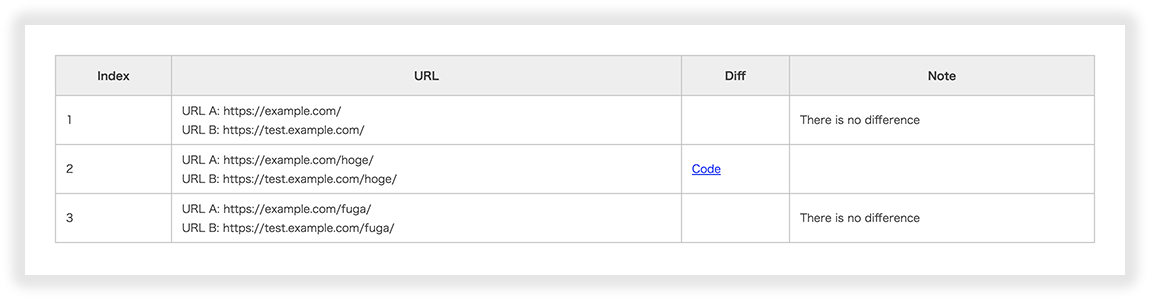
The result file is some html file and _result.csv. Open html in a browser and open csv in an editor etc.
BASIC Auth
If BASIC authentication is set to the URL you want to extract the difference, write the authentication information to the CSV file.
Sample:
1,https://example.com/,https://username:[email protected]/
Notes
- Please use it for your own website without abuse. Please note that the use of other websites and applications may violate laws and regulations.
- A lot of scraping will put a load on the server. You can reduce the load by adjusting the number of multi-threads and waiting time.
- Use of the tool is at your own risk. The author takes no responsibility for any damage caused by the use of the tool.
LICENSE
This software is released under the MIT License, see LICENSE.txt.
Tag summary
Content type
Image
Digest
Size
113.3 MB
Last updated
about 7 years ago
docker pull zenpachi/extract-html-differences