zhonger/minihpc
MiniHPC: A simple way to deploy and manage slurm cluster
357
zhonger/minihpc repository overview

A simple way to deploy and manage slurm cluster.



Requirements




-blue)
Architecture
Here is the architecture of MiniHPC as the following figure shows.
We include all requirements in the zhonger/minihpc docker image and other images provided by the community.
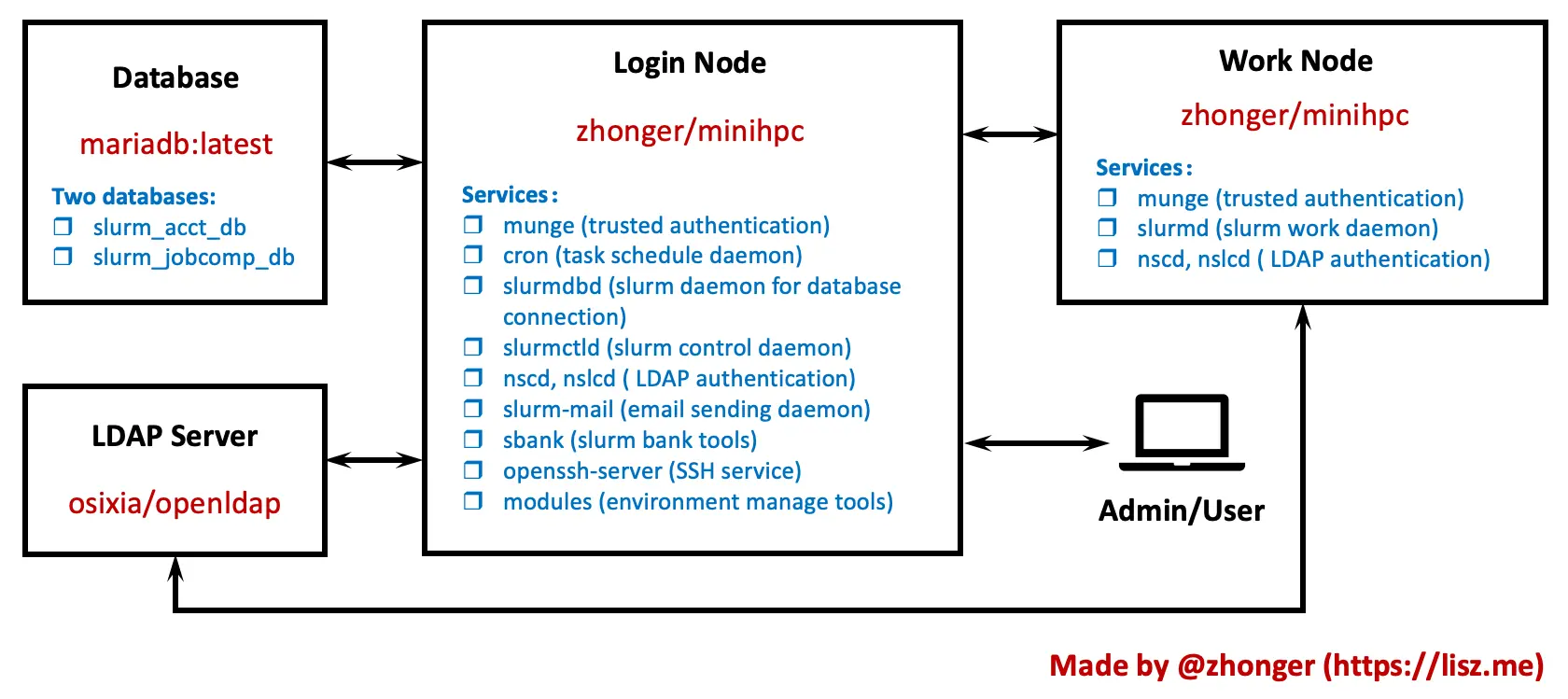
Defaultly, the container as login node cannot be work node at the same time.
If you want them in the same physical node, two containers with different configurations will be necessary.
Then one container is login node and another one is work node.
Quick start
Preparing networks
MiniHPC can be used in single node or multiple nodes. It will be no additional physical requirements for networks.
If in multiple nodes or the cluster, please confirm that all nodes can be directly connected with routers or switches.
For example, the nodes can be accessed each other if they are set as the same local network, such as 192.168.121.0/24.
Example for networks
If we have a single node or more, then two local networks can be used:
192.168.120.0/24for internal network (macvlan)192.168.121.0/24for external network (bridge)
And sake is login node. db is database. slapd is LDAP. w1 and w2are work nodes.
| Container | IP | Purpose |
|---|---|---|
| db | 192.168.121.101 | MariaDB |
| sake | 192.168.121.100 | Outside access and access database |
| sake | 192.168.120.100 | Connect other slurm nodes |
| slapd | 192.168.120.99 | OpenLDAP |
| w1 | 192.168.120.101 | work node 1 |
| w2 | 192.168.120.102 | work node 2 |
Preparing directories
The usage of MiniHPC requires a sharing filesystem if used for multiple nodes (or the cluster), such as NFS or others.
First of all, please create home directory in the sharing filesystem. Any name for home directory is ok.
And then create directories using the following commands:
mkdir data && cd data
mkdir db ldap slurm slurm-mail logs root users share share/db_init && cd ../
mkdir work && cd work
mkdir w1 w2 ... # create one directory for each node
| Directory | Purpose |
|---|---|
| data/db | data files for mariadb |
| data/ldap | data files for LDAP |
| data/slurm | data files for slurm daemons |
| data/slurm-mail | data files for slurm mail |
| data/logs | log files for slurm and slurm mail |
| data/root | the home directory for root user |
| data/users | the home directories for slurm users |
| data/share | sharing configurations |
| work/w1 | the docker-compose.yml file |
Preparing configurations
The most important thing is to prepare the necessary configuration files for your environments as follows.
| Source Path | Target Path | Purpose |
|---|---|---|
| conf/db_init/01.sql | data/share/db_init/01.sql | the initial sql for mariadb (no need to change) |
| conf/slurm.conf | data/share/slurm.conf | slurmctld (login node) and slurmd (work node) |
| conf/slurmdb.conf | data/share/slurmdb.conf | slurmdb (login node) |
| conf/slurm-mail.conf | data/share/slurm-mail.conf | slurm-mail (login node) |
| conf/nslcd.conf | data/share/nslcd.conf | LDAP connection for control |
| scripts/getPublicKey | data/share/getPublicKey | LDAP connection for readyonly |
| data/share/hosts | data/share/hosts | hostname mapping |
Copy them from source code to created directories and change to your own settings.
Optional configuration files are as follows:
| Source Path | Target Path | Purpose |
|---|---|---|
| conf/80-minihpc-news | data/share/80-minihpc-news | welcome message at login |
| conf/sshd_config | data/share/sshd_config | SSH config |
Create MiniHPC
Copy the necessary sections in docker-compose.yml and change to your own settings.
Example for MiniHPC
If you have two nodes, one is for login and work and another one is only for work.
-
For login and work node:
db,sake,slapdandw1. -
For only work node:
w2.
Please be careful about the relative path in the volume section of docker-compose.yml.
Manage accounts
The users and SSH public keys are managed by LDAP services, so additional LDPA manage softwares such as LDAPAccountManager/lam, leenooks/phpLDAPadmin can be used to connect LDAP service and manage accounts in MiniHPC.
The project and resource limits is enabled in default. It can be managed by sbank command when accessing the login node with root user. Please use sbank -h for more details.
In future, a web UI will be provided for managing MiniHPC conveniently.
TODO
Web UI
- create accounts
- manage SSH public keys
- change password
- create project and resources
- monitoring
- resource usage statistics
Features
- GPU support
- LDAP docker image
Thanks
Thanks to @neilmunday and @jcftang providing good tools (slurm-mail and slurm-bank) for enhancing the experience of Slurm.
Thanks to the Mariadb Community and @osxia providing good dockerlized images (mariadb and openldap) for convienent usage.
License
MiniHPC is released under MIT license.
Tag summary
Content type
Image
Digest
sha256:5c2890eb9…
Size
405.2 MB
Last updated
almost 2 years ago
docker pull zhonger/minihpc