jenmud/behave-graph-auto-build
Graph visualization for behave features, scenarios, and steps
649
jenmud/behave-graph-auto-build repository overview
behave-graph
Keeping track of all the behave features, scenarios, and steps can be challenging. So this is a behave scraper creating a dependency graph of features, scenarios, and steps.
TO DO
- Add in tests!!
- Add to travis
Installing, Developing, and Running
Installing and Developing
Fork the project and clone it
# Assuming that you have forked the repo
$ git clone https://github.com/<username>/behave-graph.git
Clone ruruki for examples
$ git clone https://github.com/optiver/ruruki.git
Get it installed using a python virtualenv
$ virtualenv behave-graph-ve
$ behave-graph-ve/bin/pip install -U pip setuptools wheel
$ behave-graph-ve/bin/pip install behave-graph  # use -e to do a develop install.
Running a scrape and starting a webserver
$ behave-graph-ve/bin/behave-graph --runserver -b ruruki/ruruki/test_behave
INFO:root:Starting server 0.0.0.0:8000
INFO:ruruki_eye.server:Setting up db to <ruruki.graphs.Graph object at 0x10df1b150>
INFO:werkzeug: * Running on http://0.0.0.0:8000/ (Press CTRL+C to quit)
Open a web browser and navigate to the running address provided in the output above.
http://0.0.0.0:8000
Using a docker container
To use the behave-graph docker container, you will need to mount your root test behave directory which contains all the features and steps to the container directory called my-share. The ruruki-eye server will listen and expose port 80. So you may need to port map.
There are two containers
- jenmud/behave-graph - stable
- jenmud/behave-graph-auto-build - auto generated from github when a push has happened.
This is development and latest pushes and is not regarded stable
Example mounting volumes to scrape and mapping port 80 to 8000.
$ docker run -t -p 8000:80 -v /git-repos/ruruki/ruruki/test_behave/:/my-share jenmud/behave-graph
Open a web browser and navigate to the running address provided in the output above.
http://0.0.0.0:8000
Once you have run the container (as example above) it will run forever in the background. So you will need to manually stop it once you are done.
$ docker stop jenmud/behave-graph
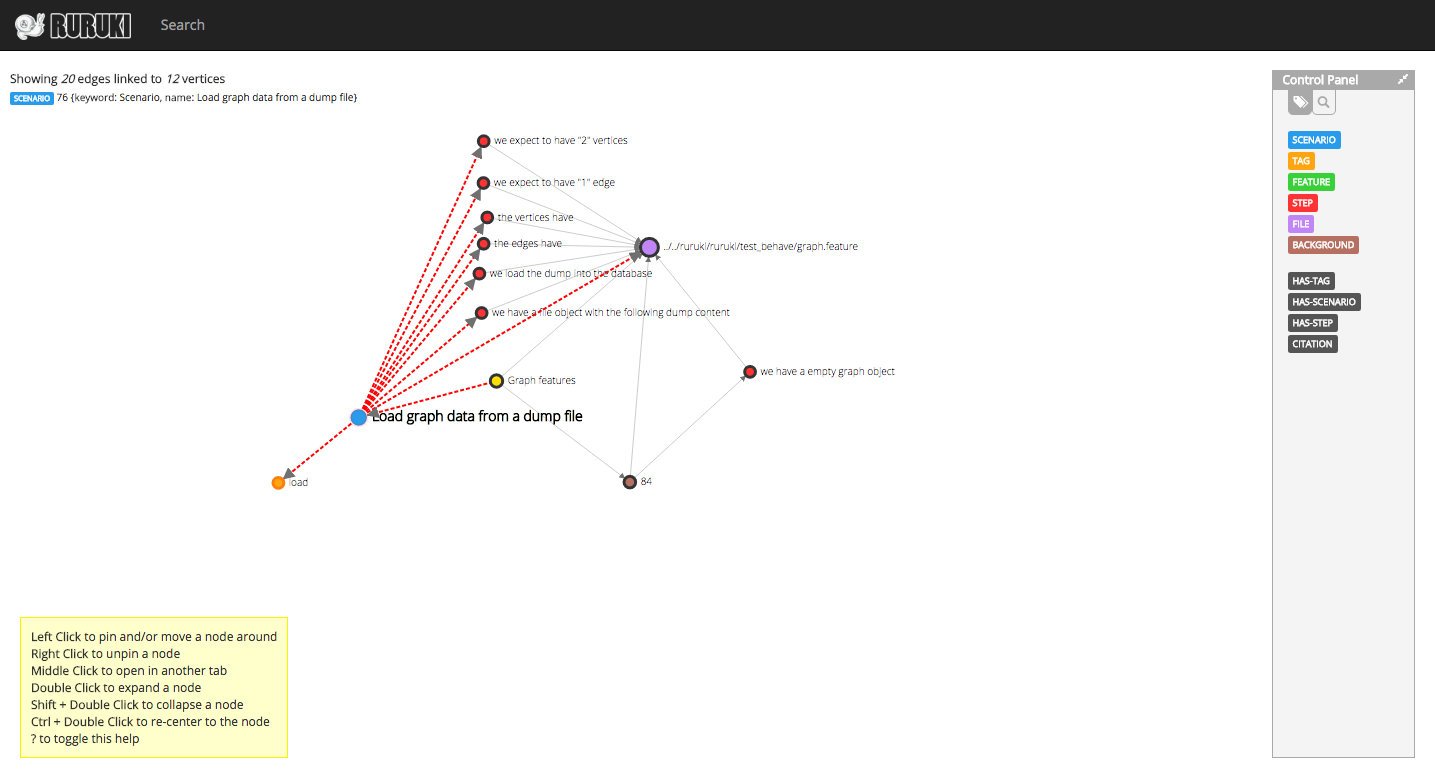
Example of interesting output (assuming that vertex with name="Graph features" has the id 74)
http://localhost:8000/vertices/74?levels=1
Screenshot
Tag summary
Content type
Image
Digest
Size
29.9 MB
Last updated
over 10 years ago
docker pull jenmud/behave-graph-auto-build