monitoringartist/dockbix-agent-xxl-limited
Dockbix Agent XXL - Dockerized Zabbix Agent with Docker/host/systemd/socket/stress metric monitoring
50M+
monitoringartist/dockbix-agent-xxl-limited repository overview
Dockbix Agent XXL - Zabbix Agent with Docker monitoring





dockbix-agent-xxl-limited is a 2nd generation of successful (500k+ pulls) zabbix-agent-xxl-limited Docker image - it's a standard Zabbix agent with Docker/host/systemd/socket/stress metrics support, which can be used with any Zabbix server. Tested on CoreOS, RHEL, CentOS, Ubuntu, Debian, Fedora, Boot2docker, Photon OS.
If you like or use this project, please provide feedback to author - Star it ★ or submit feedback form.
Overview of Monitoring Artist (dockerized) monitoring ecosystem:
- Dockbix XXL - Zabbix server/proxy/UI/snmpd/java gateway with additional extensions
- Dockbix agent XXL - Zabbix agent with Docker (Kubernetes/Mesos/Chronos/Marathon) monitoring
- Zabbix templates - Docker image for template deployment of selected Zabbix monitoring templates
- Zabbix extension - all templates - storage image for Dockbix XXL with 200+ community templates
- Kubernetized Zabbix - containerized Zabbix cluster based on Kubernetes
- Grafana XXL - dockerized Grafana with all community plugins
- Grafana dashboards - Grafana dashboard collection for AWS and Zabbix
- Monitoring Analytics - graphic analytic tool for Zabbix data from data scientists
- Docker killer - Docker image for Docker stress and Docker orchestration testing
Start Dockbix agent container and monitor all Docker containers on your host. Module Zabbix Docker monitoring is used - all docker module container metrics are available except docker.xnet. Import/assign Dockbix Agent XXL templates + then just start Dockbix agent container:

docker run \
  --name=dockbix-agent-xxl \
  --net=host \
  --privileged \
  -v /:/rootfs \
  -v /var/run:/var/run \
  --restart unless-stopped \
  -e "ZA_Server=<ZABBIX SERVER IP/DNS NAME/IP_RANGE>" \
  -e "ZA_ServerActive=<ZABBIX SERVER IP/DNS NAME>" \
  -d monitoringartist/dockbix-agent-xxl-limited:latest
If Docker user namespaces are enabled, then you need also --userns=host.

docker run --rm -t monitoringartist/dockbix-agent-xxl-limited version
Please donate to the author, so he can continue to publish other awesome projects for free:

Available tags
| Docker image tag | Docker image description |
|---|---|
| latest / 3.4-3 | Recommended version Zabbix 3.4 agent + Dockbix v3 |
| 3.2-2 | Zabbix 3.2 agent + Dockbix v2 |
| 3.2-1 | Zabbix 3.2 agent + Dockbix v1 |
Public image tags | Private image tags
Public limited vs private paid image
Public limited Docker image monitoringartist/dockbix-agent-xxl-limited:latest
has almost the same functionality as private paid Docker image
monitoringartist/dockbix-agent-xxl:latest. However, limited version:
- doesn't support custom UserParameter(s)
- doesn't support command execution in the container; for example, you can't
use
system.run[]item - doesn't support any shell access in the container; for example, you can't
use
docker exec -ti dockbix-agent-xxl bash - collects Google Analytics statistics (Docker version, kernel version, execution driver, Dockbix agent container start-up errors), which are used for improvements; statistics may also be used for public presentations

General limitations:
- Dockbix agent container doesn't support
docker stop/startcontainer commands - Dockbix agent container doesn't support
docker.xnetcontainer metrics - host metric support is not complete; CPU and net host metrics are available, filesystem metrics with
/rootfsprefix, process (proc.*) are not available due to cgroup limitation
Environment configuration variables
You can use almost any agent config parameter, just add prefix ZA_. If you don't specify a custom setting variable, then default Zabbix agent setting will be used. For example, you want to use StartAgents=10, just add environment variable -e "ZA_StartAgents=10".
Example:
docker run \
  --name=dockbix-agent-xxl \
  --net=host \
  --privileged \
  -v /:/rootfs \
  -v /var/run:/var/run \
  --restart unless-stopped \
  -e "ZA_Server=<ZABBIX SERVER IP/DNS NAME/IP_RANGE>" \
  -e "ZA_ServerActive=<ZABBIX SERVER IP/DNS NAME>" \
  -e "ZA_StartAgents=10" \
  -e "ZA_Timeout=30" \
  -d monitoringartist/dockbix-agent-xxl-limited:latest
You can't override some parameters: AllowRoot, LoadModulePath, LoadModule, LogType, because Docker monitoring module is used. Also, Zabbix agent configuration from the config file is not supported.
Zabbix templates
Example of Zabbix templates, which can be used with Dockbix agent:
- Templates for Dockbix Agent XXL - discovers and monitors host and Docker metrics
- Templates App systemd services - discovers and monitors systemd services metrics
- Template App TCP Sockets - monitors TCP socket metrics
- Template App UDP Sockets - monitors UDP socket metrics
- Template App UNIX Sockets - monitors UNIX socket metrics
- Template App Zabbix Server Stress 5k passive A - template for Zabbix stress testing
Public Dockbix Agent XXL
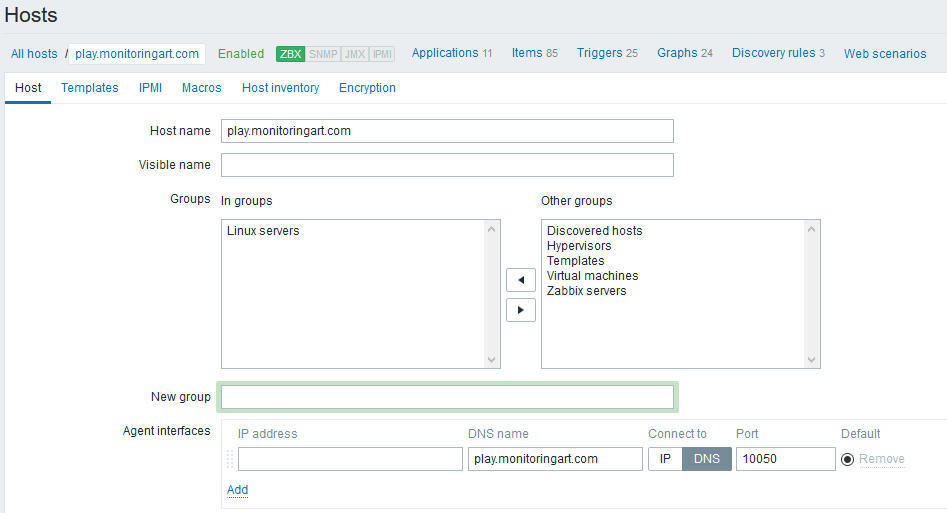
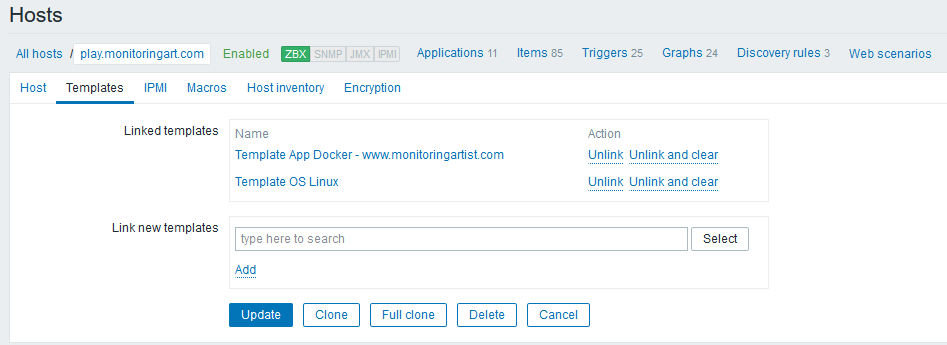
Public Dockbix agent XXL is available on the address play.monitoringart.com:10050. It's available for anyone as a public part of the monitoringartist playground. Just create a new host in your Zabbix server with this configuration:
How it works
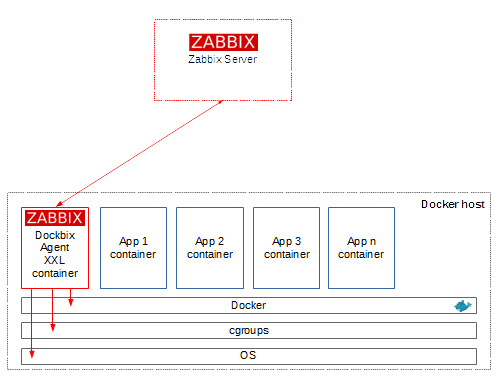
No classic rpm/deb package installation or Zabbix module compilation. Just start the dockbix-agent-xxl container and Docker container metrics will be collected from the Docker daemon API or cgroups.
How to monitor dockerized apps
Ideas about monitoring of dockerized apps:
- health endpoint: publish app health as a HTTP endpoint, which can be used for monitoring (item keys:
web.page.get, web.page.regexp) - monitor them as a service: use standard Zabbix TCP/HTTP check (item keys:
net.tcp.port, net.tcp.service, net.tcp.service.perf) - monitor them as a process: use standard Zabbix process check (item key:
proc.num)
Still no idea how to monitor your dockerized app? Hire us!
Included projects
- zabbix-module-systemd - loadbable agent module for systemd monitoring
- zabbix-module-sockets - loadbable agent module for sockets monitoring
- zabbix_agent_bench - utility to test performance of Zabbix agent
- zabbix-server-stress-test - loadbable agent module for stress testing
Zabbix agent stress testing:
docker run \
  --name=dockbix-agent-xxl \
  --net=host \
  --privileged \
  -v /:/rootfs \
  -v /var/run:/var/run \
  -e "ZA_Server=<ZABBIX SERVER IP/DNS NAME>" \
  -e "ZA_ServerActive=<ZABBIX SERVER IP/DNS NAME>" \
  -d monitoringartist/dockbix-agent-xxl-limited:latest

# used HW - 8xCPU Intel(R) Xeon(R) CPU E31270 @ 3.40GHz:
docker exec -ti dockbix-agent-xxl zabbix_agent_bench -host 127.0.0.1 -timelimit 30 -key stress.ping --threads 50
Testing 1 keys with 50 threads (press Ctrl-C to cancel)...
stress.ping :	1225787	0	0

=== Totals ===

Total values processed:		1225787
Total unsupported values:	0
Total transport errors:		0
Total key list iterations:	1225787

Finished! Processed 1225787 values across 50 threads in 30.002141605s (40856.650040 NVPS)
Integrations
- Puppet for dockbix-agent-xxl-limited
- Ansible for dockbix-agent-xxl-limited
- docker-compose for dockbix-agent-xxl-limited
- systemd service unit file - see next section
Dockbix Agent XXL service managed by systemd
Example of systemd service unit file for Dockbix Agent XXL - don't forget to edit environment variables. Then you can manage Dockbix agent XXL as a standard OS service:
# wget -P /usr/lib/systemd/system/ https://raw.githubusercontent.com/monitoringartist/dockbix-agent-xxl/master/systemd/docker-dockbix-agent-xxl.service
## edit env variables: vi /usr/lib/systemd/system/docker-dockbix-agent-xxl.service
# systemctl enable docker-dockbix-agent-xxl.service
Created symlink from /etc/systemd/system/multi-user.target.wants/docker-dockbix-agent-xxl.service to /usr/lib/systemd/system/docker-dockbix-agent-xxl.service.
# systemctl start docker-dockbix-agent-xxl.service
# systemctl status docker-dockbix-agent-xxl.service
● docker-dockbix-agent-xxl.service - Dockbix Agent XXL www.monitoringartist.com
   Loaded: loaded (/usr/lib/systemd/system/docker-dockbix-agent-xxl.service; enabled; vendor preset: disabled)
   Active: active (running) since Sat 2016-08-20 00:17:04 BST; 5s ago
  Process: 72712 ExecStartPre=/usr/bin/docker pull monitoringartist/dockbix-agent-xxl-limited:latest (code=exited, status=0/SUCCESS)
 Main PID: 72719 (docker)
   Memory: 8.6M
   CGroup: /system.slice/docker-dockbix-agent-xxl.service
           └─72719 /usr/bin/docker run --rm -e ZA_Server=<ZABBIX SERVER IP/DNS NAME> --name docker-dockbix-agent-xxl.service -h dockerhost --net=host --privileged -v /:/rootfs...

Aug 20 00:17:05 dockerhost docker[72719]: 11:20160819:231705.575 IPv6 support:          YES
Aug 20 00:17:05 dockerhost docker[72719]: 11:20160819:231705.575 TLS support:           YES
Aug 20 00:17:05 dockerhost docker[72719]: 11:20160819:231705.575 **************************
Aug 20 00:17:05 dockerhost docker[72719]: 11:20160819:231705.575 using configuration file: /etc/zabbix/zabbix_agentd.conf
Aug 20 00:17:05 dockerhost docker[72719]: 11:20160819:231705.581 loaded modules: zabbix_module_docker.so, zabbix_module_stress.so
Aug 20 00:17:05 dockerhost docker[72719]: 11:20160819:231705.583 agent #0 started [main process]
Aug 20 00:17:05 dockerhost docker[72719]: 12:20160819:231705.583 agent #1 started [collector]
Aug 20 00:17:05 dockerhost docker[72719]: 14:20160819:231705.583 agent #3 started [listener #2]
Aug 20 00:17:05 dockerhost docker[72719]: 13:20160819:231705.584 agent #2 started [listener #1]
Aug 20 00:17:05 dockerhost docker[72719]: 15:20160819:231705.586 agent #4 started [listener #3]
# docker ps | grep dockbix-agent-xxl
b2ecbf3a7df0        monitoringartist/dockbix-agent-xxl-limited:latest   "/dockbix-agent-xxl"       25 seconds ago      Up 24 seconds       0.0.0.0:10050->10050/tcp   docker-zabbix-agent-xxl.service
Support
First try to troubleshoot problems yourself. Increase debug level -e 'ZA_DebugLevel=5' and check the container logs docker logs dockbix-agent-xxl. Try to obtain raw values from the agent, for example:
# docker exec -ti dockbix-agent-xxl zabbix_get -s 127.0.0.1 -k docker.mem[/dockbix-agent-xxl,rss]
2977792
Other options:
- Try to ask Zabbix community http://www.zabbix.org/wiki/Getting_help
- If you need support directly from the author, then don't hesitate to contact him and ask for paid support
All reported issues, which are not real issues, but requests for support will be closed with reference to this README section.
Author
Devops Monitoring Expert, who loves monitoring systems and cutting/bleeding edge technologies: Docker, Kubernetes, ECS, AWS, Google GCP, Terraform, Lambda, Zabbix, Grafana, Elasticsearch, Kibana, Prometheus, Sysdig, ...
Summary:
- 2000+ GitHub stars
- 10 000+ Grafana dashboard downloads
- 1 000 000+ Docker image pulls
Professional devops / monitoring / consulting services:

Tag summary
Content type
Image
Digest
Size
17 MB
Last updated
over 8 years ago
docker pull monitoringartist/dockbix-agent-xxl-limited